









Crow is an AI agent layer that empowers users to control complex SaaS applications and internal tools through a conversational interface. By connecting directly to your product via OpenAPI or Model Context Protocol (MCP), Crow transforms standard UIs into actionable AI copilots. This allows product teams to deploy secure, production-ready AI agents in days, enabling users to execute workflows, navigate menus, and perform tasks simply by chatting.
Table of Contents
Every product manager knows the struggle of “dashboard fatigue.” You build powerful features, design intricate menus, and engineer robust backends, yet users still churn because the learning curve is too steep. They get lost in navigation trees or overwhelmed by the sheer number of buttons on the screen. The traditional Graphical User Interface (GUI) is reaching its limit. The next phase of software interaction is not about better menus. It is about removing menus entirely.
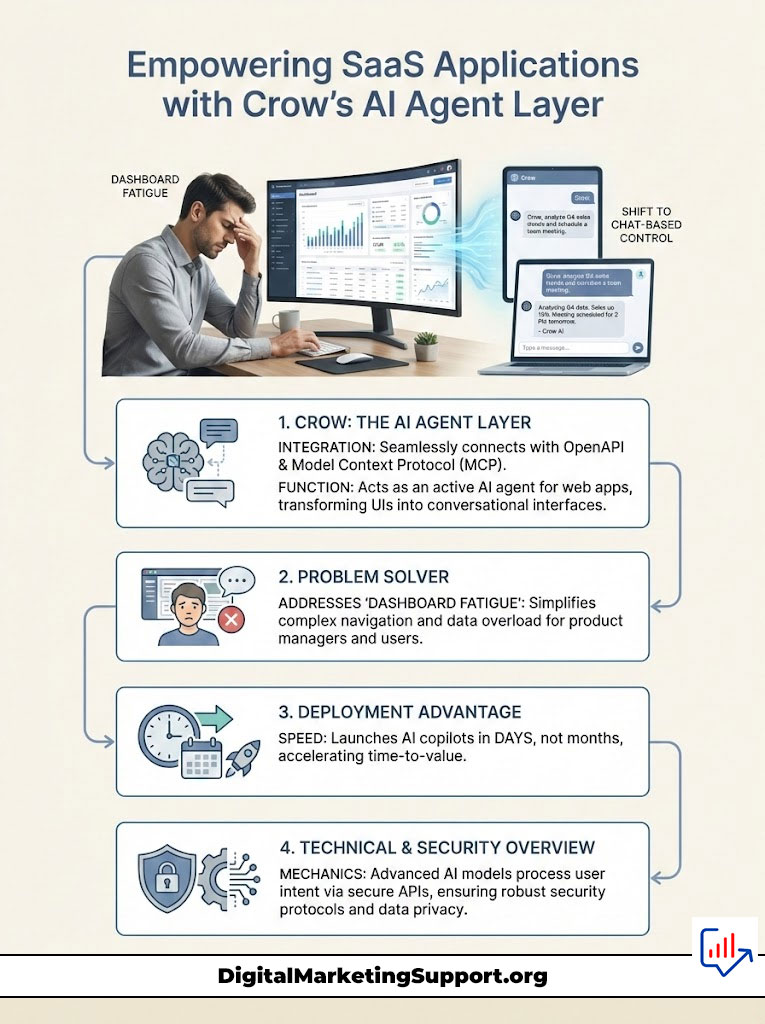
The solution is to let users control your app through chat. This is not about adding a customer support bot that regurgitates FAQ articles. This is about integrating an active AI agent for web apps that can push buttons, fill forms, and execute complex workflows on behalf of the user. Crow stands at the forefront of this shift. It serves as the infrastructure layer that connects Large Language Models (LLMs) to your product’s API, effectively turning your software into an AI-native product platform.
We will explore how Crow’s architecture allows you to deploy an AI copilot for SaaS in days rather than months. We will examine the technical mechanics of OpenAPI AI integration, the security protocols required for enterprise adoption, and the strategic advantage of moving from a point-and-click interface to a conversational command center.
The Evolution of Software Interaction: From Clicks to Conversation
The history of software design is a history of abstraction. We moved from punch cards to command lines, and then from command lines to graphical interfaces. Each step made technology more accessible. We are now witnessing the next leap: the transition to conversational UI for SaaS.
The Limitations of Traditional Graphical User Interfaces (GUI)
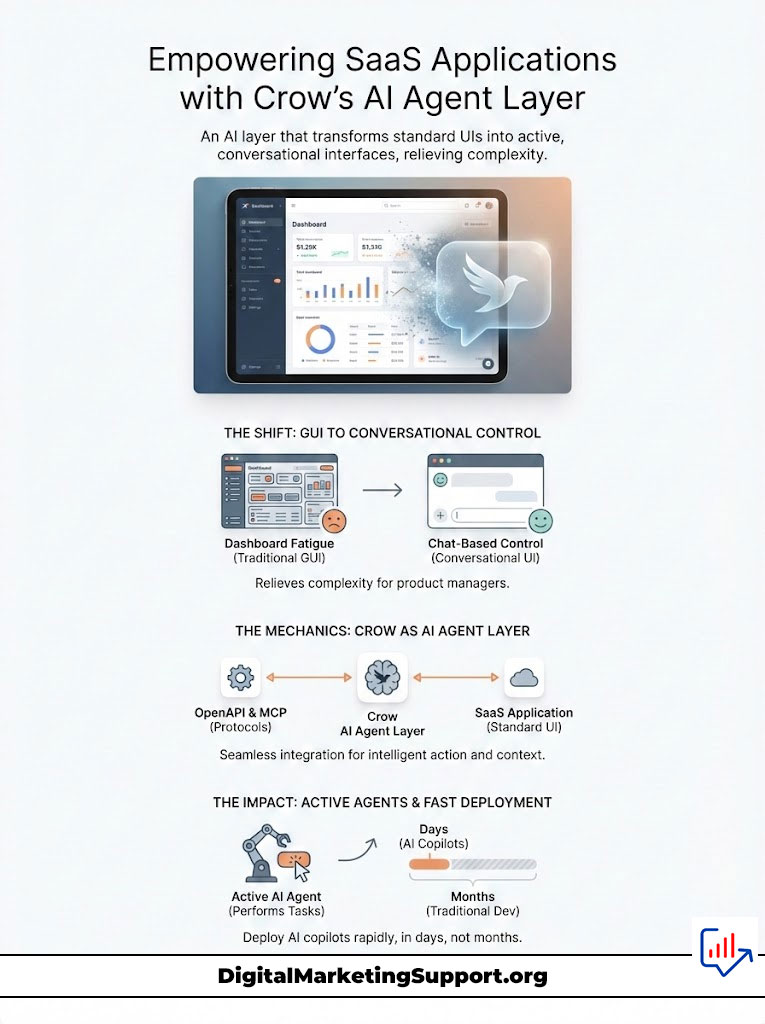
Modern SaaS applications are incredibly capable, but that capability comes at a cost. Complexity. An ERP system might have thousands of potential actions a user can take. To accommodate this, designers bury features inside nested dropdowns, tabs, and modals.
Research suggests that users utilize less than 20% of a complex software’s features. The reason is rarely a lack of need. It is a lack of discoverability. Users know what they want to achieve, but they do not know where to click to achieve it. When you rely solely on a GUI, you force the user to translate their intent (e.g., “Onboard the new client”) into a series of mechanical steps (Click Settings > Click Users > Click Add New > Type Name > Click Save).
This friction kills AI feature adoption and slows down user activation. The GUI, once a liberator, has become a bottleneck.
Why “Chat with Data” Is No Longer Enough
Most current AI implementations in SaaS are passive. They are “Chat with Data” interfaces. You see this everywhere: a sidebar where you can ask, “Summarize this document” or “What is our refund policy?”
While useful, this uses RAG (Retrieval-Augmented Generation) to read information. It cannot do anything. If a user asks a standard chatbot to “Refund this order,” the bot will likely reply with a link to the refund settings page. It forces the user back into the GUI to do the actual work.
Crow facilitates “Chat with App.” This is an active paradigm. An AI agent for web apps integrated via Crow understands the user’s intent and has the permission to execute the code. It doesn’t tell you how to refund the order; it calls the POST /refund endpoint and processes the transaction. This distinction is vital for anyone looking to build a true AI copilot for SaaS.
The Rise of the AI-Native Product Platform
An AI-native product platform is designed with the assumption that the primary mode of interaction might be natural language. It decouples the capability of the software from the visual interface.
When you let users control your app through chat, you effectively flatten the learning curve. A new user does not need to watch a three-hour tutorial to learn how to generate a report. They simply ask for it. This shift enables app control through chat, making complex tools accessible to non-technical users and drastically reducing time-to-value.
Deep Dive: How Crow Enables App Control Through Chat
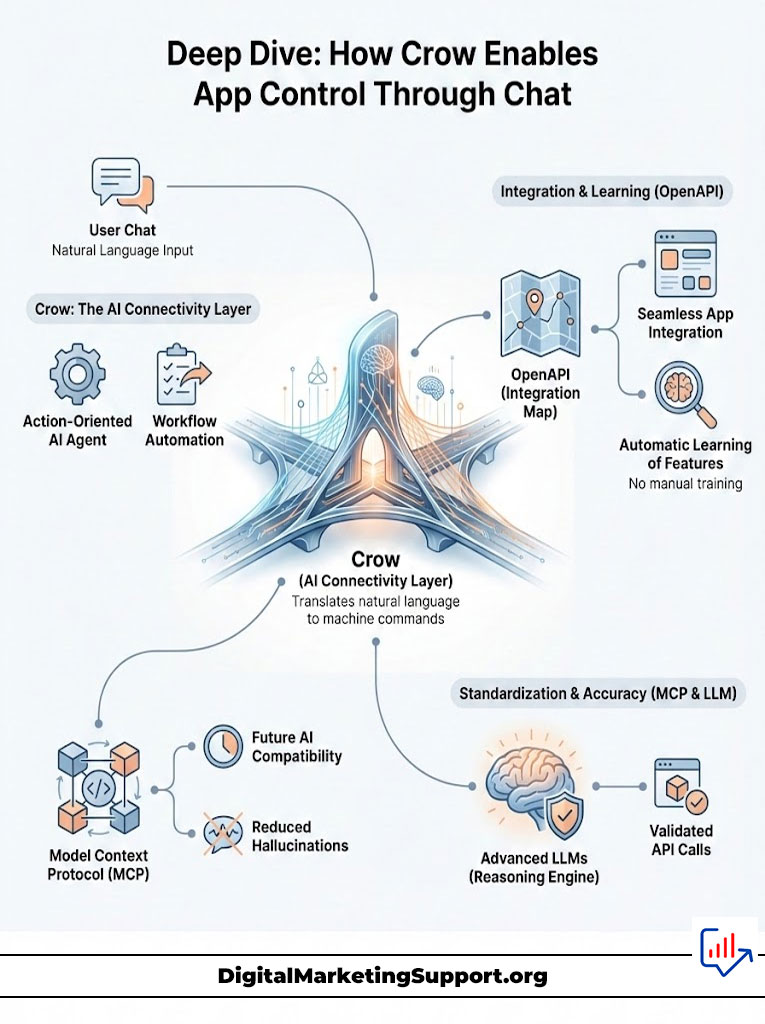
Understanding Crow requires looking under the hood. It is not a black box model. It is a connectivity layer that sits between the user’s natural language and your application’s rigid code structure.
The Architecture of an Action-Oriented AI Agent
At its core, Crow functions as a translation engine for intent. The workflow follows a precise logic chain:
- Ingestion: The user types a command into the embedded AI chat widget.
- Semantic Analysis: Crow’s agent analyzes the text to determine the user’s goal.
- Tool Selection: The agent looks at the available tools (your APIs) and decides which one matches the intent.
- Parameter Extraction: It extracts necessary data from the chat (e.g., pulling “Acme Corp” from “Onboard Acme Corp”).
- Execution: It makes the actual API call to your server.
- Response: It receives the API response and confirms the action to the user in plain English.
This process transforms vague human instructions into precise machine commands. This is the essence of AI workflow automation for apps.
Bridging the Gap with OpenAPI and MCP
The magic of Crow lies in how it learns your application. You do not need to manually teach the agent every single feature.
OpenAPI AI Integration
Most modern SaaS products connect their frontend to their backend using REST APIs, often documented with OpenAPI (formerly known as Swagger). These specifications act as a map of your software. They define every endpoint, every required parameter, and every possible response.
Crow is designed for seamless OpenAPI AI integration. You simply provide Crow with your OpenAPI spec. The platform parses this file and instantly “learns” every capability of your product. If your API has an endpoint for “Create Project,” the AI agent for web apps immediately knows how to create a project, what data is needed (name, date, owner), and how to report success. This is a massive leap forward in no-code AI agent integration.
Model Context Protocol (MCP) Integration
As the AI ecosystem matures, standardization becomes critical. MCP (Model Context Protocol) is an emerging standard championed by industry leaders to unify how AI models connect to data and tools.
Crow supports MCP AI integration, ensuring that your agent is future-proof. MCP standardizes the way context is provided to the LLM, making the agent more reliable and less prone to hallucinations. By adopting MCP AI integration, you ensure that your AI interface for complex software remains compatible with the next generation of Large Language Models, regardless of which provider (OpenAI, Anthropic, etc.) wins the race.
The “Brain” Behind the Agent
Crow utilizes advanced Large Language Models to function as the reasoning engine. However, Crow adds a layer of proprietary logic to handle “function calling.”
LLMs are great at writing poetry but historically bad at outputting perfect JSON for API calls. Crow’s infrastructure ensures that the output from the model is strictly validated against your API schema before it ever touches your server. This validation layer is what makes app control through chat safe for production environments.
Strategic Implementation: Deploying Your AI Copilot in Days
Speed is a competitive advantage. The market is flooded with companies claiming to have AI, but few have functional agents.
The “Build vs. Buy” Dilemma for SaaS Teams
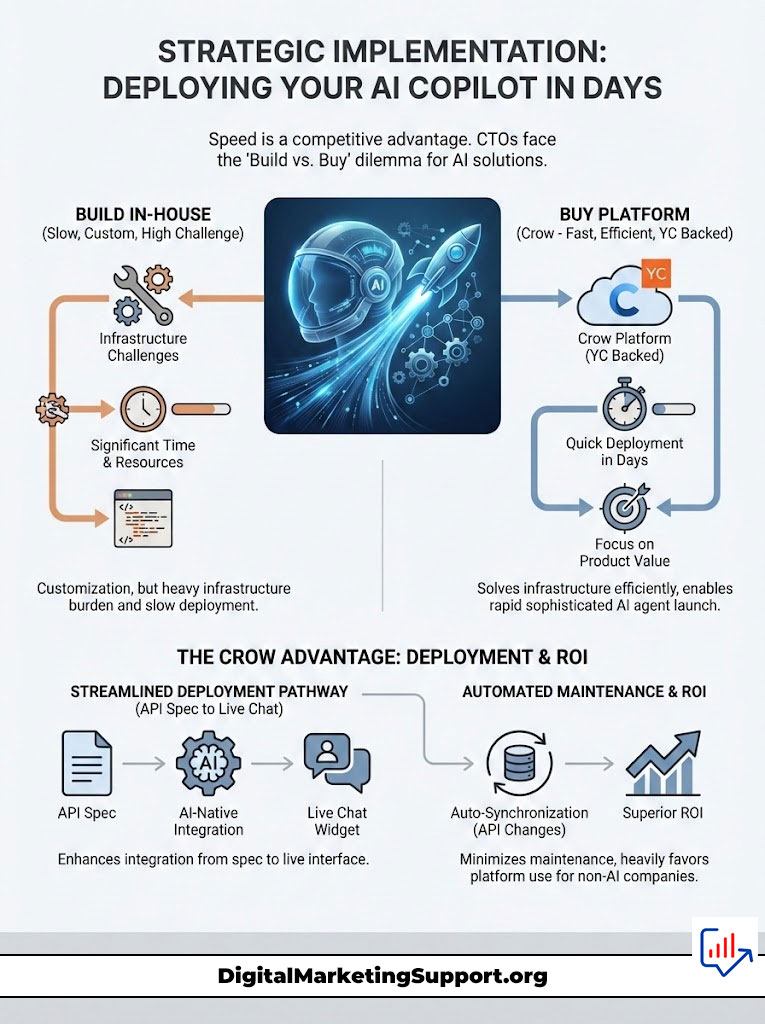
Every CTO faces the choice: build the AI agent layer in-house or buy a platform.
The Case for Building:
- You have full control over the code.
- You avoid vendor lock-in.
The Reality of Building:
- You need a dedicated team of AI engineers (expensive and scarce).
- You must build infrastructure to manage context windows, token limits, and vector databases.
- You must constantly update the agent as your APIs change.
- Debugging AI agent for internal tools is notoriously difficult.
The Case for Crow (Buy):
Crow is backed by Y Combinator and built by engineers from Qualcomm, Microsoft, Amazon, Oracle, and Salesforce. They have solved the infrastructure problems already.
By using Crow, you bypass the friction of building the plumbing. You focus on the product value while Crow handles the AI copilot for SaaS infrastructure. This allows you to deploy a sophisticated agent in days. The ROI calculation heavily favors the platform approach for most companies that are not AI research labs.
Step-by-Step: From API Spec to Live Chat Widget
Deploying Crow is a structured process designed for existing engineering teams.
- Connect Your Schema: Upload your OpenAPI spec or connect your repository. Crow parses the definitions and generates a list of available “tools” for the agent.
- Configure the Widget: Customize the embedded AI chat widget. You can adjust colors, fonts, and opening messages to match your brand voice.
- Set Guardrails: Define which API endpoints are off-limits. You might want the agent to read user data but never delete it.
- Test in Sandbox: Use Crow’s developer console to chat with your agent and verify that it calls the correct APIs.
- Deploy: Embed the JavaScript snippet into your frontend.
This pathway represents the fastest way to make my SaaS product AI native.
Managing Updates and API Changes
Software is living. APIs change. In a custom-built solution, an API change breaks the AI agent until an engineer manually updates the prompt or function definition.
Crow solves this with synchronization. When you update your API spec, Crow detects the changes. If a new parameter is added to an endpoint, the AI agent automatically becomes aware of it. This resilience reduces the maintenance burden significantly, ensuring your app control through chat remains robust over time.
Comparison: Crow vs. Traditional Chatbots vs. DIY Solutions
To understand where Crow sits in the market, we must compare it to alternative approaches.
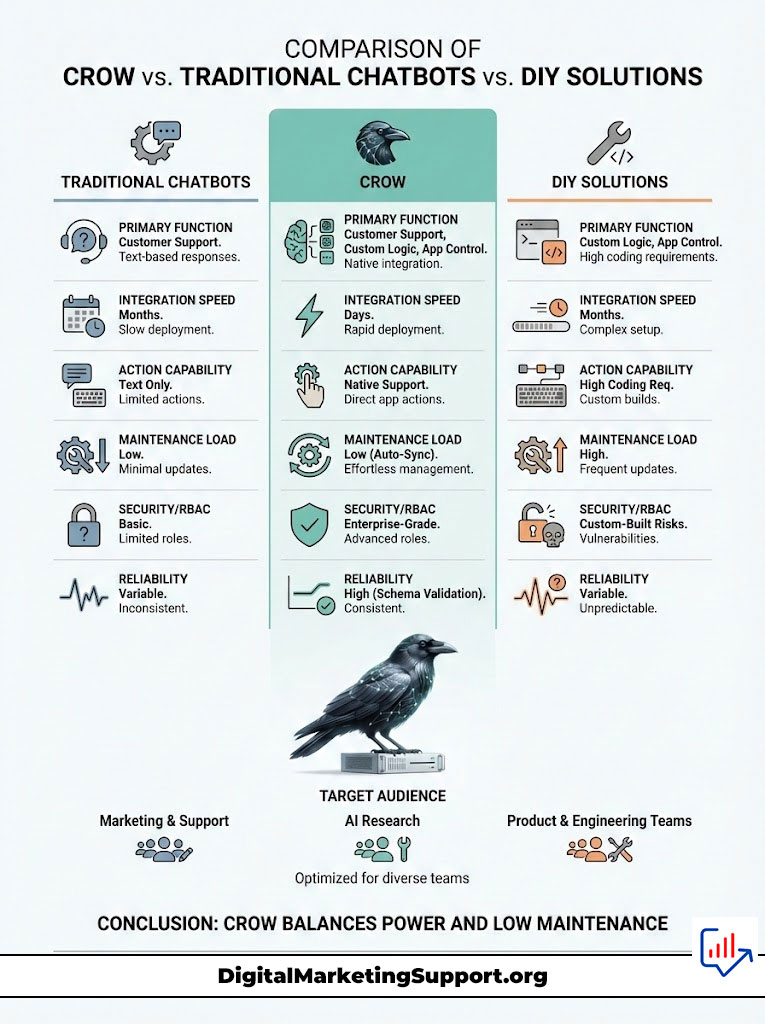
| Feature | Traditional Chatbot (Intercom/Drift) | Internal Build (LangChain/OpenAI) | Crow AI Agent |
| Primary Function | Customer Support (FAQ & Routing) | Custom Logic & RAG | App Control & Action Execution |
| Integration Speed | 1-2 Days | 3-6 Months | Days |
| Action Capability | Very Low (Text only) | High (Requires custom coding) | High (Native OpenAPI/MCP support) |
| Maintenance Load | Low | Extremely High | Low (Auto-syncs with API) |
| Security/RBAC | Basic | Custom Built (High Risk) | Enterprise Grade (Native SSO) |
| Reliability | High (Rule-based) | Variable (Prompt dependent) | High (Schema validation) |
| Target Audience | Marketing & Support Teams | AI Research Teams | Product & Engineering Teams |
This comparison highlights that while traditional bots are great for answering questions, they fail at AI workflow automation for apps. Internal builds offer power but come with massive technical debt. Crow strikes the balance: high power, low maintenance.
Enterprise-Grade Security and Governance
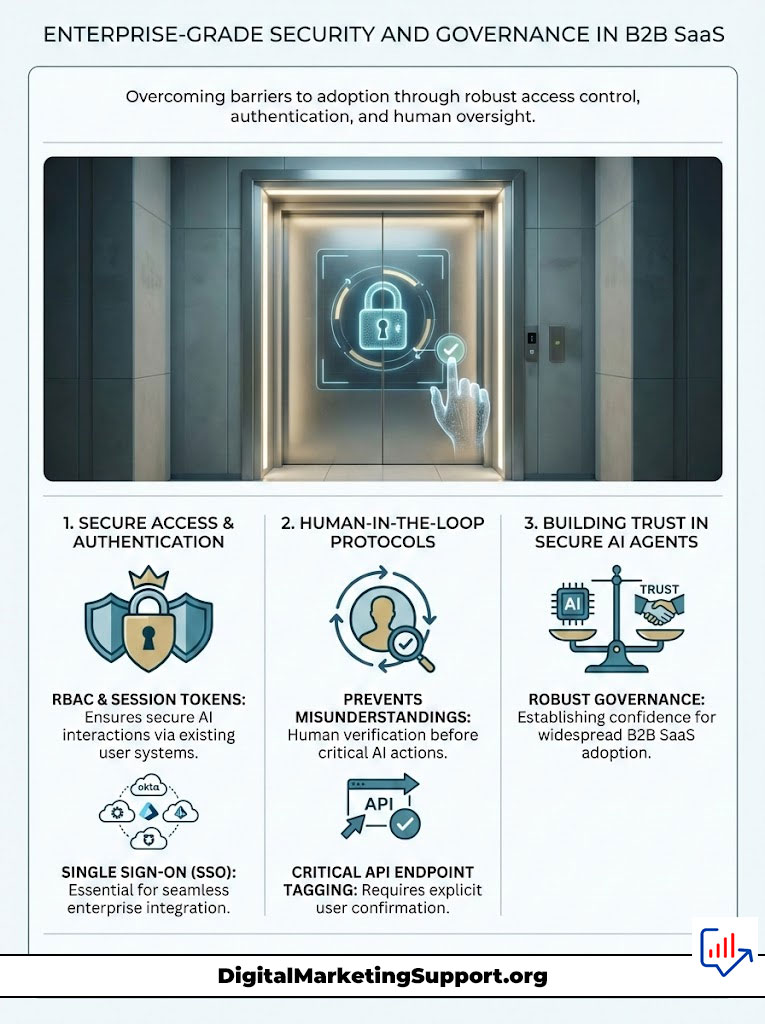
For B2B SaaS, security is the primary barrier to adoption. An AI agent for enterprise software must be more than smart; it must be secure. You cannot have an AI agent that allows a junior employee to access the CEO’s payroll data just because they asked nicely.
Role-Based Access Control (RBAC) in the Age of AI
Crow respects your existing permission structures. This is critical.
When a user logs in, Crow authenticates them via your system. It receives a session token. When the user asks the agent to “Delete Project X,” the agent does not just execute the command. It attempts to call the API using the user’s credentials.
If your backend would reject that API call for that user, the agent will also fail and report the error. This means you do not need to rebuild a separate permission layer for the AI. You leverage your existing role-based AI permissions. This architectural decision makes Crow the safest path for app control through chat in regulated industries.
Single Sign-On (SSO) and Authentication
Enterprise buyers demand SSO (Single Sign-On). They want to manage access via Okta, Microsoft Entra ID, or Auth0.
Crow integrates seamlessly with these providers. The embedded AI chat widget only activates for authenticated users. This ensures that the conversation context is always linked to a verified identity. SSO for AI assistants is not just a feature; it is a requirement for selling into the Fortune 500.
Human-in-the-Loop Guardrails
Even with perfect permissions, AI can misunderstand intent. Crow implements “Human-in-the-Loop” protocols for sensitive actions.
You can tag specific API endpoints (like DELETE /database or POST /transfer-funds) as “Critical.” When the agent identifies a need to call a critical endpoint, it pauses. It presents a UI component to the user summarizing the proposed action: “I am about to delete the database ‘Production’. Do you want to proceed?”
The user must explicitly click “Confirm” for the action to execute. This prevents catastrophic errors and builds trust in the secure AI agent with SSO.
Practical Use Cases and Industries
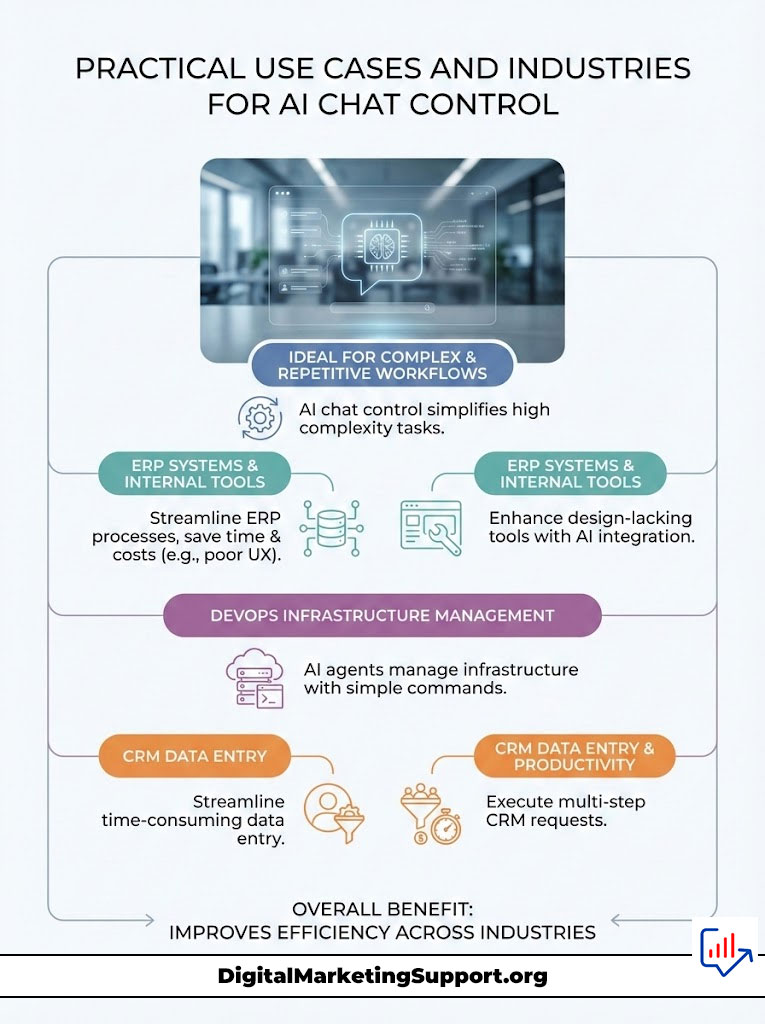
Where does app control through chat deliver the most value? It excels in environments with high complexity and repetitive workflows.
Transforming Complex ERP Systems
ERP systems are notorious for bad UX. They are powerful but hostile to users. An AI assistant for ERP systems changes the game.
Imagine a logistics manager. Instead of clicking through five screens to find a shipment and update its status, they type: “Where is the shipment for order #123? Update its status to ‘Delayed’ and notify the customer.”
Crow’s agent retrieves the data, calls the update endpoint, and triggers the notification email via the ERP’s messaging API. This is efficiency that translates directly to dollars saved.
Internal Tools and Developer Platforms
Internal tools often get the least design love. They are functional but ugly.
DevOps teams can use an AI agent for internal tools to manage infrastructure. A query like “Restart the staging server and show me the last 50 error logs” can replace a context switch to a command line interface. This keeps technical teams focused and reduces the cognitive load of switching contexts.
CRM and Sales Enablement
For sales teams, time is money. Entering data into a CRM is a distraction.
An AI copilot for web apps inside a CRM allows a rep to say: “Create a new lead for John Doe at Acme, set probability to 50%, and schedule a follow-up for next Tuesday.”
The agent parses this multi-step request and executes three distinct API calls: Create Lead, Update Opportunity, Create Task. The rep completes administrative work in seconds, leaving more time for selling.
Analytics and Observability: Tracking the Agent
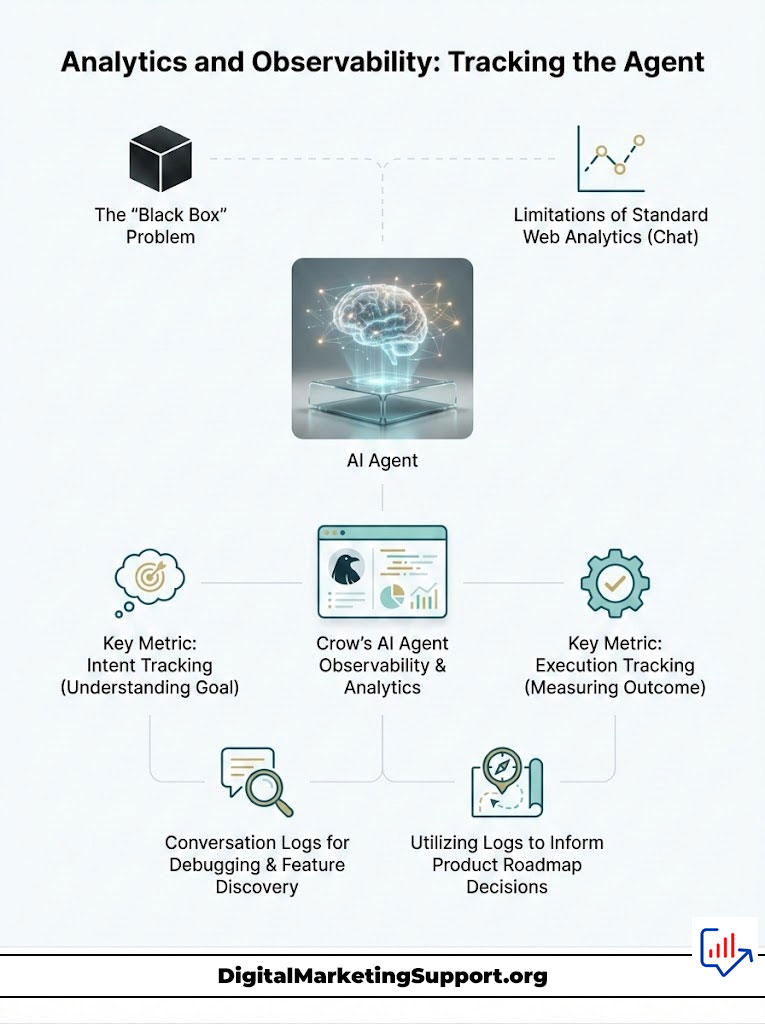
You cannot optimize what you cannot measure. One of the biggest fears product managers have regarding AI is the “Black Box” problem. They don’t know what the AI is telling their users.
Beyond Standard Metrics
Standard web analytics (page views, bounce rate) are useless for chat. Crow provides AI agent observability and analytics focused on intent and execution.
Key metrics include:
- Goal Completion Rate: How often does a chat session result in a successful API call?
- Tool Usage: Which features (API endpoints) are being called most often by the agent?
- Error Rate: How often does the agent fail to execute a request?
The Observability Dashboard
Crow’s dashboard allows you to replay conversation logs. You can see exactly what the user typed, how the agent interpreted it, which tools were considered, and the raw JSON payload sent to your API.
This level of detail is essential for debugging. If users keep asking for a feature the agent fails to execute, you can analyze the logs. You might discover that users are using a different terminology than your API expects. You can then update the agent’s system prompt to bridge that vocabulary gap.
Using Agent Data to Inform Product Roadmap
The chat logs are a goldmine of user research. Users are literally typing what they want your product to do.
If 20% of your users ask the AI agent to “Export to PDF,” and your product doesn’t have that feature, you have validated demand without running a survey. Monitor AI agent actions to discover the missing features in your roadmap.
Comparison of Integration Methods
Different products have different architectures. Crow supports multiple integration paths to ensure flexibility.
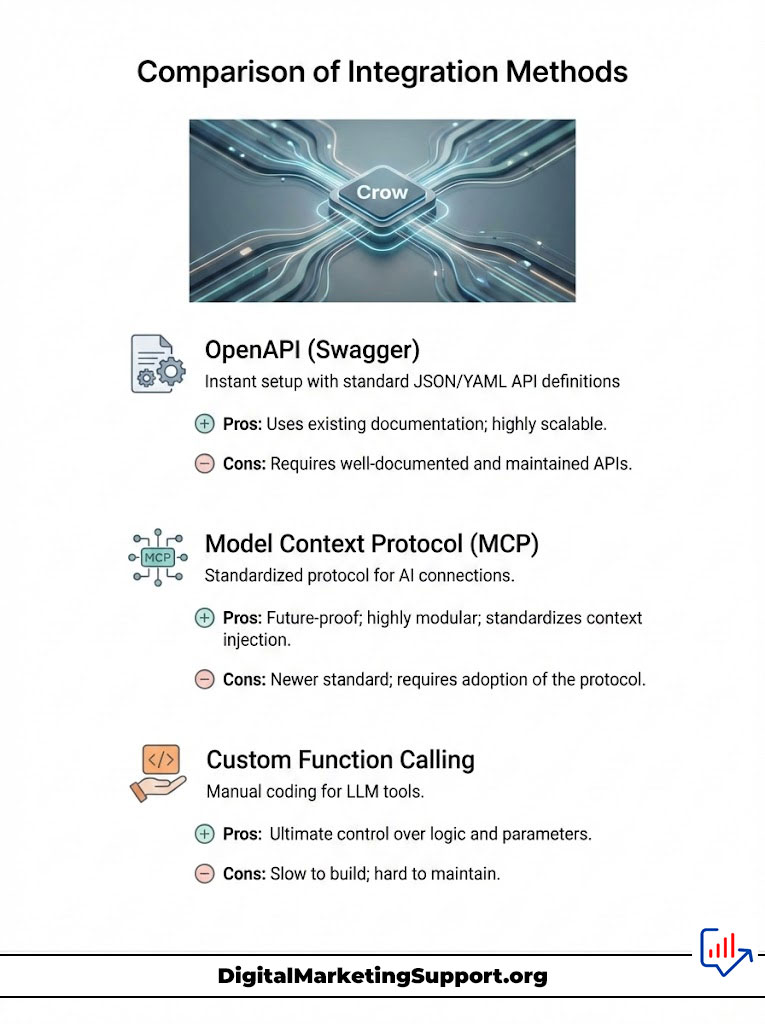
| Integration Method | Description | Pros | Cons | Ideal For |
| OpenAPI (Swagger) | Ingesting standard JSON/YAML API definitions. | Instant setup; uses existing documentation; highly scalable. | Requires well-documented and maintained APIs. | Most modern SaaS apps & Rest APIs. |
| Model Context Protocol (MCP) | A standardized protocol for connecting AI to systems. | Future-proof; highly modular; standardizes context injection. | Newer standard; requires adoption of the protocol. | Forward-thinking AI-native apps. |
| Custom Function Calling | Manually coding individual tools for the LLM. | Ultimate control over logic and parameter handling. | Slow to build; hard to maintain; brittle to changes. | Legacy apps with no API docs. |
Choosing the right method depends on your stack, but OpenAPI AI integration remains the gold standard for speed and reliability.
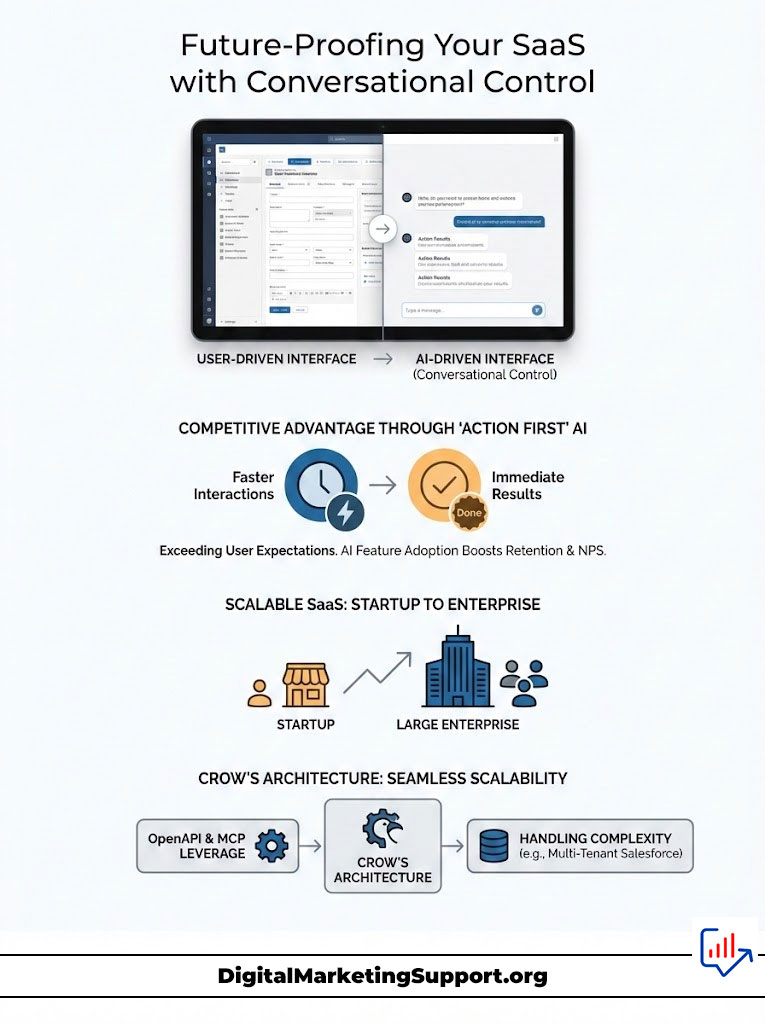
Future-Proofing Your SaaS with Conversational Control
The trend is clear. We are moving away from users learning interfaces and toward interfaces learning users.
The Competitive Advantage of “Action First” AI
Companies that adopt app control through chat today are building a moat. They are training their users to expect immediate results. When a competitor requires ten clicks to do what your product does in one sentence, you win. The AI feature adoption boost provided by a copilot is a tangible metric that impacts retention and Net Promoter Score (NPS).
Scalability: From Startup to Enterprise
Crow is built to scale. Whether you are a seed-stage startup with 100 users or a public enterprise with 100,000, the architecture holds.
By leveraging OpenAPI and MCP, the agent scales with your backend. It handles the concurrency and the complexity of multi-tenant architectures found in giants like Salesforce or Oracle.
Summary & Key Takeaways
The era of static, complex dashboards is ending. Users demand intuitive, fast, and conversational experiences.
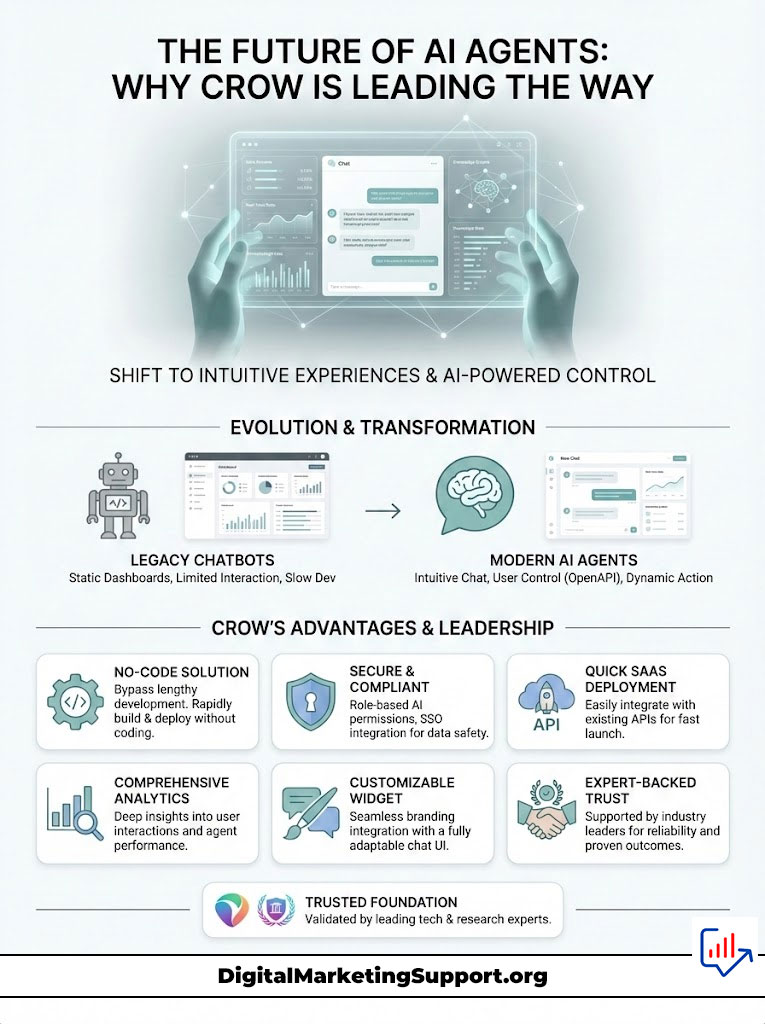
Crow provides the infrastructure to let users control your app through chat. By utilizing OpenAPI AI integration and MCP, Crow allows engineering teams to bypass the months of development required to build an in-house agent. With enterprise-grade role-based AI permissions, SSO, and deep AI agent observability, Crow is the safe, scalable choice for the modern SaaS stack.
Key Takeaways:
- Integration Speed: Deploy a production-ready AI copilot for SaaS in days using existing API specs.
- Security First: Rely on native SSO and RBAC to ensure the AI agent for enterprise software is secure.
- Action over Chat: Move beyond RAG. Enable true app control through chat where the agent executes real workflows.
- Future Proof: Utilize MCP AI integration to stay ahead of the curve in the rapidly evolving AI landscape.
It is time to stop building chatbots that just talk, and start building agents that work.
Frequently Asked Questions
What is the main difference between Crow’s AI agent and a standard customer support chatbot?
Standard chatbots typically use RAG (Retrieval-Augmented Generation) to answer questions based on static text like FAQs. Crow is an AI agent for web apps designed to execute actions. It connects to your product’s APIs to perform tasks like creating records, updating settings, or navigating menus, rather than just talking about them.
How does Crow ensure the AI doesn’t perform unauthorized actions?
Crow leverages your application’s existing security model. It utilizes role-based AI permissions and SSO for AI assistants. When a user commands the agent, the API call is made with that user’s specific credentials. If the user lacks permission in your app, the agent cannot execute the task.
Do I need to rewrite my application code to use Crow?
No. Crow is designed for no-code AI agent integration regarding backend logic. It ingests your existing OpenAPI (Swagger) specifications. If your application has a documented API, Crow can “read” it and enable app control through chat without requiring you to rewrite your codebase.
What is MCP and why does Crow use it?
MCP (Model Context Protocol) is an industry standard for connecting AI models to data and tools. Crow uses MCP AI integration to ensure your agent is modular and reliable. It standardizes how context is passed to the LLM, making the integration more robust against future changes in AI technology.
Can I use Crow for internal company tools?
Yes. Crow is frequently deployed as an AI agent for internal tools. It helps operations and DevOps teams interact with databases, ERP systems, and admin dashboards more efficiently, reducing the time spent on manual, repetitive administrative tasks.
How fast can I deploy an AI copilot with Crow?
Because Crow builds upon your existing API structure, most teams can deploy a fully functional AI copilot for SaaS in days. Building a similar capability in-house typically takes months of specialized engineering work.
Does Crow provide analytics on user conversations?
Yes. Crow offers a comprehensive AI agent observability and analytics suite. You can track every conversation, audit every tool call the agent makes, and analyze user intent to understand exactly how your customers are trying to use the product.
Is Crow suitable for non-technical product teams?
Crow offers a user-friendly interface for configuring the agent’s personality and guardrails, making it accessible for Product Managers. However, the initial connection typically requires an engineer to provide the API specification or configure the OpenAPI AI integration.
What happens if the AI agent makes a mistake?
Crow allows you to implement “Human-in-the-Loop” guardrails. for high-stakes actions (like deleting data), you can configure the agent to ask for explicit user confirmation via a UI prompt before it executes the API call, minimizing the risk of errors.
Is Crow backed by reputable industry experts?
Yes, Crow is backed by Y Combinator and was built by a team with deep engineering experience from major tech companies like Qualcomm, Microsoft, Amazon, and Salesforce, ensuring high reliability and trust.
Can I customize the design of the in-app chat widget?
Yes, the embedded AI chat widget is fully customizable. You can adjust the colors, fonts, and placement to ensure it blends seamlessly with your SaaS product’s existing branding and User Interface.
Does Crow support complex workflows involving multiple steps?
Yes. The agent is capable of AI workflow automation. It can chain together multiple API calls based on a single natural language request. For example, “Onboard new user” could trigger calls to create the user, assign a license, and send a welcome email sequentially.
References
- Y Combinator: Startup accelerator backing Crow.
- Model Context Protocol (MCP): Open standard for AI connectivity.
- OpenAPI Initiative: Standard for REST API description.
- Salesforce / Oracle / Microsoft: Referenced as industry standards for enterprise software architecture.
Disclaimer
The information provided in this article regarding Crow and its capabilities is based on the available technical documentation and industry standards for AI integration. Implementation results may vary based on the specific architecture of your SaaS application and the quality of your API documentation. Always conduct thorough security testing when integrating AI agents into production environments.