Negative Keywords Tool & Bulksheet Builder for Amazon Ads
Turn your Amazon search term report or a pasted list into Sponsored Products negative keyword bulksheet rows — for the campaign or ad group each term came from, or for many campaigns at once.
Negative Keyword Bulksheet Builder for Amazon Ads
- Upload
- Pick
- Download
1 Add your search terms
File 2 gives the numeric Campaign Ids Amazon needs, and lets the tool skip negatives you already have.
1. Search term report or a list of negatives
Choose a file or drag it here
Search term report (any version) or one term per line · up to 300 MB
2. Bulk operations download (recommended)
Choose a file or drag it here
Your Sponsored Products bulk file: it holds the Campaign Ids · up to 300 MB
2 Check the columns and options
Rules last checked: against the official pages:
How to use the negative keywords tool for Amazon Ads
This negative keywords tool for Amazon Ads writes Sponsored Products bulksheet rows with the 31 columns and values from Amazon's How to create Sponsored Products campaigns in bulksheets guide. It doesn't analyze phrases — it turns the terms you choose into rows Amazon accepts.
- Get your search terms. Download the Sponsored Products search term report from Reporting, or tick Sponsored Products Search term data in a bulk operations download. You can also paste your own list of negatives.
- Add your bulk operations file. It has the numeric Campaign Id and Ad Group Id every new row needs, plus your existing negatives and keywords.
- Choose where the negatives go. Back to the campaign or ad group each term came from, or one list to many campaigns at once — for example every campaign with "Dog Beds" in its name.
- Choose which terms. By default the builder picks terms with spend and no sales. Set a minimum spend or clicks, or add terms whose ACOS is above your limit.
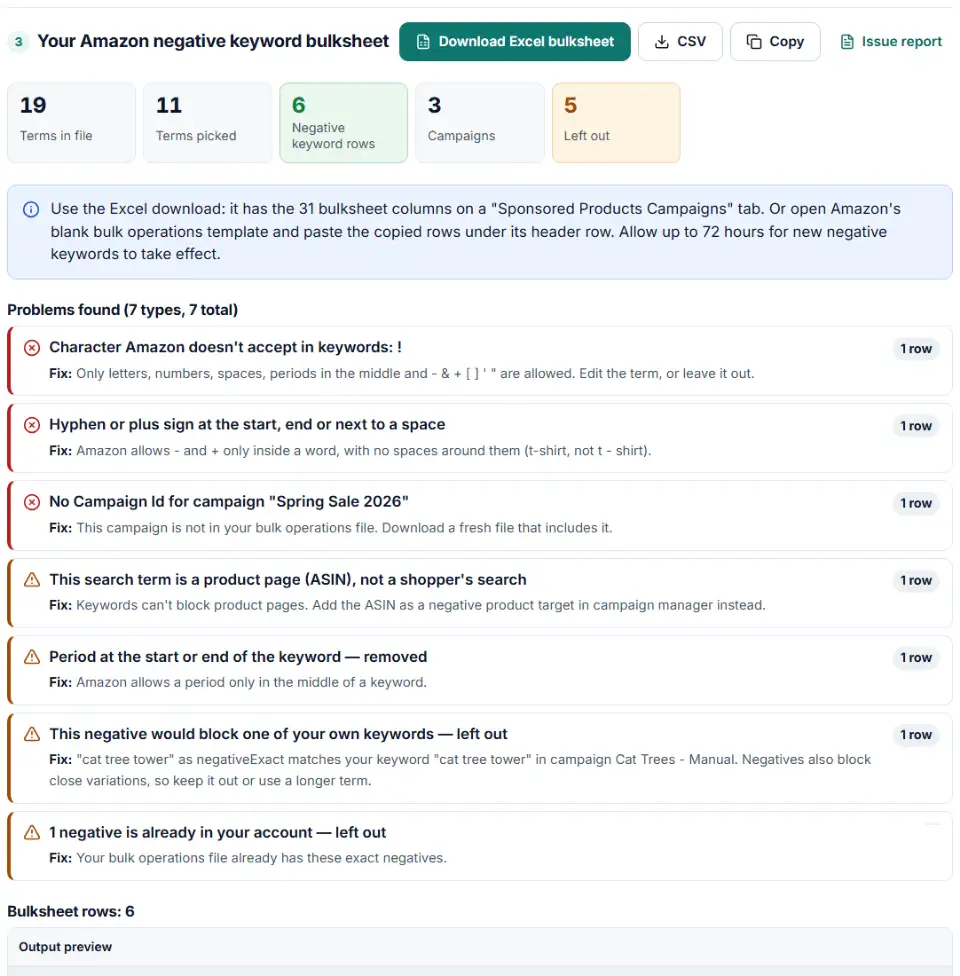
- Download the Excel file. Fix any red rows first: invalid characters, too many words, or a missing Campaign Id.
What the builder checks for you
- Word and length limits: 4 words for negative phrase, 10 for negative exact, 80 characters for both.
- Characters: letters, numbers and
- & + [ ] ' "only; periods only in the middle; no hyphen or plus next to a space; quotes in pairs. - Product pages: search terms that look like ASINs (b0…) are product detail pages. A keyword can't block those, so they are listed for negative product targeting instead.
- Duplicates and existing negatives: keyword text plus match type must be unique, so repeats and negatives you already have are left out.
- Your own keywords: a negative that would block one of your keywords in the same campaign is left out with a warning.
What to do next: upload the bulksheet
- Open Bulk operations. Sellers find it in Seller Central's campaign manager, vendors in the advertising console under Sponsored ads.
- Upload the Excel file. Every row already says Create in the Operation column. Amazon skips rows with an empty Operation.
- Check Bulk spreadsheet history. If the status says Finished with errors, download the error report. It lists each row with an error message. Fix those rows in the report's campaign tab and upload that file again.
- Give it time. New negative keywords can take up to 72 hours to work. Compare your next search term report with this one.
Common Amazon bulksheet errors for negative keywords
"Invalid value for column: Campaign ID, which can't be found in any parent entity row"
The Campaign Id doesn't match a campaign. Usually the ID was copied from the console or typed by hand. Use the numeric ID from a bulk operations download — load that file as file 2 and the builder fills it in.
Invalid value "Exact" for column "Match Type"
A negative row needs negativeExact or negativePhrase. A positive match type on a negative row is rejected. When a pasted list says "exact" or "phrase", the builder writes the negative version.
"Keyword is invalid" or "Keyword text is too long"
The term has a character Amazon doesn't accept, such as ! or an emoji, or it is longer than 80 characters. Edit it or leave it out.
Too many words for negative phrase
Long search terms often break the 4-word limit for negative phrase. Switch them to negative exact, which allows 10 words, or pick the short part that causes the waste.
"Duplicate Keyword Text"
The same keyword text and match type twice in one campaign or ad group is a duplicate. The builder removes repeats inside the file and skips negatives your bulk download already has.
Search report changes in late 2026
Amazon is closing the old Sponsored ads reports page. Legacy saved reports and schedules are deleted on December 31, 2026, and search term reports move to Reporting. The new files use names like "Total cost" and "Purchases" instead of "Spend" and "7 Day Total Orders". The builder reads both.
Frequently asked questions
How do I add negative keywords to many Amazon campaigns at once?
Load your bulk operations download as file 2, paste your negatives as file 1 and choose Many campaigns from file 2. Filter by campaign name or targeting type, and the builder writes one row per negative per campaign. Upload the Excel file on the Bulk operations page.
What is the difference between negative phrase and negative exact on Amazon?
Negative phrase stops your ads on shopping queries that contain the complete phrase or close variations, and allows up to 4 words. Negative exact stops them on queries that match the exact phrase or a close variation, and allows up to 10 words. Both are limited to 80 characters.
What is the difference between a campaign negative keyword and an ad group negative keyword?
A campaign negative keyword applies to every ad group in the campaign, so it is the usual choice for terms that never sell. An ad group negative keyword applies only to that ad group. Campaign negative keywords can’t be paused — remove them with the Archive operation.
Can Amazon negative keywords be broad match?
No. Amazon negative keywords use only negative exact and negative phrase. In a bulksheet the Match Type values are negativeExact and negativePhrase; a positive value like Exact on a negative row is rejected.
Why did my Amazon negative keyword bulksheet fail to upload?
Open Bulk spreadsheet history and download the error report. Typical causes are a Campaign Id copied from the console instead of a bulksheet, a positive match type on a negative row, a character Amazon doesn’t accept, a duplicate keyword, or an empty Operation column. The builder fills in the bulksheet IDs from your file 2, so you never type one, and checks the other causes before you download.
How long do Amazon negative keywords take to work?
Amazon says to allow up to 72 hours for a new negative keyword to take effect, and up to 96 hours for a negative product target.
Is my search term report uploaded anywhere?
No. Your report and your bulk file are read in your own browser. Nothing is sent to our server or to Amazon until you upload the finished file yourself.
Related tools and guide
-
See which words in your Amazon search terms waste money and which ones sell, with ACOS per phrase, ready negatives and new keywords to add.
Amazon -
Build new Sponsored Products campaigns, ad groups, keywords and product targets in bulk, or add keywords to campaigns you already run.
Amazon -
Break search terms into 1–3-word phrases with cost and conversions, and copy the negatives that wasted money.
Google -
Upload your keywords and negatives to see which negatives stop your own keywords from showing, with a removal file for Editor.
Google -
Clean a messy list of websites, apps and YouTube channels into Google Ads placement exclusions, with duplicates and already-covered entries removed.
Google
Need help setting this up? Talk to EmproIT