N-gram Analysis Tool for Google Ads Search Terms
Upload your Google Ads search terms report to see cost, clicks and conversions for every 1-, 2- and 3-word phrase, and get a short list of negative keywords that stop wasted spend.
Search Terms N-gram Analyzer for Google Ads
- Upload
- Analyze
- Download
1 Add your search terms report
Choose a file or drag it here
Excel CSV, TSV or XLSX download of the report · up to 300 MB
2 Check the columns and options
Rules last checked: against the official pages:
- About the search terms report (Google Ads)
- Create, save, and schedule reports from your statistics tables (Google Ads)
- About negative keywords (Google Ads)
- About negative keyword lists (Google Ads)
How to run a Google Ads n-gram analysis
This n-gram analysis tool for Google Ads splits every search term in your report into 1-, 2- and 3-word phrases and adds up their clicks, cost and conversions. Google's About the search terms report page explains what the report contains. The tool works on the file you download from it.
- Download the report. Pick a date range long enough for your sales cycle, add the Conversions and Keyword columns, and download it in any format.
- Drop the file in. Title rows, total rows, currency symbols and thousands separators are handled for you. The columns are matched by name.
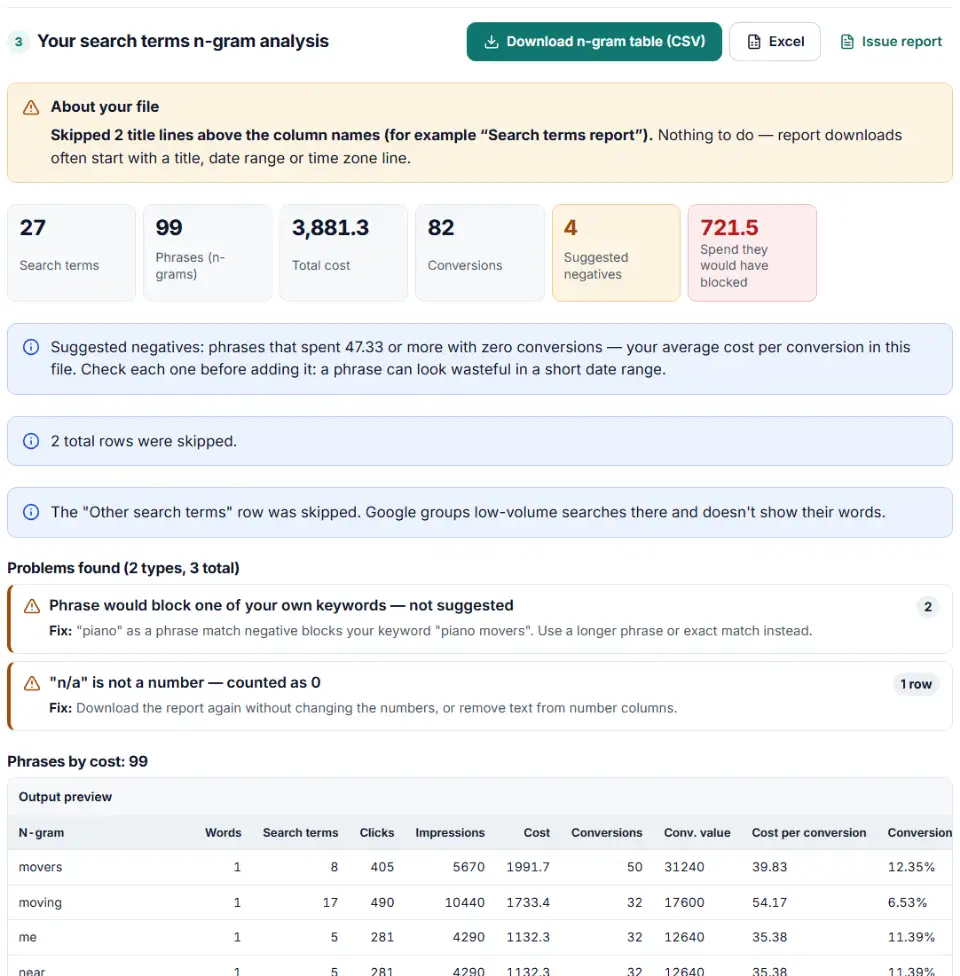
- Read the phrase table. It is sorted by cost. Each phrase shows how many search terms contain it, its cost per conversion, conversion rate and ROAS, and the costliest searches behind it.
- Review the suggested negatives. They are phrases that spent money and never converted. The list is kept short: a phrase is left out when a better suggestion already blocks its searches.
- Copy or download. Paste the list into Google Ads, or download the full phrase table for your client report.
Why phrases beat single search terms
A search terms report often has thousands of rows that each cost a little. The waste hides in patterns. In the sample file, no single "truck rental" search looks alarming, yet the word truck appears in three searches that cost almost $300 and never brought a lead. That is a moving company paying for people who want to drive themselves.
The same view shows winners. Phrases with many conversions and a low cost per conversion are good candidates for their own exact or phrase match keywords.
What to do next: add the negatives in Google Ads
- Check the list. Remove anything you still want, such as a brand word or a product you plan to sell. The Negative Keyword Conflict Checker can test the list against all your keywords first.
- Choose where they go. In the negative keywords view, use Edit exclusions and choose all campaigns or a specific campaign.
- Paste one per line. Keep the quotes or brackets: Google reads them as the match type. The list is made for the Google Ads website; to use Google Ads Editor instead, add them there with Make multiple changes.
- Save them to a list if they apply widely. Tick Save to new or existing list so you can reuse the same negatives on other campaigns, then click Done.
- Repeat monthly. New searches appear all the time. Run the analysis again on fresh data.
Common n-gram analysis problems and fixes
No negatives suggested
The report probably has no Conversions column, or no conversions at all in the date range. Add the column and download again, or type your own spend limit in the options.
A suggested negative would block my own keyword
If the phrase piano wasted money but you bid on piano movers, a phrase negative "piano" would stop that keyword too. The tool lists these as warnings instead of suggesting them. Use a longer phrase, or an exact match negative for the bad search itself.
Plural and singular forms
Negative keywords don't match close variants, so "job" does not block jobs. If both forms waste money, both appear in the table — add both.
Performance Max and AI Max search terms
Performance Max campaigns now take campaign-level negative keywords and negative keyword lists too. Google's Negative keywords in Performance Max campaigns page says they apply to Search and Shopping inventory only. For AI Max, Google advises waiting at least two weeks after turning it on before adding negatives.
Numbers look wrong after editing in Excel
Excel can turn cost cells into text. Drop in the report without editing it; unreadable cells count as zero and are listed.
Frequently asked questions
What is n-gram analysis in Google Ads?
An n-gram is a group of words that appears inside search terms: truck is a 1-gram, truck rental a 2-gram. N-gram analysis adds up clicks, cost and conversions for each group across all your search terms. A word that shows up in fifty cheap searches with no sales becomes easy to spot, even when no single search term looks expensive.
How do I run an n-gram analysis on my search terms?
In Google Ads, open Campaigns > Insights and reports > Search terms, set a date range and download the report as Excel CSV, TSV or XLSX (if you pick Google Sheets, download it from Sheets as CSV or XLSX). Drop the file into the tool above. It splits every search term into phrases, adds up the numbers and suggests negatives.
Which search terms report columns do I need?
Search term and Cost are required. Add Conversions to get negative keyword suggestions, and the Keyword column (Columns > Attributes > Keyword — hidden by default) so the tool can warn when a suggestion would block one of your keywords. Clicks, Impr. and Conv. value are used when present.
What is the difference between 1-grams, 2-grams and 3-grams?
A 1-gram is a single word, a 2-gram two words in a row and a 3-gram three. Single words find broad patterns such as free or jobs. Longer phrases are more precise, like truck rental, and are safer as negatives when a single word also appears in good searches.
Can I turn n-grams into negative keywords?
Yes. Phrase match is the default here: a phrase negative such as "jobs" blocks every search with that word or phrase in it. Broad match blocks searches that contain all the words in any order. Exact match only blocks the identical search, so in exact mode the tool suggests whole search terms instead of phrases.
Do I need a Google Ads script for n-gram analysis?
No. Scripts need access to the account and some code. Here you download the report and drop it in. There is no spend limit and no row limit, and the report never leaves your browser.
Is my search terms report uploaded anywhere?
No. The file is read and analyzed in your own browser. Nothing is sent to our server or to Google.
Related tools and guide
-
Upload your keywords and negatives to see which negatives stop your own keywords from showing, with a removal file for Editor.
Google -
See which words in your Amazon search terms waste money and which ones sell, with ACOS per phrase, ready negatives and new keywords to add.
Amazon -
Build an Editor-ready CSV of campaigns, ad groups and keywords from any sheet, with match types, bids and duplicate checks.
Google -
Pick the search terms that cost money without sales and get upload-ready negative exact or phrase rows for Amazon bulk operations.
Amazon -
Find the Quality Score part to fix first — expected CTR, ad relevance or landing page — ranked by keyword spend.
Google -
Turn a sheet of headlines and descriptions into responsive search ads for Google Ads Editor, with character limits, paths and pins checked.
Google
Need help setting this up? Talk to EmproIT