RSA Template & Bulk Sheet Builder for Google Ads
Build responsive search ads in bulk from a sheet: up to 15 headlines and 4 descriptions per ad, checked for character limits, paths, URLs and pins, ready for Google Ads Editor or a bulk upload.
RSA Bulk Sheet Builder for Google Ads
- Upload
- Check
- Download
1 Add your ad sheet
Choose a file or drag it here
CSV, Excel, TSV or TXT · one ad per row · up to 300 MB
2 Check the columns and options
Rules last checked: against the official pages:
- About responsive search ads (Google Ads)
- Templates and examples for bulk upload (Create Responsive Search Ad(s) template) (Google Ads)
- CSV file columns - Google Ads Editor Help (Google Ads)
- About keyword insertion for your ad text (Google Ads)
How to use the RSA template builder for Google Ads
This RSA template builder for Google Ads checks every responsive search ad in your sheet against the limits on Google's About responsive search ads page, then writes the rows with Editor's own headers: Headline 1 to Headline 15, Description 1 to Description 4, Path 1, Path 2 and Final URL.
- Write one ad per row. Put the campaign and ad group first, then a column for each headline and description, the two paths and the final URL. Short headers such as H1 or D1 work too.
- Add pins only if you need them. Use columns like
Headline 1 positionwith the value 1, 2 or 3. The builder finds them by name. - Load or paste the sheet. Try the sample first to see every kind of problem the builder catches.
- Pick the file type. The Editor CSV is the default. Choose the bulk upload sheet when your pins must stay in the file.
- Fix the red rows and download. Ads with errors stay out of the file until you fix them, so a bad row never blocks the whole import.
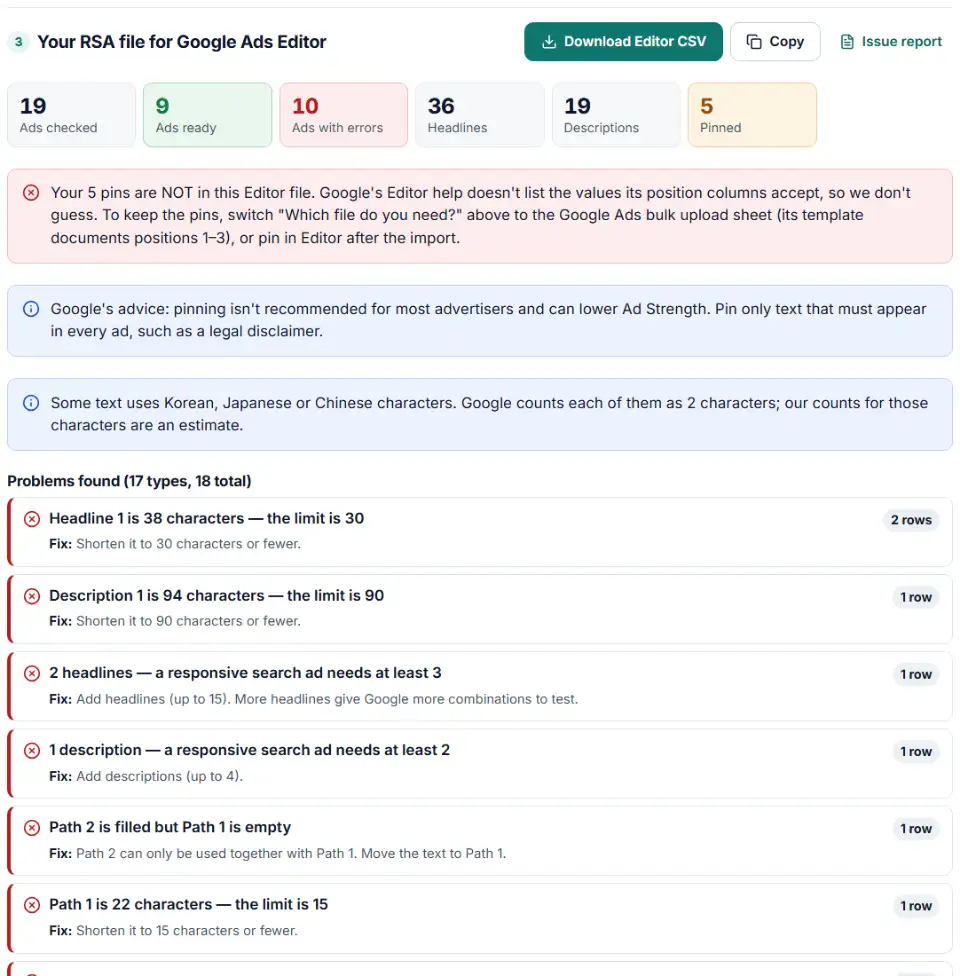
What every ad is checked for
- Counts: 3 to 15 headlines and 2 to 4 descriptions. Empty cells are skipped.
- Lengths: 30 characters per headline, 90 per description and 15 per path, with Korean, Japanese and Chinese characters counted twice.
- Paths and URLs: Path 2 needs Path 1. The final URL needs
http://orhttps://, must stay within 2,084 bytes, and can't contain keyword insertion or customizers. - Codes: keyword insertion, default text, countdown dates, location levels and old
{=…}codes. - Pins: headline pins outside 1–3, description pins outside 1–2, a position with only one pinned headline, and pins that leave unpinned text with no place to show.
What to do next: RSA bulk upload in Google Ads Editor
Google Ads Editor CSV
- In Editor, open the account and go to Account > Import > From file…. You can also copy the rows here and use Paste text.
- Check that every column header was read correctly, then select Import and Review imported changes.
- In the preview, check that Editor lists the rows as responsive search ads. Keep the proposed changes, add any pins in the ad's edit panel, and post.
Google Ads bulk upload sheet
- In Google Ads, go to Tools > Bulk actions > Uploads and upload the CSV. The file follows the columns of Google's Create Responsive Search Ad(s) template.
- Click Preview before Apply. Google recommends it to find problems before anything changes. After applying, download the results to see every change.
Google suggests at least two responsive search ads with Good or Excellent Ad Strength in each ad group.
Common responsive search ad upload errors
Headline over 30 characters with keyword insertion
A headline such as Buy {KeyWord:Dental Implants Online} counts its default text. If that version is longer than 30 characters, it fails. Shorten the default text. Google shows the default text whenever the keyword is too long to fit.
Not enough headlines without a countdown
Google needs at least 3 headlines that don't contain a countdown, and at least 3 without location insertion. The second rule is met when the location code has default text, like {LOCATION(City):Your Area}.
Old expanded text ad codes
Codes like {=COUNTDOWN("2026/12/24 00:00:00","en-US",5)} or {=Mixers.Model} belong to expanded text ads, which can no longer be created. In a responsive search ad, a countdown has no equals sign, no quotes and no language: {COUNTDOWN(2026-12-24 00:00:00,5)}.
Path 2 without Path 1
Path 2 can only be set when Path 1 is set, so move the text to Path 1.
Every position pinned
If at least one headline is pinned to each of positions 1, 2 and 3, the unpinned headlines can never show. Keep pins for text that must always appear, such as a legal line.
More than 3 enabled ads in an ad group
Google's account limits allow 3 enabled responsive search ads per ad group, so a fourth enabled ad can't be added. Pause the weakest live ad first, or load the new ads as Paused and swap them in.
Frequently asked questions
How many headlines and descriptions can a responsive search ad have?
At least 3 headlines and 2 descriptions, and up to 15 headlines and 4 descriptions. Google’s account limits allow 3 enabled responsive search ads per ad group, and the builder warns when your file has more.
What are the character limits for RSA headlines and descriptions?
Headlines can have up to 30 characters and descriptions up to 90. Each display path can have up to 15. In Korean, Japanese and Chinese every character counts as 2. With keyword insertion or customizers, the default text must also fit.
How do I pin a headline in a responsive search ad?
Headlines can be pinned to position 1, 2 or 3 and descriptions to position 1 or 2. In this template, add a column such as Headline 1 position with the number. Google’s bulk upload sheet keeps those pins. Editor’s CSV help doesn’t list the values its position columns take, so pins are left out of the Editor file — pin in Editor after the import. Google advises pinning only text that must always show.
Can I upload responsive search ads in bulk with Google Ads Editor?
Yes. Build the rows here and import them with Account > Import > From file, or copy them and use Paste text. Prefer the website? Choose the bulk upload sheet and upload it under Tools > Bulk actions > Uploads. Both let you review the ads before they go live.
How do responsive search ads work?
You give Google several headlines and descriptions, and it shows up to 3 headlines and 2 descriptions at a time in different combinations. Every ad shows at least one headline and one description. Text in headline positions 1 and 2 and description position 1 always appears; position 3 and description position 2 may not show.
Can I use keyword insertion and countdowns in bulk RSAs?
Yes. Write them as {KeyWord:Default text}, {CUSTOMIZER.Name:Default}, {LOCATION(City):Default} or {COUNTDOWN(2026-12-31 23:59:59,5)}. The builder measures each headline with the default text in place and flags old text-ad codes that start with {=.
Is my ad copy uploaded anywhere?
No. Your sheet is read and checked in your own browser. Nothing is sent to our server or to Google, so unreleased offers and client ad copy stay private.
Related tools
-
Build an Editor-ready CSV of campaigns, ad groups and keywords from any sheet, with match types, bids and duplicate checks.
Google -
See how your Google Ads keyword insertion ads read with each of your keywords, with capitals, character limits, countdowns and old syntax checked.
Google -
Build a Google Ads tracking template or final URL suffix with UTM and ValueTrack tags, catch errors before you save and see the GA4 channel.
Google -
Upload your keywords and negatives to see which negatives stop your own keywords from showing, with a removal file for Editor.
Google -
Break search terms into 1–3-word phrases with cost and conversions, and copy the negatives that wasted money.
Google -
Turn days and hours into Google Ads Editor ad schedule rows with bid adjustments, the 6-per-day limit and time zone shifts handled.
Google
Need help setting this up? Talk to EmproIT