Ad Schedule Builder for Google Ads
Pick the days, hours and bid adjustments you want, and get the exact ad schedule text Google Ads Editor imports — for one campaign or a hundred — or check a schedule you already have.
Ad Schedule Builder for Google Ads
1 Pick your days and hours
2 Your ad schedule
Fill in the settings above — your result appears here instantly.
Rules last checked: against the official pages:
- About Ad Scheduling (Google Ads)
- Set up an ad schedule (Google Ads)
- Ad schedule formats - Google Ads Editor Help (Google Ads)
- Import ad schedules in a CSV file - Google Ads Editor Help (Google Ads)
How to build a Google Ads ad schedule in bulk
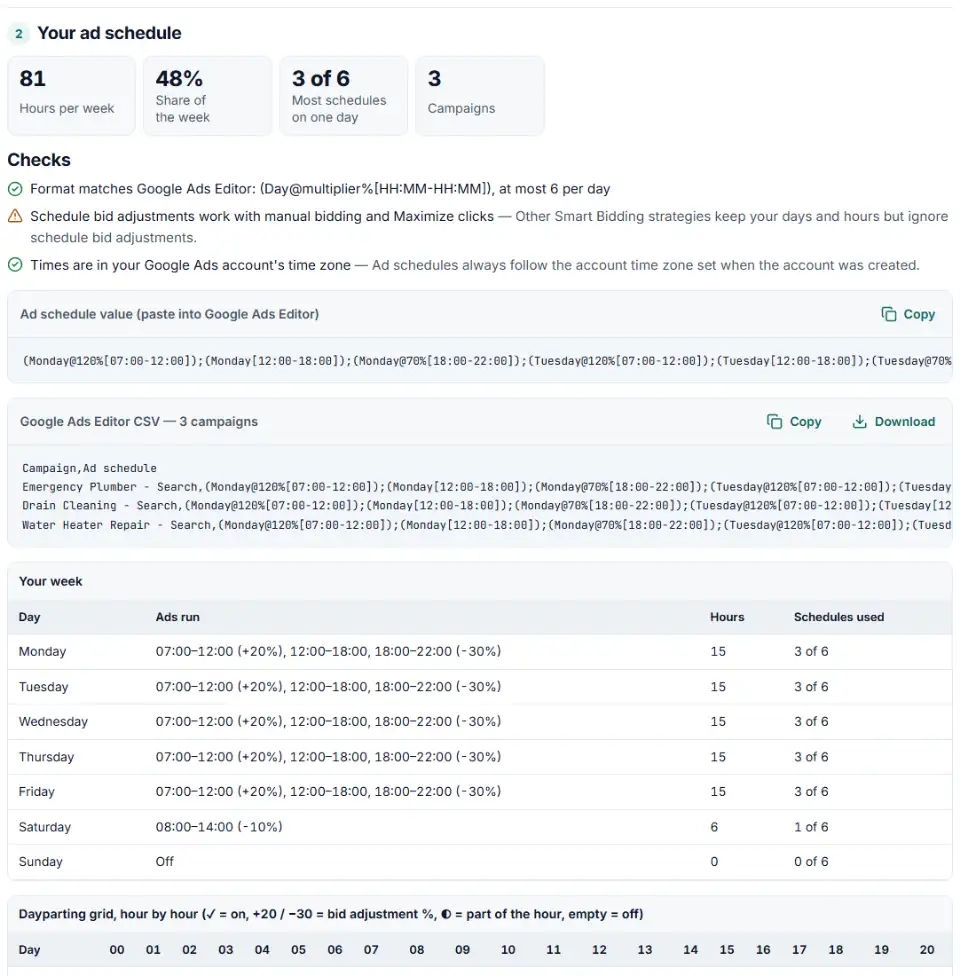
A Google Ads ad schedule tells the campaign which days and hours it may show ads, and how much to raise or lower bids in each block. This builder writes it in the exact text format from Google's Ad schedule formats page for Google Ads Editor, so you can set the same dayparting on many campaigns in one import.
- Add time windows or paint the grid. For each window pick the days, a start and end time on the quarter hour, and an optional bid adjustment. Or switch to the hour grid and click or drag across the hours you want, with the keyboard too.
- Overnight is fine. A window from 22:00 to 02:00 is split into two days for you, because Google Ads entries can't cross midnight.
- Paste your campaign names. One per line, spelled exactly as in your account.
- Read the checks. The builder counts blocks per day against Google's limit of six and flags bid adjustments outside −90% to +900%.
- Copy the schedule text or the Editor CSV. To audit existing schedules, switch to Check a schedule and paste them in.
How the Editor format works
Each entry is (Day[start-end]), or (Day@multiplier%[start-end]) with a bid change. Entries are joined with semicolons, days are written in English, and times use the 24-hour clock. A multiplier of 120% means +20%. An empty cell leaves the campaign's schedule unchanged, and [ ] removes it.
What to do next in Google Ads Editor
- Download your account in Editor so it has your latest campaigns.
- Import the CSV. Use the Account menu's Import option and choose the file, or paste the rows. Editor matches each row to a campaign by name.
- Review the proposed changes. Check one campaign's ad schedule panel to confirm the days, hours and bid adjustments.
- Post the changes to send them to Google Ads. After a few weeks, compare results by hour and day and adjust the windows.
Common Google Ads ad schedule errors
More than 6 ad schedules in one day
Google allows six schedules per day for each campaign. Every change of bid adjustment starts a new block, so many small steps add up fast. Merge neighboring hours that share a bid.
Times written as 2:00 pm
Editor wants the 24-hour clock: 14:00. A pasted schedule with am or pm is flagged in check mode.
Bid multipliers with decimals
Write 80%, not 80.5%. Editor accepts whole-number multipliers only, and the builder only takes whole percentages.
Schedules that cross midnight
An entry like Saturday 22:00–02:00 isn't possible. Split it into Saturday until midnight and Sunday from 00:00.
Ads running at the wrong local time
Schedules follow the account's time zone, which Google says can't be changed on an account that serves ads. If the account is in New York and the shop is in Los Angeles, shift the hours first.
Bid adjustments that seem to do nothing
With Target CPA, Target ROAS or Maximize conversions, Google ignores schedule bid adjustments; only the on and off times count.
Frequently asked questions
How do I set an ad schedule in Google Ads?
On the Google Ads website you set the schedule campaign by campaign, one day and time at a time. For many campaigns it is faster in Google Ads Editor: put the schedule text from this builder in the Ad schedule column next to each campaign and import it.
Which time zone does a Google Ads ad schedule use?
Your account’s time zone — the one chosen when the account was created. If your business hours are in another zone, tick My hours are in a different time zone and the builder moves the schedule for you.
How many ad schedule time blocks can a campaign have per day?
Six per day. Each change in bid adjustment starts a new block, so a day with morning, lunch, afternoon and evening rates uses four. The builder counts them and warns before you go over.
Can I add bid adjustments to ad schedule times?
Yes, from −90% to +900%. In Editor they are written as a multiplier: +20% is @120%, −30% is @70%, and no @ means 100%. Smart Bidding strategies other than Maximize clicks keep the hours but ignore these adjustments.
How do I copy one ad schedule to many campaigns?
List the campaign names in the builder, one per line. You get a CSV with a Campaign column and an Ad schedule column; import it in Google Ads Editor and every campaign gets the same schedule.
What is dayparting in Google Ads?
Dayparting means running ads only at certain times of day, or bidding more or less at those times — for example a plumber bidding up during working hours and down late at night. In Google Ads it is done with ad schedules.
Related tools
-
Turn a list of ZIP codes, cities or counties into Google Ads location IDs, with warnings for look-alike places and locations Google plans to remove.
Google -
Build an Editor-ready CSV of campaigns, ad groups and keywords from any sheet, with match types, bids and duplicate checks.
Google -
Turn a sheet of headlines and descriptions into responsive search ads for Google Ads Editor, with character limits, paths and pins checked.
Google -
Clean a messy list of websites, apps and YouTube channels into Google Ads placement exclusions, with duplicates and already-covered entries removed.
Google -
Upload your keywords and negatives to see which negatives stop your own keywords from showing, with a removal file for Editor.
Google -
Turn your store list into a Google Business Profile bulk upload sheet, with store codes, addresses, phones, categories and opening hours checked.
Google
Need help setting this up? Talk to EmproIT