Location ID List Finder for Google Ads
Paste ZIP codes, cities or counties and get their Google Ads location IDs and exact names from Google's own location list — ready for Google Ads Editor, the bulk locations box or the API.
Location ID Finder for Google Ads
- Upload
- Match
- Download
1 Add your locations
Choose a file or drag it here
CSV, Excel or one location per line: ZIP codes, cities, counties or IDs · up to 300 MB
2 Check the columns and options
Rules last checked: against the official pages:
- Geo targets - Google Ads API (Google Ads)
- Target ads to geographic locations (Google Ads)
- About your Google Ads account limits (Google Ads)
- Add multiple location targets - Google Ads Editor Help (Google Ads)
How to use the location ID list finder for Google Ads
This finder searches the Google Ads location ID list — Google's own geotargets CSV (version 2026-10-06) — for every line you paste. It returns the Criteria ID, the exact name, the canonical name with its state and country, and the target type, so you know you are targeting the right Springfield.
- Paste or upload your list. ZIP codes, cities, counties, states, or IDs you found in a report. Write Austin, TX or Kansas City, Missouri to tell same-name places apart, or add a State column.
- Pick the country. Only that country's slice of Google's list is downloaded; your own list never leaves your browser. A Country column lets one file cover several countries.
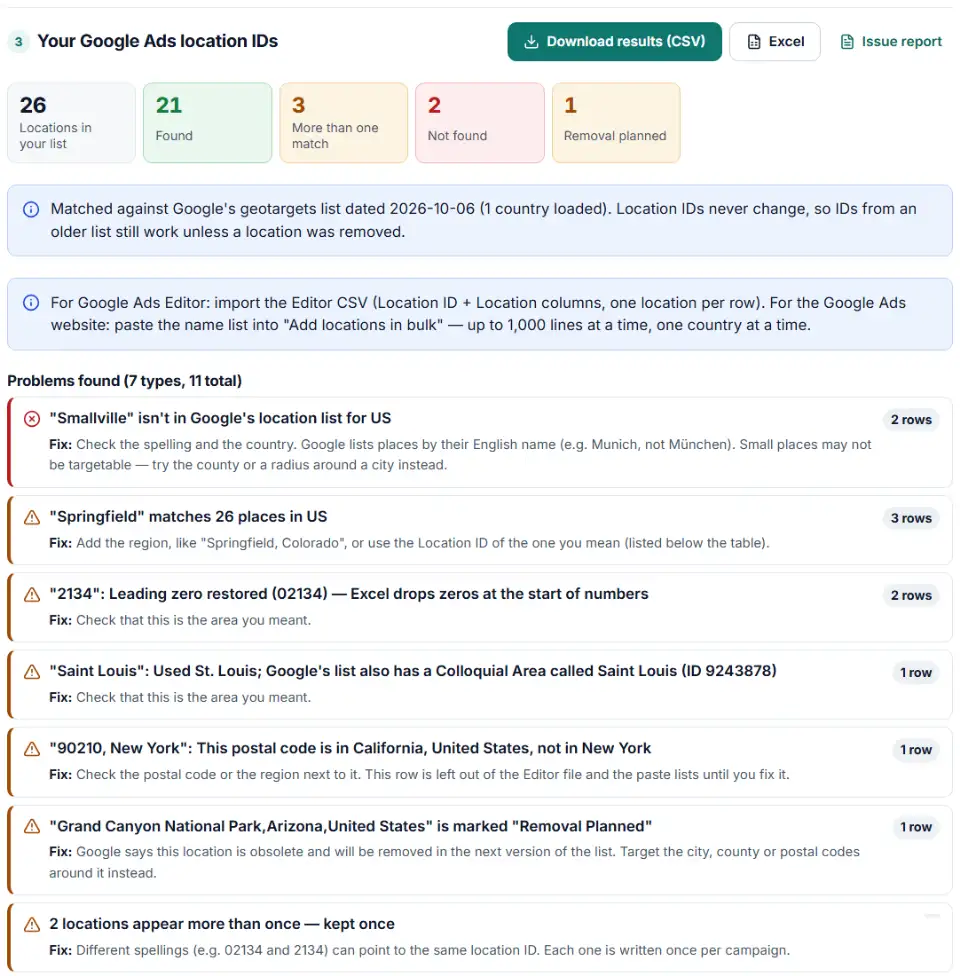
- Check the matches. Green rows are found. Rows with more than one match list every candidate with its ID. Not-found rows tell you why.
- Choose target or exclude. Exclusions get Negative in the Editor file's Criterion Type column.
- Download or copy. Take the Editor CSV, the name list for the bulk box, or the bare IDs for the API.
Fixes it makes for you
- Lost zeros: Excel turns 02134 into 2134. The finder adds the zero back, using the usual length of that country's postal codes.
- Long codes: ZIP+4 (94103-1234), full UK postcodes and full Canadian codes are matched at the level Google lists.
- Accents and punctuation: Montréal finds Montreal, St. Louis and St Louis are the same search, and Saint Louis falls back to the city St. Louis.
- City versus district: when one city shares its name with a smaller area such as a post town, the city is used and the other ID is noted.
What to do next: add the locations to your campaigns
- Google Ads website: open Locations in the Campaigns menu, click the blue pencil, select a campaign and tick Add locations in bulk. Paste one batch of names, click Search, then Target All and Save.
- Google Ads Editor: go to Keywords and targeting › Locations › Make multiple changes, choose “My data includes columns for campaigns”, paste the Editor rows, then Process and Finish and review changes. Or import the CSV from the Account menu.
- Post your changes from Editor so they go live in your account.
Common Google Ads location targeting errors
Why does Google Ads say a location was not found?
The bulk box keeps every line it can't find. Look up those lines here: the finder shows whether the name is spelled differently in Google's list, whether the postal code exists at a shorter level, or whether the place simply isn't targetable.
The wrong Springfield, Portland or Paris
Many place names repeat. A list of bare city names can quietly target a town in the wrong state. Add the state after the name, or use the Location ID, which points to exactly one place.
Google Ads ZIP code format and lost leading zeros
US ZIP codes are five digits, and the ones in New England start with 0. Format the column as text before you save from Excel, or let the finder put the zeros back.
Locations marked Removal Planned
Google marks obsolete locations before deleting them in the next version of its list. Replace them now with the city, county or postal codes around them, so the targeting doesn't silently shrink.
Too many locations for one campaign
A campaign can hold 10,500 location targets: up to 10,000 individual places plus 500 radius targets, and exclusions count too. The finder warns before a list goes over.
A location both targeted and excluded
Google Ads Editor flags a location that is targeted and excluded in the same campaign as a conflict. Keep target and exclusion lists in separate files.
Frequently asked questions
Where can I find Google Ads location IDs?
Google publishes every targetable location in one big file, the geotargets CSV on its developer site. This tool carries that list (split by country) so you can search it in bulk without opening a spreadsheet of more than 270,000 rows.
What is a criteria ID in Google Ads?
It is the number Google gives each location: 2840 is the United States, 1023191 is New York City, 9004056 is ZIP code 10001. Google calls it unique and persistent. You use it in Google Ads Editor’s Location ID column, the API and scripts, and it is what {loc_physical_ms} and {loc_interest_ms} put in your URLs.
Can Google Ads target ZIP codes?
Yes, in the countries where Google’s list has postal codes — for example 5-digit ZIP codes in the US. Some countries only go part of the way: UK postcodes stop at the district (SW1A) and Canadian ones mostly at the first three characters (M5V). Paste full codes and the finder tries the shorter form for you.
How do I add many ZIP codes or cities at once?
On the Google Ads website, use Add locations in bulk in the Locations editor: up to 1,000 lines at a time, one country at a time, written like 94103, California. The finder writes that list for you. In Google Ads Editor, import the CSV with Location ID and Location columns.
Why does Google Ads say a location was not found?
The usual reasons are a typo, a local-language name (Google uses English: Munich, not München), a ZIP code that lost its leading zero in Excel, a full UK or Canadian postcode, or a place too small for Google to list. Locations Google can’t find stay in the bulk entry box.
Do Google Ads location IDs change?
No, the ID itself stays the same. But Google sometimes retires a location: it is first marked Removal Planned in the list and then disappears in the next version. The finder flags those so you can pick a replacement.
Related tools
-
Turn days and hours into Google Ads Editor ad schedule rows with bid adjustments, the 6-per-day limit and time zone shifts handled.
Google -
Build an Editor-ready CSV of campaigns, ad groups and keywords from any sheet, with match types, bids and duplicate checks.
Google -
Clean a messy list of websites, apps and YouTube channels into Google Ads placement exclusions, with duplicates and already-covered entries removed.
Google -
Build a Google Ads tracking template or final URL suffix with UTM and ValueTrack tags, catch errors before you save and see the GA4 channel.
Google -
Turn a sheet of headlines and descriptions into responsive search ads for Google Ads Editor, with character limits, paths and pins checked.
Google -
Turn your store list into a Google Business Profile bulk upload sheet, with store codes, addresses, phones, categories and opening hours checked.
Google
Need help setting this up? Talk to EmproIT