Placement Exclusion List Formatter for Google Ads
Paste your own list of websites, apps and YouTube links and get a clean, de-duplicated placement exclusion list in the formats Google Ads accepts — plus a bulk upload file.
Placement Exclusion List Formatter for Google Ads
- Upload
- Clean
- Download
1 Add your placements
Choose a file or drag it here
Your own list, a spreadsheet or a placement report: CSV, Excel or one per line · up to 300 MB
2 Check the columns and options
Rules last checked: against the official pages:
- Exclude specific webpages and videos (Google Ads)
- Exclude placements at the account level (Google Ads)
- Use placement exclusion lists across your accounts (Google Ads)
- About your Google Ads account limits (Google Ads)
How to format a Google Ads placement exclusion list
This tool formats your own Google Ads placement exclusion list — it doesn't ship a ready-made list of bad sites. Paste the websites, apps and YouTube links you want to block, and each one is rewritten in the forms shown on Google's Exclude specific webpages and videos page.
- Collect your placements. Copy them from the “where ads showed” report, a spreadsheet, a brand-safety list from a client, or your notes. Any mix of formats works.
- Paste or upload. With both a name and a URL column, the tool uses the column that holds a real address.
- Pick how to treat websites. Keep folders and pages, or cut everything down to whole sites. Removing www. widens each exclusion to the whole domain.
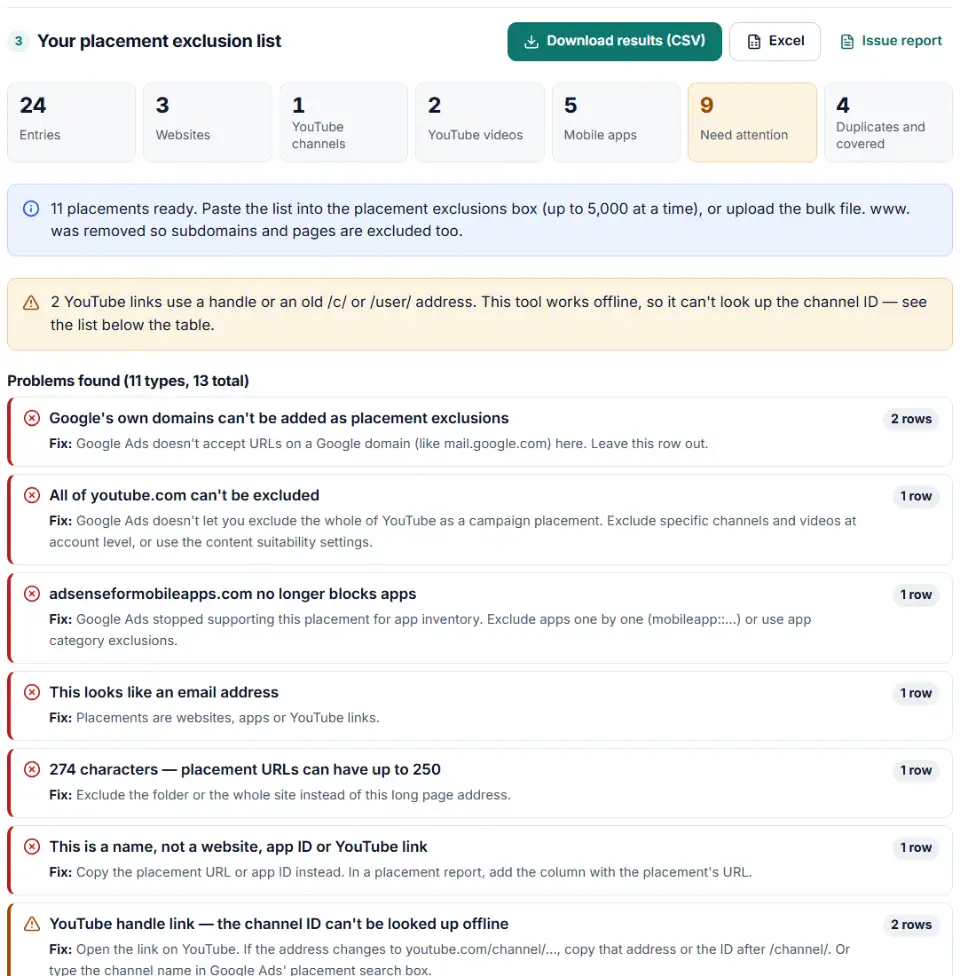
- Read the results. Every entry gets a type and a status: ready, duplicate, covered by a broader entry, needs a channel ID, or not usable — with the reason.
- Copy or download. Use the paste list, the bulk upload file, or the website file for a scheduled list.
What it converts
- Websites: protocol, www., query strings and trailing slashes removed; host names lowercased; pages under an excluded domain dropped as already covered.
- Apps: Play Store links become
mobileapp::2-com.example.app, App Store linksmobileapp::1-1234567890. - YouTube: youtu.be, shorts, embed and mobile links become standard video links; channel links keep their ID.
What to do next: add the exclusions in Google Ads
- For the whole account: go to Tools › Content suitability › Advanced settings › Excluded placements, paste the list and save. This also covers Performance Max campaigns.
- For a reusable list: Tools › Shared library › Exclusion lists, turn on placement exclusion lists, click the plus button, name the list, paste or upload, then apply it to campaigns.
- For one campaign: open Content › Exclusions in the campaign, choose placements, then Enter multiple placements.
- Give it time. Google says new account-level exclusions usually work within 12 hours. Check the “where ads showed” report next week for anything that slipped through.
Why won't Google Ads accept my placement list?
Google domains
Addresses such as mail.google.com can't be excluded as placements. They are marked “Not usable” so the rest of the list goes through.
All of youtube.com
You can't exclude YouTube as a whole site. Exclude the channels and videos you don't want, at account level for every campaign.
adsenseformobileapps.com
Old guides say to exclude this domain to keep ads out of apps. Google no longer supports it for app inventory, so exclude apps one by one or use app category settings.
Kids YouTube channel exclusion list with @handles
Handle links don't contain a channel ID. Look them up first — open each channel and copy a youtube.com/channel/ address.
www. kept the subdomains open
Excluding www.example.com still lets ads show on shop.example.com. Excluding example.com blocks every subdomain and page. Country sites such as example.co.uk need their own entry.
The list is too long
One shared list holds 65,000 exclusions, and the screen takes 5,000 at a time. The paste list is split in parts, and the bulk file starts a second list when the first is full.
Scheduled list: “File not found” on SFTP
Google suggests putting a double slash between the folder path and the file name in the SFTP address.
Frequently asked questions
What is a placement exclusion list in Google Ads?
A saved list of websites, apps, YouTube channels and videos where you don’t want your ads to appear. You build it once and apply it to many campaigns or accounts. An account can have 20 shared lists with up to 65,000 exclusions each.
How do I upload a placement exclusion list?
In Google Ads open Tools › Shared library › Exclusion lists, switch to placement exclusion lists, click the plus button, name the list and add or upload your placements. You can also upload the bulk file from this page under Bulk actions › Uploads, or schedule a list that refreshes from Google Sheets, HTTPS or SFTP.
How do I exclude YouTube channels in Google Ads?
Add the channel’s address, like youtube.com/channel/UC…, as a placement exclusion — at account level, in a list, or in one campaign. Video links work the same way for single videos. Handle links (youtube.com/@name) need the channel ID first.
How do I exclude mobile apps in Google Ads?
Exclude each app in Google’s format: mobileapp::2- plus the package name for Android (the part after id= in the Play Store link), or mobileapp::1- plus the number at the end of the App Store link for iOS. Paste store links here and the formatter converts them. The old adsenseformobileapps.com trick no longer works.
Why won't Google Ads accept some of my placements?
Usually because they are on a Google domain (like mail.google.com), they try to exclude all of youtube.com, they are names instead of addresses, or the address is longer than 250 characters. The formatter marks each one with the reason.
How do I get a YouTube channel ID from a URL?
If the address is youtube.com/channel/…, the ID is the letters and numbers after /channel/. For an @handle there is no ID in the link, and this tool works offline, so it can’t look it up — open the channel and copy a /channel/ link, or search the channel by name in Google Ads.
Related tools
-
Build an Editor-ready CSV of campaigns, ad groups and keywords from any sheet, with match types, bids and duplicate checks.
Google -
Turn a list of ZIP codes, cities or counties into Google Ads location IDs, with warnings for look-alike places and locations Google plans to remove.
Google -
Turn days and hours into Google Ads Editor ad schedule rows with bid adjustments, the 6-per-day limit and time zone shifts handled.
Google -
Upload your keywords and negatives to see which negatives stop your own keywords from showing, with a removal file for Editor.
Google -
See which words in your Amazon search terms waste money and which ones sell, with ACOS per phrase, ready negatives and new keywords to add.
Amazon
Need help setting this up? Talk to EmproIT