Negative Keyword Conflicts Checker for Google Ads
Find the negative keywords that block your own keywords — ad group, campaign and list negatives — using Google's broad, phrase and exact negative matching rules.
Negative Keyword Conflict Checker for Google Ads
- Upload
- Compare
- Download
1 Add your keywords and negatives
File 1 is required. Add file 2 for shared lists or for new negatives you plan to add.
1. Your keywords (negatives can be in the same file)
Choose a file or drag it here
Editor or Google Ads export · CSV, Excel, TSV · up to 300 MB
2. Negative keyword list (optional)
Choose a file or drag it here
A shared list, account-level negatives or a pasted list · up to 300 MB
2 Check the columns and options
Rules last checked: against the official pages:
- About negative keywords (Google Ads)
- Fix issues with negative keywords (Google Ads)
- About negative keyword lists (Google Ads)
- Conflicting targets and exclusions - Google Ads Editor Help (Google Ads)
How to find negative keyword conflicts in Google Ads
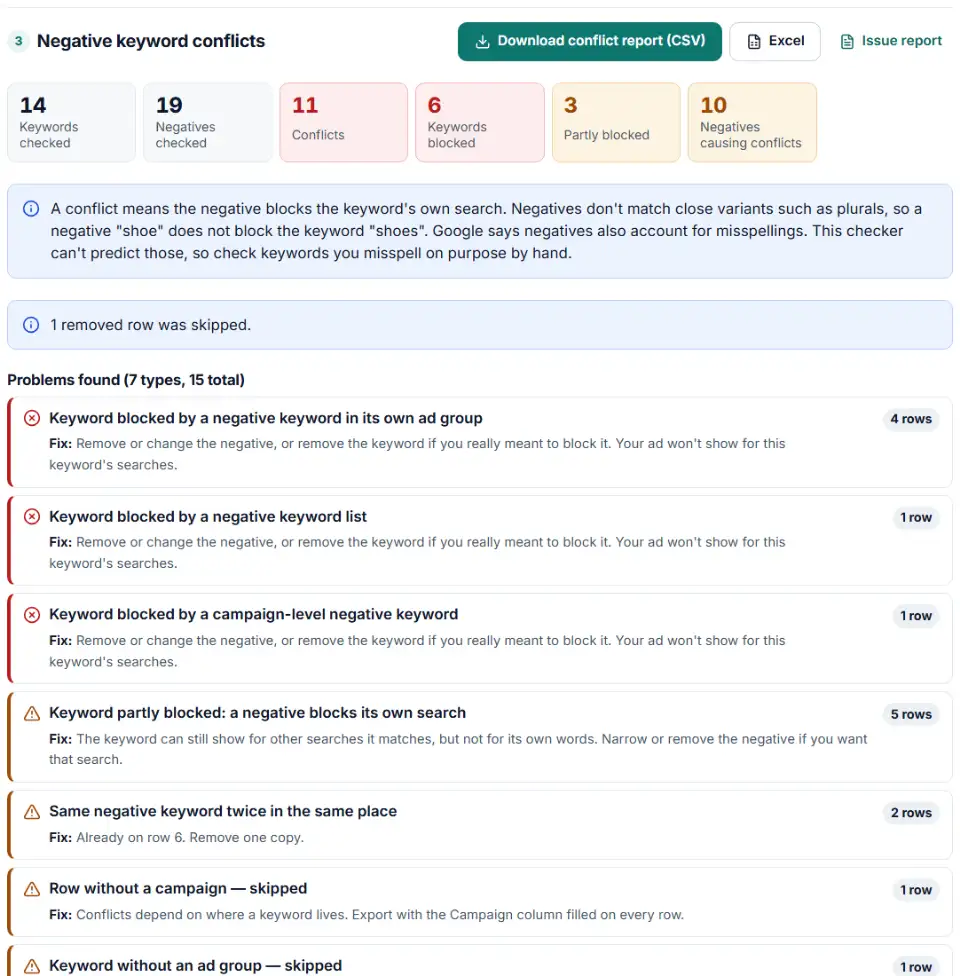
This checker finds negative keyword conflicts in Google Ads by treating each keyword's own text as a search and testing it against every negative, using the match rules on Google's About negative keywords page. A conflict means the ad can't show for that keyword's own search.
- Export your keywords. Use a Google Ads Editor export or a keywords report from Google Ads with campaign, ad group, keyword and match type. Negative rows can be in the same file.
- Add negative lists if you use them. Put a shared list, your account-level negatives or a set of negatives you plan to add in the second box. A plain list with one negative per line is fine.
- Check the columns. The tool reads Editor values like Negative phrase and Campaign negative, web export values like Exact match, and symbols like
[exact]and"phrase". - Read each conflict. Every blocked keyword shows the negative, where it lives (ad group, campaign or list) and why it matches.
- Download and fix. Get the conflict report, plus an Editor file that removes the conflicting negatives from file 1 if you decide the keywords should win.
How the matching works
- Broad match negative (
repair): blocks the keyword when every word of the negative is in it, in any order. - Phrase match negative (
"bike rental"): blocks the keyword when the words appear together in the same order, even with other words around them. - Exact match negative (
[road bikes]): blocks only the identical keyword. - Capital letters don't matter and periods are ignored. Accents and
&do matter: cafe and café are different words. - Scope matters: an ad group negative only affects its own ad group, a campaign negative the whole campaign, and a list every campaign it is applied to.
- Not covered: misspellings (Google says negatives account for them, but doesn't say which) and Display or Video campaigns, where Google treats every negative as broad match.
What to do next in Google Ads
- Decide who wins. For each conflict, ask: do I want this keyword? If yes, the negative goes or gets narrower (for example, broad
repairbecomes phrase"free repair"). If no, pause or remove the keyword instead. - Remove negatives in Google Ads Editor. Import the removal file with Account > Import > From file, review the changes and post. You can also open Keywords and Targeting > Keywords, Negative, select the negatives and click Remove.
- Fix shared lists in the Shared library. In Google Ads, open Tools > Shared library > Exclusion lists, then the Negative keyword lists tab, and edit the list. Remember a list affects every campaign it is applied to.
- Run the check again. Export again after your changes and confirm the conflict count is zero.
Common negative keyword mistakes
"A negative keyword is preventing your ad from showing"
The keyword diagnosis in Google Ads tests the exact match version of a keyword. When a negative excludes it, you see this message. Find the negative in the conflict report, including ones that come from lists.
Negative keywords blocking my keywords from a shared list
Google allows up to 5,000 negatives per list and 20 lists per account, so one broad entry such as free can quietly block keywords in many campaigns. Add the list as file 2 to catch it.
Expecting a negative to block plurals
The opposite problem: a negative shoe does not block searches for shoes. Negatives don't match close variants such as plurals. Add each form you want to block.
Accents, ampersands and symbols
Google treats sidewalk cafe and sidewalk café as two different negatives, and socks & shoes is not socks and shoes. Only &, accent marks and * have a meaning in a negative keyword.
A search term still shows after you added a negative
Searches from before the negative was added stay in the report. Check the date range against Change history.
Frequently asked questions
What is a negative keyword conflict?
It is a negative keyword that excludes one of your own keywords. If running shoes is a keyword and shoes is a broad match negative in the same campaign, a search for running shoes is blocked, so that keyword never gets an impression. Google warns that overlapping negatives and keywords cause your ad not to show.
How do I find conflicting negative keywords in Google Ads?
Google Ads can show a Remove conflicting negative keywords recommendation, Google Ads Editor flags a keyword that equals a negative in the same ad group, and the keyword diagnosis can say a negative keyword is preventing your ad from showing. For a full list, export your keywords and negatives and drop them into this checker — it tests every keyword against every negative, lists included.
Do negative keywords match close variants?
No. Google says negative keywords won’t match close variants: a negative flowers blocks red flowers but not red flower, so the checker never reports a plural as a conflict. Google also says negatives automatically account for capital letters and misspellings. The checker ignores capitals, but it can’t predict which misspellings Google covers — check keywords you misspell on purpose by hand.
Can a shared negative keyword list block keywords in another campaign?
Yes. A negative keyword list works in every campaign it is applied to, so one broad entry can block keywords in campaigns you weren’t thinking about. Add the list as the second file and choose whether it applies to every campaign.
Should I remove every conflicting negative keyword?
Not always. A conflict means the keyword can’t show for its own search, so one of the two has to change. If you still want the traffic, remove or narrow the negative. If the negative is right, the keyword is the mistake — pause or remove it instead.
Which file should I upload?
Any export with campaign, ad group, keyword and match type: a Google Ads Editor export or a keywords report downloaded from Google Ads. Negative keywords can sit in the same file when their match type says Negative or Campaign negative.
Is my keyword data uploaded anywhere?
No. Both files are read and compared in your own browser. Nothing is sent to our server or to Google.
Related tools and guide
-
Break search terms into 1–3-word phrases with cost and conversions, and copy the negatives that wasted money.
Google -
Build an Editor-ready CSV of campaigns, ad groups and keywords from any sheet, with match types, bids and duplicate checks.
Google -
Turn a sheet of headlines and descriptions into responsive search ads for Google Ads Editor, with character limits, paths and pins checked.
Google -
Pick the search terms that cost money without sales and get upload-ready negative exact or phrase rows for Amazon bulk operations.
Amazon -
Clean a messy list of websites, apps and YouTube channels into Google Ads placement exclusions, with duplicates and already-covered entries removed.
Google -
See which words in your Amazon search terms waste money and which ones sell, with ACOS per phrase, ready negatives and new keywords to add.
Amazon
Need help setting this up? Talk to EmproIT