N-gram Analysis Tool for Amazon Ads Search Terms
Upload your Sponsored Products search term report to see spend, sales and ACOS for every 1-, 2- and 3-word phrase — the words that waste money and the searches that sell.
Search Term N-gram Analyzer for Amazon Ads
- Upload
- Analyze
- Download
1 Add your search term report
Choose a file or drag it here
Sponsored Products search term report: console, unified reporting or bulksheet tab · up to 300 MB
2 Check the columns and options
Rules last checked: against the official pages:
How to run n-gram analysis on Amazon Ads search terms
This n-gram analysis for Amazon Ads reads your Sponsored Products search term report and uses Amazon's own formulas: ACOS is spend ÷ sales × 100 and ROAS is sales ÷ spend, as defined on the search term report help page. The report only lists searches that got at least one click, so every row cost you something.
- Download the report. Use Reporting (the Search term template) or the Search term report tab of a bulk operations download. A month or more of data gives steadier phrases.
- Drop it in. Legacy names such as 7 Day Total Sales and new ones such as Total cost and Purchases are matched automatically. Check the column list if a guess looks wrong.
- Set your target ACOS. Phrases above it are marked; search terms with enough orders below it become keyword ideas.
- Review the wasted phrases. Each suggested negative shows the spend it would have blocked and the searches behind it. Read the top search terms before you add any of them.
- Send the negatives on. Next step carries them, with their campaigns and ad groups, to the negative keyword bulksheet builder.
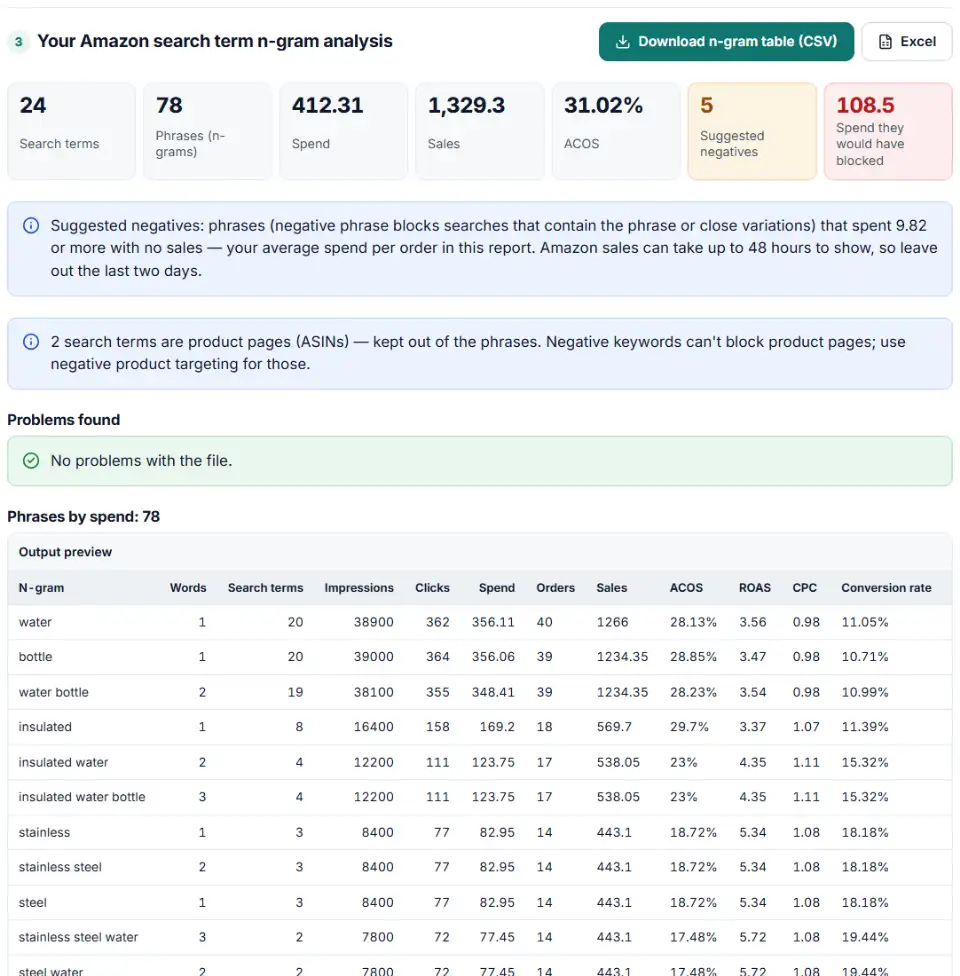
What you get
- Phrase table — impressions, clicks, spend, orders, sales, ACOS, ROAS, CPC and conversion rate for each 1–3-word phrase.
- Suggested negatives — phrases with spend and no sales, checked against Amazon's 4-word limit for negative phrase and its allowed characters.
- Keyword ideas — search terms that sell at or under your target and aren't keywords yet.
- Product pages — ASIN search terms with their spend, for negative product targeting.
What to do next with the results
- Block the waste. Open the negative keyword bulksheet builder from Next step, add your bulk operations download there for the numeric Campaign Ids, and download the rows.
- Upload on Bulk operations. New negatives can take up to 72 hours to work, so judge the result on the following weeks, not the next day.
- Lower bids, don't block, when a phrase still sells. A phrase over target ACOS with orders is a bid problem. Cut the bid on the keyword or target that triggers it.
- Harvest the winners. Add the keyword ideas as exact keywords in a manual campaign — the Sponsored Products bulk sheet builder turns the list into rows.
Common problems with Amazon search term report analysis
ACOS looks wrong because the wrong sales column was matched
Older seller reports have several sales columns. 7 Day Total Sales counts every product sold after the click; Advertised SKU Sales counts only the advertised one. The tool prefers total sales. Vendor reports use 14-day columns instead of 7-day ones.
Amazon search terms with clicks but no sales — from the last two days
Amazon says sales can take 12 to 48 hours to show, and cost can change for up to 3 days while clicks are checked. End your date range a few days before today, or recent searches look like waste.
Impressions don't match campaign manager
Amazon notes that search term report impressions may not match campaign manager. That's normal. Spend and sales are what matter for negatives.
“Too many words” for negative phrase
Negative phrase allows 4 words and negative exact 10, both up to 80 characters. Phrases here have at most 3 words. In exact mode, very long searches are left out with a note.
The negative would block your own keyword
If the Targeting column is in your file, a phrase that would also match one of your keywords is not suggested. Blocking insulated when you bid on insulated water bottle would switch that keyword off.
The report has ASINs, not words
Rows like b0fakebt01 are product detail pages. They are listed in their own table because only negative product targeting can stop them.
Frequently asked questions
What is n-gram analysis for Amazon Ads?
It splits every customer search term into its single words (1-grams), word pairs (2-grams) and three-word runs (3-grams), then adds up spend, sales and orders for each one. One search like kids water bottle for school is small, but the word kids across forty searches can be a big leak — or a big winner.
How do I download my Amazon search term report?
In the advertising console open Reporting, choose Create report or the Search term template, filter to Sponsored Products, pick a period and submit. Or tick Sponsored Products Search term data when you create a bulk operations download and use its Search term report tab, which always covers the last 7 days.
How do I find wasted spend in my Amazon search terms?
Sort by spend and look for phrases with no sales. This tool flags phrases whose spend reaches your limit — by default your average spend per order — with zero sales, and only keeps the ones that add new blocked spend, so the list stays short.
Can I turn n-gram results into Amazon negative keywords?
Yes. Short phrases become negative phrase keywords (up to 4 words); whole search terms can become negative exact (up to 10 words). Click Next step and the negatives go to the bulksheet builder with the campaigns and ad groups they came from.
Which search term report columns does the tool need?
Customer search term and Spend (or Total cost) are required. Add Sales and Orders (or Purchases) for ACOS and wasted-spend picks, Campaign name for the next step, and Targeting so the tool won’t suggest a negative that blocks your own keyword. Old and new column names both work.
Why do some search terms look like b0… codes?
Those are ASINs: your ad showed on another product’s detail page, which happens in auto campaigns and product targeting ad groups. A negative keyword can’t stop that. The tool lists them separately so you can add negative product targets instead.
Related tools and guide
-
Pick the search terms that cost money without sales and get upload-ready negative exact or phrase rows for Amazon bulk operations.
Amazon -
Build new Sponsored Products campaigns, ad groups, keywords and product targets in bulk, or add keywords to campaigns you already run.
Amazon -
Break search terms into 1–3-word phrases with cost and conversions, and copy the negatives that wasted money.
Google -
Upload your keywords and negatives to see which negatives stop your own keywords from showing, with a removal file for Editor.
Google -
Clean a messy list of websites, apps and YouTube channels into Google Ads placement exclusions, with duplicates and already-covered entries removed.
Google
Need help setting this up? Talk to EmproIT