Dynamic Keyword Insertion & Customizer Checker for Google Ads
Check dynamic keyword insertion, countdowns, location insertion and ad customizers in your responsive search ad text — see how every keyword will look, which ones fall back to the default text, check a whole Google Ads Editor export, and build a countdown code.
Keyword Insertion Checker for Google Ads
1 Check ad text or build a countdown
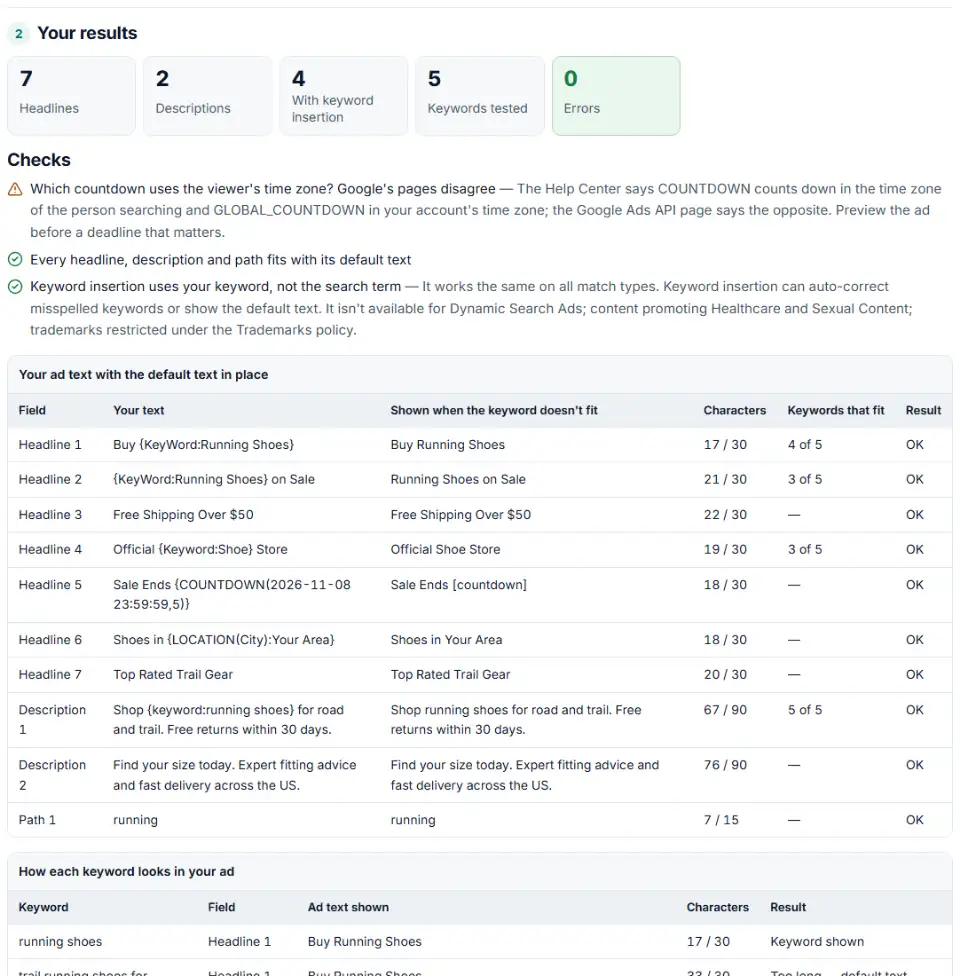
2 Your results
Fill in the settings above — your result appears here instantly.
Rules last checked: against the official pages:
- About keyword insertion for your ad text (Google Ads)
- Set up keyword insertion for your ad text (Google Ads)
- Highlight upcoming events with countdowns (Google Ads)
- About responsive search ads (Google Ads)
How to check dynamic keyword insertion in Google Ads
Dynamic keyword insertion in Google Ads only works when the code is written exactly right and the text still fits with every keyword in the ad group. This checker reads your ad text the way Google's keyword insertion help page describes it: it finds each {KeyWord:…} code, applies the capitalization, and counts characters with the default text and with each of your keywords.
- Paste your ad text. One headline per line, one description per line, plus the two paths if you use them.
- Paste the ad group's keywords. Copy them from Google Ads or Editor; brackets, quotes and plus signs are cleaned off.
- Read the first table. It shows each line as searchers see it when the keyword can't be used, its length against the limit, and how many keywords fit.
- Read the keyword preview. Every keyword appears in every line that uses keyword insertion, capitalized the way Google describes, with “too long” marked.
- Checking a whole account? Choose “Check an Editor export” and load a Google Ads Editor export with ads and keywords: every ad is checked against its own ad group's keywords, with the file's row numbers.
- Need a countdown? Switch to “Build a countdown”, pick the end date and copy the code into a headline.
What to do next in Google Ads
- Open the ad. Edit the responsive search ad in Google Ads, or open the ad group in Google Ads Editor.
- Type { in a headline or description. Google's guided setup offers keyword insertion, ad customizers, countdowns and location insertion. You can also paste the checked text directly.
- Keep plain headlines too. Google asks for at least three headlines without a countdown, and three without location insertion unless those use default text.
- Save and preview. The ad preview shows a fixed countdown, not a live one, so check the dates in this tool instead.
- Watch the end date. Ads with a countdown stop showing after it — unpin or change that headline when the sale ends.
Common keyword insertion and customizer errors
What happens if the keyword is too long for keyword insertion
Google drops it and shows the default text. That is fine for a few long tail keywords, but if most of the ad group never fits, the ad reads the same for everyone. Shorten the text around the code, or move long keywords to their own ad group.
Default text that breaks the limit
The default text has to fit too. Buy {KeyWord:Best Running Shoes For Marathons} is over 30 characters even before any keyword is tried, so Google can't serve that headline.
Typos in the code
{Keywords:…}, {Key Word:…} or a semicolon instead of a colon aren't codes at all — the braces show up in the ad. Capitalizations Google doesn't list, such as {KEYWORD:…}, are flagged too.
Old text-ad syntax with an equals sign
Expanded text ads used {=COUNTDOWN("2026/11/30 23:59:59","en-US",5)} and {=Data.Attribute}. Those ads can't be created or edited anymore and their customizers stopped serving in May 2024. The checker rewrites old countdowns in the new format. The IF function from text ads isn't supported in responsive search ads at all.
Countdown dates in the wrong format
Responsive search ads want yyyy-MM-dd HH:mm:ss in 24-hour time: 2026-11-30 23:59:59, not 11/30/2026 11:59 PM. A countdown in a display path isn't allowed.
Google ads countdown time zone
Google's Help Center says COUNTDOWN ends at the set time in each searcher's own time zone and GLOBAL_COUNTDOWN at one moment in your account's time zone. The Google Ads API documentation describes them the other way round. Until Google aligns the two, preview the ad and allow some slack around a deadline.
Frequently asked questions
What is dynamic keyword insertion in Google Ads?
It is a code in your ad text that Google replaces with the keyword that triggered the ad. Buy {KeyWord:Running Shoes} shows “Buy Marathon Shoes” when the keyword marathon shoes matched. If the keyword doesn’t fit the character limit, Google shows the default text instead — here, “Running Shoes”.
What is the correct syntax for keyword insertion?
An opening curly bracket, the word keyword in one of Google’s capitalizations, a colon, the default text and a closing bracket: {KeyWord:Running Shoes}. It works in headlines, descriptions and the two display paths — not in the final URL.
How does capitalization work in {KeyWord:default text}?
{keyword:…} shows the keyword in lower case, {Keyword:…} capitalizes only the first word, and {KeyWord:…} capitalizes every word. Google also lists KEYWord and KeyWORD, but its help page only gives examples (“USA Chocolate”, “Chocolate Made In USA”) for those, not a rule.
Why is my ad showing the default text instead of the keyword?
Usually the keyword is too long: with it inserted, the headline would pass 30 characters (90 for a description, 15 for a path). Google’s own example is “gourmet chocolate truffles” falling back to “Chocolate”. Keyword insertion also doesn’t run for some restricted content and trademarks. Paste your keywords above to see which ones fit.
How do I write a countdown customizer in Google Ads?
For responsive search ads: {COUNTDOWN(2027-01-31 23:59:59,5)} — the end date and time as yyyy-MM-dd HH:mm:ss in 24-hour time, then how many days before the end it starts. No equals sign, no quotes, no language. Use the countdown builder above to write it.
Does keyword insertion show the search term?
No. It inserts your keyword, not what the person typed. A broad match keyword like running shoes still shows “Running Shoes” even when someone searched for “best shoes for a marathon”.
Related tools
-
Turn a sheet of headlines and descriptions into responsive search ads for Google Ads Editor, with character limits, paths and pins checked.
Google -
Build an Editor-ready CSV of campaigns, ad groups and keywords from any sheet, with match types, bids and duplicate checks.
Google -
Upload your keywords and negatives to see which negatives stop your own keywords from showing, with a removal file for Editor.
Google -
Break search terms into 1–3-word phrases with cost and conversions, and copy the negatives that wasted money.
Google -
Build a Google Ads tracking template or final URL suffix with UTM and ValueTrack tags, catch errors before you save and see the GA4 channel.
Google
Need help setting this up? Talk to EmproIT