Import CSV Template and Profile + SMS Formatter for Klaviyo
Turn any customer or ESP export into a Klaviyo import CSV: email first, phones in E.164, Klaviyo's email and SMS consent columns, unsubscribes in their own file and no duplicate rows.
Import CSV Formatter for Klaviyo
- Upload
- Check
- Download
1 Add your contact export
Choose a file or drag it here
CSV, Excel, TSV or TXT from another email tool, your store or CRM · up to 300 MB
2 Check the columns and options
Rules last checked: against the official pages:
- How to import subscribers to a list (Klaviyo)
- Troubleshooting list imports (Klaviyo)
- How to upload a list of SMS contacts (Klaviyo)
- Accepted phone number formats for SMS in Klaviyo (Klaviyo)
How to fill the Klaviyo import CSV template
A Klaviyo import CSV template is simply a CSV with the right columns: Klaviyo's guide to importing subscribers to a list describes what each one needs. This tool builds that file from whatever you have — an export from another email tool, your store or a CRM — with the consent columns in Klaviyo's exact wording, which is where most imports go wrong.
- Export your contacts as a file. Any CSV or Excel file works, as long as it has emails or phone numbers.
- Check the matched columns. Email, phone, names and address are found on their own. So are status columns such as Email Status, Accepts SMS Marketing or Opt-in Date.
- Set the default country and date order. The country is only used for numbers typed without a country code. The date order matters for files from the UK, Europe or Australia.
- Decide what happens to unsubscribes. By default they go into their own file, so nobody who opted out is imported as a subscriber by mistake.
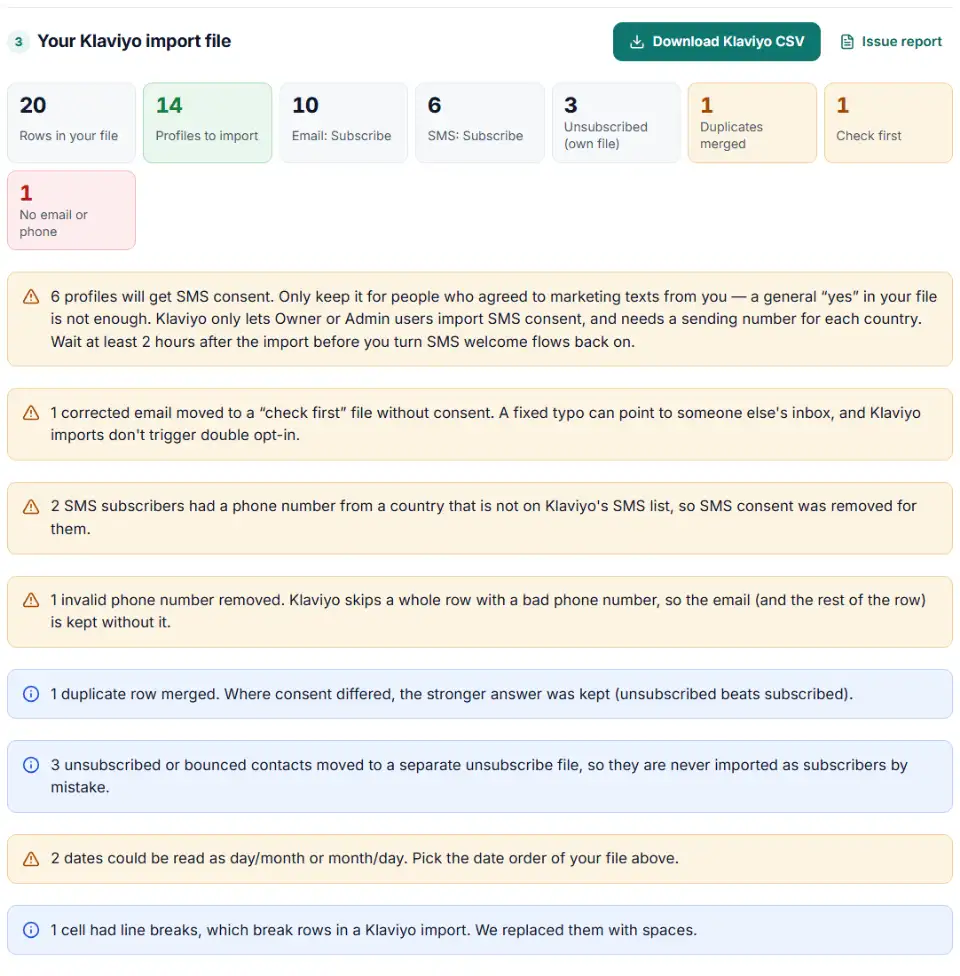
- Download and import. Check the problem list first: it shows every phone number removed and every SMS consent that could not be kept.
What the finished file contains
- Email first — or Phone Number first when some rows have no email, as Klaviyo advises.
- Phones in E.164, like
+14155550132. A number that can't be read is removed, because one invalid phone makes Klaviyo skip the whole row, email included. - Consent in Klaviyo's words. “yes”, “subscribed”, “true” or “1” become
Subscribe; “no” or “pending” stay blank, which Klaviyo reads as never subscribed. - SMS consent only where it can work. It is removed for rows without a phone number and for numbers from countries missing from Klaviyo's SMS country list.
- Dates as YYYY-MM-DD HH:MM:SS, the format Klaviyo recommends, and only for people marked Subscribe.
- One row per email. Klaviyo reads only the first row of a repeated email or phone. Rows with the same email are merged; when two emails share one phone (a family line), both people stay and the phone stays on the first one only.
How to import the CSV into Klaviyo
- Pause list-triggered flows. Set flows triggered by the target list, and SMS welcome flows, to manual first.
- Open the list. Go to Audience › Lists & segments and open your list, or create a new one.
- Upload the file. Choose Manage list › Import contacts › Upload, pick the CSV and click Next.
- Check the mapping. Each column should point to a Klaviyo property. Columns that already use Klaviyo's names map by themselves; custom ones become new fields.
- Import, then wait. Klaviyo emails you when the import is done. Wait at least two hours after an SMS import before you turn flows back on.
Common Klaviyo import errors
All columns imported as a single field
The file uses semicolons, which non-English Excel often does. This tool reads semicolon files and always writes commas.
Duplicate Unique ID and Missing Unique ID
Klaviyo skips repeated emails or phones after the first row, and rows with neither. Duplicates are merged here, and rows without an identifier go to the left-out file.
Klaviyo phone number format errors
A number like (415) 555-0132 has no country code. It gets one from the row's country or your default country, then E.164.
SMS subscribers imported without SMS consent
Klaviyo only applies SMS consent for countries where it has a sending number set up, and only when an Owner or Admin runs the import. Don't add a column called “Subscribed to SMS” or a generic “consent” column — Klaviyo asks you not to.
Incorrect date or timestamp formatting
Klaviyo only documents year-month-day and month/day/year dates, so day-first dates such as 19/10/2025 must be converted. Pick “Day/month/year” above so they are rewritten as 2025-10-19 00:00:00.
Frequently asked questions
What columns does a Klaviyo import CSV need?
A header row and, on every row, an email address or a phone number. Everything else is optional: First Name, Last Name, Organization, City, Country, Zip Code and your own custom properties, plus the consent columns Email Marketing Consent and SMS Marketing Consent if you want to set subscription status from the file.
How do I import SMS subscribers into Klaviyo?
Add an SMS Marketing Consent column with Subscribe for people who agreed, and give each of them a phone number with its country code. Only Owner or Admin users can import SMS consent, and SMS must be set up with a sending number for each country you import. See Klaviyo’s guide to uploading SMS contacts.
What phone number format does Klaviyo accept?
The import tool reads E.164 (+12345678900), tel: links and national or international E.123 formats. The API accepts only E.164, so that is the safest choice. Every number needs a country code or a Country column.
Where should unsubscribed contacts go in Klaviyo?
Klaviyo recommends the suppression list, not a marketing list, for unsubscribed, bounced and spam-complaint contacts. An import with Unsubscribed in the Email Marketing Consent column on every row unsubscribes them in bulk — this tool puts them in that separate file for you.
What is the file size limit for a Klaviyo CSV import?
50 MB per file. Larger lists must be split into several CSV files, which this tool does automatically. Import every part into the same list.
Can never-subscribed profiles get SMS from Klaviyo?
No. Profiles that never subscribed still count as active and can receive email, but Klaviyo won’t send them SMS or push messages. Only profiles with SMS consent get texts.
Related tools and guide
-
Get the Mailchimp import CSV format right: one Tags column, groups split by comma and space, MM/DD birthdays, one file per status.
Mailchimp -
Turn messy phone numbers into E.164 in bulk, with the country code added and invalid numbers flagged before you upload.
GoogleMetaTikTok -
Get a health score for a customer list, fix email typos in one click and send the clean list to the Google, Meta or TikTok formatter.
GoogleMetaTikTok -
One Shopify customers CSV in, Google, Meta and TikTok audience files out, filtered by marketing consent and tags.
GoogleMetaTikTokShopify -
Turn a CRM or store export into a Facebook custom audience CSV with Meta's column names, country codes and optional hashing.
Meta
Need help setting this up? Talk to EmproIT