Custom Audience CSV Template & Customer List Formatter for Facebook (Meta)
Fill Meta's customer list template from any export: email, phone, fn, ln, country and the other identifier columns, phones with country codes, plain or SHA-256 hashed.
Customer List Formatter for Meta
- Upload
- Check
- Download
1 Add your customer list
Choose a file or drag it here
CSV, Excel, TSV or TXT from your CRM, Shopify or WooCommerce · up to 300 MB
2 Check the columns and options
Rules last checked: against the official pages:
- Customer list formatting guidelines for custom audiences (Meta (Facebook and Instagram))
- Prepare your data for a customer list custom audience (Meta (Facebook and Instagram))
- Customer File Custom Audiences (Marketing API) - read via the .md mirror (Meta (Facebook and Instagram))
- Customer Information Parameters (Meta (Facebook and Instagram))
How to fill the Facebook custom audience CSV template
Instead of copying cells into a blank Facebook custom audience CSV template, load your export and get the finished file. The columns follow Meta's customer list formatting guidelines and the order of Meta's own example file.
- Load the export. Shopify, WooCommerce, HubSpot, Klaviyo or any spreadsheet. Pasting rows works too.
- Confirm the identifiers. Check that each identifier points to the right column. Second and third email or phone columns are picked up too.
- Set the default country and date order. They decide how phone numbers without a country code, and birthdays like 07/04/1985, are read.
- Pick plain or hashed. Plain is the simplest: Ads Manager hashes it for you. Hashed follows the normalization rules in Meta's Marketing API guide.
- Fix what the report flags, then download. Each warning names the row and the fix. Unused rows go in a separate file.
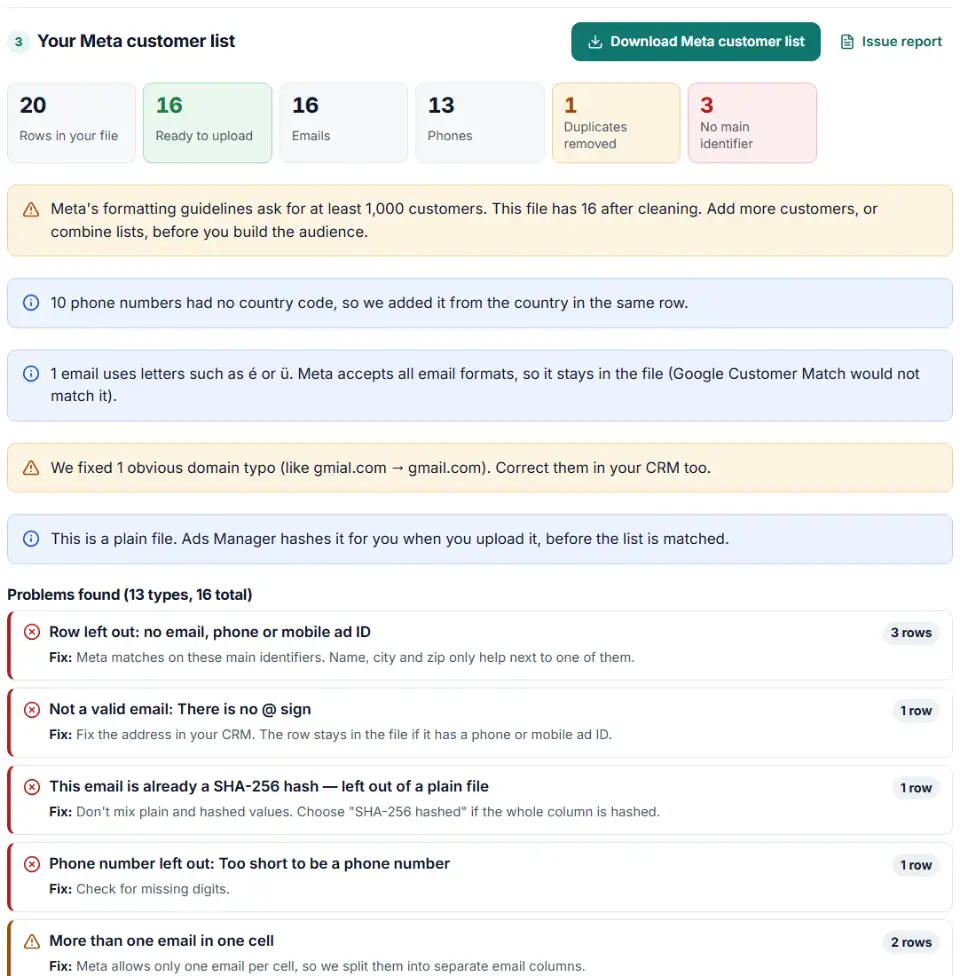
What changes in your data (Meta customer list template columns)
- email — one address per cell, trimmed and lowercased, up to three columns. Addresses with letters like é stay in, as Meta accepts all email formats.
- phone — the country code is added from the row's country or your default, so
(650) 555-0161becomes+16505550161. - fn and ln — a full name is split in two, as Meta asks; titles and emoji are removed. Values that are already hashed are never hashed twice.
- country — "United States", "USA" and "us" all become
US. - dob and gen — dates become
YYYY-MM-DD, one of the 18 formats Meta accepts; gender becomesForM. - madid — advertising IDs are checked and lowercased; all-zero IDs are dropped.
How to upload the list in Meta Ads Manager
- Start a customer list audience. Go to Audiences, click Create audience › Custom audience, choose Customer list and click Next.
- Choose how it can be used. Inclusions or exclusions keeps every option open. Only exclusions cannot be changed later, and that audience cannot become a lookalike.
- Add the file. Upload the CSV you downloaded here. When asked about customer value, answer no unless you added a value column. Name the audience and accept the custom audience terms.
- Map identifiers. Check that each column shows the right type. If a second
emailorphonecolumn has no type, set it to Email or Phone. Then click Import and create. - Check the match score. When the audience is ready, Meta's formatting guidelines say you can add the Match score column in Audiences (Columns, top right). It is a score out of ten: matched rows divided by uploaded rows.
Common Meta customer list errors and fixes
Phone numbers without a country code
Meta's guidelines say phones must include a country code "to be used for matching". Store exports are full of local numbers like (650) 555-0161. The formatter adds the code — check the default country first if you sell abroad.
A low match score after upload
The score compares matched rows with uploaded rows. More main identifiers per person help most: a second email, a mobile number or a mobile advertiser ID. Typos and test rows pull the score down.
Columns that are not mapped
With your own headers, Meta asks you to map each column by hand, and E-mail Address or Mobile are easy to miss. This file uses Meta's exact names.
Names in one column
Meta does not accept a single full-name column. Its data preparation page asks for one column for first names and one for last names.
You can't create a customer list audience yet
New or recently linked ad accounts may need a few weeks before they can create customer list audiences. That is an account limit, not a file problem.
Data Meta does not allow
Never add health, financial or other sensitive details, passwords, card numbers or information about children under 13. Remove such columns from the export first.
Frequently asked questions
What columns does a Facebook custom audience CSV need?
At least one main identifier: email, phone or madid (mobile advertiser ID). You can add fn, ln, zip, ct (city), st (state), country, dob, doby and gen to help matching. Meta’s own example file repeats the header when a customer has more than one email or phone: email,email,email,phone,phone,phone.
How do I format phone numbers for a Meta customer list?
Always include the country code, even if every customer is in one country — a US number needs the leading 1. Meta accepts punctuation, so +12223334444 and 1(222)333-4444 both work. This tool writes every phone as + plus country code plus number.
Do I need to hash my list before uploading it to Meta?
No. Ads Manager hashes the identifiers for you when you upload a plain file. If you hash it yourself, normalize first (lowercase emails, phone digits with the country code and no plus sign), use SHA-256, and leave madid unhashed.
Why does Meta ask for a country column if all my customers are in one country?
Meta’s preparation guide says it matches on a global scale and names a separate country column as one of its two most important tips, even if all your data is from one country. Use two-letter codes like US or GB. A missing country is taken from an international phone number (+44 → GB) before the default country.
How long does a Meta customer list take to be ready?
Meta says hashing can take a few minutes; the audience shows Populating, then Ready. Edits can take a few hours, and Meta’s developer docs say changes can take up to 24 hours. Your ads keep running meanwhile.
What does 'Outdated' mean on a customer list audience?
The list has not been updated in over 30 days, which may affect delivery. Run a fresh export through this formatter and use Update list on the audience.
Related tools and guide
-
Get a health score for a customer list, fix email typos in one click and send the clean list to the Google, Meta or TikTok formatter.
GoogleMetaTikTok -
Map any CRM or store export to Google's Customer Match columns, fix phones and emails, and download a plain or hashed CSV.
Google -
Build a TikTok custom audience file from a messy export, with TikTok's template columns, phones with country codes and the 1,000-entry check.
TikTok -
Hash emails and phones the way Google and Meta want, and check a pre-hashed file for hashes that will never match.
GoogleMeta -
Add up each customer's orders into Meta's customer value column, drop refunds and mixed currencies, and download the lookalike source list.
Meta -
One Shopify customers CSV in, Google, Meta and TikTok audience files out, filtered by marketing consent and tags.
GoogleMetaTikTokShopify
Need help setting this up? Talk to EmproIT