Value-Based Customer List Builder for Meta Lookalike Audiences
Turn an order export into the source list for a value-based lookalike: one row per customer, orders added up into Meta's value column, refunds and other currencies left out.
Value-Based Customer List Builder for Meta
- Upload
- Check
- Download
1 Add your order or customer export
Choose a file or drag it here
CSV, Excel, TSV or TXT — orders export or customers export · up to 300 MB
2 Check the columns and options
Rules last checked: against the official pages:
- Customer list formatting guidelines for custom audiences (Meta (Facebook and Instagram))
- About the customer value column (Meta (Facebook and Instagram))
- Create a customer value custom audience (Meta (Facebook and Instagram))
How to build the list for a value based lookalike audience
A value based lookalike audience starts from a customer list with one number per person. Meta's guide to creating a customer value custom audience calls this the source audience. Store exports have one row per order, refunds mixed in and totals like “$1,249.00”. This builder turns that export into the source list in one pass, on your own computer.
- Export your orders. A Shopify orders export works as it is, and so does any order or customer report with an email and a money column. A longer date range gives Meta more buyers to learn from.
- Check the matched columns. Email, phone, order total, order number, payment status, refunds, currency and marketing consent are matched for you.
- Pick what “value” means. Total spent is the usual choice. Average order value is one of Meta's own examples. Number of orders works like Meta's “number of items ordered” example, counted per order instead of per item.
- Choose plain or hashed. Ads Manager hashes a plain file for you. Pick hashed if no raw emails may leave your company.
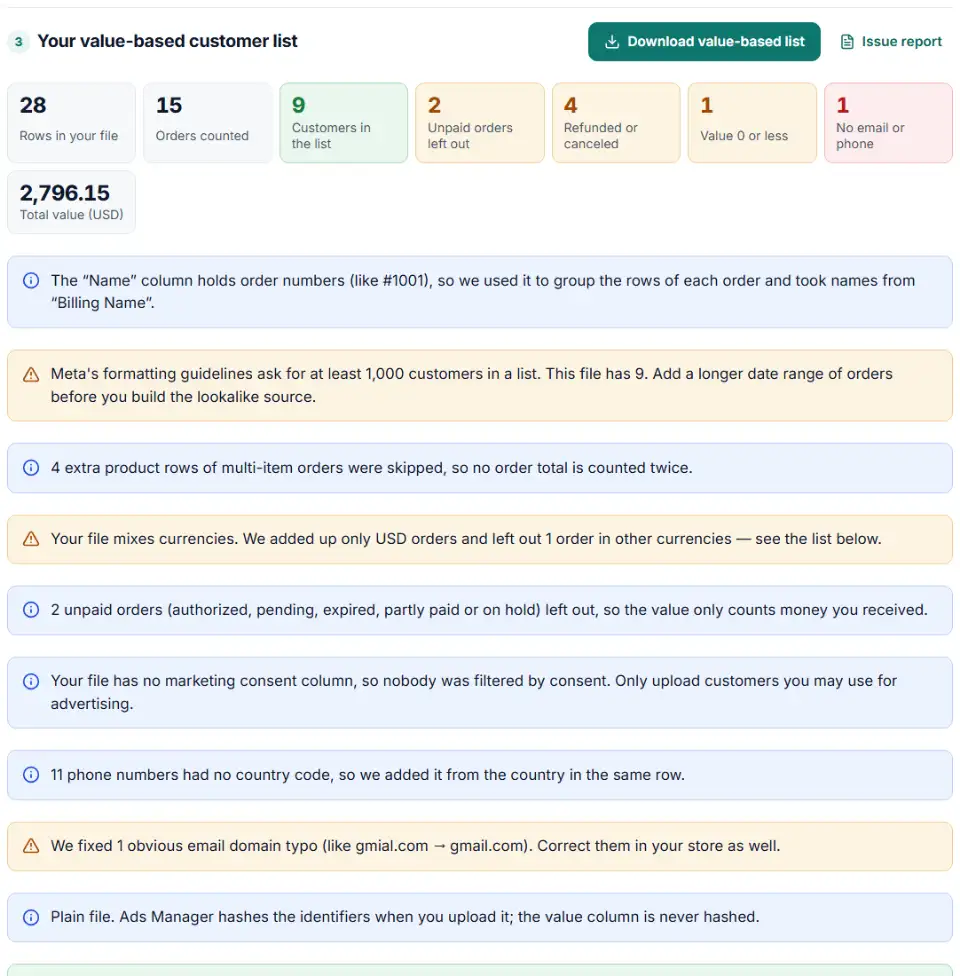
- Read the report, then download. You see which orders were skipped and why, and how much revenue sits with your top 10% of buyers.
How the value column is worked out
- One row per customer. Orders are grouped by email address, or by phone number for orders without an email.
- Each order counted once. Shopify writes extra rows for every extra product in an order, with the total only on the first row. Only that first row is used.
- Paid orders only. Refunded, voided, canceled and failed orders are skipped, and so are unpaid ones — Shopify counts Authorized, Pending, Expired and Partially paid as unpaid. A refunded amount is subtracted.
- One currency. The most common currency in the file is kept. Orders in other currencies are listed, not added up.
- Numbers only. Meta's formatting guidelines ask for a numeric value with no currency characters, so “$1,249.00” is written as
1249.
What to do next in Meta Ads Manager
- Start a customer list. Go to Audiences, then Create audience › Custom audience › Customer list.
- Answer the customer value prompt. Prepare the list, answer the Customer value question and select Next. Add the file you downloaded here and give the audience a name.
- Point Meta to the value column. Select Yes, customer value is included in my customer list, open the Select value column drop-down and choose
value. - Check the mapping and import. Fix anything marked with a yellow exclamation mark, then select Import and create.
- Create the lookalike. Use the prompt Meta shows after the upload, or go to Audiences, open Create audience, choose Lookalike audience and select this list as the source.
Common problems with value-based lookalikes
Value based lookalike audience not available
Meta says the source “needs to be a custom audience that includes customer value as the identifier type”. Meta's API notes say a list without values can't later be replaced by one with values, so upload a new list instead. A list created for Only exclusions can never be a lookalike source. Brand-new ad accounts may also have to wait a few weeks before they can create customer list audiences.
The value column has currency symbols or commas
Meta wants a numeric value only, without currency characters. Values like USD 49, 49,00 € or $1,249.00 don't fit that rule. Files from this tool always write 49, 49.5 or 1249, whatever the format in your export.
The audience is too small
Meta asks for at least 1,000 customers in a customer list. Export a longer period of orders, or add older exports from a previous platform in the same currency.
Value based lookalike vs regular lookalike
A regular lookalike treats every customer the same; a value-based one weighs people by your number, so a few big spenders can steer it. Test both side by side.
Frequently asked questions
What is a value-based lookalike audience?
It is a lookalike audience whose source is a customer value custom audience: a customer list where every person carries a number that says how valuable they are to you. Meta then looks for new people who resemble your best customers. Meta explains the setup on its customer value custom audience page.
How do I add a customer value column to a Meta customer list?
Add one extra column with a plain number for each customer — this tool names it value. When you upload the list, choose Yes, customer value is included in my customer list and pick that column in the Select value column drop-down.
Should the value column be hashed?
No. Meta hashes the contact details in your list (email, phone, names) before matching, but says the additional values you provide are not hashed. Keep the value as a readable number, even in a file where every identifier is already SHA-256 hashed.
Can I include refunds or negative values?
Meta’s help pages only say the column must hold decimal or whole numbers — they don’t say whether negative values are accepted. A refund is money you gave back, so this tool subtracts it and, by default, leaves out customers whose value ends at 0 or below.
Can the value column mix currencies?
It shouldn’t. The column takes numbers without currency characters, so Meta can’t tell a 100 in euros from a 100 in dollars. Use one currency per list: the tool keeps your main currency and lists the other orders.
Can I change customer values after the list is uploaded?
Yes — edit the audience and use Replace customers with a fresh file from this tool. Meta’s Marketing API notes that a value-based audience can’t be replaced with a list without values (or the other way round), so keep the value column in every update.
Related tools and guide
-
Turn a CRM or store export into a Facebook custom audience CSV with Meta's column names, country codes and optional hashing.
Meta -
One Shopify customers CSV in, Google, Meta and TikTok audience files out, filtered by marketing consent and tags.
GoogleMetaTikTokShopify -
Turn WooCommerce's built-in Customers report CSV into Google, Meta and TikTok audience files — no plugin, nothing uploaded.
WooCommerceGoogleMetaTikTok -
Get a health score for a customer list, fix email typos in one click and send the clean list to the Google, Meta or TikTok formatter.
GoogleMetaTikTok -
Hash emails and phones the way Google and Meta want, and check a pre-hashed file for hashes that will never match.
GoogleMeta -
Send in-store and phone sales to Meta: get an Events Manager upload file and Conversions API batches with hashed email and phone, date limits checked.
Meta
Need help setting this up? Talk to EmproIT