Ad Data Hash Checker: SHA-256 Hash Email and Phone Values
See how Google Ads and Meta each normalize an email, phone or name before SHA-256, side by side, and find hashes in your file that match neither.
Ad Data Hash Checker (SHA-256)
- Upload
- Check
- Download
1 Add values or a file
Choose a file or drag it here
Paste a few values, or load a CSV / Excel file with a raw column and a hashed column · up to 300 MB
2 Check the columns and options
Rules last checked: against the official pages:
- Fix Customer Match issues with list upload, small list size, or low volume (Google Ads)
- Get started with Customer Match - Google Ads API (Google Ads)
- Customer Information Parameters (Meta (Facebook and Instagram))
- Customer File Custom Audiences (Marketing API) - read via the .md mirror (Meta (Facebook and Instagram))
How to SHA-256 hash an email (and check one)
To SHA-256 hash an email for advertising, the value has to be normalized first, and Google and Meta don't normalize in exactly the same way. This checker shows both side by side, following Google's Customer Match hashing guide and Meta's customer information parameters. Add a column of hashes and it tells you which ones are wrong, and why.
- Paste or load values. Paste a few emails or phone numbers, one per line, or load a file. Try the sample to see every common mistake at once.
- Add your hashes (optional). Put your hash after a comma on each pasted line, or map the hashed column of your file.
- Say what the values are. Emails, phones and US ZIP codes are detected. Names, cities and countries need the type setting or a type column.
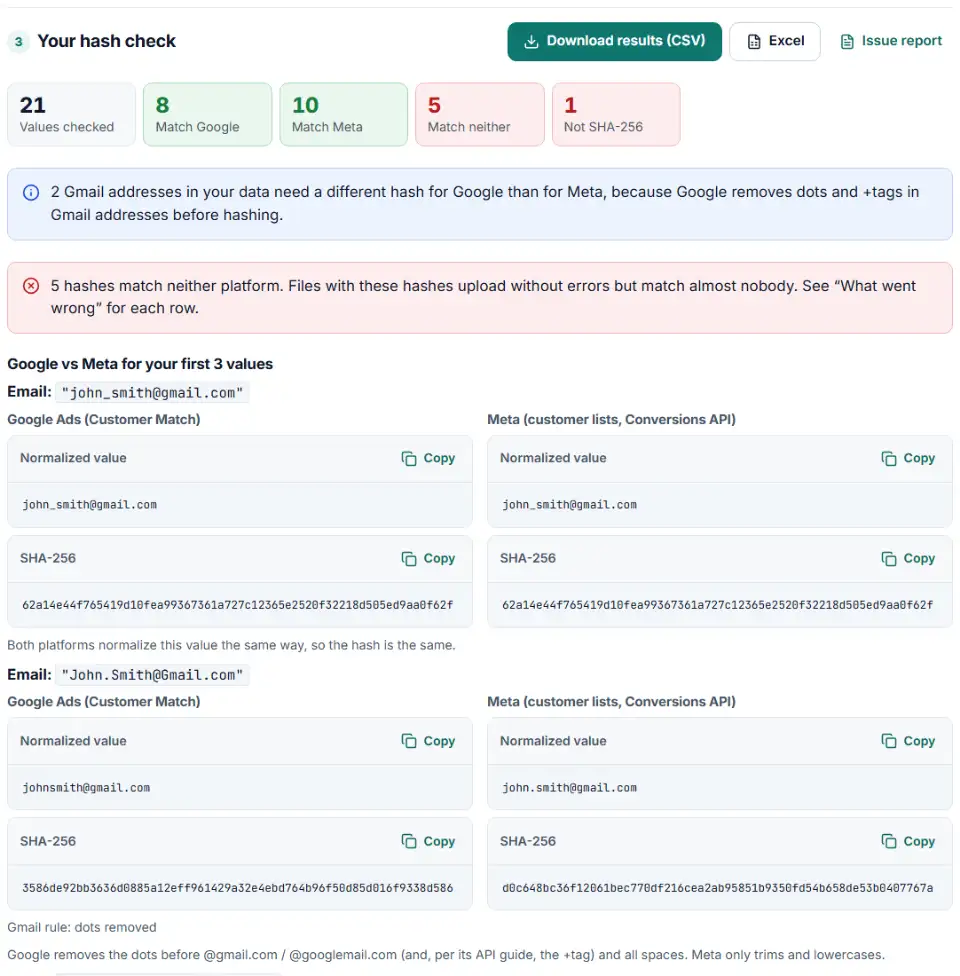
- Compare Google and Meta. The first values are shown side by side: the normalized text and the hash for each platform.
- Read "What went wrong". For hashes that match neither platform, the tool rebuilds common mistakes and names the one that fits. Download the results as CSV.
Google vs Meta: what happens before hashing
| Value | Google Ads (Customer Match) | Meta |
|---|---|---|
| Trim, remove all spaces, lowercase. Gmail and Googlemail: remove the dots before the @ (Google Ads Help); the API guide also removes the +tag. Accented emails won't match. | Trim, lowercase. All email formats accepted. | |
| Phone | E.164 with the plus: +16505551212 | Digits with country code, no plus: 16505551212 |
| First and last name | Trim, lowercase, accents kept | Lowercase, no punctuation, accents and inner spaces kept |
| Country and zip | Never hashed | Lowercase and hashed (US zip: first 5 digits) |
| City and state | Not used | Lowercase, no spaces or punctuation, hashed |
What to do with the results
- Find where hashing happens. It is usually a CRM export setting, a connector, a script your developer wrote, or a spreadsheet formula. The "What went wrong" column tells you which step is missing.
- Normalize before the hash, not after. Add trimming, lowercasing and the country code before the hashing step. A hash can't be cleaned afterwards.
- Hash per platform. Gmail addresses and phone numbers need a different hash for Google than for Meta. Keep two outputs, or upload plain text and let each platform hash it.
- Re-upload the list. In Google Ads, open the list in Audience manager and replace the data. In Meta, edit the custom audience and replace the customers. Then compare the new list size or match score.
Common hashing mistakes
Hashing before trimming and lowercasing
One trailing space or one capital letter changes the whole hash. Google says such files upload without an error, so the problem stays hidden.
Gmail dots left in for Google
Gmail ignores dots, so [email protected] and [email protected] are the same inbox. Google asks you to remove the dots before hashing. Meta's rules only ask for trimming and lowercasing, so when you hash email for Facebook ads and Google from one list, the same address needs two hashes. Dots removed but a +tag kept follows Google Ads Help and counts as a Google match.
Phone hashed without the country code, or in the wrong form
A local number like 650-555-1212 can belong to many countries, so it matches nobody. With the country code, Google wants the plus sign in the hashed text and Meta wants digits only.
MD5, SHA-1 or base64 instead of hex SHA-256
Meta's Marketing API says it supports SHA-256 only. MD5 hashes have 32 characters, SHA-1 hashes 40. A 44-character string ending in "=" is base64, which Google accepts only through its Data Manager API.
Hashed twice, in capitals, or with a line break
Hashing a hash, hashing in capital letters, or including the invisible line break at the end of a line (\n, or \r\n from Windows) all give valid-looking hashes that never match. The checker tests for each one, and for national phone numbers.
Country and zip hashed for Google
Google wants Country and Zip in plain text even in a hashed Customer Match file. Meta, on the other hand, hashes them. Follow each platform's own rule.
Frequently asked questions
How do I SHA-256 hash an email for Google Ads or Meta?
Normalize it first, then hash it. For both platforms: remove spaces at the start and end and lowercase the whole address. For Google, also remove the dots and any +tag before @gmail.com or @googlemail.com. Then run SHA-256 on the result and write it as 64 lowercase hex characters. Paste the email above to get both hashes.
Should emails be lowercased and trimmed before hashing?
Yes. SHA-256 sees [email protected] and [email protected] as completely different inputs, so the hashes have nothing in common. Google and Meta both ask you to trim and lowercase before hashing, because that is the form they compare against.
Why does my pre-hashed customer list match almost nobody?
Usually the values were hashed before they were cleaned: spaces, capital letters, phones without a country code, or Gmail dots for Google. Google’s troubleshooting page warns that such files are accepted but don’t match. Check a sample of rows here with your raw and hashed columns.
How do I hash a phone number for ad platforms?
First add the country code. For Google, hash the E.164 form with the plus sign, like +16505551212. For Meta, hash the digits only, without the plus, like 16505551212. The two hashes are different, so a file hashed for one platform will not match on the other.
Can a SHA-256 hash be reversed?
Not directly — SHA-256 is a one-way function, so there is no key to turn a hash back into the email. That is why platforms ask for it. It is not full anonymity, though: anyone who already has the same email can hash it and compare. Treat hashed lists as personal data.
What does a hashed email look like?
A SHA-256 hash is always 64 characters made of the digits 0–9 and the letters a–f, whatever the length of the email. Meta’s documentation uses [email protected], which hashes to 62a14e44f765419d10fea99367361a727c12365e2520f32218d505ed9aa0f62f.
Related tools and guide
-
Map any CRM or store export to Google's Customer Match columns, fix phones and emails, and download a plain or hashed CSV.
Google -
Turn a CRM or store export into a Facebook custom audience CSV with Meta's column names, country codes and optional hashing.
Meta -
Build the enhanced conversions for leads file for Google Ads Data Manager, with emails, phones and hashing done the way Google asks.
Google -
Check the server events you send to Meta's Conversions API for hashing mistakes, missing fields and weak customer details, and get a fixed version.
Meta -
Get a health score for a customer list, fix email typos in one click and send the clean list to the Google, Meta or TikTok formatter.
GoogleMetaTikTok -
Turn messy phone numbers into E.164 in bulk, with the country code added and invalid numbers flagged before you upload.
GoogleMetaTikTok
Need help setting this up? Talk to EmproIT