Conversions API Payload Checker for Meta Event Match Quality
Paste a Conversions API event or batch and see what Meta will reject and what may lower Event Match Quality: unhashed or badly normalized customer data, missing match keys, wrong time units and missing required fields.
Conversions API Payload Checker for Meta
1 Paste your Conversions API payload
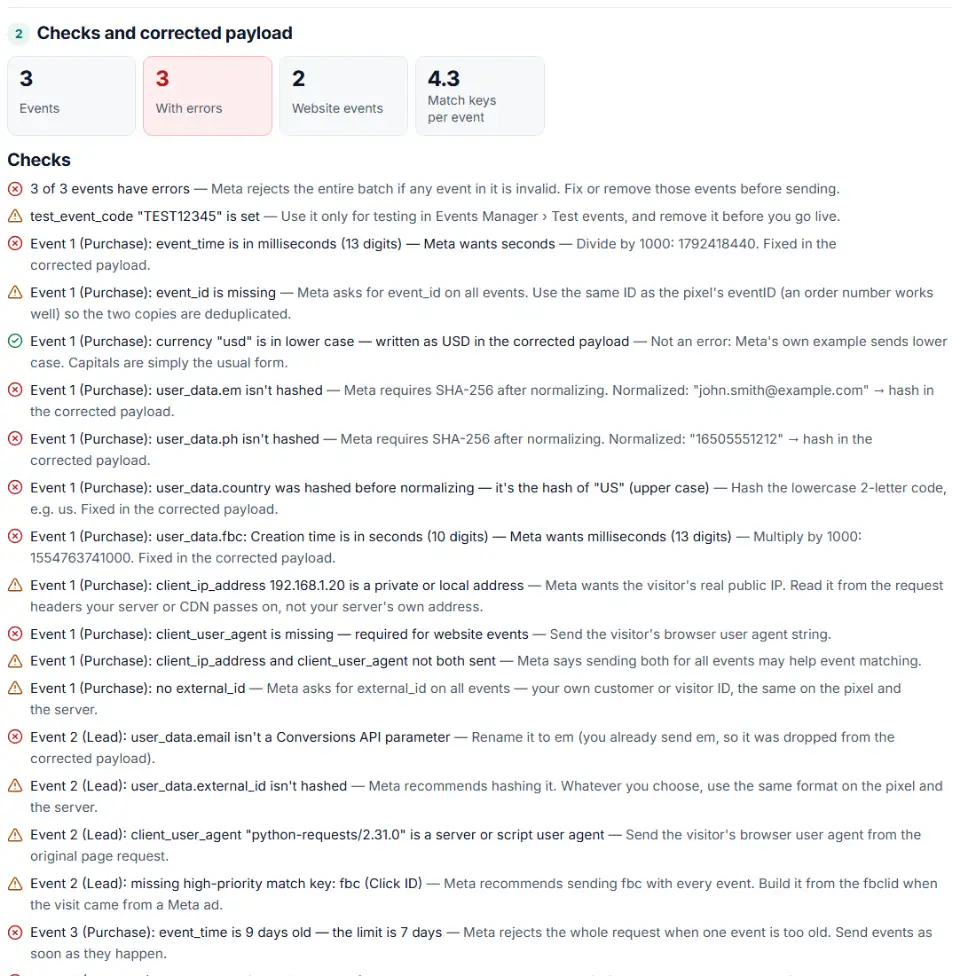
2 Checks and corrected payload
Fill in the settings above — your result appears here instantly.
Rules last checked: against the official pages:
- About event match quality (Meta)
- Conversions API best practices (Meta)
- Server Event Parameters (Meta (Facebook and Instagram))
- Customer Information Parameters (Meta (Facebook and Instagram))
How to check what lowers Meta event match quality
Meta event match quality is a 0–10 score that Meta shows per event in Events Manager — see Meta's About event match quality page. Only Meta can calculate it. This checker reads the Conversions API payload your server sends and lists everything in it that Meta will reject or can't use for matching.
- Copy a real payload. Take the JSON body from your server log, your CAPI gateway or tag manager, or a whole curl command. One event, an array of events or a full
{"data":[…]}body all work. - Paste it above. The checks run as you paste. Choose a default country if your phone numbers have no country code.
- Fix the red items first. Errors make Meta reject the event, and one bad event rejects the whole batch.
- Then work on the yellow items. Missing high-priority keys, a private IP or a server user agent don't break the request, but they weaken matching.
- Copy the corrected payload to see what your code should produce: values normalized and hashed, times in seconds, the right key names.
Meta's priority for match keys
Meta's help article ranks customer information parameters. High: email and click ID (fbc). Medium: Facebook Login ID, birthdate, country, phone, external ID and browser ID (fbp). Low: lead ID, first name, last name, city and zip code. Meta also says sending both IP address and user agent for all events may help matching. The table under the checks shows which of these each event sends.
What to do next in Events Manager
- Fix your server code so it produces the corrected payload by itself — normalizing before hashing, sending event_time in seconds, and reading fbc and fbp from the visitor's cookies.
- Send a test event. Copy the code from Events Manager › Data sources › your dataset › Test events, add it as
test_event_code, and check that the event arrives with its parameters. - Remove test_event_code before going live, then wait. Meta scores the last 48 hours of events.
- Read the score. In Events Manager, select your dataset, find the event and click View details to see its Event Match Quality and which parameters Meta received.
Common Conversions API payload errors
Meta conversions API user_data hashing mistakes
Plain-text email or phone values are not accepted. Hashing too early is just as bad: “US” hashed instead of “us” is a different value, and the hash of an empty string means the value was missing. The checker recognizes these hashes for country, gender and US states.
Meta CAPI phone number format
Digits only, with the country code and without leading zeros. A local number like 020 7946 0958 needs the country first: 442079460958. In “+44 (0)20 …” the (0) is dropped too.
Meta CAPI missing fbc
The click ID is one of the two high-priority keys, and Meta recommends sending it with every event. Read the _fbc cookie, or build fbc from the fbclid in the landing page URL — with a creation time in milliseconds, not seconds.
Client IP address and user agent
Meta wants the visitor's real IP address, unhashed, and website events can't be sent without a user agent. A 10.x or 192.168.x address is your network, not the shopper's, and “python-requests” or “axios” is your server, not their browser.
Meta CAPI deduplication and event_id
When the pixel and the server send the same purchase, Meta treats them as one event when event_name and event_id match. Meta asks for event_id on every event; an order number is a good choice.
event_time in milliseconds or older than 7 days
event_time is a Unix time in seconds (10 digits). A 13-digit value is milliseconds, and any event more than 7 days old makes Meta reject the whole request.
Frequently asked questions
What is Event Match Quality in Meta?
Event Match Quality (EMQ) is a score from 0 to 10 that Meta gives each website event sent through the Conversions API. It shows how well the customer information you send — email, phone, click ID and so on — can be matched to Meta accounts. Meta calculates it from the last 48 hours of events.
Can this tool show my Event Match Quality score?
No. Only Meta can calculate EMQ, and it shows the score in Events Manager. This checker finds the things in your payload that stop matching — unhashed or wrongly normalized values, missing high-priority keys, a server IP instead of the visitor’s — so the score you see there can go up.
Which customer information parameters must be hashed in the Conversions API?
Email, phone, first and last name, date of birth, gender, city, state, zip code and country must be SHA-256 hashed after normalizing. Hashing external_id is recommended. Click ID (fbc), browser ID (fbp), IP address and user agent must not be hashed.
How do I normalize emails and phone numbers before hashing for Meta?
Emails: trim spaces and lowercase. Phones: keep digits only, include the country code and drop leading zeros — (650) 555-1212 in the US becomes 16505551212. Then hash the result. The checker shows the normalized value next to every unhashed field.
Which Conversions API parameters must not be hashed?
client_ip_address, client_user_agent, fbc, fbp, subscription_id, fb_login_id, lead_id and the other ID parameters Meta marks “Do not hash”. Send them as plain text.
Why does Meta reject my whole Conversions API batch?
Meta rejects the entire request if any one event is invalid — for example one event older than 7 days, a missing action_source, or a website event without event_source_url. Fix or drop the bad events and send the batch again.
Related tools and guide
-
Build Meta's fbc click value from an ad click link, and bulk-check fbc and fbp values for the time, case and hashing mistakes that break matching.
Meta -
Send in-store and phone sales to Meta: get an Events Manager upload file and Conversions API batches with hashed email and phone, date limits checked.
Meta -
Get Meta pixel code for purchases, leads and other events, with order value and a matching Conversions API event so no sale is counted twice.
Meta -
Hash emails and phones the way Google and Meta want, and check a pre-hashed file for hashes that will never match.
GoogleMeta -
Turn one event or a whole sheet of them into TikTok Events API requests, with email and phone hashed, times in seconds and a matching pixel call.
TikTok -
Turn a CRM or store export into a Facebook custom audience CSV with Meta's column names, country codes and optional hashing.
Meta
Need help setting this up? Talk to EmproIT