fbc and fbp Builder & Checker for Meta Conversions API
Build a correct fbc value from a click URL, or check fbc and fbp values in bulk before you send them to the Meta Conversions API.
fbc / fbp Builder & Checker for Meta
1 Build or check
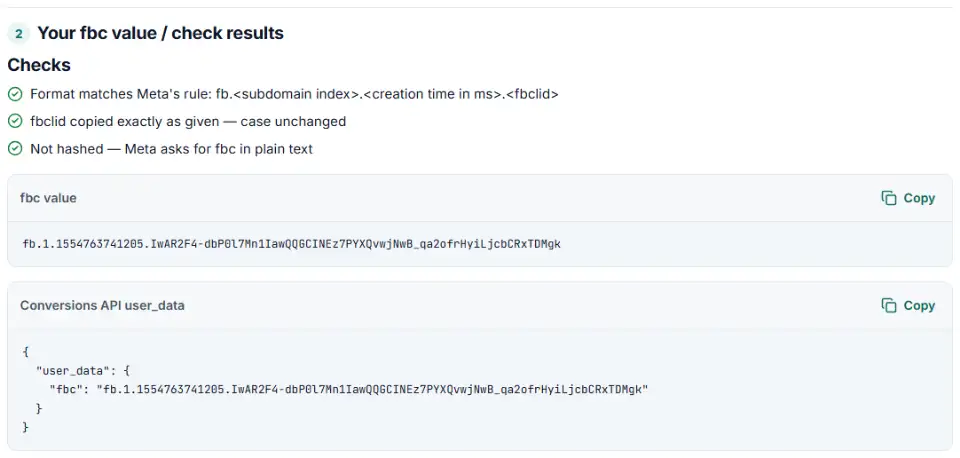
2 Your fbc value / check results
Fill in the settings above — your result appears here instantly.
Rules last checked: against the official pages:
- ClickID and the fbp and fbc Parameters (Meta (Facebook and Instagram))
- Parameter Builder Library (Meta (Facebook and Instagram))
- Customer Information Parameters (fbc/fbp: Do not hash) (Meta (Facebook and Instagram))
How to use the fbc fbp builder
This tool does two jobs for the Meta Conversions API. It builds the fbc click ID from a landing page URL, and it checks fbc and fbp values you already send, following Meta's fbp and fbc parameters page.
- Choose a mode. Pick Build an fbc value when your server has the fbclid but no
_fbccookie. Pick Check fbc / fbp values to test values from your logs. - Paste the landing page URL. The tool finds
fbclid=and copies its value without changing a single character. - Set the click time. Use the moment your site first saw the click. If you stored it as a Unix timestamp in seconds, the tool converts it to milliseconds and tells you.
- Copy the result. You get the fbc value and a ready
user_datasnippet for your Conversions API event. - Check in bulk. In check mode, paste up to thousands of values, one per line, and download the results as CSV.
What to do next
- Add fbc and fbp to every server event. Put them inside
user_data, unhashed, next to the hashed email and phone. Meta recommends sending fbc with every event when you have it. - Prefer the cookie when it exists. If the Meta Pixel already set
_fbcand_fbpcookies, read them on your server and send them as they are. Build fbc yourself only when there is no cookie. - Keep the click time from the first visit. Store the fbclid and its timestamp when the visitor lands, not when they buy days later, so the creation time stays correct.
- Test before going live. Send a test event with a test event code in Events Manager and check that the event shows the click ID and browser ID parameters.
Common fbc and fbp errors and how to fix them
Creation time in seconds instead of milliseconds
The third part must have 13 digits. A 10-digit number like 1554763741 is in seconds — the most common fbc mistake. Multiply it by 1,000. The checker flags this on every row.
A lowercased or edited fbclid
Meta says the ClickID is case sensitive and must not be changed. Some CRMs, form tools and spreadsheets lowercase text or turn characters into codes like %2D. Store the raw value from the URL in a plain text field.
Hashed fbc or fbp
If your integration hashes every field in user_data, the click and browser IDs become useless 64-character strings. Exclude fbc and fbp from hashing.
Wrong subdomain index
Meta's examples use 0, 1 or 2 for the second part. When you build the value on a server, Meta asks for 1. A cookie set on a longer domain (like a .co.uk shop) can show a higher number; send that unchanged.
fbc sent for visits without an ad click
There is no fbc without an fbclid. Do not invent one or reuse an old one for a new visitor — send fbp and customer details instead.
Values with an appendix
Values made by Meta's Parameter Builder Library end with an extra 8-character (or older 2-character) part. That is expected and valid — do not cut it off.
Frequently asked questions
What is the difference between fbc and fbp?
fbc is the click ID. It is built from the fbclid that Meta adds to your landing page URL when someone clicks an ad, so it only exists for visits that came from a Meta ad click. fbp is the browser ID. The Meta Pixel creates it on any visit and stores it in the _fbp cookie. Both help Meta match a Conversions API event to the person who saw or clicked your ad.
What format does the fbc value need?
fb.1.<creation time>.<fbclid> — the letters fb, the subdomain index, the time the click was first seen in milliseconds since 1 January 1970, and the fbclid copied exactly from the URL. Example: fb.1.1554763741205.IwAR2F4-dbP0l7Mn1IawQQGCINEz7PYXQvwjNwB_qa2ofrHyiLjcbCRxTDMgk.
Should I hash fbc and fbp before sending them?
No. Meta’s customer information parameters page marks fbc and fbp as “Do not hash”. Hash emails and phone numbers, but send fbc and fbp as plain text.
Which subdomain index should I use?
Use 1 when you build the value on your server without an _fbc cookie — that is Meta’s rule. If you read the _fbc cookie the pixel already set, send it exactly as it is, whatever the index.
How do I build an fbc value from an fbclid?
Take the fbclid from the landing page URL exactly as it arrived, add the time the click was first seen in milliseconds and the subdomain index 1: fb.1.<time>.<fbclid>. Paste the URL above and the builder does it for you. Without an fbclid there is no fbc — send fbp and customer details instead.
What is the extra part at the end of some fbc values?
Meta’s Parameter Builder Library adds an appendix after the fbclid: 8 characters (SDK version, incrementality and SDK language) or 2 characters in older versions. This checker accepts both forms.
Why is my fbc value flagged as wrong?
The usual causes are a creation time in seconds instead of milliseconds (10 digits instead of 13), an fbclid that was lowercased or URL-encoded by a CRM or form tool, a hashed value, or a missing fb. prefix. The checker names the cause on each row and gives the fix. Values are checked in your browser and never uploaded.
Related tools and guide
-
Check the server events you send to Meta's Conversions API for hashing mistakes, missing fields and weak customer details, and get a fixed version.
Meta -
Send in-store and phone sales to Meta: get an Events Manager upload file and Conversions API batches with hashed email and phone, date limits checked.
Meta -
Split click IDs and UTM tags out of thousands of landing page URLs in one go, with no spreadsheet formulas.
GoogleMetaMicrosoftTikTokLinkedIn -
Get one script that saves ad click IDs and UTM tags when visitors land and fills your form's hidden fields, ready for offline conversion uploads.
GoogleMetaMicrosoftTikTokLinkedIn -
Get Meta pixel code for purchases, leads and other events, with order value and a matching Conversions API event so no sale is counted twice.
Meta -
Paste an ad click link to see what each parameter means (gclid, gad_source, srsltid and more), spot stripped click IDs and get a clean URL.
GoogleMetaMicrosoftTikTok
Need help setting this up? Talk to EmproIT