Ad Click URL Explainer: Decode gclid, gad_source, srsltid and More
Paste one URL or hundreds and see what the ad click URL parameters in them mean — gad_source, gclid, gbraid, srsltid, fbclid, _gl and more — with stripped click IDs, broken tags and a cleaned URL for each.
Ad Click URL Explainer
1 Paste your URLs
2 What your URL says
Fill in the settings above — your result appears here instantly.
Rules last checked: against the official pages:
- About gad_* URL parameters - Google Ads Help (Ad click and tracking URL parameters)
- About aggregate identifiers - Analytics Help (Ad click and tracking URL parameters)
- About auto-tagging - Google Merchant Center Help (Ad click and tracking URL parameters)
- Measure activity across multiple domains | Tag Platform (Ad click and tracking URL parameters)
How to read gad_source and the other parameters in your URLs
Ad platforms add ad click parameters like gad_source, gclid and fbclid to your landing page URL, and they pile up fast. This explainer reads every parameter in a URL and tells you, from each platform's own documentation — such as Google's gad_* URL parameters page — what it is, who added it and whether something is wrong.
- Paste one URL or a list. Copy it from the address bar after clicking your ad, from GA4's page location, from server logs or from the landing page column in your CRM.
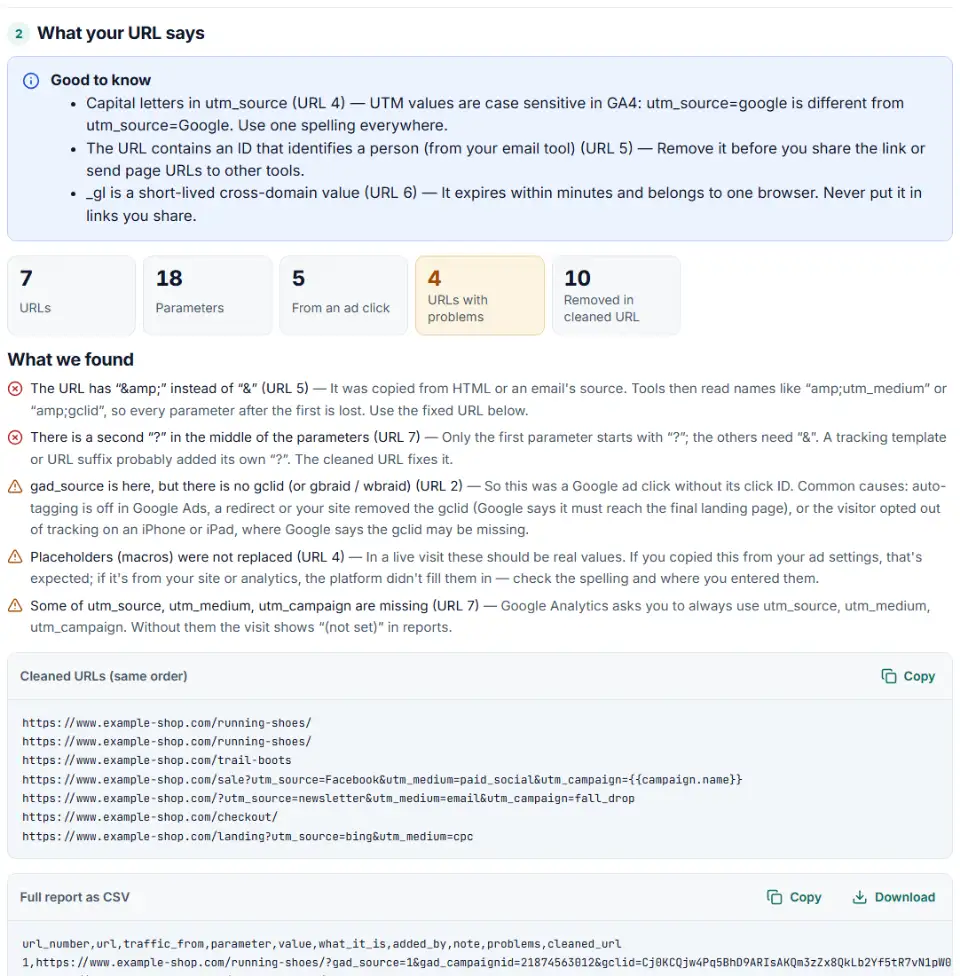
- Read the explanation. For one URL you get a row per parameter: its meaning, the platform that adds it and a note, such as which GA4 dimension a UTM tag fills.
- Check the warnings. The tool flags gad_source without a gclid, tags that appear twice, a second “?”, “&” copied from HTML, placeholders like
{keyword}that were never filled, and click IDs that look changed. - Check many URLs at once. With a list, the summary shows where each visit came from and its problems, and you can download everything as CSV.
- Copy the cleaned URL. Choose what to drop: click IDs and personal values, all tracking, or nothing but the broken parts.
What to do next
- Missing gclid? In Google Ads, open Admin › Account settings › Auto-tagging and tick “Tag the URL that people click through from my ad”. Then click a live ad and look at the landing page URL again.
- Lost in a redirect? Ask your developer to pass every query parameter through redirects, so gclid and gad_* arrive as top-level parameters on the page where your tags load.
- Placeholders not filled? Check the URL options of the campaign: Google's ValueTrack parameters use single braces, Meta's use double braces and TikTok's use double underscores.
- Saving click IDs for offline conversions? Store gclid, gbraid, wbraid and the gad_* values with each lead, exactly as they appear. Never lowercase or shorten them.
Common URL parameter problems
Page error when gad_source is added
A few websites reject parameters they don't know and show an error page. Google suggests asking your webmaster to allow gad_source and gad_campaignid. You can test by adding ?gad_source=1 to your landing page yourself.
srsltid in URL breaks the page or the cache
Merchant Center's help says some sites don't allow extra parameters. Turn Merchant Center auto-tagging off, have your developer accept any parameter, then turn it back on.
gad_source=1&gclid missing after a redirect
Short links, language redirects and http-to-https rules can drop everything after “?”. Test the full chain with a real ad click; the explainer shows at once whether the gclid survived.
fbclid in URL and duplicate UTM tags
Meta adds fbclid on its own, and since 2024 it can also add campaign tags automatically. If your own URL parameters set the same UTM, the URL ends up with two values. Keep each tag in one place.
What are these parameters in my URL from email?
Email tools add their own IDs. Mailchimp's mc_eid and Klaviyo's _kx identify the reader, so remove them before you share a link or copy it into another tool.
Frequently asked questions
What is gad_source in a URL?
A parameter Google Ads adds to the end of your final URL when someone clicks your ad. Google’s gad_* parameters page says it identifies the source of the ad, such as Google Search or the Display Network. It is not a click ID: every click from the same source carries the same value. It used to be called gad.
What do gad_source numbers like 1 or 5 mean?
Google doesn’t publish a list. The only official example is gad_source=1, without saying what 1 stands for. Lists you find on blogs are guesses, so this tool doesn’t translate the numbers either. What matters is that the visit came from a Google ad.
Is srsltid a Google Ads click ID?
No. srsltid comes from Google Merchant Center. Its auto-tagging adds it to clicks on your free listings and free local listings in Google Shopping, so you can track purchases from them. You’ll also see it on organic product traffic — it doesn’t mean you paid for the click.
Why does my URL have gad_source but no gclid?
The click came from a Google ad, but the click ID didn’t arrive. Usually auto-tagging is off, or a redirect or your website dropped the gclid on the way. On iPhones and iPads, Google may also send no gclid for people who opted out of tracking — you may see gbraid or wbraid instead.
What is the _gl parameter?
The Google tag adds _gl when someone follows a link between two of your own domains, so GA4 and Google Ads can count it as one visit. It carries cookie values, expires after two minutes and belongs to one browser — never copy it into links you share.
Should I remove gad_source or other ad parameters from my URLs?
Not from live traffic: your tags need them, and Google says to keep gad_* and gclid through redirects. But remove click IDs and personal values from links you share, put in an email or use as an ad’s final URL, because one click ID would then be reused by everyone. The cleaned URL does this.
Related tools and guide
-
Split click IDs and UTM tags out of thousands of landing page URLs in one go, with no spreadsheet formulas.
GoogleMetaMicrosoftTikTokLinkedIn -
Find broken, changed and expired GCLIDs in your CRM export before Google Ads rejects your offline conversion upload.
Google -
Get one script that saves ad click IDs and UTM tags when visitors land and fills your form's hidden fields, ready for offline conversion uploads.
GoogleMetaMicrosoftTikTokLinkedIn -
Paste or upload your campaign links and find broken, inconsistent or Unassigned UTM tags — with a corrected link for every row.
GoogleMetaTikTokMicrosoft -
Build a Google Ads tracking template or final URL suffix with UTM and ValueTrack tags, catch errors before you save and see the GA4 channel.
Google -
Build Meta's fbc click value from an ad click link, and bulk-check fbc and fbp values for the time, case and hashing mistakes that break matching.
Meta
Need help setting this up? Talk to EmproIT