Bulk UTM Link Checker
Check thousands of tagged links at once: missing or misspelled UTM tags, mixed case, spaces, duplicates, copied click IDs, the GA4 channel of every link and your team's naming rules — with a fixed link for each.
Bulk UTM Link Checker
- Upload
- Check
- Download
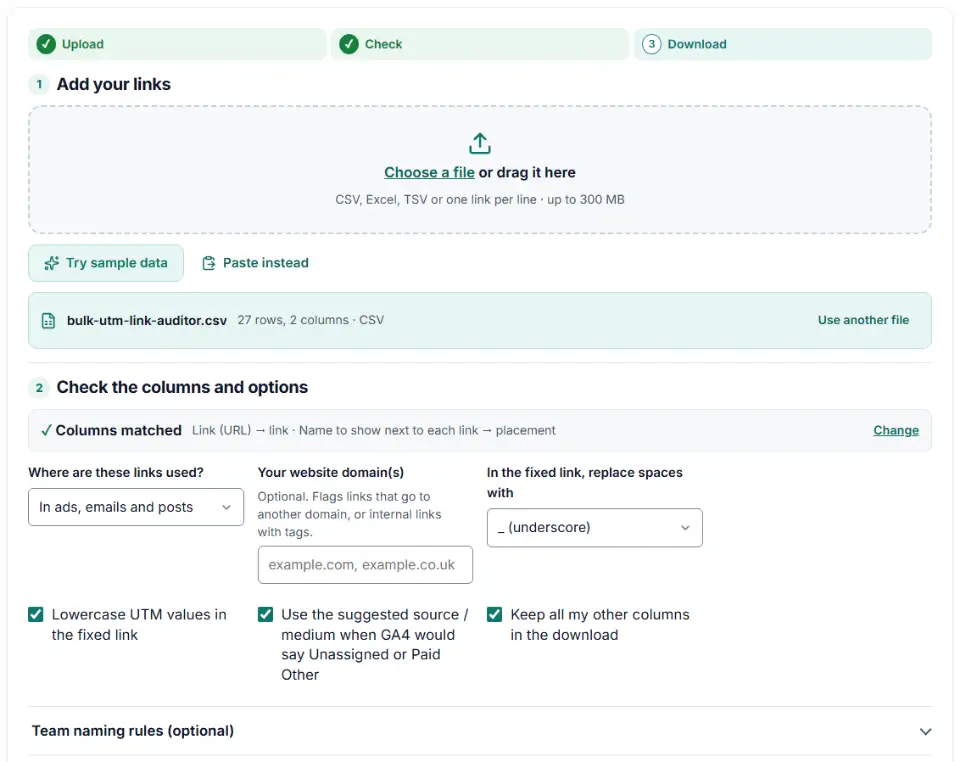
1 Add your links
Choose a file or drag it here
CSV, Excel, TSV or one link per line · up to 300 MB
2 Check the columns and options
Rules last checked: against the official pages:
- URL builders: Collect campaign data with custom URLs (Google Analytics 4)
- Traffic-source dimensions, manual tagging, and auto-tagging (Google Analytics 4)
- Default channel group (Analytics Help) (Google Analytics 4)
How to use the UTM link checker
This UTM link checker reads every link in your sheet and tests its tags against Google's GA4 campaign URL rules and the default channel rules. It works on a whole spreadsheet at once and never opens the links, so it is fast and private.
- Add your links. Drop in a CSV or Excel file, paste a column of links, or try the sample sheet first.
- Check the columns. The tool finds the link column by itself (names like “Final URL”, “Website URL” or “link”). Add a name column so you can find each row later, and the “URL Tags” or “Final URL suffix” column if your export keeps tags separate.
- Say where the links live. Choose “On my own website” to audit menu and banner links, and add your domain to catch typos like exmaple.com.
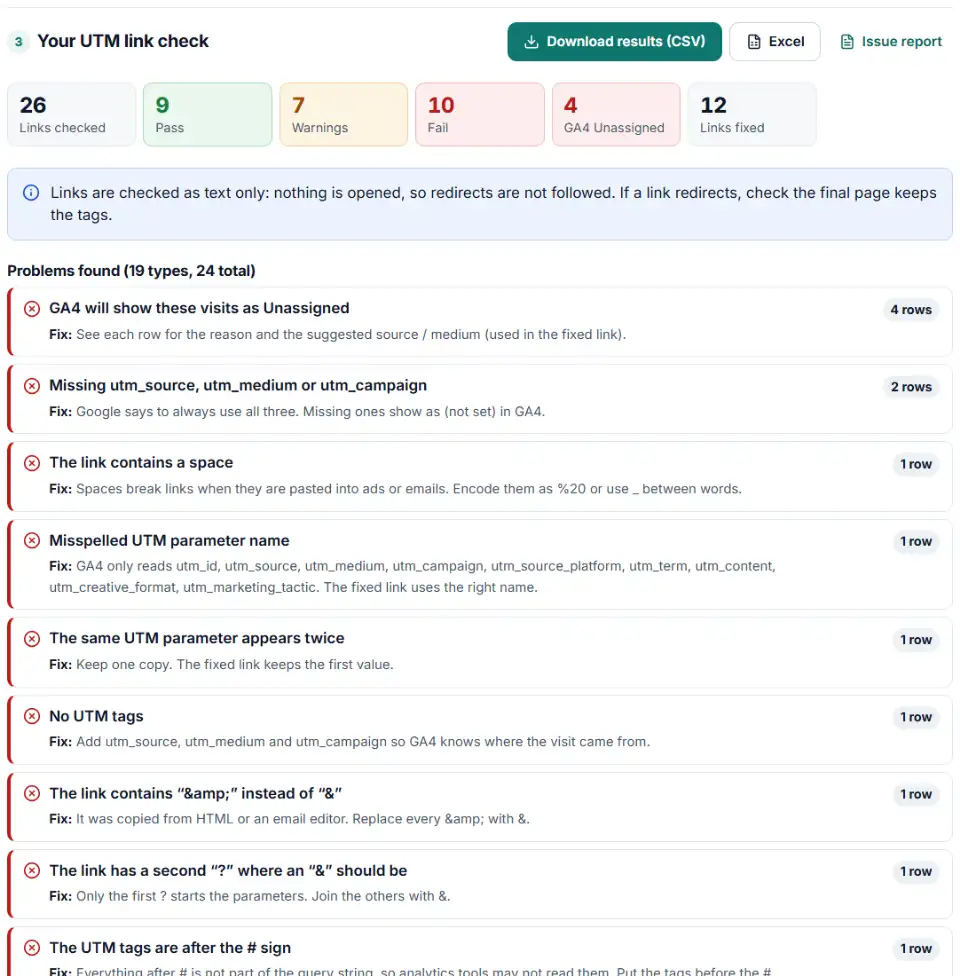
- Read the problems. Each type of problem is listed once with the rows it affects and the fix. The bar chart shows how GA4 will group your links.
- Download. Get the full results, a file with only the fixed links, or the list of source and medium pairs.
What every link is checked for
- Missing tags: no
utm_source,utm_mediumorutm_campaign(GA4 shows them as (not set)). - Broken structure: a second
?, tags after#,&, raw spaces, repeated tags and misspelled names. - Consistency: capital letters and the same source written two ways across the file.
- Leftovers: click IDs such as
gclidcopied from a clicked ad, email recipient IDs, and ad platform tags that were never filled in. - GA4 channel: for the link exactly as written — a stray
&or second?often means Unassigned — and again for the fixed link, with a suggested source and medium.
What to do next
- Fix the links where they live. Paste the fixed links back into your link sheet, email templates, social bios or ad platform fields.
- Fix the template, not just the link. If many ads share a problem, change the shared setting once: Meta's URL parameters field, Google's Final URL suffix or your email tool's UTM settings.
- Run the check again. Load the corrected file to confirm every row passes.
- Watch GA4. Over the next days, Traffic acquisition should show fewer Unassigned and (not set) rows. Old visits keep their old values.
UTM link problems this checker finds
utm_campaign missing from the link
A link with only source and medium still counts, but the campaign shows as (not set). Google's advice is to always use all three tags.
Duplicate UTM parameters in one URL
Copying a template on top of an existing link often gives utm_source twice. Reports may keep the wrong one. The fixed link keeps the first value — check it is the one you want.
UTM parameters with spaces in the URL
“spring sale” typed into a link sheet leaves a raw space in the URL. A URL can't contain a raw space, so it has to be encoded as %20 — or written more readably as spring_sale.
A second question mark
?utm_source=x?utm_medium=y turns the medium into part of the source value. Only the first ? starts the tags; join the rest with &.
Click IDs and recipient IDs in shared links
A gclid or fbclid belongs to one ad click. When a link is copied from the browser after clicking an ad, every visitor through it carries that click ID. Mailchimp's mc_eid and Klaviyo's _kx identify the person who clicked an email, so never post links that contain them.
Tags on links inside your own site
A banner on your home page tagged utm_source=homepage names your own site as the source of the visit. Keep UTM tags for links placed elsewhere.
Frequently asked questions
How do I check if my UTM parameters are correct?
Paste your links above or load a spreadsheet. Each link is checked for the three tags Google says to always use (utm_source, utm_medium, utm_campaign), misspelled names, capital letters, spaces, repeated tags and the GA4 channel the visit will get. Every row gets Pass, Warning or Fail and a fixed link.
Are UTM parameters case sensitive?
Yes. Google’s help says utm_source=google is different from utm_source=Google, so GA4 shows them as two rows. GA4’s channel rules ignore case, but your reports still split. This checker also finds the same value written different ways across your whole file.
Why are my UTM parameters not working?
The usual causes are a misspelled name (utm_campain), a second ? instead of &, tags placed after the #, & copied from HTML, or a redirect that drops the tags. The first four show up in the check; redirects can only be tested by opening the link.
Can I check many UTM links at once?
Yes. Load a CSV or Excel file, or paste a column of links. Up to 100,000 rows are checked on your own device, with progress shown for big files. Meta’s “URL Tags” or Google’s “Final URL suffix” column can be added to each link automatically.
Should UTM links have spaces in them?
No. A raw space breaks the link when it is pasted into an ad, email or post. Use _ or - between words. The fixed link replaces spaces with the separator you choose.
How do I check UTM parameters in GA4?
Open Reports › Acquisition › Traffic acquisition and switch the table to “Session source / medium” or “Session campaign”. GA4 strips UTM tags from the landing page dimensions, so look in these source and campaign reports, not the page reports.
Related tools and guide
-
Paste a link or a GA4 report and see the default channel for every row — with the rule that matched and a fix for Unassigned traffic.
Google -
Build a UTM naming convention your team can follow: GA4-safe sources and mediums, a campaign pattern, a printable guide and a built-in link checker.
GoogleMetaTikTokMicrosoft -
Upload a sheet, get every link tagged: lowercase values, no spaces, existing parameters kept, the GA4 channel per link and a CSV to paste back.
GoogleMetaTikTokMicrosoftLinkedInAny platform -
Split click IDs and UTM tags out of thousands of landing page URLs in one go, with no spreadsheet formulas.
GoogleMetaMicrosoftTikTokLinkedIn -
Paste an ad click link to see what each parameter means (gclid, gad_source, srsltid and more), spot stripped click IDs and get a clean URL.
GoogleMetaMicrosoftTikTok -
Tag every Facebook and Instagram ad with one URL parameters string that fills in campaign and ad names, with syntax checks and a GA4 channel preview.
Meta
Need help setting this up? Talk to EmproIT