UTM Naming Convention Template Builder
Set your team's UTM rules — allowed sources and mediums, separators, lowercase and a campaign name pattern — check them against GA4's channel rules, and share them as a printable guide, a link or a rules file.
UTM Naming Convention Builder
1 Set your team's rules
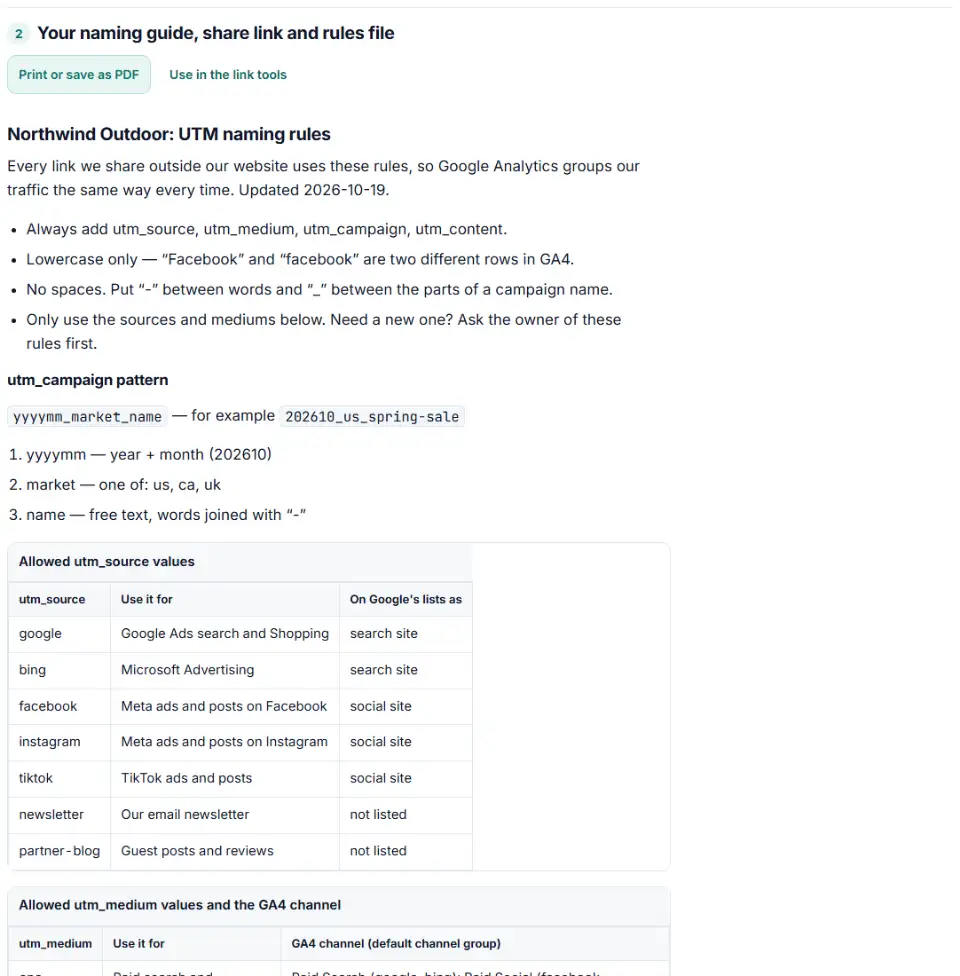
2 Your naming guide, share link and rules file
Fill in the settings above — your result appears here instantly.
Rules last checked: against the official pages:
- Default channel group (Analytics Help) (Google Analytics 4)
- URL builders: Collect campaign data with custom URLs (Google Analytics 4)
How to build your UTM naming convention template
This UTM naming convention template builder turns your team's choices into a one-page guide, then tests every allowed value against Google's GA4 default channel group rules. A medium that GA4 doesn't understand is caught here, before anyone uses it in a live campaign.
- List your sources. One per platform or sender: google, facebook, newsletter. The guide shows which ones are on Google's site lists.
- List your mediums. The checks show the GA4 channel each one gives with each source — and warn about any that end up Unassigned or Paid Other.
- Choose separators and the campaign pattern. For example a date, a market and a short name:
202610_us_fall-boots. - Test real links. Paste a few live links into the checker box to see which ones break the new rules, with a fixed value for each.
- Share it. Print the guide, copy the share link, or download the rules file for the link builders.
Three ways to share the rules
- Printable guide — one page with the allowed values, the GA4 channel of each medium, the campaign pattern and example links. Print it or save it as a PDF.
- Share link — the rules are packed into the part of the link after
#. Browsers don't send that part to our server, so the rules aren't stored on any server; whoever opens the link sees the same rules. - Rules file — a small JSON file. Load it in the link builders for Google Ads, Meta, TikTok and Microsoft, the channel group checker for GA4 and the bulk link checker, and every value is checked against your rules.
What to do next
- Agree the rules once. Send the share link to everyone who builds links — in-house, agency and freelancers — and ask for changes before you lock it.
- Put the guide where people work. Pin the PDF or the link in your shared drive, project tool or the top row of your link spreadsheet.
- Load the rules file in the builders. Open “Team naming rules” in any of our link tools, or click “Use in the link tools” to use them on this device.
- Audit what is already live. Run your current links through the bulk checker with the rules loaded and fix the old ones.
- Review every quarter. Add new platforms to the lists instead of letting people invent values.
Common UTM naming convention mistakes
Mediums GA4 doesn't recognize
Words like social_paid, boosted, influencer or print look sensible in a meeting, but no GA4 channel rule uses them. Every visit tagged that way is Unassigned, unless the source is on Google's lists. Choose mediums from Google's rules and add detail in utm_content instead.
Nicknames instead of the names on Google's lists
GA4 compares the source against Google's lists of search, social, video and shopping sites. meta and fb-ads are not on them; facebook and fb are. Paid traffic from an unlisted source can only reach Paid Other.
Two spellings of the same value
“Facebook”, “facebook” and “FB” split one source into three report rows. A lowercase-only rule plus one fixed list removes the guesswork.
utm source vs medium mixed up
A list with paid_social as a source or facebook as a medium is a sign the two got swapped. The builder warns about both.
Campaign names nobody can split later
If the same character separates words and parts, “spring_sale_us” can't be read back reliably. Use one separator between words and another between parts, and keep dates in one format.
Frequently asked questions
What is a UTM naming convention?
It is your team’s short rulebook for UTM tags: which utm_source and utm_medium values are allowed, whether everything is lowercase, which separator goes between words, and how campaign names are built (for example 202610_us_fall-boots). No ad platform sets these rules — you do — but GA4’s channel rules decide which values work.
What is the difference between utm_source and utm_medium?
Google’s URL builder page describes utm_source as the referrer — for example google, newsletter4 or billboard — and utm_medium as the marketing medium, such as cpc, banner or email. In short: source is who sent the visit, medium is the kind of traffic. GA4 needs both to pick the right channel.
Should UTM parameters be lowercase?
Yes, as a rule. Google says parameter values are case sensitive, so utm_source=Facebook and utm_source=facebook become two rows in GA4. The channel rules ignore case, but your reports still split. A lowercase-only rule is the easiest one for a team to follow.
What should utm_medium be for paid social ads?
Any value GA4’s paid pattern accepts — it must start with “paid”, contain “cp”, or be ppc or retargeting. paid_social is the clearest. Combine it with a source on Google’s list of social sites, such as facebook, instagram, tiktok or linkedin, and GA4 shows Paid Social.
Can I use spaces in UTM campaign names?
Avoid them. Spaces must be encoded as %20 in a link and are easy to break when the link is copied. Pick one separator, like a hyphen between words and an underscore between parts, and write it into your rules.
How do I get my team to follow one UTM naming convention?
Make it easy to follow and easy to check. Share the link or the printed guide, give everyone the rules file to load in the link builders, and run new links through the checker before they go live. A monthly check of all live links catches the rest.
Related tools and guide
-
Paste or upload your campaign links and find broken, inconsistent or Unassigned UTM tags — with a corrected link for every row.
GoogleMetaTikTokMicrosoft -
Paste a link or a GA4 report and see the default channel for every row — with the rule that matched and a fix for Unassigned traffic.
Google -
Upload a sheet, get every link tagged: lowercase values, no spaces, existing parameters kept, the GA4 channel per link and a CSV to paste back.
GoogleMetaTikTokMicrosoftLinkedInAny platform -
Tag every Facebook and Instagram ad with one URL parameters string that fills in campaign and ad names, with syntax checks and a GA4 channel preview.
Meta -
Build a Google Ads tracking template or final URL suffix with UTM and ValueTrack tags, catch errors before you save and see the GA4 channel.
Google -
Rename Facebook and Instagram campaigns, ad sets and ads in bulk to one naming convention — with a before/after preview and an Ads Manager import file.
Meta
Need help setting this up? Talk to EmproIT