Naming Convention Bulk Renamer for Meta Ads
Apply your Meta ads naming convention to every campaign, ad set and ad at once: load an Ads Manager export, set a pattern, check the new names and download an import file that renames them by ID.
Naming Convention Bulk Renamer for Meta Ads
- Upload
- Rename
- Download
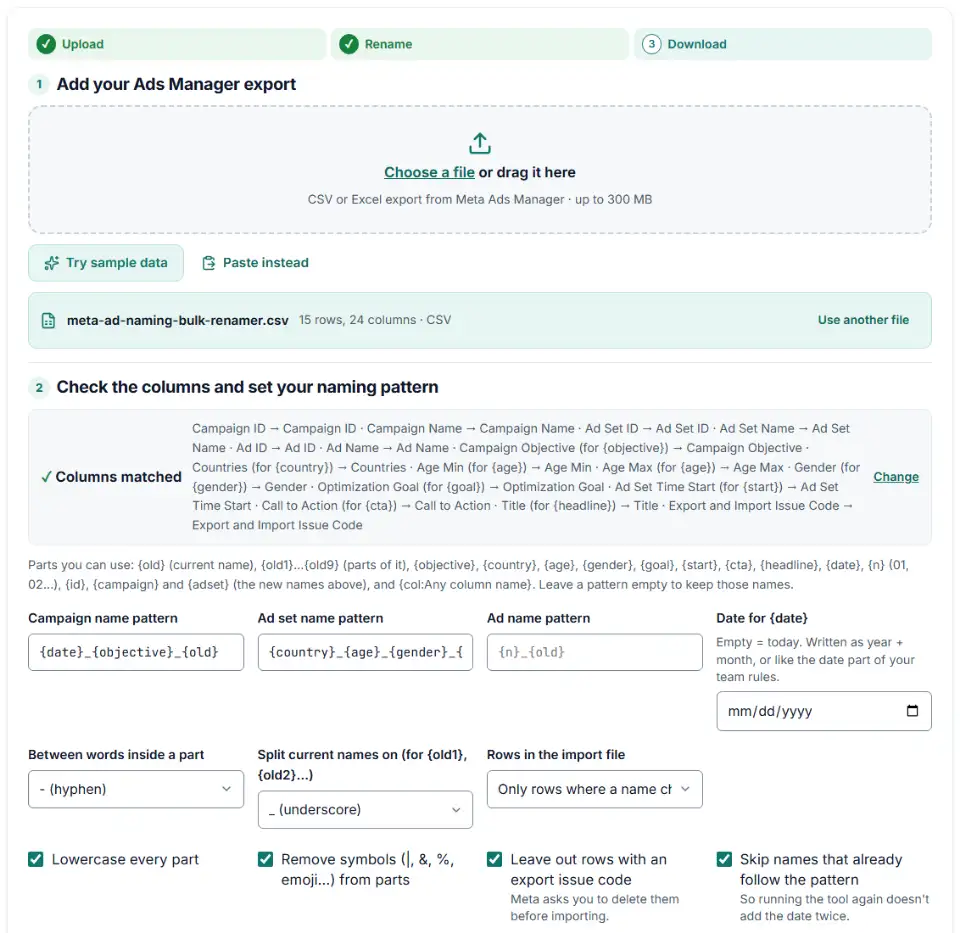
1 Add your Ads Manager export
Choose a file or drag it here
CSV or Excel export from Meta Ads Manager · up to 300 MB
2 Check the columns and set your naming pattern
Rules last checked: against the official pages:
- Columns in the Import/Export Template in Meta Ads Manager (Meta (Facebook and Instagram))
- Edit ads in Meta Ads Manager using Excel (Meta (Facebook and Instagram))
- Troubleshoot issues when bulk importing updates to existing ads (Meta (Facebook and Instagram))
- Specifications for dynamic URL parameters in Meta Ads Manager (Meta (Facebook and Instagram))
How to apply a Meta ads naming convention in bulk
A Meta ads naming convention only helps if every campaign, ad set and ad follows it — and renaming hundreds of items by hand takes hours. This tool rebuilds the names from your own export and gives you a file for Meta's Edit ads in Ads Manager using Excel workflow, so the changes go back in one import.
- Export for editing, not a report. In Ads Manager, select the items to rename and export them for editing in Excel, as in Meta's Export ads guide. That file has Campaign ID, Ad Set ID and Ad ID. A performance report (with “Reporting starts” or “Amount spent”) can't be re-imported, so the tool refuses it.
- Load the export. The tool finds the ID and name columns and the targeting columns used by the pattern parts. Check the matches in step 2.
- Write one pattern per level. Mix fixed text with parts like
{objective}or{country}. The table of your current names split into parts shows what{old1}and{old2}hold. - Read the before and after list. Fix anything flagged: names that clash, parts that came out empty, IDs damaged by Excel.
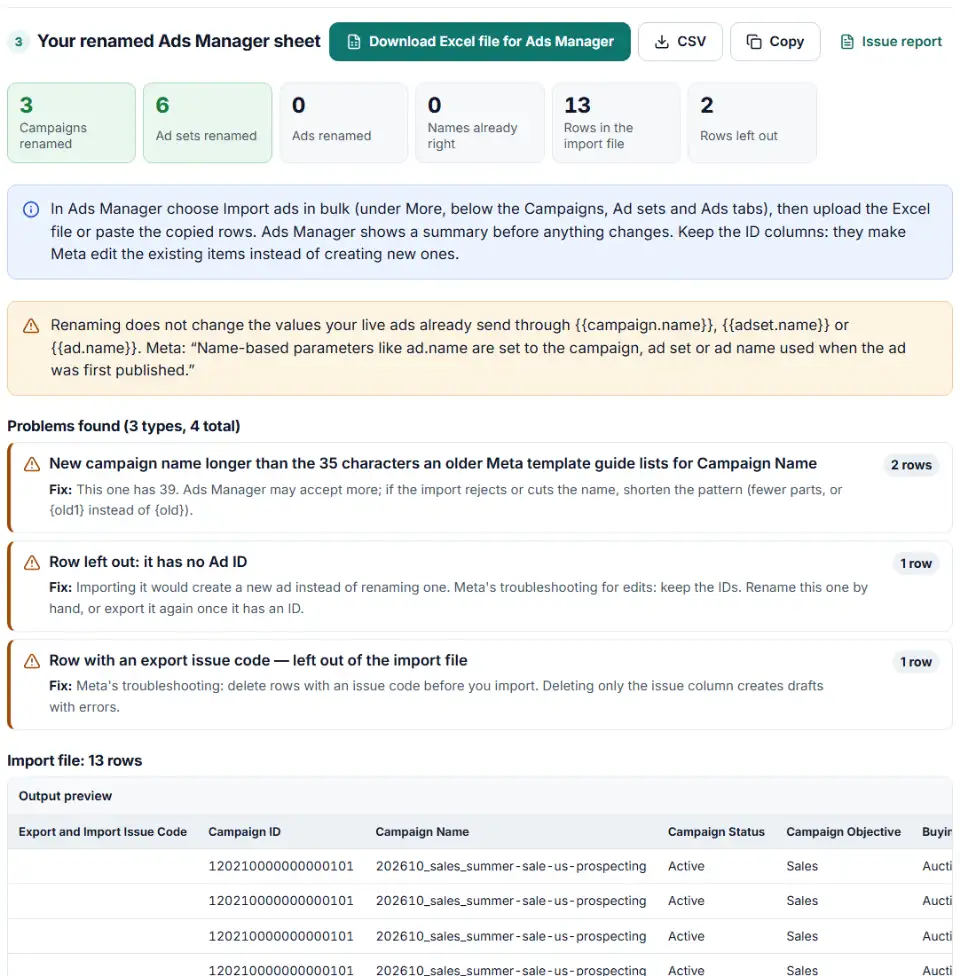
- Download the Excel file (or copy the rows) and keep the rename log in case you want to undo.
What to do next in Ads Manager
- Open Import ads in bulk. In Ads Manager, below the Campaigns, Ad sets and Ads tabs, choose More › Import ads in bulk. It works on a computer, not in the mobile app.
- Upload the Excel file or paste the rows. Use the Copy button to paste instead of uploading. Meta's limit is about 2 MB per file, so split very large accounts.
- Read Meta's summary. It should list edits to existing items, not new campaigns. If it says it will create items, cancel and check the ID columns.
- Fix blocking errors. If Meta reports errors, choose View errors in Excel, correct those rows and import again.
- Use the new names in your links. Add
{{campaign.name}}URL parameters to ads you publish from now on so GA4 shows the clean names.
Meta ads bulk import errors when renaming
New campaigns appear instead of renamed ones
The import had no ID for those rows. Meta matches by name when there is no ID, and a new name matches nothing, so it builds a copy. Never delete the Campaign ID, Ad Set ID or Ad ID columns from an edit file.
IDs changed by Excel
Meta IDs are longer than the 15 digits Excel keeps for a number. Save the export from Excel and an ID can turn into 1.2E+17 or quietly end in different digits. The tool leaves out every row whose ID is not a plain number or was stored as a number cell, so load the export without saving it in Excel first.
Rows with an issue code
Exports can start with Export and Import Issue columns. Meta asks you to delete those rows before importing — removing only the issue column creates drafts with errors. The tool leaves such rows out by default.
Names cut short or refused
An older Meta template guide lists 35 characters for campaign, ad set and ad names, and Ads Manager may accept more. If the import refuses long names, use {old1} instead of {old} to keep only the part you need.
Strange “< >” at the start of a name
When a value starts with +, -, = or @, Ads Manager adds a short prefix on export so Excel doesn't treat it as a formula, and removes it on import. The tool strips it before building names.
A Meta ads naming convention template
Start from this and change the parts to fit how your team reports. Each level answers one question.
- Campaign — why:
{date}_{objective}_{old1}gives 202610_sales_summer-sale. - Ad set — who:
{country}_{age}_{gender}_{goal}gives us_25-54_all_offsite_conversions. - Ad — what:
{n}_{old}or{cta}_{old}gives 01_ugc-video.
Frequently asked questions
What is a good naming convention for Meta ads?
One that puts the same facts in the same order at every level, with one separator between parts. For example campaigns as date_objective_offer, ad sets as country_age_gender_goal, and ads as format_hook_version. Keep names short, lowercase and free of symbols, so they read well in reports and in UTM values.
How do I rename many Facebook campaigns, ad sets or ads at once?
Export them from Ads Manager, load the export here, type a naming pattern for each level, and download the import file. In Ads Manager choose Import ads in bulk and upload it. The IDs in the file make Meta update the existing items.
Can I rename Meta ads with an Excel import without creating new ads?
Yes, as long as the ID columns stay in the file. Meta’s help says you can change any field except Ad ID, Campaign ID and Image hash, and that without an ID it matches by name or creates something new. This tool leaves out rows that have no usable ID for that reason.
Does changing a campaign name change my {{campaign.name}} UTM values?
Not for ads that are already live. Meta says name-based URL parameters use the name from when the ad was first published. New ads you publish after the rename will send the new name.
What should a Facebook ad set name include?
The things that make the ad set different from its siblings: usually country, age range, gender or audience type, and the optimization goal. Use the {country}, {age}, {gender} and {goal} parts here and the tool fills them in from your export’s targeting columns.
Does renaming a Facebook ad reset the learning phase?
Meta’s bulk-edit troubleshooting says editing some fields can restart the learning phase or trigger ad review, but it doesn’t list which fields. To change as little as possible, this tool only puts rows with a new name in the import file and leaves every other column exactly as exported.
Related tools and guide
-
Fill Meta's Ads Manager import template from a plain sheet of campaigns, ad sets and ad copy, with checks for links, countries, CTAs and budgets.
Meta -
Tag every Facebook and Instagram ad with one URL parameters string that fills in campaign and ad names, with syntax checks and a GA4 channel preview.
Meta -
Build a UTM naming convention your team can follow: GA4-safe sources and mediums, a campaign pattern, a printable guide and a built-in link checker.
GoogleMetaTikTokMicrosoft -
Compare cost per result by placement, age, gender or device from an Ads Manager export, without falling for the breakdown effect.
Meta -
Build an Editor-ready CSV of campaigns, ad groups and keywords from any sheet, with match types, bids and duplicate checks.
Google -
Upload a sheet, get every link tagged: lowercase values, no spaces, existing parameters kept, the GA4 channel per link and a CSV to paste back.
GoogleMetaTikTokMicrosoftLinkedInAny platform
Need help setting this up? Talk to EmproIT