Breakdown Report Analyzer for Meta Ads
Upload a Meta Ads Manager export with a breakdown to compare spend, results and cost per result by placement, age, gender, device or region — read the way Meta's breakdown effect says to.
Breakdown Report Analyzer for Meta Ads
- Upload
- Analyze
- Download
1 Add your Ads Manager export
Choose a file or drag it here
CSV or Excel export from Meta Ads Manager · up to 300 MB
2 Check the columns and options
Rules last checked: against the official pages:
- About breakdowns, metrics and filtering in Meta Ads Reporting (Meta (Facebook and Instagram))
- View ad results by platform, device and placement in Meta Ads Manager (Meta (Facebook and Instagram))
- Specifications for breakdowns in Meta Ads Reporting (Meta (Facebook and Instagram))
- About the "breakdown effect" when advertising on our system (Meta)
How to analyze a Meta Ads breakdown
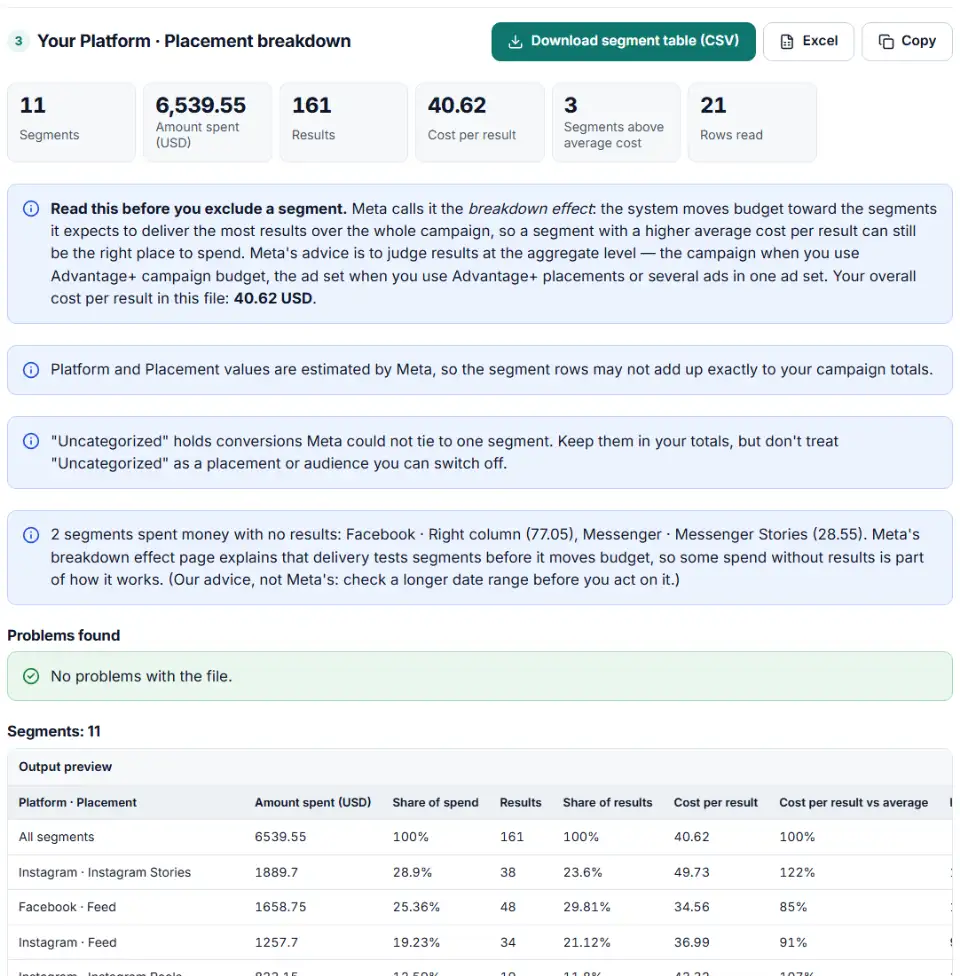
A Meta Ads breakdown splits your results by placement, age, gender, device or region. This analyzer adds up an Ads Manager export and shows each segment's share of spend, share of results and cost per result next to the average. It follows Meta's breakdowns, metrics and filtering page and its breakdown effect article, so it never tells you to switch off a placement only because its average cost looks high.
- Choose a breakdown in Ads Manager. Open the Breakdown menu between Columns and Reports and pick one, such as Placement or Age and gender. Keep Results and Amount spent in your columns.
- Export and drop the file in. CSV and Excel both work, in any currency and with decimal commas. Summary rows are skipped.
- Check the columns. The breakdown columns, spend and results are found by name. Add a result indicator column if your file mixes campaigns with different goals.
- Read the charts with the note on top. Orange bars cost more per result than your average. That is a question to test, not proof of waste.
- Compare inside each ad set. Switch the option to see segments within each ad set or campaign — the level Meta says to judge results at.
Why averages mislead in breakdowns
In Meta's own example, a campaign ran on Facebook Stories and Instagram Stories with a $500 budget. Facebook Stories started cheaper, but its cost rose faster as more was spent there. After a small test on each, the system shifted the remaining $400 to Instagram Stories, which ended with $450 of the spend. At the end Instagram Stories showed $1.46 per result and Facebook Stories $1.10 — yet Meta explains that the shift drove more results overall, because the cost on Facebook Stories was climbing faster. A breakdown table only shows averages, not the cost of the next result.
What to do next in Ads Manager
- Start from the total. Note the cost per result of the campaign (with Advantage+ campaign budget) or of each ad set. That is the number any change must improve.
- Look for real outliers. A segment that spends a lot over a long period with no results at all is worth a test. One that is simply above average is usually not.
- Test, don't cut everywhere. Duplicate one ad set, remove the segment there only, and run both side by side. Compare the ad sets' total cost per result.
- Check the creative per placement (our advice). If Stories or Reels look expensive, first make sure the ad was made for a vertical, full-screen space. A better-fitting version is a cheaper test than removing the placement.
- Check tracking for missing results. If a breakdown shows website purchases as zero, make sure you used a breakdown that returns website conversions.
Common Meta breakdown problems
Breakdown rows don't match the campaign total
Platform, placement and device numbers are estimates. Small gaps against the total are expected. Meta may also use statistical modeling when conversion data is missing.
Purchases show as zero by region or time of day
Those breakdowns don't return website conversions. Use Country, Age, Gender, Placement, Platform or Impression device instead.
“Uncategorized” rows
Conversions Meta could not assign to one segment land here. They belong in your totals, but you can't target or exclude “Uncategorized”.
Gender shown as “not specified”
These are people who don't list a gender. Keep them in the total; they are not a separate audience you can bid on.
Results from different goals added together
A file with a leads campaign and a traffic campaign mixes leads with link clicks in one Results column. The analyzer uses the result indicator to keep only the result type with the most spend and tells you what it left out.
Can't pick two breakdowns from the same group
In Ads Manager you can't combine two breakdowns from the same group, and Age, Country and Placement all sit under By delivery. Pair one delivery breakdown with a time breakdown such as Day, or export two files.
Frequently asked questions
What is the breakdown effect in Meta Ads?
It is Meta’s name for a common misreading: the belief that the system pushes budget into placements, ad sets or ads that perform worse. In fact delivery moves budget to where it expects the most results over the whole campaign. A segment can show a higher average cost per result and still be the cheaper place to buy the next result.
Should I exclude placements or ages with a higher cost per result?
Not on that number alone. Meta says to judge results at the aggregate level: the campaign when you use Advantage+ campaign budget, the ad set when you use Advantage+ placements or run several ads in one ad set. Test a change on one ad set and compare the total cost per result before and after.
Why don't Meta breakdown rows add up to the total?
Platform, placement and device values are estimated by Meta, so the rows can differ a little from the campaign total. Reach never adds up across rows anyway, because one person can see your ad in several placements. This tool sums only spend, results, impressions, clicks and value.
Which breakdowns can I combine in Meta Ads Manager?
Ads Manager’s Breakdown menu groups breakdowns By time, By delivery and By action, and Meta’s help says two breakdowns from the same group can’t be combined. Age, Gender, Country, Region, Placement and Impression device all sit under By delivery, so pick one of them and add, for example, Day from By time. Placement and device is offered as one combined breakdown. Meta’s Ads Reporting tool groups breakdowns differently (Demographics, Geography, Delivery…), so more pairs are possible there.
Which breakdowns show website conversions?
Age, Gender, Age and gender, Country, Impression device, Platform, Platform and device, Placement and Audience segments. Region and time-of-day breakdowns don’t return website (pixel) conversions, so purchases can look like zero there.
How do I export a breakdown report from Meta Ads Manager?
Open Ads Manager, pick Campaigns, Ad sets or Ads, then open the Breakdown menu between Columns and Reports and choose a breakdown. Add Results and Amount spent to your columns, then export the table as CSV or Excel and drop the file into this tool.
Related tools and guide
-
Tag every Facebook and Instagram ad with one URL parameters string that fills in campaign and ad names, with syntax checks and a GA4 channel preview.
Meta -
Turn an auction insights download into competitor charts, a trend table and a list of who entered or left your auctions.
Google -
Fill Meta's Ads Manager import template from a plain sheet of campaigns, ad sets and ad copy, with checks for links, countries, CTAs and budgets.
Meta -
Get Meta pixel code for purchases, leads and other events, with order value and a matching Conversions API event so no sale is counted twice.
Meta -
Check the server events you send to Meta's Conversions API for hashing mistakes, missing fields and weak customer details, and get a fixed version.
Meta -
Clean a Facebook leads CSV for your CRM: strip “p:” and ID labels, split names, fix dates and merge duplicate leads.
Meta
Need help setting this up? Talk to EmproIT