Lead Ads CSV Cleaner for Facebook: Make Your Leads Download CRM-Ready
Turn a Facebook or Instagram leads download into a CRM-ready file: phone numbers in E.164 without the “p:”, ID labels removed, names split, dates in one format, duplicate submissions merged.
Lead Ads Export Cleaner for Facebook
- Upload
- Check
- Download
1 Add your Facebook leads file
Choose a file or drag it here
CSV or Excel from Ads Manager, Instant forms or Leads Center · up to 300 MB
2 Check the columns and options
Rules last checked: against the official pages:
- Download or retrieve your leads data from Meta (Meta (Facebook and Instagram))
- Information included when you download your leads data (Meta (Facebook and Instagram))
- How to Find the Meta Lead ID (Meta (Facebook and Instagram))
How to clean your Facebook leads download
A Facebook leads download is built for Meta, not for your CRM. IDs carry letter labels, dates come with a time zone offset, phone numbers often arrive with a “p:” stuck to the front, and your custom questions become column names with underscores. This cleaner fixes all of that in your browser, using the columns Meta lists on its information included in your leads data page.
- Download your leads from Meta. In Ads Manager, click the number in the Results column, choose On-Facebook leads, set your filters and download a CSV or XLS. The Instant forms page in Meta Business Suite gives the same file. Then drop it here, or click Try sample data.
- Check the matched columns. The tool finds Meta's standard columns and the usual contact questions (full name, email, phone number, city, ZIP code). Every other question stays as its own column.
- Pick your settings. Choose the default country for phone numbers without a country code, the time zone your sales team works in, and the column names your CRM import expects.
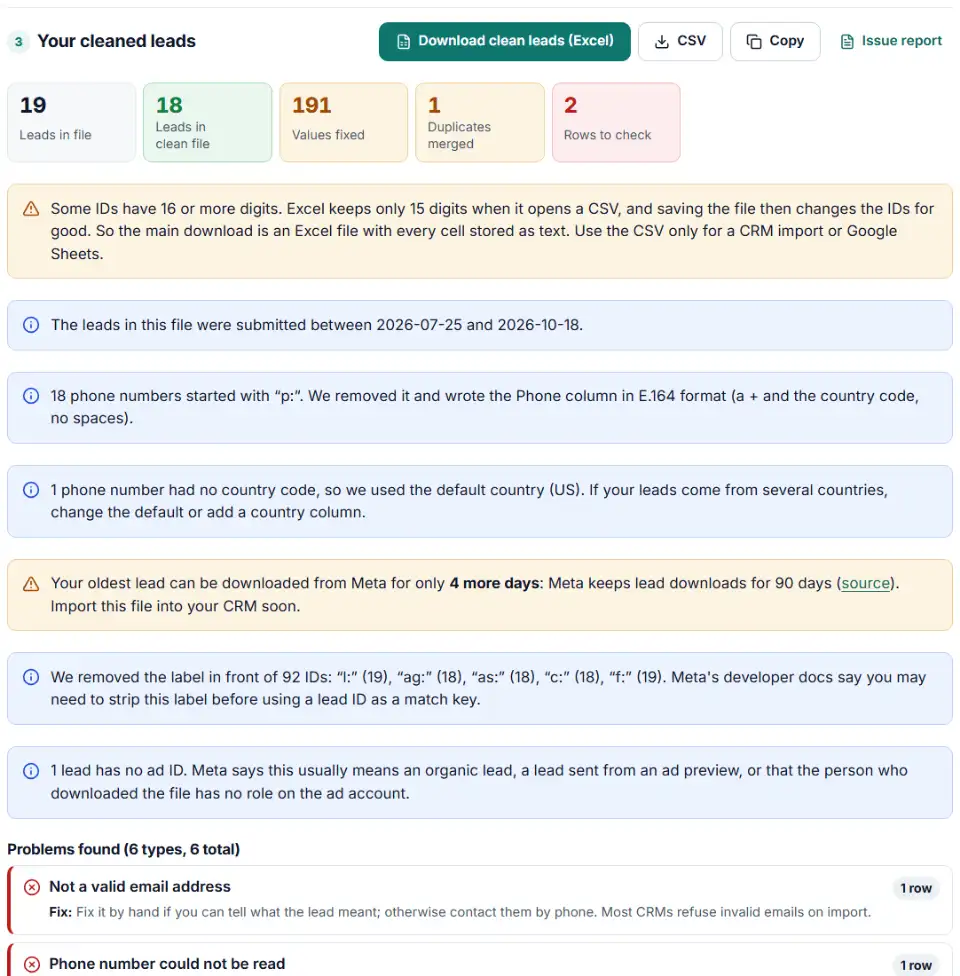
- Read the problems. Invalid emails and phones, typos and leads you can't contact are listed by row, each with a fix.
- Download the clean file. Get the file for your CRM, plus a file with the duplicates that were merged. Every row taken out is also listed in the problems.
What gets fixed
- Phones: a leading “p:” is removed when your file has one (Meta's help pages don't mention it), and numbers are written as E.164, like
+16175550132. - IDs: labels like
ag:andc:are stripped. Because a bare 16-digit ID gets rounded by Excel, the main download is then an Excel file with IDs stored as text. - Names and answers: full names are split, “MIA” becomes “Mia”, and
within_1_monthreads “within 1 month”.
What to do next with your leads
- Import the file into your CRM. Map Email, Phone, First Name and Last Name to contact fields and the question columns to custom fields. Keep the Lead ID column.
- Keep the lead ID for later. If you send lead stages such as qualified or converted back to Meta, they are matched by lead ID (How to find the Meta lead ID).
- Set a download routine. Leads expire from the download after 90 days, so download at least monthly, or weekly while a campaign runs.
- Stop paying for the same people. Upload your leads as a Meta customer list and exclude it from your lead campaigns.
- Plan a CRM integration. For ongoing use, Meta recommends the API or a CRM integration over the manual download. Either one removes the 90-day risk, because leads reach your CRM without anyone having to download them.
Common problems with Facebook lead downloads
The download has fewer leads than the Results column
Meta only lets you download leads from the last 90 days, even when Ads Manager shows Lifetime results. Older leads can't be recovered from Meta.
Blank ad ID, ad set ID or campaign ID
These leads were organic, came from an ad preview, or were downloaded by someone without a role on the ad account. The cleaner keeps and counts them. Leads made with Meta's lead ads testing tool are organic too and hold dummy data, so delete those before you import.
Whole columns are empty or the download button is missing
You need leads access. Meta asks for Page admin with full control plus a role on the ad account to see all lead data. Ask the Page owner or business admin to give you that access.
Leads Center CSV without your custom questions
The Leads Center download is limited to date, name, email, phone, stage, source and owner, and to 10,000 leads per file. For ad, form and question columns, download from Ads Manager or the Instant forms page.
facebook lead export phone number prefix (“p:”)
Many lead files show phone numbers as p:+16175550132. A CRM stores that as text, and many dialers and SMS tools can't use it. The cleaner removes the prefix and checks each number for its country.
Long IDs turned into 1.20E+17
Meta lead IDs are 15 to 17 digits long. With the label in front they stay text, but a bare ID in any CSV, including the clean one, is rounded when Excel opens it, and saving loses the last digits. Use the Excel download, Google Sheets or your CRM's importer instead.
The same person appears twice
People often send a form twice, from another device or another ad. The cleaner matches by lead ID, email and phone, keeps the first submission and fills its blanks. If the second one has a different email, phone or answer, both rows stay and you are told why.
Frequently asked questions
Which columns are in a Facebook leads download?
Meta lists 12 standard columns: id, created_time, ad_id, ad_name, adset_id, adset_name, campaign_id, campaign_name, form_id, form_name, is_organic and platform. Your form’s questions follow, including prefilled ones like email and phone (Meta’s column list). A Leads Center download only has date, name, email, phone, stage, source and owner.
Why can't I download Facebook leads older than 90 days?
Meta keeps lead information available for 90 days only, so older leads can’t be downloaded (Meta’s download page). Download at least once a month and keep the files, or connect a CRM.
Why does my Facebook leads download have fewer leads than Ads Manager shows?
Ads Manager’s Results column can count leads for any date range, including Lifetime, but the download only includes the last 90 days. The gap is the leads that have expired.
Why are ad and campaign IDs blank for some leads?
Meta gives three usual reasons: the lead came in organically (not from an ad), it was sent from an ad preview, or the person who downloaded the file has no role on the ad account. If many fields are blank, ask for Page admin access with full control plus a role on the ad account.
Why do IDs in my Facebook leads export have letters in front?
Meta’s own example shows IDs with a short label and a colon, such as ag: for the ad, as: for the ad set, c: for the campaign and f: for the form. Meta’s developer docs say you may need to strip the label before you use a lead ID as a match key. This cleaner removes it and keeps the digits.
Is a CSV download a good replacement for a CRM integration?
Not for the long run. Meta doesn’t recommend the manual download for integrations: leads wait until someone downloads them, and anything older than 90 days is lost. Use it to catch up, and a CRM integration for new leads.
Related tools and guide
-
Make a LinkedIn leads CSV CRM-ready: fix garbled accents, keep hidden fields, tidy names, format phones and merge duplicate leads.
LinkedIn -
Turn a Google Ads lead form download into a CRM-ready file with clear field names, international phone numbers and no duplicate or test leads.
Google -
Turn a CRM or store export into a Facebook custom audience CSV with Meta's column names, country codes and optional hashing.
Meta -
Send in-store and phone sales to Meta: get an Events Manager upload file and Conversions API batches with hashed email and phone, date limits checked.
Meta -
Turn messy phone numbers into E.164 in bulk, with the country code added and invalid numbers flagged before you upload.
GoogleMetaTikTok -
Build a realistic test lead for your Google Ads lead form webhook, then check what your CRM or server actually received.
Google
Need help setting this up? Talk to EmproIT