Lead Gen Form Download Cleaner for LinkedIn
Clean a LinkedIn Lead Gen Form download for your CRM: garbled accents repaired, renamed and hidden-field columns read from your own header row, names tidied, phones in E.164, duplicates merged.
Lead Gen Form Download Cleaner for LinkedIn
- Upload
- Check
- Download
1 Add your LinkedIn leads file
Choose a file or drag it here
The CSV from Campaign Manager, or the same data in Excel · up to 300 MB
2 Check the columns and options
Rules last checked: against the official pages:
- View and download leads, metrics, and analytics for Lead Gen Form ad sets (LinkedIn Ads)
- Data collection and retention for Lead Gen Forms (LinkedIn Ads)
- Lead Gen Form hidden fields (LinkedIn Ads)
- Customize Lead Gen Form field names when downloading leads (LinkedIn Ads)
How to clean a LinkedIn lead gen form download
Your LinkedIn lead gen form download arrives as one CSV per form, and no two forms look the same. LinkedIn's help page on viewing and downloading leads explains how to get the file, but not which columns it will have. Field names can be renamed per form and hidden fields add columns, so this cleaner reads the column names from your own file instead of assuming a fixed list.
- Download the leads. In Campaign Manager, open Content & Assets > Lead generation forms, tick the form, pick a date range and click Download leads. Drop the CSV here, or click Try sample data.
- Check the matched columns. First name, last name, the two emails, phone, company, job title and country are found by their names. Custom questions and hidden fields are kept as they are. The sample's column names are only an example; LinkedIn doesn't publish a fixed layout.
- Choose the settings. Pick the country for local phone numbers, the time zone of your dates and the column names your CRM import wants.
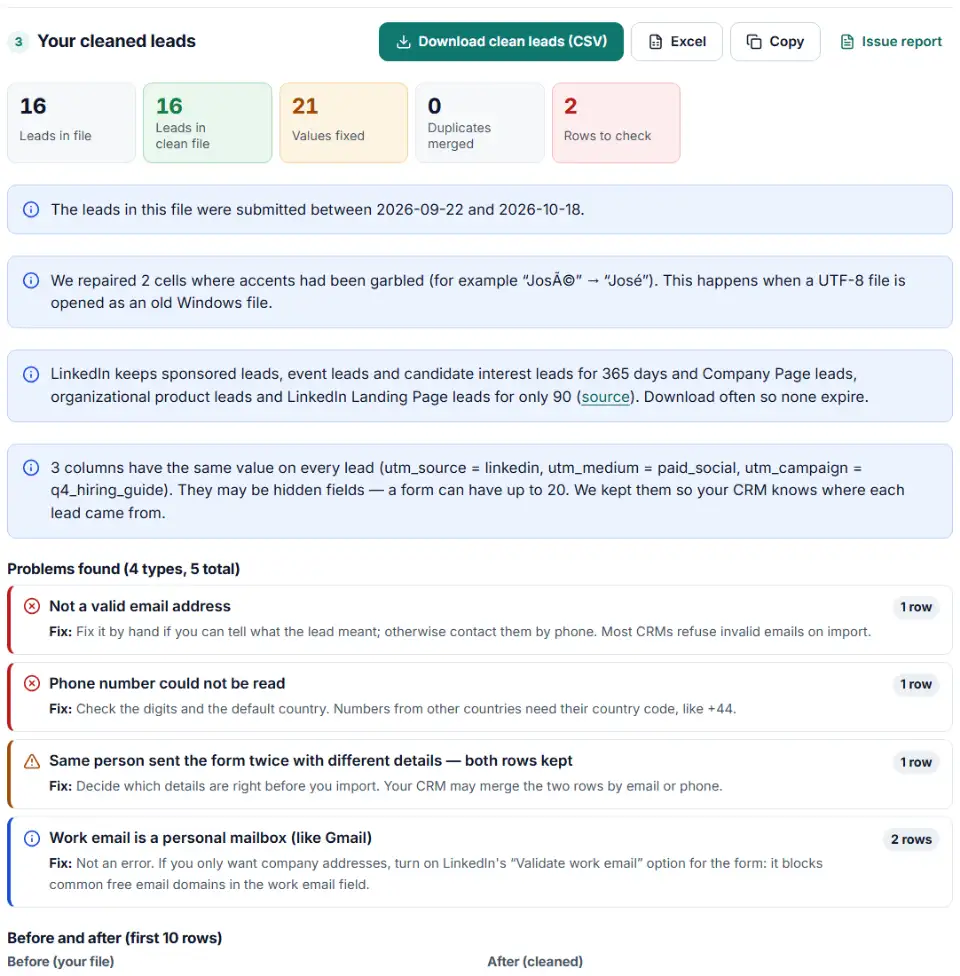
- Review the problems. Invalid emails and phones, leads you can't contact and work emails on personal mailboxes are listed by row.
- Download. Save the clean CSV or Excel file for your CRM, and the file of merged duplicates.
What this cleaner changes
- Garbled text: names like “François” and “Björn” are turned back into “François” and “Björn”.
- Two emails per lead: the email the member shared and the work email are both kept and checked. A work email on Gmail or Yahoo is pointed out, not removed.
- Duplicates: one person who filled in the form twice becomes one row, with blanks filled from the second submission. If the two disagree, both rows stay and are flagged.
- Profile links: LinkedIn profile URLs without
https://get it added, so they are clickable in your CRM.
What to do next with your LinkedIn leads
- Import the clean file into your CRM. Map the email and work email to separate fields if your CRM has them, and keep the campaign and hidden field columns as lead source fields.
- Download again before leads expire. Set a reminder well inside the 90-day limit if you run Company Page or Landing Page lead forms, and inside 365 days for sponsored ads.
- Leave converted leads out of your ads. Upload the same people as a LinkedIn contact list and exclude it from your Lead Gen campaign targeting.
- Send results back to LinkedIn. When leads become customers, upload them as offline conversions so Campaign Manager can show which campaigns brought real deals.
- Automate it later. CRM connectors use LinkedIn's lead sync API, which sends each new lead without a manual download.
Common LinkedIn lead download problems
linkedin lead gen form csv garbled characters
This happens when Excel opens the UTF-8 file with the wrong encoding. LinkedIn's own fix is to import the file into a new worksheet and choose UTF-8. If someone already saved the file after opening it, the damage is in the file itself. Load it here and the repair setting turns the characters back.
You can't see the Download leads button
Ask for Viewer access or higher on the ad account and Lead Gen Forms manager access on the Page. If the ad account sits in a Business Manager, the Page must belong to the same one.
linkedin lead gen form custom field names don't match your CRM
Field names in the download can be renamed per form in the form's settings, and each name must be unique within the form. If two forms use different names for the same field, set the same custom names on both, or let this tool turn them into one set of column names.
Columns with the same value on every row
These may be hidden fields, such as a campaign name or UTM value you added to the form. LinkedIn writes each hidden field as its own column. The cleaner keeps them and lists them.
Older leads are missing
Company Page, organizational product and LinkedIn Landing Page leads are only kept for 90 days. Sponsored, event and candidate interest leads last 365 days. After that, LinkedIn can't give them back.
A “work email” on Gmail
Members can edit the email fields before they submit. If you only want company addresses, turn on the form's validate work email option, which blocks common free email domains.
Frequently asked questions
How do I download leads from a LinkedIn Lead Gen Form?
In Campaign Manager, go to Content & Assets > Lead generation forms, tick one or more forms, set the start and end date, then click Download leads > Download. You can also tick an ad set on the Ad Sets tab and choose Export > Report Type: Leads (LinkedIn’s download steps).
How long does LinkedIn keep Lead Gen Form leads?
It depends on the lead type. Sponsored leads, event leads and candidate interest leads are kept for 365 days. Company Page leads, organizational product leads and LinkedIn Landing Page leads are kept for only 90 days (LinkedIn’s retention page).
Why are accented characters garbled in my LinkedIn leads CSV?
The file is saved as UTF-8, but Excel often opens it with an older Windows encoding, so “José” shows as “José”. LinkedIn’s fix is to import the file into a new Excel sheet and pick UTF-8, or to open it in Google Sheets. This cleaner repairs the garbled names for you, even in a file that was already saved that way.
Why do the columns change between my LinkedIn lead downloads?
Each form has its own fields, up to 12, plus up to 3 custom questions and up to 20 hidden fields, and each hidden field becomes a column. Advertisers can also rename how fields appear in the download. LinkedIn doesn’t publish one fixed column list, so this tool reads the column names from your file.
Who can download LinkedIn Lead Gen Form leads?
You need Viewer access or higher on the ad account, and Lead Gen Forms manager access or higher on the LinkedIn Page. If the ad account belongs to a Business Manager, the Page must be owned by the same Business Manager.
Can I download leads for several forms at once?
Yes, tick several forms before you click Download leads. LinkedIn then downloads one CSV file per form. Clean each file here, or paste them into one sheet first if the forms ask the same questions.
Related tools and guide
-
Clean a Facebook leads CSV for your CRM: strip “p:” and ID labels, split names, fix dates and merge duplicate leads.
Meta -
Turn a Google Ads lead form download into a CRM-ready file with clear field names, international phone numbers and no duplicate or test leads.
Google -
Fill LinkedIn's contact list CSV template from a HubSpot, Salesforce or Shopify export, with every rejected row explained.
LinkedIn -
Turn CRM deals into LinkedIn's offline conversions file, with dates, amounts, currency and event types checked and emails hashed if you want.
LinkedIn -
Turn a CRM account list or contact export into LinkedIn's company list CSV for account-based targeting.
LinkedIn -
Build a realistic test lead for your Google Ads lead form webhook, then check what your CRM or server actually received.
Google
Need help setting this up? Talk to EmproIT