Contact List Template and Formatter for LinkedIn Ads
Turn any CRM or store export into LinkedIn's contact list template: exact headers, clean emails, country codes, no duplicates, hashed or plain.
Contact List Formatter for LinkedIn Ads
- Upload
- Check
- Download
1 Add your contacts
Choose a file or drag it here
CSV, Excel, TSV or TXT export from your CRM · up to 300 MB
2 Check the columns and options
Rules last checked: against the official pages:
- Contact list targeting in Campaign Manager (LinkedIn Ads)
- Upload company and contact targeting lists (LinkedIn Ads)
- DMP Segment List Uploads - LinkedIn Marketing API (Microsoft Learn, updated 2026-08-17) (LinkedIn Ads)
How to use the contact list template formatter for LinkedIn
LinkedIn gives you a blank LinkedIn contact list template and asks you to fill it in without changing a single header. This tool fills it for you from a HubSpot, Salesforce, Shopify or Excel export, following LinkedIn's Upload company and contact targeting lists and contact list targeting help pages. Your contacts never leave your computer.
- Add your export. Drop in the CSV or Excel file, or paste rows from a spreadsheet. Click Try sample data to see a test run first.
- Check the matched columns. Headers like
Email Address,Company Name,Country/Regionorbilling_first_nameare matched for you. If your CRM has one “Name” column, map it as the full name and we split it. - Pick plain or hashed emails. Plain is fine for the Campaign Manager upload. Choose SHA-256 if your company policy says personal data must be hashed before it leaves your system.
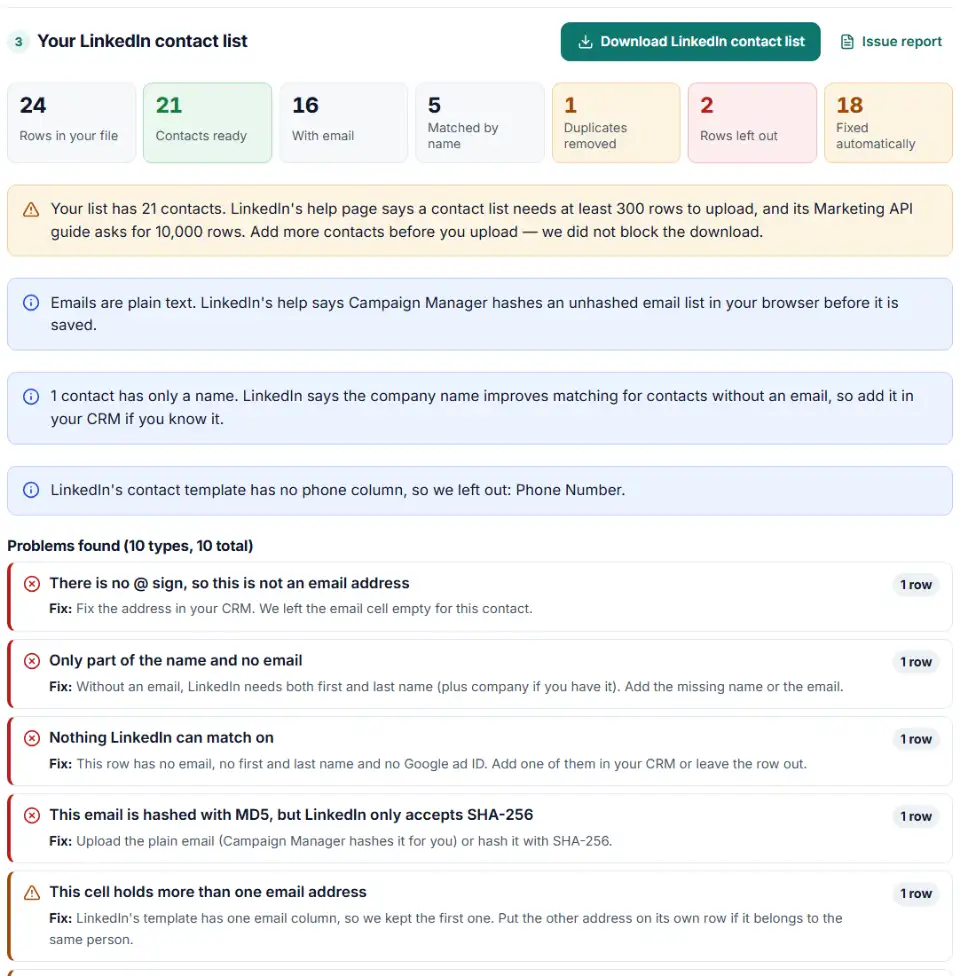
- Read the problem list. Each rejected row says why: no match key, a broken address, an MD5 hash, a name over LinkedIn's length limit, a country we could not read.
- Download the CSV. The file keeps LinkedIn's seven headers in the original order, saved as UTF-8 so accents in names survive.
What goes in each column
| Header | What we write |
|---|---|
| Lowercased, spaces and wrappers removed, or a SHA-256 hash | |
| firstname / lastname | Plain text; emojis removed; flagged when over 35 characters |
| jobtitle / employeecompany | Plain text; flagged when over 50 characters |
| country | Two-letter code, so “United Kingdom” becomes GB |
| googleaid | Android advertising ID as plain text; Apple IDs (when a device column says iOS) and all-zero IDs left out |
The length limits come from LinkedIn's Matched Audiences API guide. The help pages give none, so long values are flagged, not cut.
How to upload the contact list in Campaign Manager
- In Campaign Manager, open Plan and then Audiences.
- Click Create audience and choose Matched Audience.
- Pick Company / Contact and click Next.
- Name the audience, set List type to Contact list and click Select list to choose the downloaded CSV.
- Click Agree & Upload. Building the audience can take up to 48 hours.
Each audience holds one list. If the tool split your file into parts, create one matched audience per part. Also note that LinkedIn does not let you combine a contact list with member interests and traits targeting in the same ad set.
Common LinkedIn contact list errors and fixes
Upload error after editing the template
Renaming firstname to “First Name” or deleting the empty googleaid column counts as a changed header, and LinkedIn says that causes an upload error. Extra columns such as “Phone” are not part of the template either. Start from the downloaded CSV and only edit the rows below the header.
LinkedIn contact list less than 300 members
The upload worked, but fewer than 300 people matched. The audience stays gray until it reaches 300 members. Bigger lists fix this faster than anything else; that is why LinkedIn suggests 10,000 or more emails.
Hashed names or companies
Some data tools hash every column. LinkedIn accepts a hash only in email. A hashed first name or company cannot match anyone, so the tool empties those cells and tells you which rows they were on.
Broken accents and special characters
Names like Zoë or Müller turn into odd symbols when Excel saves in an older encoding. LinkedIn asks for UTF-8 when a list has special characters. Our download is always UTF-8. If you open it in Excel, save it again as “CSV UTF-8”.
List over 300,000 records or 20 MB
LinkedIn caps one list at 300,000 records or 20 MB. The tool splits a bigger list into parts under both limits, so nothing is lost. Each part becomes its own audience.
Rows with a first name only
Without an email, LinkedIn needs both first and last name. Rows like “Hana, Adventure Works” are left out, because a first name and a company are not enough to find one person.
Frequently asked questions
What columns are in LinkedIn's contact list template?
Seven, in this order: email, firstname, lastname, jobtitle, employeecompany, country and googleaid. You can leave columns empty, but you should not rename, remove or reorder them. LinkedIn says changed headers cause an upload error.
How many contacts should a LinkedIn contact list have?
LinkedIn’s help page says a list needs at least 300 rows to upload, and its Marketing API guide mentions 10,000 rows. LinkedIn recommends 10,000 or more emails, because only part of any list matches a LinkedIn member and the audience needs 300 matched members to run.
Why does my LinkedIn audience show fewer than 300 members?
Not enough people on your list could be found on LinkedIn. The audience name turns gray with “< 300 members” and cannot run until it grows. Add more contacts, fill in first name, last name and company where the email is missing, then upload the bigger list as a new audience.
Can I upload hashed emails to LinkedIn?
Yes, as SHA-256 only, and only in the email column. Keep the header as email either way. For the same result as LinkedIn’s API, lowercase the address and remove all spaces before hashing. If you upload plain emails, Campaign Manager hashes them in your browser before saving.
Can LinkedIn match contacts without an email address?
Yes. A row can match on first name plus last name, ideally with the company name, or on a Google advertising ID. A row with only a first name, or only a company, cannot be matched.
How long does LinkedIn take to build a contact list audience?
Up to 48 hours, and on rare occasions longer. Check the audience size in Plan > Audiences after two days. If it still shows “< 300 members”, the list is too small to run yet.
Related tools and guide
-
Turn a CRM account list or contact export into LinkedIn's company list CSV for account-based targeting.
LinkedIn -
Turn CRM deals into LinkedIn's offline conversions file, with dates, amounts, currency and event types checked and emails hashed if you want.
LinkedIn -
Get a health score for a customer list, fix email typos in one click and send the clean list to the Google, Meta or TikTok formatter.
GoogleMetaTikTok -
Turn a CRM or store export into a Facebook custom audience CSV with Meta's column names, country codes and optional hashing.
Meta -
Map any CRM or store export to Google's Customer Match columns, fix phones and emails, and download a plain or hashed CSV.
Google -
Turn a customer export into a Microsoft Advertising customer match file, with emails cleaned the way Microsoft asks, hashed and de-duplicated.
Microsoft
Need help setting this up? Talk to EmproIT