Customer Match Formatter for Microsoft Advertising
Turn any customer export into Microsoft Advertising's customer match file: one Email column, Microsoft's own email cleanup for every domain, SHA-256 hashed.
Customer Match Formatter for Microsoft Ads
- Upload
- Check
- Download
1 Add your customer list
Choose a file or drag it here
CSV, Excel or TSV from Shopify, your CRM or email tool · up to 300 MB
2 Check the columns and options
Rules last checked: against the official pages:
- Customer match: Use your own data to find customers (Microsoft Advertising)
- Create an audience (Microsoft Advertising)
- Customer List Item Record - Bulk - Microsoft Advertising API (Microsoft Advertising)
How to prepare a Microsoft Advertising customer match list
Microsoft Advertising customer match reads one thing: email addresses, cleaned with Microsoft's own steps and usually hashed. Those steps are stricter than Google's. Microsoft's customer match help page asks you to strip periods and “+tags” before the @ for every email provider. This tool applies each step in Microsoft's order, then hashes the result on your device.
- Load your list. A Shopify customer export, a Mailchimp audience, a CRM report or a plain list of emails. Excel files work too.
- Pick the email columns. If your file has a personal and a work email, select both: each address becomes its own row.
- Choose hashed or plain. Hashed (SHA-256) is the default and the safer choice.
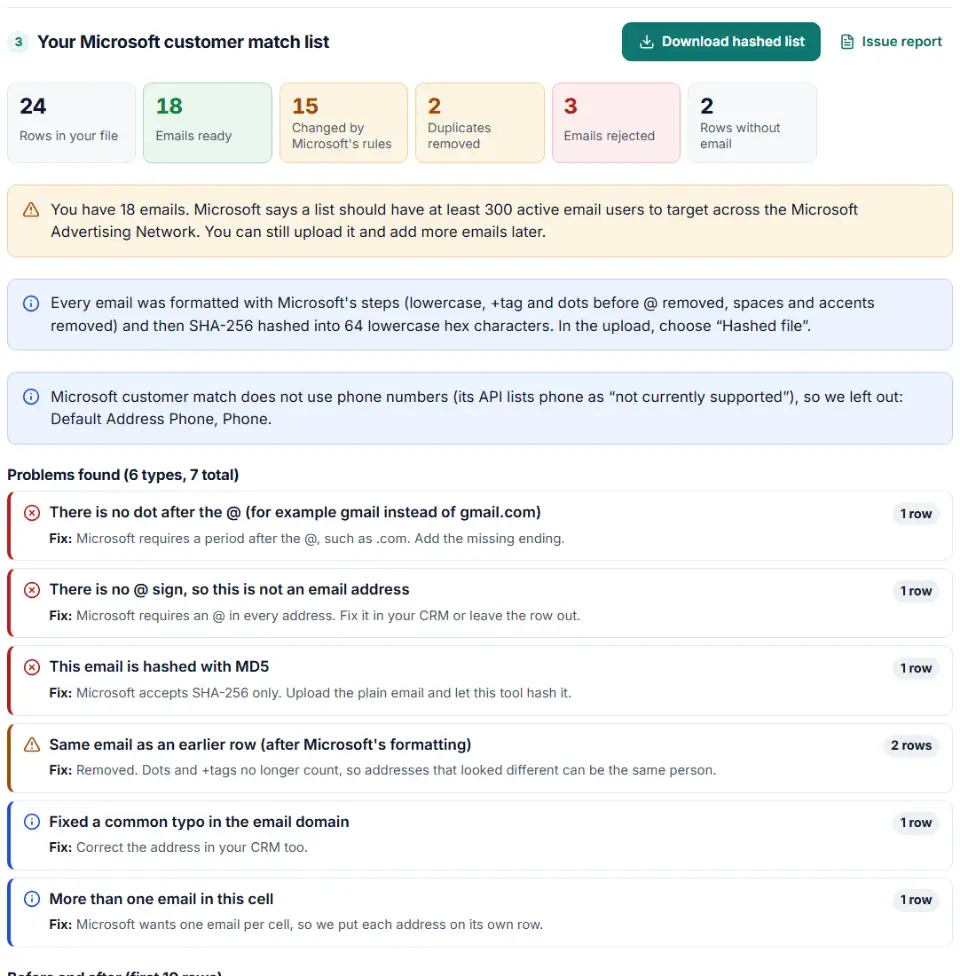
- Check the results. The chart shows how many addresses lost dots, +tags, capitals or accents. Rejected emails are listed with the reason.
- Download the CSV. One column, headed
Email, ready for the upload screen.
Why the same person can appear twice
Under Microsoft's rules, [email protected] and [email protected] become the same string. It happens when a customer signs up for a newsletter with a +tag and later buys with the plain address. The tool formats first, then removes these duplicates, so your count is honest.
Upload the list in Microsoft Advertising
- Go to Tools › Audiences and click Create.
- Give the audience a unique name and choose Customer match list as the type. Click Next.
- Choose Hashed file or Plain text to match your download, and upload the CSV.
- Tick the box confirming you comply with Microsoft's customer match policies and terms. Set the membership duration and sharing (all accounts or one account).
- Click Next, check the preview, then Apply changes to start the upload.
Wait 48 hours before you attach the list to a campaign or ad group. Keep your own copy of the file: Microsoft does not let you download an audience list again.
Microsoft Ads customer match problems and fixes
Customer match is not available in the account
Microsoft says the feature is not rolled out to everyone. Only direct advertisers and authorized representatives may upload customer emails, and Microsoft will not upload your data for you. If the option is missing, contact Microsoft support.
Terms not accepted
The upload stops if the policy checkbox is not ticked. Advanced users of the Bulk API can accept the terms inside the file with the Accept Customer Match Term field set to True; without it the API returns error 8003.
Hashed the Google way, uploaded to Microsoft
Google's customer match rules remove dots only for gmail.com and googlemail.com addresses. Microsoft removes them for every domain. A list hashed for Google often produces different hashes for Microsoft, so fewer people match. Hash from the plain list with this tool instead of reusing the Google file.
Phone numbers in the file
Extra columns are not part of Microsoft's format. A file with Email and Phone columns does not follow the “Email header, emails below” layout. The download here has the single column only.
Bought or partner lists
Third-party data is not allowed in customer match. Upload only customers who gave you their email directly. Data from a supported data partner goes through custom audiences instead.
Using Zapier
Microsoft's help says not to hash data you send through its Zapier connection, because Microsoft hashes it there. Use the plain export for Zapier and this tool for manual CSV uploads.
Frequently asked questions
What file does Microsoft Advertising customer match need?
A .csv file whose first line is the header Email, with one email address per row below it. Nothing else: no names, no phone numbers, no extra columns. This tool writes the one-column layout Microsoft’s help page describes. Microsoft also offers a template inside the customer match setup.
Does Microsoft Ads customer match accept phone numbers?
No. Only email addresses are matched. Microsoft’s API lists phone and CRM IDs as “not currently supported”, so this tool leaves phone columns out of the file.
How does Microsoft want emails cleaned before SHA-256 hashing?
Trim spaces at both ends, lowercase everything, remove anything between a + and the @, remove every period before the @, remove spaces and accents, and check there is an @ and a dot after it. Microsoft applies the dot and plus rules to every domain, not just Gmail. Then hash with SHA-256.
Why can't I see customer match in my Microsoft Ads account?
Microsoft’s help page says not everyone has the feature yet. It is also limited to direct advertisers and authorized representatives, and it is not allowed for sensitive categories. If the audience type is missing, ask your Microsoft account team.
What if my list has more than 4 million emails?
Each upload can hold up to 4 million entries. Split the list and upload each file to the same customer match list. This tool does the split for you.
How soon can I use a new customer match list in Microsoft Ads?
Microsoft says lists are ready to attach to campaigns and ad groups 48 hours after upload. The list should reach at least 300 active email users to target across the Microsoft Advertising Network.
Related tools and guide
-
Map any CRM or store export to Google's Customer Match columns, fix phones and emails, and download a plain or hashed CSV.
Google -
Get a health score for a customer list, fix email typos in one click and send the clean list to the Google, Meta or TikTok formatter.
GoogleMetaTikTok -
Turn a CRM export into a Microsoft Advertising offline conversion file with the exact template headers, checked click IDs and hashed email and phone.
Microsoft -
Build a Microsoft Advertising tracking template or final URL suffix, catch Google-only tags that break after an import and see the GA4 channel.
Microsoft -
Hash emails and phones the way Google and Meta want, and check a pre-hashed file for hashes that will never match.
GoogleMeta -
Fill LinkedIn's contact list CSV template from a HubSpot, Salesforce or Shopify export, with every rejected row explained.
LinkedIn
Need help setting this up? Talk to EmproIT