Tracking Template Builder for Microsoft Ads (Bing Ads)
Build a Microsoft Advertising tracking template or Final URL suffix with {lpurl}, UTM and custom parameters — and catch the Google-only tags that break after an import.
Tracking Template Builder for Microsoft Ads
1 Choose your tracking setup
2 Your template, suffix and checks
Fill in the settings above — your result appears here instantly.
Rules last checked: against the official pages:
- What tracking or URL parameters can I use? (Microsoft Advertising)
- Using a final URL suffix (Microsoft Advertising)
- Create an account tracking template (Microsoft Advertising)
- How do I add UTM tags to my landing page URL? (Microsoft Advertising)
How to use the tracking template builder for Microsoft Ads
This tracking template builder for Microsoft Ads writes your tracking template or Final URL suffix and checks every tag against Microsoft Advertising's list of tracking and URL parameters. It is built for advertisers who imported campaigns from Google Ads and want to know which tags still work in Bing.
- Choose the level. Account level covers everything. A campaign or ad group template replaces the account one completely — Microsoft doesn't merge levels.
- Say how you track. Without a third-party tracker, the parameters go in the Final URL suffix and no template is needed.
- Match your account settings. Tell the builder if Auto-tagging of UTM or of MSCLKID is on, so it can warn about duplicate tags.
- Pick the UTM values and tags.
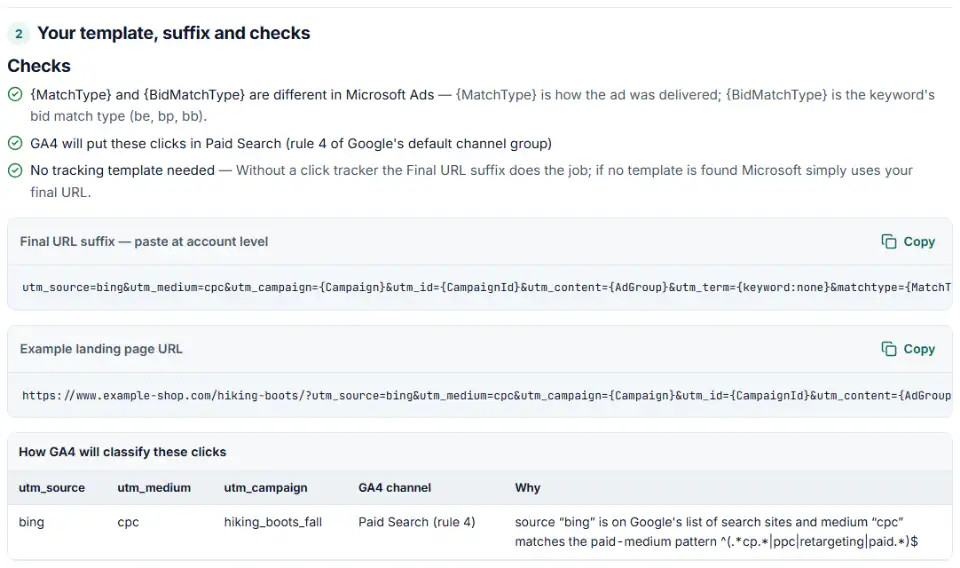
bing/cpcis the pair GA4 files under Paid Search; tags like{Campaign}fill in the names. - Copy and test. Copy the suffix or template, then fix anything in red.
Bing ads tracking template vs UTM auto-tagging
Microsoft's own UTM auto-tagging writes bing / cpc for Search but msads for Audience, Shopping and Performance Max ads and bing_video for Video. Those two sources are not on Google's lists, so GA4 files them under Display, Paid Other or Unassigned. The table in the tool shows each case when you switch the setting on.
What to do next in Microsoft Advertising
- Account level: hover over Campaigns and select Settings › Account level options. Paste into Final URL suffix (and Tracking template if you have one), then select Save.
- Campaign level: select Campaigns, choose the campaign, select Settings, and under Campaign URL options enter the Final URL suffix. Save.
- Ad group level: hover over Campaigns, select Ad groups, show the Final URL suffix column, hover over it and select the pencil icon.
- For Search campaigns make sure Final URL is chosen as the landing page — tracking templates don't work with old destination URLs.
- Test the click ID. Microsoft suggests adding
msclkid=01234567890123456789012345678901to your URL and checking it survives every redirect.
Microsoft Ads tracking template errors and fixes
Google-only tags after an import
Microsoft doesn't fill in tags it doesn't support — they stay in the URL, braces and all. {creative}, {gclid} and {placement} are common leftovers. Use {AdId} instead of {creative}.
{lpurl} not at the start
Microsoft recommends putting {lpurl} first. Anywhere else the final URL is escaped, so the question mark after it must be %3F and each ampersand %26.
utm_source=google on Bing ads
Microsoft doesn't allow competitor names in utm_source. Imported templates often still say google, which also puts your Bing clicks under Google in GA4.
Microsoft ads tracking template not working after a change
Parallel tracking is mandatory. Every tracker in the chain must use HTTPS and server-side redirects; a JavaScript or HTML redirect breaks it. Click trackers can't add landing page parameters either — that is what the Final URL suffix is for.
Why does my URL show msclkid twice?
Auto-tagging already adds msclkid. If you also put msclkid={msclkid} in a template or suffix, the ID appears twice. Keep only the auto-tagging setting.
Frequently asked questions
What is a tracking template in Microsoft Ads?
It is the URL Microsoft Advertising calls when someone clicks your ad, built from {lpurl} (your final URL) plus parameters, or from a third-party tracker’s URL that contains {lpurl}. You can set it at account, campaign, ad group, ad, keyword or sitelink level; the lowest level wins.
What is msclkid?
The Microsoft Click ID. When auto-tagging of MSCLKID is on — it is by default — Microsoft adds msclkid to your landing page URL on every click. It is a GUID, always 32 characters, and UET and offline conversion imports use it to connect conversions to clicks.
How do I add UTM parameters to Microsoft Ads?
Either type them yourself in a Final URL suffix (build one above), or turn on Auto-tagging of UTM under Campaigns › Settings › Account level options and let Microsoft add utm_source, utm_medium, utm_campaign, utm_content and utm_term. Don’t do both without checking, or the tags can be duplicated.
Should I use auto-tagging or UTM parameters in Microsoft Ads?
Keep MSCLKID auto-tagging on in every case — conversion tracking needs it. For UTMs, auto-tagging is quick but writes sources like msads and bing_video, which are not on Google’s GA4 source lists. For Search ads, typing your own utm_source=bing&utm_medium=cpc in a suffix gives Paid Search in GA4; for Audience ads use utm_medium=display, which GA4 files under Display (with bing, even cpm would count as Paid Search).
Do Google Ads tracking templates still work after importing into Microsoft Ads?
Partly. Microsoft reads tags without caring about capital letters, so {campaignid}, {adgroupid}, {matchtype} and {lpurl} still work. Google-only tags such as {creative} or {gclid} are not on Microsoft’s list and stay in the URL as text. Paste the imported template’s parameters into the builder to find them.
Why is my Microsoft Ads tracking template not working?
Common causes: no {lpurl}, a ? after an {lpurl} that is not at the start (it must be %3F), an http:// tracker (parallel tracking needs HTTPS at every hop), a JavaScript redirect in the tracking chain, or a template longer than 2,048 characters.
Related tools and guide
-
Build a Google Ads tracking template or final URL suffix with UTM and ValueTrack tags, catch errors before you save and see the GA4 channel.
Google -
Paste a link or a GA4 report and see the default channel for every row — with the rule that matched and a fix for Unassigned traffic.
Google -
Paste or upload your campaign links and find broken, inconsistent or Unassigned UTM tags — with a corrected link for every row.
GoogleMetaTikTokMicrosoft -
Build a UTM naming convention your team can follow: GA4-safe sources and mediums, a campaign pattern, a printable guide and a built-in link checker.
GoogleMetaTikTokMicrosoft -
Turn a CRM export into a Microsoft Advertising offline conversion file with the exact template headers, checked click IDs and hashed email and phone.
Microsoft -
Get Microsoft Advertising UET code for purchases and other goals, with revenue, currency, consent settings and enhanced conversions.
Microsoft
Need help setting this up? Talk to EmproIT