Offline Conversions CSV Builder for Microsoft Ads
Turn a CRM export into Microsoft Advertising's offline conversion import file: MSCLKIDs checked, times with a GMT offset, values and currencies cleaned, emails and phones hashed for enhanced conversions.
Offline Conversions CSV Builder for Microsoft Ads
- Upload
- Check
- Download
1 Add your CRM export
Choose a file or drag it here
CSV, Excel (XLSX), TSV or TXT export from your CRM or spreadsheet · up to 300 MB
2 Check the columns and options
Rules last checked: against the official pages:
- Tracking offline conversions (Microsoft Advertising)
- Enhanced conversions (Microsoft Advertising)
- Time Zones - Microsoft Advertising API (Microsoft Advertising)
- Auto-tagging of Microsoft Click ID - Microsoft Advertising (Ad click and tracking URL parameters)
How to build a Microsoft Ads offline conversions file
Microsoft Ads offline conversions let you report sales and qualified leads that happen after the click — on the phone, in your CRM or in person. This builder writes the upload file in the layout of the CSV template linked from Microsoft's tracking offline conversions help page, with its seven columns in their published order.
- Export your conversions. Each row needs the msclkid saved with the lead, the conversion date and time, and ideally the value. Emails and phones let Microsoft match rows without a click ID if you use enhanced conversions.
- Load the file. The tool finds columns such as msclkid, Microsoft Click ID, Close Date and Amount by name. A filled-in Microsoft template works too: its Parameters row is used to read the times.
- Set the goal name and time zone. The goal name must match your offline conversion goal exactly. The time zone turns your CRM times into times with a GMT offset.
- Pick the currency rule. Leave it blank to let Microsoft use the goal's currency, or pick a currency for rows that don't have one.
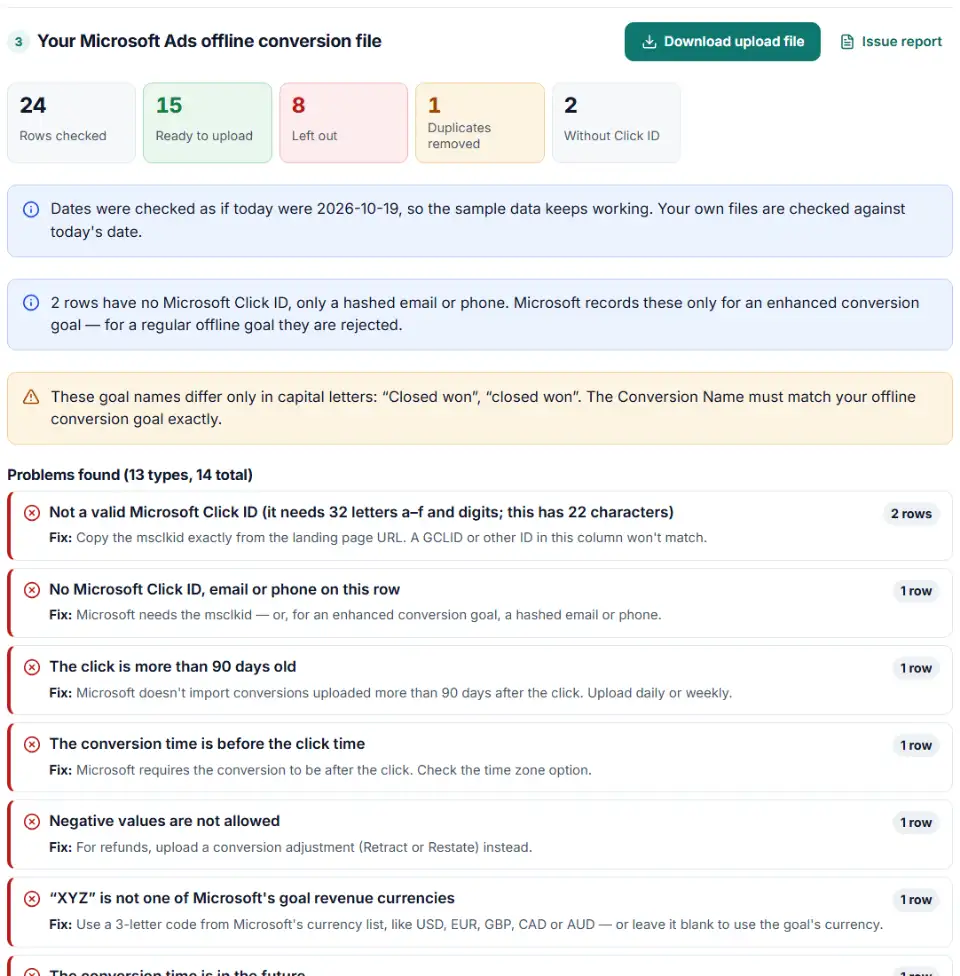
- Check, then download. Rows Microsoft would reject are listed with the reason and left out. The download copies Microsoft's own template line for line: its instruction rows, a byte order mark and 8 cells in every row.
MSCLKID, value and hashed email checks
- MSCLKID: pulled out of saved URLs, hyphens and { } removed from GUID-style values, and anything that isn't 32 hex characters flagged.
- Values: currency signs and thousands separators removed, rounded to Microsoft's limit of 3 decimals, and negative values stopped.
- Currency: checked against Microsoft's list of goal revenue currencies.
- Email: trimmed, lowercased, accents and spaces removed, the “+” tag and dots before the @ removed, then SHA-256 hashed — the steps on Microsoft's enhanced conversions page.
- Phone: converted to E.164 (like
+14255551234) and hashed.
How to import offline conversions into Microsoft Ads
- Create the goal first. Go to Conversions › Conversion goals, create a goal and choose Offline conversions. Its name is the Conversion Name in your file. Wait 2 hours before the first upload.
- Check auto-tagging. Microsoft turns on Microsoft Click ID auto-tagging when you create your first offline goal. Make sure your site saves the msclkid from the landing page URL into the lead record.
- Upload. Go to Conversions › Offline conversions, open the Uploads tab and click + Upload. Browse to the CSV and choose Upload and preview.
- Review and apply. Read the results and download the errors if there are any, then click Apply changes.
- Upload often. Microsoft recommends daily uploads so automated bidding gets fresh data. For regular imports, publish the file from a link and use a scheduled import.
Why Microsoft Ads (Bing) offline conversion uploads get rejected
“Uploaded successfully”, but conversions are missing
Microsoft notes that click IDs that are too old or from another account still pass the upload because their format is valid. Check that the clicks are under 90 days old and belong to the account you uploaded to.
The conversion name doesn't match a goal
The Conversion Name must match an existing offline conversion goal exactly, and goal names can't be reused. The results chart lists every name in your file so you can spot variants.
Unhashed email or phone detected
Microsoft returns an error when an offline file contains plain emails or phones. The builder always hashes them. If you hash in your own system, follow the same normalization first, or the hashes won't match.
Rows without a Microsoft Click ID are rejected
For a regular offline goal, every row needs a Click ID. Rows with only a hashed email or phone count only for an enhanced conversion goal — the builder tells you how many rows rely on that.
Conversion time before the click
The conversion must be after the click. A wrong time zone is the usual cause, so check the time zone option against your CRM's settings.
Very large files
Microsoft's help page states a 100,000-row limit for adjustment uploads. Keeping import files under that size is the safe choice, and daily uploads keep each file small anyway.
Frequently asked questions
What columns does the Microsoft Ads offline conversion file need?
Seven, in this order: Conversion Name, Conversion Time, Conversion Value, Conversion Currency, Microsoft Click ID, Hashed Email Address and Hashed Phone Number. Above them sit an instructions block and a Parameters:TimeZone= row. Microsoft’s template says not to add extra columns, and regular goals can leave the last two empty.
What does a valid Microsoft Click ID (MSCLKID) look like?
32 characters of digits and the letters a–f, with no hyphens — for example dd4afcccb1c94a4cad9544dd7e5006ab. Microsoft adds it to your landing page URL as msclkid= when auto-tagging is on, and it is unique to each ad click.
How do I set the time zone in a Microsoft Ads offline conversion file?
Write a GMT offset with a sign and four digits in the Parameters row, like Parameters:TimeZone=-0500, or put the offset in each Conversion Time, like 2017-06-01T13:00:00-0100. A row’s own offset is used before the Parameters value, so per-row offsets stay right across daylight saving changes.
Can I upload offline conversions to Microsoft Ads without an MSCLKID?
Only to an enhanced conversion goal, and only with a hashed email, phone or both on the row. For a regular offline goal, rows without a Microsoft Click ID are rejected. Google’s GCLIDs don’t work here at all.
Do emails and phone numbers need to be hashed for Microsoft Ads?
Yes. For offline conversions Microsoft says formatting and SHA-256 hashing are mandatory and must be done before the upload; plain values come back as errors. This builder does both in your browser.
How long should I wait after creating an offline conversion goal?
2 hours before the first upload. Microsoft also asks you to wait an hour after the click, and uploaded data can take up to six hours to show. Conversions uploaded more than 90 days after the click aren’t imported.
Related tools and guide
-
Split click IDs and UTM tags out of thousands of landing page URLs in one go, with no spreadsheet formulas.
GoogleMetaMicrosoftTikTokLinkedIn -
Build a Microsoft Advertising tracking template or final URL suffix, catch Google-only tags that break after an import and see the GA4 channel.
Microsoft -
Get Microsoft Advertising UET code for purchases and other goals, with revenue, currency, consent settings and enhanced conversions.
Microsoft -
Turn a customer export into a Microsoft Advertising customer match file, with emails cleaned the way Microsoft asks, hashed and de-duplicated.
Microsoft -
Build a ready-to-upload Google Ads offline conversions CSV from your CRM export, with time zones, values and 90-day checks done for you.
Google -
Turn CRM deals into LinkedIn's offline conversions file, with dates, amounts, currency and event types checked and emails hashed if you want.
LinkedIn
Need help setting this up? Talk to EmproIT