Click ID & URL Parameter Extractor
Pull gclid, gbraid, wbraid, fbclid, msclkid, ttclid, li_fat_id and UTM tags out of a column of landing page URLs into their own columns, ready for offline conversion uploads.
Click ID & URL Parameter Extractor
- Upload
- Check
- Download
1 Add your landing page URLs
Choose a file or drag it here
CSV, Excel, TSV or one URL per line · up to 300 MB
2 Check the columns and options
Rules last checked: against the official pages:
- About auto-tagging - Google Ads Help (Ad click and tracking URL parameters)
- ClickID and the fbp and fbc Parameters - Meta for Developers (Ad click and tracking URL parameters)
- Auto-tagging of Microsoft Click ID - Microsoft Advertising (Ad click and tracking URL parameters)
- URL builders: Collect campaign data with custom URLs (Google Analytics 4)
How to use the URL parameter extractor
This URL parameter extractor reads each landing page URL in your file and splits the ad click IDs and UTM tags into separate columns. It's the fast way to extract the gclid from a URL for hundreds of leads at once. Parameter names come from each platform's own pages — for example Google's auto-tagging help page for gclid.
- Export the URLs. Most CRMs and form tools store the page a lead arrived on, such as HubSpot's First page seen or a hidden “page URL” field in your form.
- Load the file or paste the list. The tool picks the URL column itself. If your CRM keeps a first and a last page, choose both — the first value found wins.
- Choose the columns. Keep your own columns to stay next to names and lead IDs, and switch on the extra click IDs if you advertise on X, Snapchat, Reddit or Pinterest.
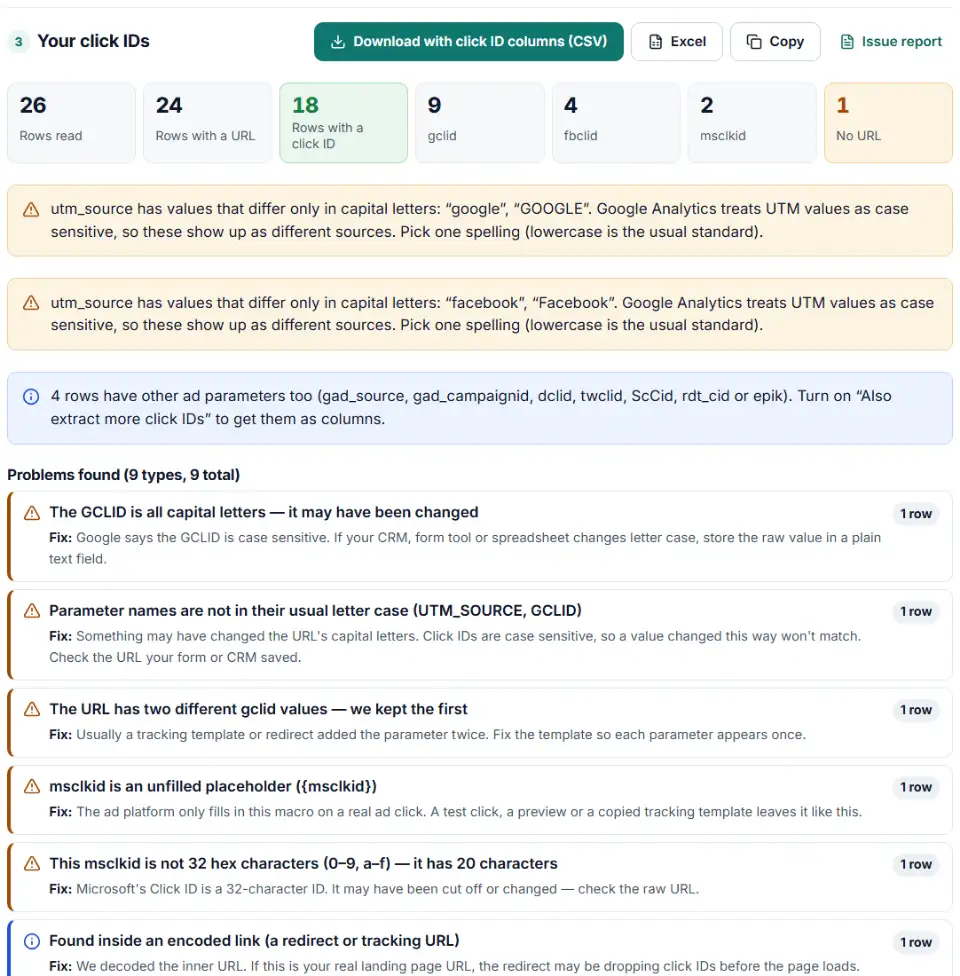
- Check the notes. The tool flags URLs saved in capitals, empty or unfilled parameters, duplicate click IDs in one URL and UTM tags spelled two ways.
- Download or continue. Download the CSV, copy it into a spreadsheet, or send it straight to the offline conversion builder for Google Ads.
Extract click IDs from CRM landing page URLs, whatever their shape
- Normal links, links without
https://and links inside notes like “Visited https://… then called”. - Redirect and tracking links where the real URL is encoded inside a parameter.
- Single-page apps that put parameters after the
#. - Links copied from HTML or emails with
&instead of&, parameters split by;, and a URL with a stray space. - Parameter names in any letter case — a name that isn't in its usual case is flagged, because the value may have been changed too.
What to do with each click ID
- gclid, gbraid, wbraid: send sales and qualified leads back to Google Ads with the offline conversion builder. Check the gclids first with the GCLID checker if your CRM is older than a few months.
- msclkid: use it in a Microsoft Advertising offline conversion file. Microsoft's Click ID is 32 characters long, so the extractor warns about values of any other length.
- fbclid: turn it into an
fbcvalue for the Meta Conversions API. Meta says not to change the click ID in any way. - ttclid and li_fat_id: keep them with the lead for TikTok and LinkedIn conversion uploads or their conversion APIs.
- UTM tags: use them to report leads by source and campaign in your CRM, and to spot campaigns that are tagged inconsistently.
Common problems when you split URL parameters into columns
The URL was saved without its query string
If every row reads like /pricing/ or has nothing after the page path, your form saved only the path. Change the hidden field to store the full address, including everything after the ?.
A redirect dropped the gclid
Google says redirects must pass the gclid through to the final landing page. If the click IDs only appear inside an encoded tracking link, the redirect may be losing them before your page loads.
“{msclkid}” or an empty gclid= in the URL
An unfilled macro or an empty value means the link came from a preview, a test or a template — not from a real ad click. The extractor leaves these cells blank so they don't end up in an upload.
The whole URL is in capital letters
Some systems change addresses to capitals. That breaks click IDs, which are case sensitive. The extractor still finds GCLID=, but flags the row so you can trace the cause.
Two different gclids in one URL
This happens when a tracking template adds a parameter the ad platform also adds. The first value is kept; fix the template so each parameter appears once.
utm_source spelled two ways
“Facebook” and “facebook” show up as two sources in Google Analytics. Decide on one spelling — lowercase is the usual choice — and update your ad links.
Frequently asked questions
How do I extract the GCLID from a landing page URL?
Paste or upload the URLs above and the gclid appears in its own column. For a single cell in Google Sheets you could use =REGEXEXTRACT(A2,"[?&]gclid=([^&#]+)"), but a formula misses URLs inside notes, encoded redirect links and parameters after a #, which this tool reads.
Which click IDs can I pull out of my URLs?
By default gclid, gbraid, wbraid (Google Ads), fbclid (Meta), msclkid (Microsoft), ttclid (TikTok) and li_fat_id (LinkedIn), plus five UTM tags. An option adds gad_source, gad_campaignid, dclid, twclid, ScCid, rdt_cid, epik and utm_id.
What is the fbclid parameter?
The click ID Meta adds to your URL when someone clicks a Facebook or Instagram ad. The Meta Conversions API doesn’t take it raw: it wants an fbc value built from it, fb.1.<time in milliseconds>.<fbclid>. The fbc builder turns the fbclid column into fbc values.
What is the ttclid parameter?
TikTok’s click ID. TikTok adds it to the landing page URL when someone clicks an ad, each one is unique, and it stays valid for the click-through attribution window set in TikTok’s Attribution Manager. The TikTok Pixel also stores it in a first-party cookie named ttclid.
Are click IDs case sensitive?
Yes. Google says the GCLID and GBRAID are case sensitive, and Meta says not to change the fbclid in any way. That’s why the extractor copies every click ID exactly, keeping its capital letters. The only change is that URL-encoding like %2D is decoded (and reported). UTM values are decoded too, so spring+sale becomes spring sale.
What do I do with the extracted click IDs?
Send them back with your sales: gclids to a Google Ads offline conversion upload, msclkids to Microsoft Advertising, fbclids to the Meta Conversions API as fbc. See the steps below.
Why are there no gclids in my landing page URLs?
Usually auto-tagging is off in Google Ads, a redirect drops the parameters, or the CRM saved the page address without its query string. Google also notes that iOS users who opt out of tracking may arrive without a gclid.
Related tools and guide
-
Build a ready-to-upload Google Ads offline conversions CSV from your CRM export, with time zones, values and 90-day checks done for you.
Google -
Turn a CRM export into a Microsoft Advertising offline conversion file with the exact template headers, checked click IDs and hashed email and phone.
Microsoft -
Find broken, changed and expired GCLIDs in your CRM export before Google Ads rejects your offline conversion upload.
Google -
Paste an ad click link to see what each parameter means (gclid, gad_source, srsltid and more), spot stripped click IDs and get a clean URL.
GoogleMetaMicrosoftTikTok -
Get one script that saves ad click IDs and UTM tags when visitors land and fills your form's hidden fields, ready for offline conversion uploads.
GoogleMetaMicrosoftTikTokLinkedIn -
Build Meta's fbc click value from an ad click link, and bulk-check fbc and fbp values for the time, case and hashing mistakes that break matching.
Meta
Need help setting this up? Talk to EmproIT