UET Tag Event Code Generator for Microsoft Ads
Generate Microsoft UET tag code — window.uetq.push for custom event goals, variable revenue, purchases and dynamic remarketing, plus Consent Mode and enhanced conversions lines — or check the UET code you already have.
UET Event Code Generator for Microsoft Ads
1 Build or check
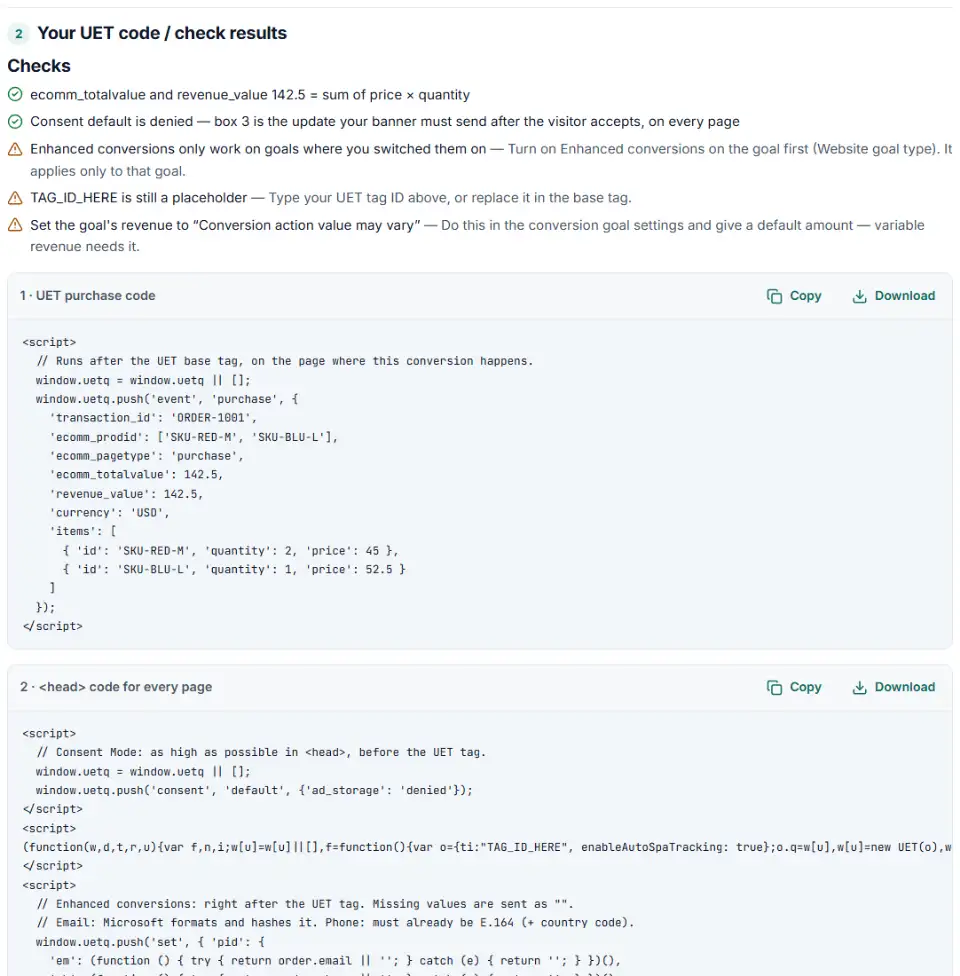
2 Your UET code / check results
Fill in the settings above — your result appears here instantly.
Rules last checked: against the official pages:
- Update your UET tags to the new syntax (Microsoft Advertising)
- How to track custom events with UET (Microsoft Advertising)
- How to report variable revenue with UET (Microsoft Advertising)
- Setting up UET for Consent Mode (Microsoft Advertising)
How to use the event generator for the Microsoft UET tag
The Microsoft UET tag reports page loads on its own; conversions with an action or a changing amount need a window.uetq.push line. This generator writes it in Microsoft's current syntax, following How to track custom events with UET and How to report variable revenue with UET.
- Pick what to report: a custom event goal, revenue for a destination URL goal, a purchase with products, or a dynamic remarketing page.
- Match your goal. Use the same action, category and label you set on the conversion goal in Microsoft Advertising.
- Add the amount and currency. Decimal commas are turned into periods and currencies into capitals for you.
- Tick consent and enhanced conversions if you need them, and add your tag ID to get the base tag too.
- Copy both boxes, or paste an existing setup into Check my code.
What to do next: install the UET code
The base tag goes on every page, in the <head> or right after the opening <body> tag. Copy your real tag from Conversions › UET tag › View tag if you don't use box 2.
Plain HTML
- Paste box 2 into the shared head of your site: consent default first, then the tag, then the enhanced conversions line. Box 3 runs from your banner when a visitor accepts.
- Paste box 1 on the confirmation page or next to the button it tracks.
WordPress and WooCommerce
- Add box 2 with a header code plugin. If a consent plugin already talks to UET, skip the consent line rather than sending two.
- On WooCommerce's order-received page, print the purchase push with the order number, line items and total.
Shopify
- Shopify's new Thank you page ignores additional scripts, so a purchase push must come from an app pixel or a custom pixel (Settings › Customer events).
- In a custom pixel, read the total from
event.data.checkout.totalPrice.amountand the currency fromevent.data.checkout.currencyCodein thecheckout_completedevent.
UET tag in Google Tag Manager
- Put the consent default and base tag in a Custom HTML tag on All Pages (or Consent Initialization for the consent line).
- Add a Custom HTML tag per event with box 1, fired by its page or click trigger after the base tag.
- Preview, then publish.
Check it with the UET Tag Helper browser extension: every page load sends a request to bat.bing.com/action/0?ti=…, and each custom event sends one more. The UET dashboard also shows whether consent signals arrive.
Common Microsoft UET errors and fixes
Why is variable revenue not tracking in Microsoft Ads?
Check the format first: 12,34 must be 12.34, and 'usd' must be 'USD'. Then check the goal: its revenue must be set to Conversion action value may vary, with a default amount.
Old ea / ec / gv syntax
Pushes like {'ec': …, 'ea': …, 'gv': …} come from the old syntax. Rewrite them as 'event', action, {…} with event_category, revenue_value and currency.
Revenue mixed with a custom event
A destination URL goal wants an empty action and only revenue and currency. If you also send category or label, decide which goal type the conversion uses and match it.
“uetq is not defined” before the tag
A push placed above the base tag fails unless window.uetq = window.uetq || []; comes first. The generated code always includes that line.
A broken bat.js address
Help pages wrap long lines, and a copied tag can end up with a space inside "//bat.bing.com/bat.js". The tag then never loads.
No consent signal for European visitors
Without Consent Mode or TCF, conversions and remarketing from the EEA, UK and Switzerland stop. Use one of them — Microsoft says never both.
Frequently asked questions
What is the Microsoft UET tag?
UET (Universal Event Tracking) is Microsoft Advertising’s site tag. The base tag loads on every page and reports page loads to bat.bing.com; extra window.uetq.push lines report actions such as purchases or sign-ups, which your conversion goals and remarketing lists use.
How do I send a custom event with UET?
window.uetq.push('event', 'generate_lead', {'event_category': 'leads', 'event_label': 'quote form', 'event_value': 1}); — the command event always comes first, then the action, then the details. Run it when the action is complete, for example from a button’s click handler.
How do I track variable revenue with UET?
Add revenue_value and currency to the push. For a destination URL goal, the action stays empty: window.uetq.push('event', '', {'revenue_value': 49.90, 'currency': 'USD'});. Then set the goal’s revenue to Conversion action value may vary, with a default amount.
Why is my variable revenue not showing in Microsoft Ads?
The usual causes: a decimal comma (12,34) instead of a period, a currency in lower case, the old gv syntax, a goal still set to a fixed value, or revenue sent with an event action to a destination URL goal. Paste your code into Check my code to find which.
How does UET consent mode work?
You send window.uetq.push('consent', 'default', {'ad_storage': 'denied'}) high in the head, and 'update' with granted once the visitor accepts. Since 5 May 2025 Microsoft enforces a consent signal for visitors in the EEA, the UK and Switzerland. Without a default, UET uses granted in most countries but denied where consent is enforced.
Can I add the UET tag with Google Tag Manager?
Yes. Put the base tag in a Custom HTML tag that fires on all pages, and each event push in its own tag with a trigger. Google Tag Manager is also on Microsoft’s list of tools that can pass consent signals to UET.
Related tools and guide
-
Turn a CRM export into a Microsoft Advertising offline conversion file with the exact template headers, checked click IDs and hashed email and phone.
Microsoft -
Build a Microsoft Advertising tracking template or final URL suffix, catch Google-only tags that break after an import and see the GA4 channel.
Microsoft -
Turn a customer export into a Microsoft Advertising customer match file, with emails cleaned the way Microsoft asks, hashed and de-duplicated.
Microsoft -
Get LinkedIn Insight Tag and conversion code for button clicks and form sends, with order value, currency and an event ID for the Conversions API.
LinkedIn -
Get Google consent mode v2 code for your cookie banner, with defaults for EEA, UK and Swiss visitors and a check for tags that fire before consent.
Google -
Get Google Ads conversion tracking code with the real order value and ID, for a thank-you page, WooCommerce or Tag Manager, and check code you have.
Google
Need help setting this up? Talk to EmproIT