Insight Tag Conversion Tracking Code Generator for LinkedIn Ads
Generate the LinkedIn Insight Tag and event-specific window.lintrk conversion code for button clicks, form submits and page loads — with a dynamic value, currency and an event_id for the Conversions API — or check the code you already have.
Insight Tag Conversion Code Generator for LinkedIn
1 Build or check
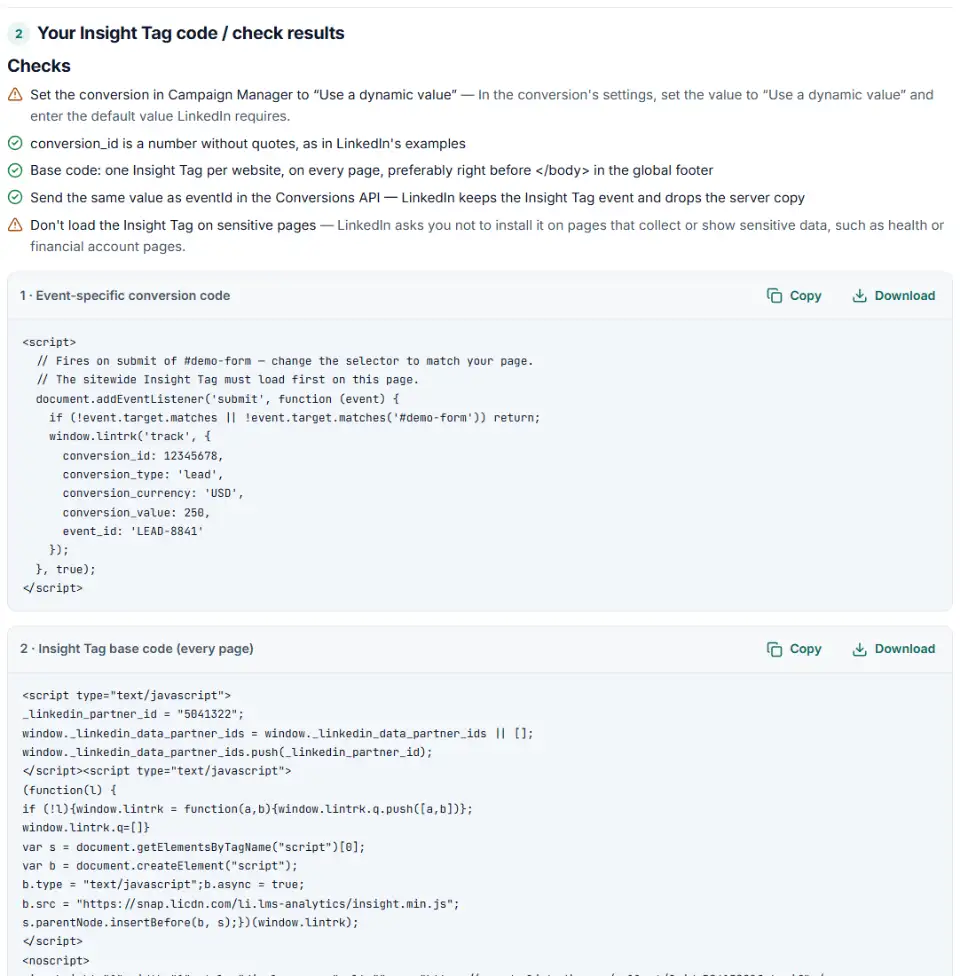
2 Your Insight Tag code / check results
Fill in the settings above — your result appears here instantly.
Rules last checked: against the official pages:
- Add the LinkedIn Insight Tag to your website (LinkedIn Ads)
- Set up Conversion Tracking for Insight Tag conversions (LinkedIn Ads)
- Send dynamic conversion values with your Insight Tag (LinkedIn Ads)
- Deduplication for Conversion Tracking (LinkedIn Ads)
How to use the conversion tracking generator for the LinkedIn Insight Tag
LinkedIn Insight Tag conversion tracking needs two pieces: the sitewide base code and, for actions like clicks and form submits, an event-specific lintrk call. This generator writes both from your IDs, following LinkedIn's help article Set up Conversion Tracking for Insight Tag conversions.
- Choose the method. Event-specific for a button, link or form; page load when the conversion is reaching a thank-you page.
- Enter the conversion ID from Campaign Manager, and the selector of the button or form that should fire it.
- Add a dynamic value if a lead or sale is worth a different amount each time.
- Add an event ID only if your server also reports the conversion through the Conversions API.
- Copy the code. Use Check my code to find why an existing conversion stays unverified.
What to do next: install the tag and verify the conversion
LinkedIn wants the base code on every page of the domain, preferably right before </body> in the global footer — one Insight Tag per website.
Plain HTML
- Add box 2 to your shared footer template.
- Paste box 1 below it on the page with the button or form. The click listener waits for the visitor, so nothing fires on load.
WordPress
- Add the base code to the footer with a header-and-footer code plugin or your child theme.
- For form plugins, choose I'll call it from my own code and call the function it gives you from the plugin's success hook, so failed submissions don't count.
Shopify
- The base code can go in your theme's layout (Online Store › ⋯ › Edit code); duplicate the theme before editing.
- Conversions on the new Thank you page need an app pixel or a custom pixel under Settings › Customer events, because additional scripts no longer run there.
Google Tag Manager
- Base code: a Custom HTML tag on All Pages.
- Conversion: a second Custom HTML tag with only the lintrk line, fired by a Click or Form Submission trigger, sequenced after the base code. LinkedIn's GTM guide covers its own setup screens.
Then turn on enhanced conversion tracking (first-party cookies) for the tag, and give LinkedIn up to 24 hours to update the conversion's status. Note that LinkedIn also reads the Microsoft UET tag now: if both tags report the same action at the same time, LinkedIn counts it once.
Common LinkedIn conversion tracking errors and fixes
LinkedIn conversion tracking unverified
Usually the base code is missing on that page, uses the wrong partner ID, or the button never ran the code. Open the page, click the button, and check the browser console for errors before waiting another day.
Conversion code before the base code
LinkedIn says the sitewide tag must load first. A lintrk call placed in the <head> above a footer tag can run too early.
Curly quotes
Code pasted through email or a word processor often gets “smart” quotes. LinkedIn's setup page warns about this — retype them as straight quotes.
Wrong field names and an unquoted currency
conversionId, value or currency: USD don't work. The fields are conversion_id, conversion_value and conversion_currency: 'USD'.
Image pixel conversions
Image pixels rely on third-party cookies only and can't use enhanced conversion tracking. Switch them to event-specific conversions.
Dynamic value not showing
Dynamic values only work when the conversion in Campaign Manager is set to Use a dynamic value, which also needs a default value. Check that setting first.
Frequently asked questions
How does LinkedIn Insight Tag conversion tracking work?
The Insight Tag base code runs on every page of your site. A conversion is then counted either when someone loads a chosen page (page load) or when your code calls window.lintrk('track', { conversion_id: … }) after a click or form submit (event-specific). The base code must be on the page in both cases.
What is an event-specific conversion in LinkedIn?
A conversion tied to an action instead of a page — a button click, a download, a form submit. Campaign Manager gives it a numeric conversion ID, and one line of code sends it. It is the method LinkedIn recommends over the old image pixel, which only uses third-party cookies.
Why does my LinkedIn conversion say Unverified?
Usually LinkedIn hasn’t received the tag or the event yet. Validation can take from a few minutes to 24 hours after the page loads. If it stays unverified, check that the base code is on the page with the right partner ID, that it loads before the lintrk call, and that the button or form really triggers the code.
How do I track a button click as a LinkedIn conversion?
Create an event-specific conversion in Campaign Manager, copy its conversion ID, and run window.lintrk('track', { conversion_id: 12345678 }); when the button is clicked. Choose When a button is clicked above and the tool wraps the call in a click listener for your button’s selector.
Can I set up LinkedIn conversion tracking in Google Tag Manager?
Yes — Google Tag Manager is one of the tag managers LinkedIn supports. Fire the base code on all pages, then fire the conversion code with a click or form trigger, and keep the base code first.
Does LinkedIn deduplicate Insight Tag and Conversions API conversions?
Yes, when both carry the same ID: event_id in the Insight Tag and eventId in the Conversions API. LinkedIn then counts the Insight Tag event and discards the server copy, so the Insight Tag count is usually the higher one.
Related tools and guide
-
Turn CRM deals into LinkedIn's offline conversions file, with dates, amounts, currency and event types checked and emails hashed if you want.
LinkedIn -
Build LinkedIn tracking links with the new campaign, ad set and ad name macros, convert strings from before the 2025 rename and see the GA4 channel.
LinkedIn -
Fill LinkedIn's contact list CSV template from a HubSpot, Salesforce or Shopify export, with every rejected row explained.
LinkedIn -
Get Microsoft Advertising UET code for purchases and other goals, with revenue, currency, consent settings and enhanced conversions.
Microsoft -
Get Reddit pixel code for purchases, leads, sign-ups and the other standard events, with value, products and a conversion ID that stops double counts.
Reddit -
See every tag in a Google Tag Manager export in one Excel file, with unused, paused and outdated items flagged and two versions compared.
Google
Need help setting this up? Talk to EmproIT