Dynamic UTM Parameters Builder for LinkedIn Ads
Build LinkedIn dynamic UTM parameters with {{CAMPAIGN_NAME}}-style values for the new campaign / ad set / ad names, or convert an old string written before LinkedIn's October 2025 rename.
Dynamic UTM Builder for LinkedIn Ads
1 Build or convert
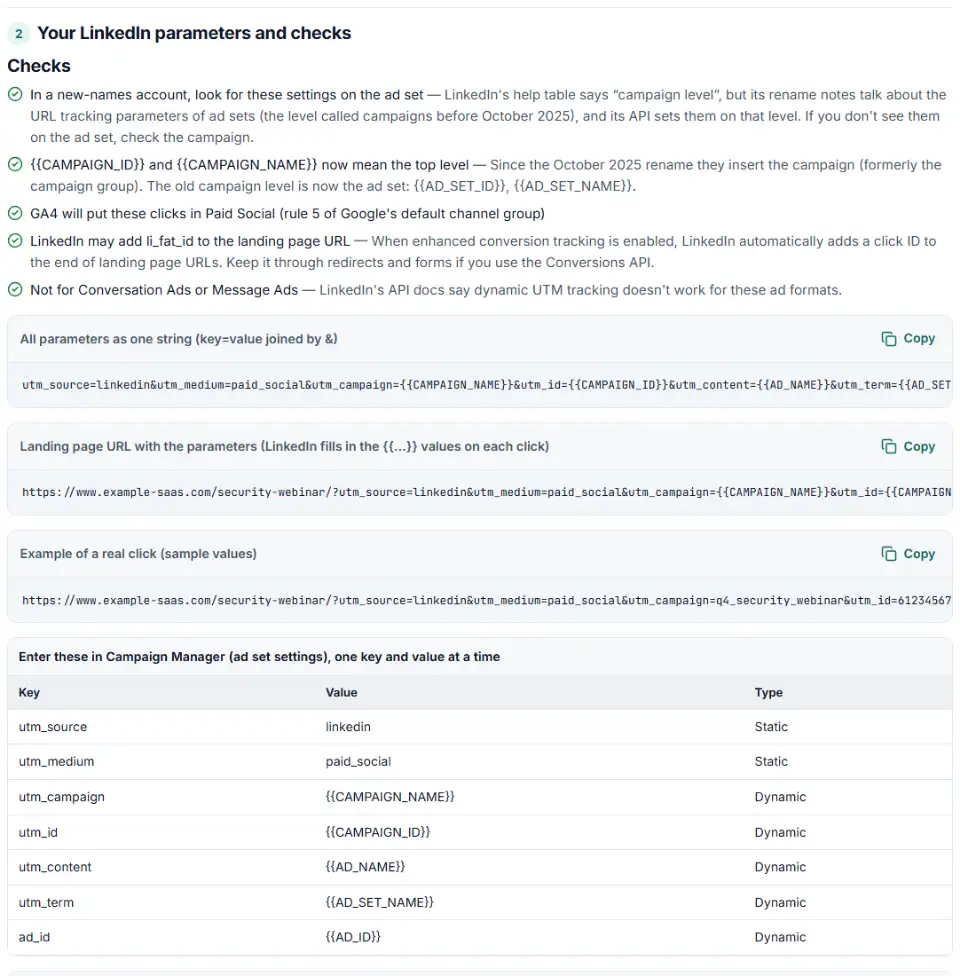
2 Your LinkedIn parameters and checks
Fill in the settings above — your result appears here instantly.
Rules last checked: against the official pages:
- URL tracking parameters in Campaign Manager (LinkedIn Ads)
- Changes to campaign hierarchy in Campaign Manager (LinkedIn Ads)
- Dynamic UTM Tracking - LinkedIn Marketing API (Microsoft Learn, updated 2026-08-17) (LinkedIn Ads)
- Default channel group (Analytics Help) (Google Analytics 4)
How to build LinkedIn dynamic UTM parameters
LinkedIn dynamic UTM parameters are values like {{CAMPAIGN_NAME}} that Campaign Manager swaps for the real name or ID on every click. This builder follows LinkedIn's URL tracking parameters help page: capital letters, double curly brackets, and only the characters LinkedIn accepts. Then it shows the GA4 channel your clicks will get.
- Say which names your account shows. If you see “ad sets”, keep the new names. If you still see “campaign groups”, pick the old names — the tool writes the matching values.
- Choose where the parameters go. Account level tags everything at once. One ad set (a campaign in older accounts) tags just its ads. A single ad can only take fixed values.
- Mind LinkedIn's character rules. Values may only use letters, numbers, _, + and -. LinkedIn's own example writes spaces as +, but GA4 turns + back into a space, so stick to underscores.
- Copy the key and value table. Campaign Manager asks for each key and its value separately; the one-line string is there for your notes, the API and the preview.
- Converting an old setup? Switch to “Check or convert”, paste the string you used before October 2025, and copy the version with the new names.
What to do next in Campaign Manager
- Open the level you chose. For everything at once, use the ad account's URL tracking parameters. For one group of ads, edit the ad set — in accounts that still show campaign groups, that is the campaign. Fixed values for one ad go on the ad.
- Add one key and value per row. Type each key from the table, then its value. Dynamic values are typed exactly as shown, braces included.
- Remember how levels add up. LinkedIn combines account, campaign and ad parameters into one string. Campaign parameters don't remove anything already in the ad's destination URL, so don't put the same key in both places.
- Click a live ad and look at the address bar. You should see real names instead of braces, plus
li_fat_idif enhanced conversion tracking is on. - Check GA4 the next day. Open Traffic acquisition and look for linkedin / paid_social in the Paid Social row.
Common LinkedIn URL parameter errors
Old names like {{CREATIVE_ID}} and {{CAMPAIGN_GROUP_NAME}}
Strings saved before October 2025 often still use the creative and campaign group names. LinkedIn switched existing ad sets for you, but when you create or edit an ad set you must use the new names. Paste the old string in convert mode to get {{AD_ID}} and {{CAMPAIGN_NAME}}.
{{CAMPAIGN_ID}} now reports a different level
This one kept its spelling but changed meaning: it used to send the middle level and now sends the top level. LinkedIn switched existing ad sets for you, so live setups keep reporting the same level. The risk is a string you copy from old notes into a new or edited ad set — there, {{CAMPAIGN_ID}} now means something else. Use {{AD_SET_ID}} for the middle level.
Why LinkedIn UTM parameters are missing in GA4
Usually the value was written {{campaign_name}} or {CAMPAIGN_NAME}. LinkedIn only fills in capital letters inside two braces on each side, so GA4 receives the braces as plain text — or nothing useful at all.
Spaces, dots or % signs in a value
LinkedIn's value field takes letters, numbers, underscores, plus signs and hyphens only. spring.sale and 50%off are refused. LinkedIn's own example uses + for a space, but GA4 then shows a space, so underscores give cleaner reports.
Dynamic values added to a single ad
LinkedIn accepts dynamic values on the account or a campaign, not on one ad. Move the dynamic keys up a level and leave the ad with fixed values such as an offer code.
The click ID removed by a redirect
Some landing page tools and redirects drop unknown parameters. If li_fat_id disappears, LinkedIn's Conversions API can't match offline leads to the click.
Frequently asked questions
What are LinkedIn dynamic UTM parameters?
They are values in double curly brackets, written in capital letters, that LinkedIn fills in when someone clicks your ad. Write utm_campaign={{CAMPAIGN_NAME}} once and every click reports the real campaign name. Static parameters, like utm_source=linkedin, stay the same on every click.
How do I add UTM parameters to LinkedIn ads?
Build them above, then add them in Campaign Manager as key and value pairs. Static parameters can go on the account, the middle level or a single ad. Dynamic parameters go on the account or the middle level only — LinkedIn’s help calls it the campaign level, and since the October 2025 rename that level is shown as the ad set. LinkedIn joins all levels into one string on the click.
Which macros can I use in LinkedIn ad URLs?
Since the October 2025 rename: {{ACCOUNT_ID}}, {{ACCOUNT_NAME}}, {{CAMPAIGN_ID}}, {{CAMPAIGN_NAME}}, {{AD_SET_ID}}, {{AD_SET_NAME}}, {{AD_ID}} and {{AD_NAME}}. Accounts that still show campaign groups use the old set with {{CAMPAIGN_GROUP_NAME}} and {{CREATIVE_ID}}. The table in the tool shows both lists side by side.
Why did {{CAMPAIGN_ID}} change meaning on LinkedIn?
LinkedIn renamed its levels: campaign groups became campaigns, campaigns became ad sets, and creatives became ads. {{CAMPAIGN_ID}} used to insert the old campaign (now the ad set). It now inserts the new campaign (the old campaign group). Use {{AD_SET_ID}} for the middle level.
What is li_fat_id in my URL?
It is the LinkedIn First-Party Ad Tracking ID, a click ID. LinkedIn adds it to the end of your landing page URL when enhanced conversion tracking is on for your Insight Tag, which is the default for new tags. It does not change your UTM values. Keep it if you send conversions through the Conversions API.
How do I track LinkedIn ads in Google Analytics?
Tag the account or each ad set with utm_source=linkedin and utm_medium=paid_social, and let {{CAMPAIGN_NAME}} fill in the campaign. GA4’s list of social sites includes LinkedIn, so these clicks show under Paid Social.
Related tools and guide
-
Tag every Facebook and Instagram ad with one URL parameters string that fills in campaign and ad names, with syntax checks and a GA4 channel preview.
Meta -
Build TikTok tracking links with macros that fill in campaign and ad names, including Smart+ ads, with # sign and duplicate checks and the GA4 channel.
TikTok -
Build a UTM naming convention your team can follow: GA4-safe sources and mediums, a campaign pattern, a printable guide and a built-in link checker.
GoogleMetaTikTokMicrosoft -
Paste a link or a GA4 report and see the default channel for every row — with the rule that matched and a fix for Unassigned traffic.
Google -
Upload a sheet, get every link tagged: lowercase values, no spaces, existing parameters kept, the GA4 channel per link and a CSV to paste back.
GoogleMetaTikTokMicrosoftLinkedInAny platform -
Turn CRM deals into LinkedIn's offline conversions file, with dates, amounts, currency and event types checked and emails hashed if you want.
LinkedIn
Need help setting this up? Talk to EmproIT