UTM Macros Builder for TikTok Ads
Build TikTok UTM parameters with macros like __CAMPAIGN_NAME__, including the Smart+ ad-level macros, and check them against TikTok's rules and GA4's channel rules.
UTM Macro Builder for TikTok Ads
1 Choose your macros
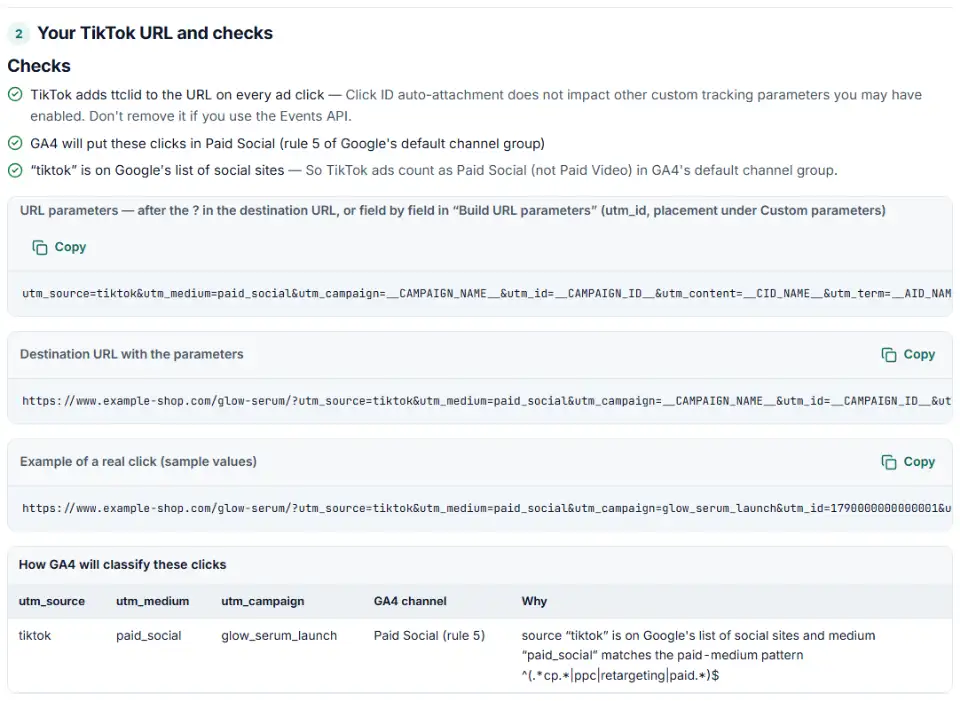
2 Your TikTok URL and checks
Fill in the settings above — your result appears here instantly.
Rules last checked: against the official pages:
- About UTM parameters (Last updated: February 2026) (TikTok Ads)
- How to add URL parameters to your website URL in TikTok Ads Manager (Last updated: December 2025) (TikTok Ads)
- Best practices when adding UTM parameters (Last updated: September 2025) (TikTok Ads)
- Default channel group (Analytics Help) (Google Analytics 4)
How to build TikTok UTM macros
TikTok UTM macros are placeholders like __CAMPAIGN_NAME__ that TikTok fills in on every ad click. This builder uses the macro list from TikTok's About UTM parameters help page, applies the rules from its UTM best-practices page, and shows how GA4 will group the clicks.
- Tell the builder about your campaign. Tick Smart+ if the campaign uses the upgraded Smart+ experience — it adds ad-level macros.
- Keep source and medium fixed.
tiktokandpaid_socialgive Paid Social in GA4. Macros belong in campaign, content and term. - Pick a macro for each detail. Names make reports readable; IDs survive renaming.
- Type an example campaign name. The GA4 table uses it, since a name with “shop” in it moves clicks to Paid Shopping.
- Copy the parameters. Paste them in Build URL parameters, or add the full destination URL. Fix anything in red first.
What to do next in TikTok Ads Manager
- Open the ad. In the Ad details section, enter your destination URL.
- Click Edit under the Preview button, then Build URL parameters.
- Fill in the fields. Copy each UTM value into its field; add anything else under Custom parameters › Add.
- Decide on Autodetect. When it is on, TikTok adds detected parameters to catalog product links as well.
- Check the preview and click Apply. Copying an ad later copies its URL parameters too, so new ads keep the same tags.
TikTok UTM parameter mistakes and fixes
A # in the destination URL
TikTok doesn't accept # in URL links: everything after it is dropped. Single-page sites that use #section anchors lose every parameter written after the anchor.
TikTok UTM macros not replaced
Each macro needs two underscores on both sides. TikTok's own Smart+ reporting page prints _CAMPAIGN_NAME__ with one leading underscore — copying it gives a macro that never fills in. The ad-level __ADID_V2__ macros also stay empty outside upgraded Smart+ campaigns.
Source and medium swapped
utm_source=paid_social&utm_medium=tiktok is one of the mistakes TikTok lists. Source is the site; medium is the kind of traffic.
Another platform's source value
Copying a Facebook template leaves utm_source=facebook on TikTok ads, so GA4 credits Meta. Change it to tiktok.
The same parameter twice
A link with utm_source=tiktok and later utm_source=tiktokads may report only the last value. Check for this if you use Auto-attach and also type UTMs by hand.
Capital letters
TikTok reminds you that UTM values are case sensitive: “TikTok” and “tiktok” become two rows in GA4.
Frequently asked questions
What are TikTok UTM macros?
They are placeholders with two underscores on each side that TikTok replaces when someone clicks your ad. TikTok’s list: __CAMPAIGN_NAME__, __CAMPAIGN_ID__, __AID_NAME__, __AID__ (ad group), __CID_NAME__, __CID__ (creative), __PLACEMENT__, and for upgraded Smart+ campaigns __ADID_V2_NAME__ and __ADID_V2__ (ad).
How do I add UTM parameters to TikTok ads?
In TikTok Ads Manager, go to the Ad details section, enter the destination URL, click Edit under the Preview button, then Build URL parameters. Type the UTM values (macros included), add custom parameters under Custom parameters, check the preview and click Apply.
What does __CAMPAIGN_NAME__ do in a TikTok ad URL?
TikTok swaps it for the name of the campaign the click came from. Used as utm_campaign=__CAMPAIGN_NAME__, every ad in every campaign reports its own campaign name in GA4 without you editing each URL.
What is ttclid in my URL?
It is the TikTok Click ID. TikTok adds ttclid to the landing page URL when someone clicks an ad. Each one is unique and TikTok says it does not affect your other tracking parameters. Keep it if you send events through the TikTok Pixel or Events API.
Why are my TikTok macros not being replaced?
Usually the macro is misspelled: one underscore instead of two, a name that isn’t on TikTok’s list, or a Smart+ ad macro (__ADID_V2__) in a campaign that isn’t upgraded Smart+. Other platforms’ tags such as {campaignid} are never replaced by TikTok either.
What utm_medium should I use for TikTok ads?
Use a medium that GA4 counts as paid, such as paid_social, paid or cpc, together with utm_source=tiktok. TikTok is on Google’s list of social sites, so that pair lands in Paid Social. A medium like tiktok_ads or social_paid ends up Unassigned.
Related tools and guide
-
Tag every Facebook and Instagram ad with one URL parameters string that fills in campaign and ad names, with syntax checks and a GA4 channel preview.
Meta -
Paste a link or a GA4 report and see the default channel for every row — with the rule that matched and a fix for Unassigned traffic.
Google -
Build a UTM naming convention your team can follow: GA4-safe sources and mediums, a campaign pattern, a printable guide and a built-in link checker.
GoogleMetaTikTokMicrosoft -
Paste or upload your campaign links and find broken, inconsistent or Unassigned UTM tags — with a corrected link for every row.
GoogleMetaTikTokMicrosoft -
Build Snapchat ad tracking links with Snap's macros in one clean string, checked for typos, Dynamic Ads and Auto-UTM conflicts, plus the GA4 channel.
Snap -
Turn one event or a whole sheet of them into TikTok Events API requests, with email and phone hashed, times in seconds and a matching pixel call.
TikTok
Need help setting this up? Talk to EmproIT