UTM Parameters Builder for Snapchat Ads
Build Snapchat UTM parameters with Snap's URL macros like {{campaign.name}} and {{adSet.name}}, check them against Snap's rules, Auto-UTMs and Dynamic Ads limits, and see the GA4 channel.
UTM Parameter Builder for Snapchat Ads
1 Choose your parameters
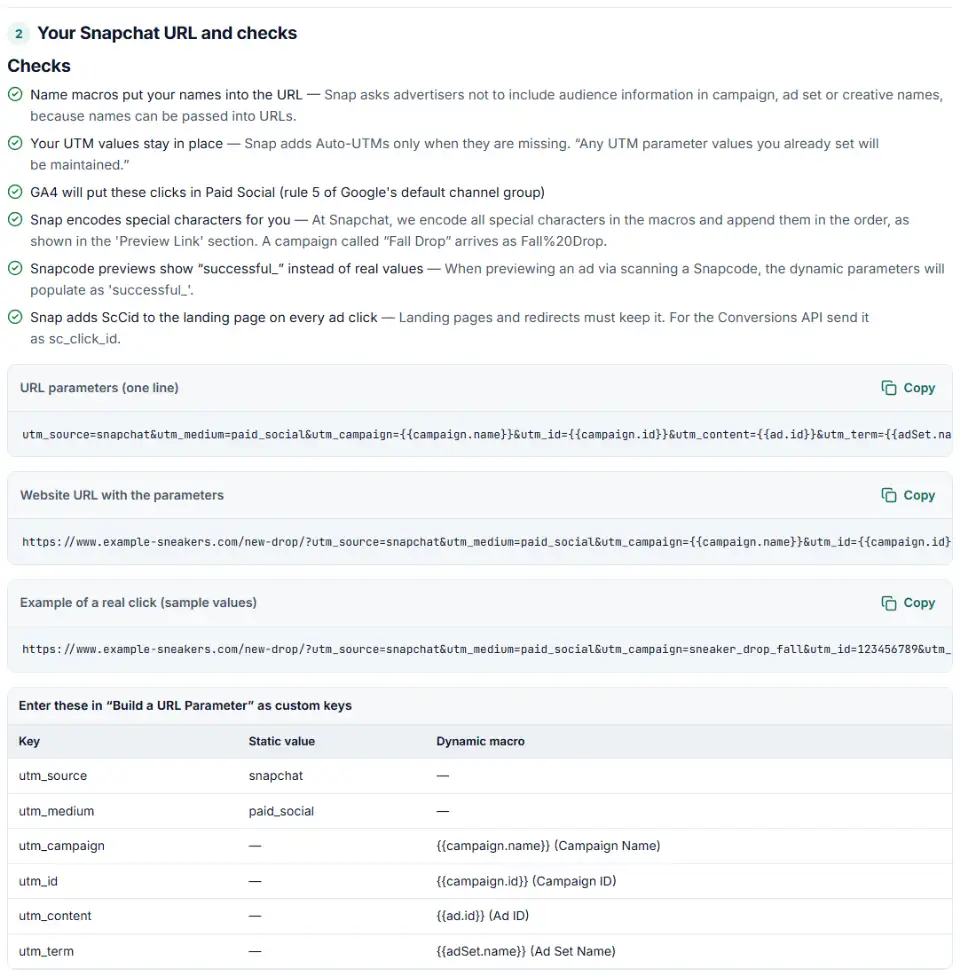
2 Your Snapchat URL and checks
Fill in the settings above — your result appears here instantly.
Rules last checked: against the official pages:
- Add URL Macros to Your Ads (Snapchat Ads)
- Add URL Macros and Custom Parameters to Dynamic Ads (Snapchat Ads)
- Auto-UTMs (Validate Your UTM Parameters) in Ads Manager (Snapchat Ads)
- Default channel group (Analytics Help) (Google Analytics 4)
How to build Snapchat UTM parameters
Snapchat UTM parameters tell GA4 that a visit came from your Snap ad, and Snap's URL macros fill in the campaign, ad set and ad on every click. This builder uses only the macros on Snap's Add URL Macros to Your Ads page, writes them in the exact spelling Snap shows — {{adSet.name}} with a capital S — and checks the GA4 channel.
- Tick Dynamic Ads if you run catalog ads. Snap marks only five macros as available there, and the tool warns about the rest.
- Write snapchat in full. GA4 recognizes “snapchat” as a social site, not “snap”. Give it a paid medium so Auto-UTMs have nothing to fill in.
- Choose IDs or names. Names read well in reports. IDs never change, and they keep audience details out of your URLs.
- Mind the Snapcode preview. Scanning a Snapcode fills every macro with “successful_”, so judge the result by the GA4 table and the sample click here.
- Copy the key table into Snap's builder. Each row is one custom key with its static part and its macro. The full URL is there to check against Snap's Preview Link.
What to do next in Snapchat Ads Manager
- Open the ad. In Ads Manager choose Create Ads, fill in the campaign and ad set, and pick an ad type with a Website or Deep Link attachment (single image or video, Story, Collection, Commercial or AR ads).
- Click “Build a URL Parameter”. Add one custom key per row of the table. For each value, type the static part, pick the macro, or both.
- Read the Preview Link. Snap shows the order and encoding it will use. If you also run a third-party tracker, check its macros sit in the right place.
- Dynamic Ads: you can attach the parameters inside the catalog instead. For multi-segment Dynamic Ads, Snap says to add the UTMs both in the parameter builder and in the website URL section.
- Submit and test. Click a live ad (not a Snapcode preview, which fills every macro with “successful_”) and look for real values plus
ScCid.
Common Snapchat URL macro errors
Why your Snapchat macros show as text
Snap replaces only macros it knows, written with two braces: {{campaign.name}}. One brace, three braces or a typo like {{campain.name}} reaches your site unchanged and GA4 records the braces.
Using a Snapchat {{ad.name}} macro
Many guides list {{ad.name}}, but it isn't on Snap's help page or in its API docs. Use {{creative.name}} for the creative's name, or {{ad.id}}.
A space copied from the help page
Snap's help article prints {{adSet.name }} and {{creative.name }} with a space before the closing braces. The API documentation shows them without it. Remove the space.
Macros Dynamic Ads don't support
Catalog campaigns support campaign and ad set names and IDs plus the ad ID. Creative name, creative headline and site source name aren't marked as available, so leave them out of Dynamic Ads.
utm_source=snap
Google's list of social sites includes “snapchat” but not “snap”. With a paid medium, snap ends up in Paid Other instead of Paid Social.
Duplicate UTM parameters
Ads Manager now validates URLs for duplicate UTM keys. Don't put utm_source in the website URL and again in the builder. Since October 2025 Snap also adds basic UTMs automatically when they're missing, but keeps any values you set.
Frequently asked questions
How do I add UTM parameters to Snapchat ads?
In Snapchat Ads Manager, create or edit an ad with a Website or Deep Link attachment and click Build a URL Parameter. Add each key from the table above, type its static value or pick the macro, check the Preview Link, then continue and submit the ad for review.
Which macros does Snapchat support in ad URLs?
{{campaign.name}}, {{campaign.id}}, {{adSet.name}}, {{adSet.id}}, {{creative.name}}, {{ad.id}}, {{creative.headline}} and {{site_source_name}}. For Dynamic Ads Snap marks only the campaign and ad set name and ID plus {{ad.id}} as available.
Is there an {{ad.name}} macro on Snapchat?
No. Snap’s help and API pages list no ad-name macro, even though some guides use one — it would reach GA4 as plain text. Use {{creative.name}} for the creative’s name or {{ad.id}} for the ad.
What is ScCid in my URL?
ScCid is the Snapchat Click ID. Snap appends &ScCid= to the landing page URL when someone clicks an ad. Don’t add it yourself and don’t let redirects remove it — the Snap Pixel and the Conversions API use it (sent as sc_click_id) to match conversions to clicks.
What utm_medium should I use for Snapchat ads?
Any medium GA4 counts as paid works, such as paid_social or paid, combined with utm_source=snapchat. Snap’s Auto-UTMs use “paid” as the medium. Avoid social on its own: GA4 then files paid clicks under Organic Social.
How do I track Snapchat ads in Google Analytics?
Spell the source out as utm_source=snapchat — Google’s list of social sites has “snapchat” but not “snap” — and pair it with a paid medium. Set both yourself, because Snap’s Auto-UTMs fill in their own source and medium when yours are missing. Then look for snapchat / paid_social under Paid Social in Traffic acquisition.
Related tools and guide
-
Build TikTok tracking links with macros that fill in campaign and ad names, including Smart+ ads, with # sign and duplicate checks and the GA4 channel.
TikTok -
Tag every Facebook and Instagram ad with one URL parameters string that fills in campaign and ad names, with syntax checks and a GA4 channel preview.
Meta -
Build Reddit Ads tracking links for catalog ads and trackers, with every macro's spelling and case checked before you publish, plus the GA4 channel.
Reddit -
Build Pinterest tracking links that report the campaign, ad group and Pin behind each click, checked for your ad type and Pinterest's automatic UTMs.
Pinterest -
Paste a link or a GA4 report and see the default channel for every row — with the rule that matched and a fix for Unassigned traffic.
Google -
Build a UTM naming convention your team can follow: GA4-safe sources and mediums, a campaign pattern, a printable guide and a built-in link checker.
GoogleMetaTikTokMicrosoft
Need help setting this up? Talk to EmproIT