Dynamic UTM Parameters Builder for Facebook and Meta Ads
Build the string for Meta's URL parameters field with dynamic tags like {{campaign.name}}, catch wrong syntax, and see which GA4 channel every placement's clicks will land in.
Dynamic UTM Builder for Meta Ads
1 Choose your parameters
2 Your URL parameters and checks
Fill in the settings above — your result appears here instantly.
Rules last checked: against the official pages:
- Specifications for dynamic URL parameters in Meta Ads Manager (Meta (Facebook and Instagram))
- Add URL parameters to your Meta ads in Meta Ads Manager (Meta (Facebook and Instagram))
- Default channel group (Analytics Help) (Google Analytics 4)
How to build Facebook dynamic UTM parameters
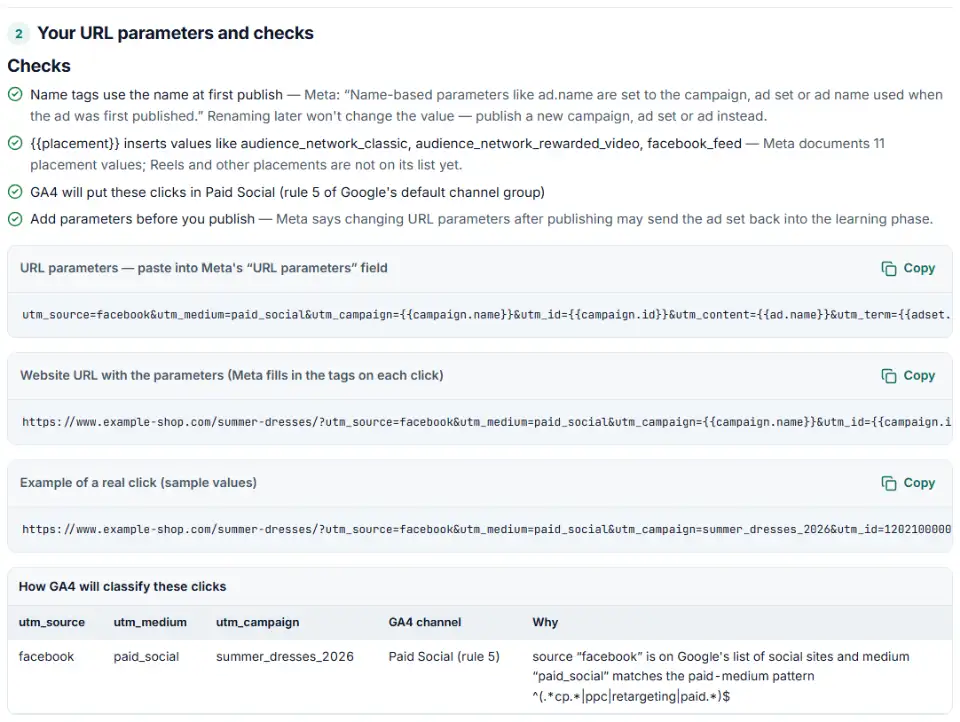
Facebook dynamic UTM parameters let one string tag every ad: Meta swaps tags like {{campaign.name}} for the real value on each click. This builder uses the tag list from Meta's dynamic URL parameters specifications and checks the result against GA4's channel rules, so your Facebook and Instagram clicks land in Paid Social — not Paid Other or Unassigned.
- Add your website URL. It is only used to preview the final link; the parameters go in a separate field in Ads Manager.
- Pick fixed values for source and medium.
facebook(orinstagram) withpaid_socialis the safest pair for GA4. - Use tags for the rest.
{{campaign.name}},{{adset.name}}and{{ad.name}}keep reports readable; the ID tags never change when you rename things. - Type an example campaign name. The GA4 preview uses it, because words like “shop” in a name can change the channel.
- Copy the string. Fix anything in red first. The “example of a real click” shows what GA4 will receive.
What to do next in Meta Ads Manager
- Open the ad, not the campaign. URL parameters are set at ad level, in the Tracking section.
- Paste into “URL parameters”. Leave the website URL clean. If both hold the same key, Meta says the URL parameters field wins.
- Check the preview link. Ads Manager shows the website URL with your parameters; make sure no tag shows a typo.
- Publish, then test. Click a live ad, or view it from a preview, and check GA4 Realtime or Traffic acquisition the next day.
- For app promotion ads, add the dynamic parameters to the end of the deferred deep link instead; there is no separate field.
Common Meta URL parameter mistakes
Google-style tags with single braces
Copying a Google Ads template gives {campaignid} or {campaign.name}. Meta ignores single braces, so the text lands in GA4 unchanged. Meta's tags always have two braces on each side.
Facebook utm parameters not showing in GA4 with the right name
Name tags are frozen. Meta says {{ad.name}} and the other name tags use the name from when the item was first published. Rename a campaign later and GA4 keeps showing the old name. Use the ID tags if you rename often.
{{site_source_name}} as utm_source
This tag inserts fb, ig, msg, an or th. Google's list of social sites includes fb and ig but not the Messenger, Audience Network or Threads codes, so with a paid medium those clicks fall into Paid Other. Put the tag in its own parameter, like site_source_name={{site_source_name}}, and keep utm_source fixed.
Campaign names that turn Paid Social into Paid Shopping
GA4 checks Paid Shopping before Paid Social. With a paid medium, a campaign name that contains “shopping”, or “shop” at the start or right after a non-letter or an “e” — “Summer Shop”, “shop_now”, “eshop” — sends the clicks there. “workshop” does not.
Empty parameters
Meta asks you never to leave a parameter empty. utm_term= with nothing after it shows up as a blank value, so remove it instead.
Frequently asked questions
How do I add UTM parameters to Facebook ads?
Build the string above, then open the ad in Meta Ads Manager, scroll to the Tracking section and paste it into the URL parameters field (or use Build a URL parameter). Do it before you publish: Meta says changing URL parameters later can send the ad set back into the learning phase.
What are dynamic URL parameters in Meta Ads?
They are tags in double braces that Meta fills in on every click: {{campaign.id}}, {{adset.id}}, {{ad.id}}, {{campaign.name}}, {{adset.name}}, {{ad.name}}, {{placement}}, {{site_source_name}} and, for Advantage+ catalog ads only, {{media_type}}. One string then works for every ad without editing.
Why does GA4 show {{campaign.name}} instead of my campaign name?
Meta only fills in tags that are on its list and written exactly right. A typo like {{campaign_name}}, single braces like {campaign.name}, or a tag in an ad format Meta doesn’t support (ads in collection format on Instagram placements) reaches GA4 as plain text. Rebuild the string here and the checker flags the bad tag.
What is fbclid in my URL?
It is Meta’s click ID. Meta adds fbclid to the website URL when someone clicks a Facebook or Instagram ad. It does not change your UTM values or the GA4 channel. If you use the Conversions API, keep it exactly as it is — it is case sensitive and becomes part of the fbc value.
Should utm_source be facebook or fb?
Both are on Google’s list of social sites, so both give Paid Social with a paid medium. Pick one and never mix them, because GA4 reports each spelling as its own row. Be careful with {{site_source_name}}: it inserts fb, ig, msg, an or th, and only fb and ig are on Google’s list.
How do I track Facebook ads in Google Analytics 4?
Add utm_source, utm_medium and utm_campaign to every ad with the URL parameters field. A good set is utm_source=facebook&utm_medium=paid_social&utm_campaign={{campaign.name}}. Then look at Reports › Acquisition › Traffic acquisition in GA4 the next day.
Related tools and guide
-
Build TikTok tracking links with macros that fill in campaign and ad names, including Smart+ ads, with # sign and duplicate checks and the GA4 channel.
TikTok -
Paste a link or a GA4 report and see the default channel for every row — with the rule that matched and a fix for Unassigned traffic.
Google -
Build a UTM naming convention your team can follow: GA4-safe sources and mediums, a campaign pattern, a printable guide and a built-in link checker.
GoogleMetaTikTokMicrosoft -
Paste or upload your campaign links and find broken, inconsistent or Unassigned UTM tags — with a corrected link for every row.
GoogleMetaTikTokMicrosoft -
Build Meta's fbc click value from an ad click link, and bulk-check fbc and fbp values for the time, case and hashing mistakes that break matching.
Meta -
Rename Facebook and Instagram campaigns, ad sets and ads in bulk to one naming convention — with a before/after preview and an Ads Manager import file.
Meta
Need help setting this up? Talk to EmproIT