Channel Group Checker for GA4: Default Grouping Rules and Unassigned Traffic
See which GA4 default channel a link or a source / medium will land in, which of Google's rules matched, and how to fix traffic that shows up as Unassigned.
Channel Group Checker for GA4
1 What do you want to check?
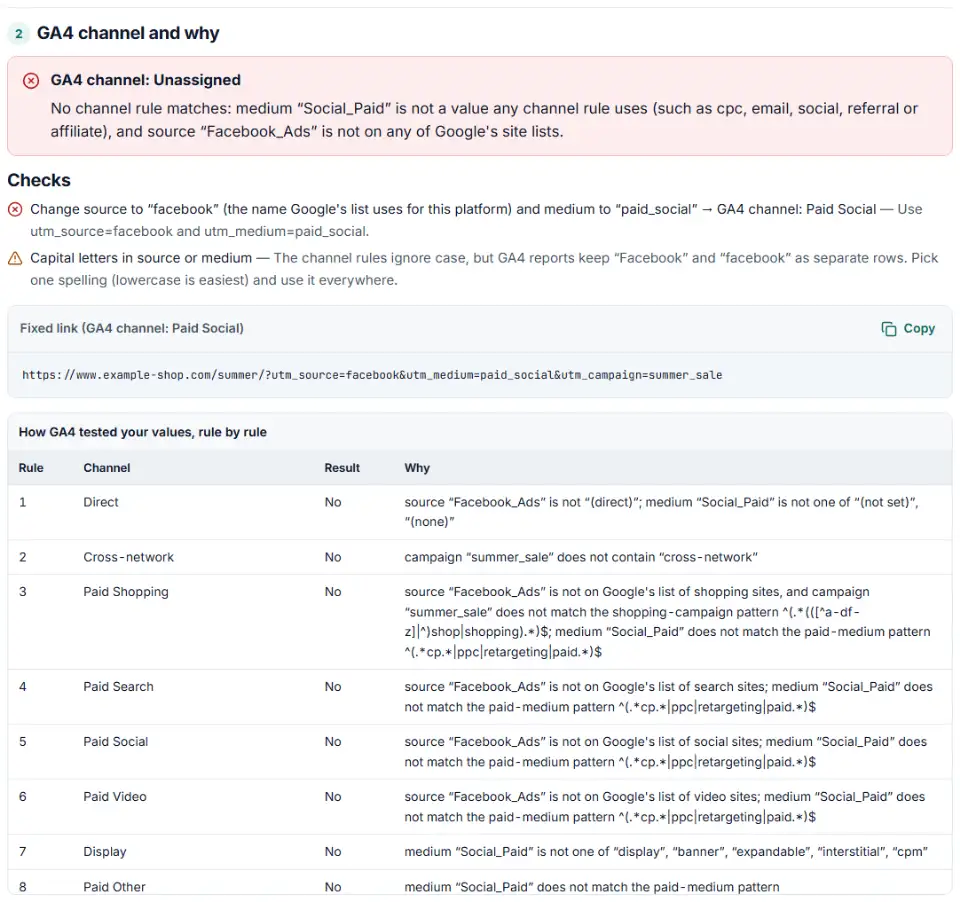
2 GA4 channel and why
Fill in the settings above — your result appears here instantly.
Rules last checked: against the official pages:
- Default channel group (Analytics Help) (Google Analytics 4)
- What's new in Google Analytics - May 13, 2026: New AI Assistant traffic measurement (Google Analytics 4)
- URL builders: Collect campaign data with custom URLs (Google Analytics 4)
- Traffic-source dimensions, manual tagging, and auto-tagging (Google Analytics 4)
How to find the cause of GA4 unassigned traffic
Most GA4 unassigned traffic comes from UTM tags that don't fit Google's channel rules. This checker runs your link, or your whole report, through the same 19 rules, in the same order, that Google publishes on its [GA4] Default channel group page. It tells you which rule matched — or why none did — and what to change.
- Choose what to check. One link, a source and medium you type in, or many rows at once.
- Paste your link. The tool reads
utm_source,utm_mediumandutm_campaign, and spots Google Ads click IDs. - Read the verdict. You see the channel, the rule number and the reason, such as “source fb_ads is not on Google's list of social sites”. The table shows every rule GA4 tests before it stops.
- Apply the fix. For Unassigned and Paid Other results you get values that land in a named channel, plus a fixed link to copy.
- Check a whole report. In GA4, export Traffic acquisition with “Session source / medium”, then paste it under Many rows. With a Sessions column, the tool shows how many sessions each problem costs you.
What to do next
- Fix the tags where they are made. Change the URL parameters in the ad platform, your email tool's UTM settings or your link sheet. GA4 reads the tags at the moment of the visit.
- Watch the new data. In GA4, open Reports › Acquisition › Traffic acquisition with “Session source / medium” and check the new rows.
- Regroup past data if needed. The default group can't be edited, but a custom channel group (Admin › Data display › Channel groups) also applies to past reports.
- Write the rules down. One agreed list of sources and mediums stops the problem coming back.
Why GA4 traffic is unassigned: causes and fixes
A medium no rule knows
Values like social_paid, sponsored, boosted_post, qr or print match nothing. Paid traffic needs a medium that starts with “paid”, contains “cp”, or is ppc or retargeting. Organic links need one of Google's exact words, such as social, email, referral or affiliate.
GA4 unassigned (not set): the medium is missing
Without utm_medium the medium is (not set). Only a source a rule knows on its own still matches — a listed site like google, or email and sms. newsletter alone is Unassigned.
A source nickname instead of the listed name
meta, fb_ads, msads and google.com are not on Google's lists. With a paid medium they fall into Paid Other; with a medium like post or story they end up Unassigned. Use the listed name: facebook, bing, google.
Paid social traffic shows as Paid Shopping
Paid Shopping is tested before Paid Social and reads the campaign name: “summer_shop_sale” on a Facebook ad lands in Paid Shopping. “cross-network” in a name beats every rule but Direct.
AI Assistant visits
Since May 2026 GA4 sets the medium to ai-assistant itself for assistants it recognizes. The list isn't published, so a hand-made chatgpt.com / referral stays in Referral.
GA4 default channel grouping rules, in order
| # | Channel | Rule |
|---|---|---|
| 1 | Direct | Source exactly matches "(direct)" AND Medium is one of ("(not set)", "(none)") |
| 2 | Cross-network | Campaign Name contains "cross-network" |
| 3 | Paid Shopping | Source matches a list of shopping sites OR Campaign Name matches regex the shop pattern AND Medium matches regex the paid pattern |
| 4 | Paid Search | Source matches a list of search sites AND Medium matches regex the paid pattern |
| 5 | Paid Social | Source matches a regex list of social sites AND Medium matches regex the paid pattern |
| 6 | Paid Video | Source matches a list of video sites AND Medium matches regex the paid pattern |
| 7 | Display | Medium is one of (“display”, “banner”, “expandable”, “interstitial”, “cpm”) |
| 8 | Paid Other | Medium matches regex the paid pattern |
| 9 | Organic Shopping | Source matches a list of shopping sites OR Campaign name matches regex the shop pattern |
| 10 | Organic Social | Source matches a regex list of social sites OR Medium is one of (“social”, “social-network”, “social-media”, “sm”, “social network”, “social media”) |
| 11 | Organic Video | Source matches a list of video sites OR Medium matches regex ^(.*video.*)$ |
| 12 | Organic Search | Source matches a list of search sites listed under "SOURCE_CATEGORY_SEARCH" OR Medium exactly matches organic |
| 13 | AI Assistant | The medium exactly matches “ai-assistant”. The medium is set to “ai-assistant” and the campaign is set to “(ai-assistant)” if the referrer matches a list of AI Assistants. |
| 14 | Referral | Medium is one of ("referral", "app", or "link") |
| 15 | Source = email|e-mail|e_mail|e mail OR Medium = email|e-mail|e_mail|e mail | |
| 16 | Affiliates | Medium = affiliate |
| 17 | Audio | Medium exactly matches audio |
| 18 | SMS | Source exactly matches sms OR Medium exactly matches sms |
| 19 | Mobile Push Notifications | Medium ends with "push" OR Medium contains "mobile" or "notification" OR Source exactly matches "firebase" |
GA4 tests these from top to bottom, ignores capital letters and stops at the first match. The paid pattern is ^(.*cp.*|ppc|retargeting|paid.*)$; the shop pattern ^(.*(([^a-df-z]|^)shop|shopping).*)$ matches “eshop” and “summer_shop” but not “workshop”. Google doesn't say if its site lists match whole values, so this tool matches whole values — use google, not google.com, which isn't listed.
Frequently asked questions
What is Unassigned traffic in GA4?
The leftover bucket: Google says Unassigned is the value Analytics uses when no other channel rule matches. The visits still count — GA4 just can’t say if they came from search, social, email or ads.
Why is my traffic Unassigned in GA4?
Almost always because of the UTM tags: a medium no rule knows (like social_paid or qr), a missing utm_medium, or an unlisted source with a medium that needs a listed one. Paste the link above to see the exact reason.
What is the difference between Direct and Unassigned in GA4?
Direct needs source (direct) and medium (none) or (not set) — a visit with no tags and no referrer, like a bookmark. Unassigned visits do have values, but none of Google’s rules fit them.
Which utm_medium values does GA4 count as Paid Social?
The source must be on Google’s list of social sites (facebook, instagram, fb, ig, tiktok, linkedin…) and the medium must match ^(.*cp.*|ppc|retargeting|paid.*)$. So paid_social, paid and cpc work; social_paid doesn’t.
Why does my Facebook ads traffic show as Unassigned in GA4?
Usually the medium: facebook_ads or social_paid matches no rule. And utm_source=meta isn’t on Google’s social list. Use utm_source=facebook with utm_medium=paid_social.
Does fixing my UTM tags fix past Unassigned traffic?
No. The default channel group can’t be edited, and corrected tags only change new visits. For past data, create a custom channel group in GA4 (Admin › Data display › Channel groups). Google says custom channel groups apply to reports retroactively.
Related tools and guide
-
Paste or upload your campaign links and find broken, inconsistent or Unassigned UTM tags — with a corrected link for every row.
GoogleMetaTikTokMicrosoft -
Build a UTM naming convention your team can follow: GA4-safe sources and mediums, a campaign pattern, a printable guide and a built-in link checker.
GoogleMetaTikTokMicrosoft -
Plan GA4 custom channels for AI assistants, paid social per platform and brand search, with rules in the right order, tested on your own traffic.
Google -
Turn a list of pages, sources or campaigns into a GA4-ready regex and see why a pattern that works elsewhere fails in GA4.
Google -
Tag every Facebook and Instagram ad with one URL parameters string that fills in campaign and ad names, with syntax checks and a GA4 channel preview.
Meta -
Build a Google Ads tracking template or final URL suffix with UTM and ValueTrack tags, catch errors before you save and see the GA4 channel.
Google
Need help setting this up? Talk to EmproIT