Customer List Formatter for Snapchat Custom Audiences
Split any customer export into the one-type-per-file lists Snapchat wants for a custom audience: emails, phone numbers with country code, and mobile ad IDs.
Customer List Formatter for Snapchat Ads
- Upload
- Check
- Download
1 Add your customer export
Choose a file or drag it here
CSV, Excel, TSV or TXT from your CRM, shop or app · up to 300 MB
2 Check the columns and options
Rules last checked: against the official pages:
- Create a Customer List Audience (Snapchat Ads)
- Hashing Customer List Audiences (Snapchat Ads)
- Normalizing and Hashing Identifiers FAQs (Snapchat Ads)
How to build a Snapchat custom audience file
A Snapchat custom audience made from your customers is called a Customer List Audience (Snap used to call it Snap Audience Match). Snap's Create a Customer List Audience page asks for one column and one identifier type per file. Real exports have emails, phones and app IDs side by side, so this tool splits them up and fixes the phone format Snap is strict about.
- Add your export. From a CRM, loyalty program, Shopify or an app database. Use Try sample data for a quick demo.
- Map the columns. Email, phone, mobile ad ID and a country column are found automatically. You can select two email or phone columns at once.
- Set a default country. Numbers like
(415) 555-0132get the code of the row's country, or of this default when the row has none. - Pick plain or SHA-256, and .csv or .txt. Plain is fine, because Ads Manager hashes in your browser anyway.
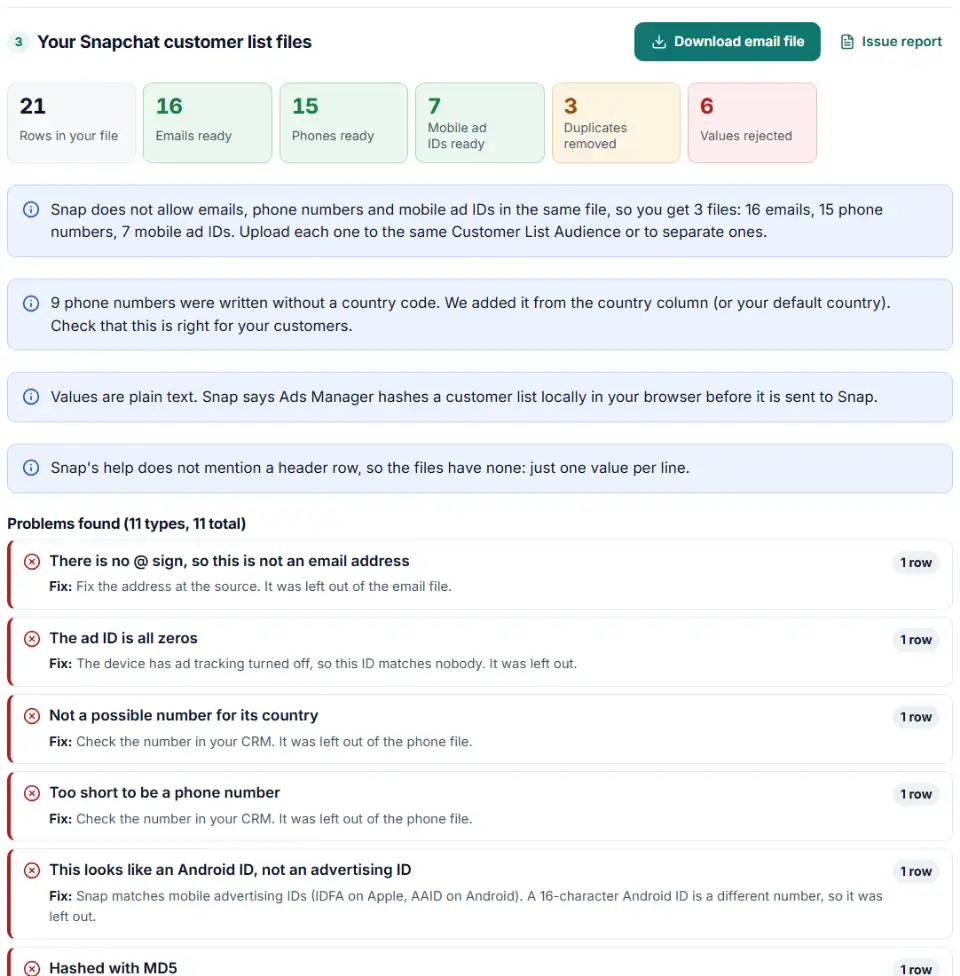
- Download each file. You get up to three: emails, phone numbers and mobile ad IDs, each one value per line.
Snap's normalization, step by step
- Emails: trim spaces, then lowercase.
[email protected]becomes[email protected]. - Phones: country code added,
00and the national 0 removed, then only digits.020 7946 0321in the UK becomes442079460321— no plus sign. - Mobile ad IDs: lowercase, hyphens kept.
6D92078A-8246-…becomes6d92078a-8246-….
These rules come from Snap's normalizing and hashing FAQ. They matter most when you hash yourself: one extra space or a capital letter gives a different hash, and the person is not found.
Upload the files in Snapchat Ads Manager
- Open Ads Manager, click the menu at the top left and choose Audiences.
- Click New Audience › Custom Audience › Customer List.
- Drag in the email file (or click to upload it). If it is hashed, choose hashed emails when Ads Manager asks.
- Enter an audience name and description, then click Upload.
- To add the phone or ad ID file to the same audience, open it from Audiences, choose Edit and Add users.
The same Edit screen lets you remove people or replace the whole list later. Ads Manager also offers example files above the upload box if you want to compare.
Snapchat customer list problems and fixes
Emails and phones in one file
Two columns, or a mix of values in one column, is the classic mistake. Snap supports a single type per file. Use the separate downloads from this tool.
Snapchat customer list phone number format wrong
US exports often drop the country code, and European ones keep the leading 0. Snap asks for the code on every number and no 0 after it. Numbers we could not place are listed with the reason, such as “too short” for a 5-digit value.
Pre-hashed file, wrong type chosen
When you upload hashed data, Ads Manager asks whether it is hashed emails, hashed mobile advertising IDs or hashed phone numbers. Picking the wrong one means nothing matches. The file names from this tool say which is which.
Upper-case ad IDs
Many iOS exports write IDFAs in capitals. Snap wants them lowercase with the hyphens left in. Reddit wants Apple IDFAs in upper case, so do not reuse this file there.
Audience smaller than expected
Snap does not match customer data to accounts of people aged 13 to 17 in the UK and the EEA for personalized ads. It also deletes unmatched customer data 30 days after upload, so add new customers again later instead of expecting old rows to match.
Very large files
There is no hard size limit, but Snap suggests staying under 1 GB. The tool splits a bigger list into parts.
Frequently asked questions
How do I create a customer list custom audience on Snapchat?
In Ads Manager, open the menu at the top left, go to Audiences, click New Audience, pick Custom Audience and then Customer List. Upload a .csv or .txt file (or paste the values), name the audience and click Upload.
Can one Snapchat customer list mix emails and phone numbers?
No. Snap says mixing emails, mobile advertising IDs and phone numbers in one file is not supported. Make one file per type. This tool does that split for you and you upload the files one by one.
How should phone numbers be formatted for Snapchat?
Always include the country code (1 for the US, 44 for the UK), drop a leading 00 before it, drop the leading 0 of the national number, and keep digits only. A UK number written +44 20 7946 0958 becomes 442079460958.
Do I need to hash my list before uploading it to Snapchat?
No. Snap says Ads Manager hashes a customer list locally in your browser before it is sent. If you hash it yourself, normalize first, use SHA-256 with lowercase hex, and tell Ads Manager which kind of hashed data the file holds.
What does 'too few users' mean for a Snapchat audience?
The audience matched too few Snapchatters to be targeted yet. Snap does not publish a fixed minimum on its help pages. Add more people with Edit › Add, or upload your phone and email files to the same audience so more customers can be found.
Can I use a Snapchat customer list as a lookalike seed?
Yes. Snap lists Customer List Audiences as a source for Lookalike Audiences, which find Snapchatters who resemble your customers.
Related tools and guide
-
Get a health score for a customer list, fix email typos in one click and send the clean list to the Google, Meta or TikTok formatter.
GoogleMetaTikTok -
Turn messy phone numbers into E.164 in bulk, with the country code added and invalid numbers flagged before you upload.
GoogleMetaTikTok -
Build a TikTok custom audience file from a messy export, with TikTok's template columns, phones with country codes and the 1,000-entry check.
TikTok -
Hash emails and phones the way Google and Meta want, and check a pre-hashed file for hashes that will never match.
GoogleMeta -
Format and hash lists for X (Twitter) custom audiences: one file per identifier type, the way X's help asks.
X -
Make the one-column CSV Pinterest wants for customer list audiences, without names, phones or iOS IDs.
Pinterest
Need help setting this up? Talk to EmproIT