Customer List Template and Formatter for Pinterest Ads
Turn a store or CRM export into Pinterest's single-column customer list: emails or Android ad IDs only, no header, no empty rows, plain or SHA-256.
Customer List Formatter for Pinterest Ads
- Upload
- Check
- Download
1 Add your customer export
Choose a file or drag it here
CSV, Excel or TSV from your store, app or CRM · up to 300 MB
2 Check the columns and options
Rules last checked: against the official pages:
- Set up audience targeting (Customer lists section) (Pinterest Ads)
- Create audiences (developer guide, customer list audience) (Pinterest Ads)
How to use the customer list template formatter for Pinterest
A Pinterest customer list template is just one column of data, but most exports have twenty. This tool pulls out the emails (and Android ad IDs, if you have them), cleans them, and writes the single-column file that Pinterest's audience targeting help page describes. Your customer data stays in your browser.
- Add your export. Shopify, WooCommerce, Klaviyo, an app's user table or a spreadsheet all work. Try sample data loads a test file with emails and ad IDs.
- Confirm the columns. Pick every email column. If your file has ad IDs, map them too, plus the device or platform column so iOS IDs can be removed.
- Choose hashed or plain. SHA-256 is selected by default; plain text is fine too.
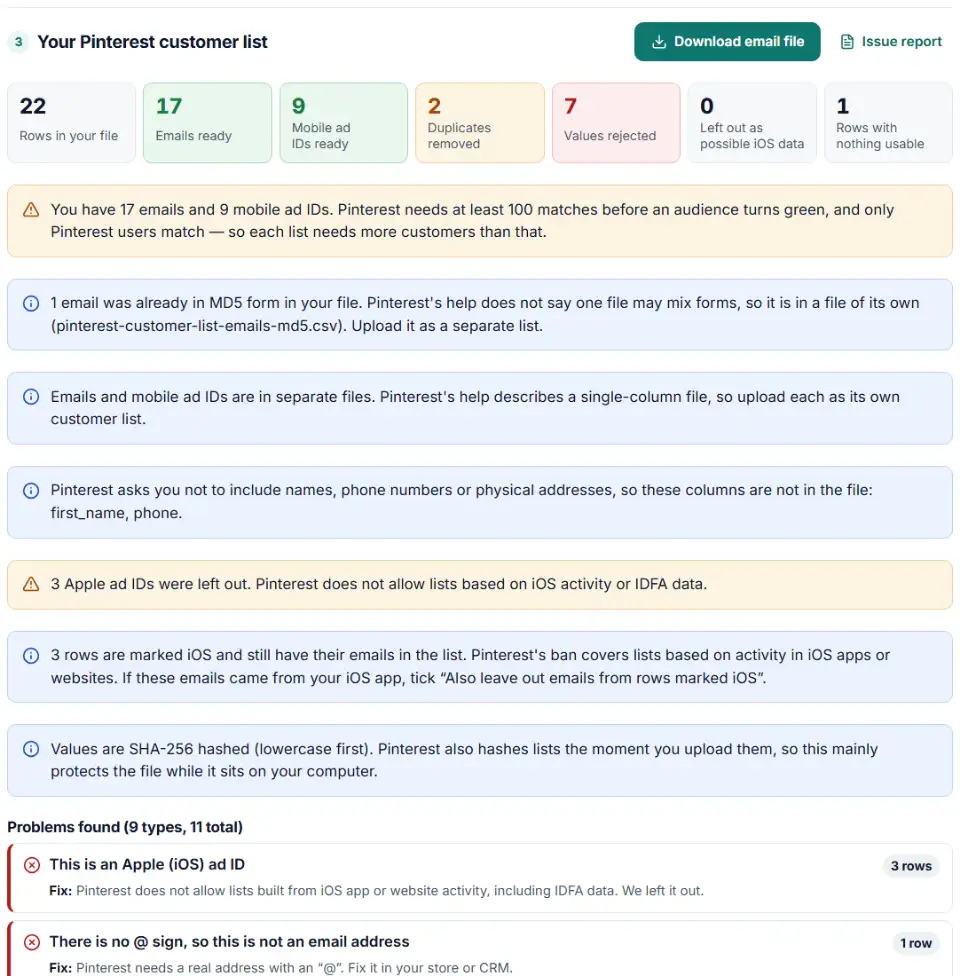
- Read the checks. Rejected values, duplicates and dropped iOS IDs are listed with the row number.
- Download. You get an email file and, if needed, a separate ad ID file. Neither has a header row.
What Pinterest accepts in each file
| File | Forms | Format rule |
|---|---|---|
| Emails | Cleartext, SHA-256, MD5 | Lowercase; must contain an “@” |
| Mobile ad IDs | Cleartext, SHA-1, SHA-256, MD5 | Android AAIDs, lowercase, 8-4-4-4-12 |
Upload the list in Pinterest Ads Manager
- Log in to your Pinterest business account and click the menu icon at the top left.
- Under Manage business, click Audiences, then Create audience.
- Select Customer list and enter an audience name and an optional description.
- Click Choose file, pick the downloaded CSV, and click Create.
- Come back after 24 to 48 hours. The audience size updates on the Audiences page, and the status turns green at 100 matches.
Upload the ad ID file the same way as a second list. Before sharing data, Pinterest asks you to review its Ad Data Terms and advertising guidelines.
Pinterest customer list errors and fixes
Pinterest customer list upload failed
The most common cause is a header such as email on the first line, which Pinterest's help says to leave out. Titles, blank lines and tab characters break the file too. The download from this tool has none of them.
Phone numbers or names in the file
Unlike Google or Meta, Pinterest does not take phone numbers in customer lists. Names and addresses are not accepted either. Keep only the email column, or the ad ID column, nothing more.
iOS ad IDs (IDFA) in the list
Pinterest prohibits lists built from activity in iOS apps or websites, which includes lists with IDFA data. If your app data has a platform column, map it: ad IDs on rows marked iOS, iPhone or iPad are removed and counted. The ban is about the source of the list, so you can also leave out the emails on those rows.
All-zero or malformed ad IDs
An ID made of zeros means the person turned off ad tracking. Pinterest does not allow people who opted out of targeted advertising, so those rows go. IDs that do not follow the 8-4-4-4-12 shape, like a 16-character Android ID, are rejected too.
Upper-case ad IDs
Pinterest says AAIDs must be lowercase, and Android devices show them that way. Apple IDFAs usually come in capitals, so an upper-case ID with no device column is left out and listed as a possible IDFA. If you know your IDs are all Android, pick “All Android AAIDs” and they are lowercased before hashing.
Audience smaller than the list
Only people with a Pinterest account can be matched, so the final audience is usually smaller than your file. Under 100 matches, the status stays red; add people to the same audience rather than starting over.
Frequently asked questions
What does a Pinterest customer list file look like?
A .csv file with one column and one record per line: either email addresses or mobile ad IDs (MAIDs). No header, no title line, no empty rows. Emails can be plain text or hashed with SHA-256 or MD5.
Can I upload phone numbers to a Pinterest customer list?
No. Pinterest asks you not to include names, phone numbers or physical addresses. Only emails and mobile ad IDs are accepted, so this tool leaves every other column out.
Why did my Pinterest customer list upload fail?
Pinterest says a failed upload usually means a format rule was broken. The usual causes are a header row, a title line, empty rows, or tabs that split the data. Extra columns such as names cause the same problem.
What if my Pinterest customer list has fewer than 100 matches?
The audience stays red and cannot be used until at least 100 people match. Open the audience, choose Edit and Add people to upload more emails or MAIDs. Only Pinterest users match, so you usually need many more than 100 customers.
Does Pinterest hash my customer list?
Yes. Pinterest hashes the list right after upload, and you cannot download or view it again. You may also hash it yourself before upload; Pinterest’s developer guide calls SHA-256 hashing a best practice.
Do Pinterest customer lists update on their own?
No. A list uploaded by file stays as it is until you add, remove or replace people. Automatic updates need a CRM connected through a Pinterest API partner.
Related tools and guide
-
Get a health score for a customer list, fix email typos in one click and send the clean list to the Google, Meta or TikTok formatter.
GoogleMetaTikTok -
Find the missing or badly formatted required fields that make Pinterest reject a whole retail catalog, plus price, variant and length problems.
Pinterest -
Turn one messy export into Snap-ready email, phone and mobile ad ID files, plain or SHA-256.
Snap -
Turn a customer export into Reddit's custom audience file, with emails cleaned Reddit's way and hashed and mobile ad IDs in the right case.
Reddit -
Build a TikTok custom audience file from a messy export, with TikTok's template columns, phones with country codes and the 1,000-entry check.
TikTok -
Hash emails and phones the way Google and Meta want, and check a pre-hashed file for hashes that will never match.
GoogleMeta
Need help setting this up? Talk to EmproIT