Custom Audience Template and Customer File Formatter for TikTok Ads
Turn any export into TikTok's customer file template: email, phone and mobile ad ID columns, E.164 phones, at most 3 of each, plain or SHA-256 hashed.
Customer File Formatter for TikTok Ads
- Upload
- Check
- Download
1 Add your customer list
Choose a file or drag it here
CSV, Excel, TSV, or a TXT list with one ID per line · up to 300 MB
2 Check the columns and options
Rules last checked: against the official pages:
How to fill the TikTok custom audience template
This tool builds the TikTok custom audience template for you from whatever you have: a Shopify or app export, a CRM report, or a pasted list with one ID per line. It follows TikTok's customer file specifications for the header row, emails, E.164 phones and mobile advertising IDs (MAIDs).
- Add your IDs. Upload a file or paste a list. A single column that mixes emails, phone numbers and ad IDs is fine — each value is sorted into the right column.
- Check the columns. Up to three email and three phone columns are used per customer, plus the IDFA or GAID column. Add a country column if you have one; it sets each phone's country code.
- Pick a default country. Numbers like
(415) 555-0101need a country code to become+14155550101. - Choose plain or hashed. Plain values are what TikTok's template shows. Hashing is optional, because TikTok hashes plain values on upload.
- Download. You get one combined file. If your list has more than one ID type, you can also download emails, phones and ad IDs as separate one-column files.
Rules the file follows
- A header row that names the ID:
email,phoneandmaid, exactly as in TikTok's template. - No header more than three times, one ID per cell, one customer per row.
- Emails without spaces and in lowercase; phones in E.164; ad IDs trimmed and all in one case.
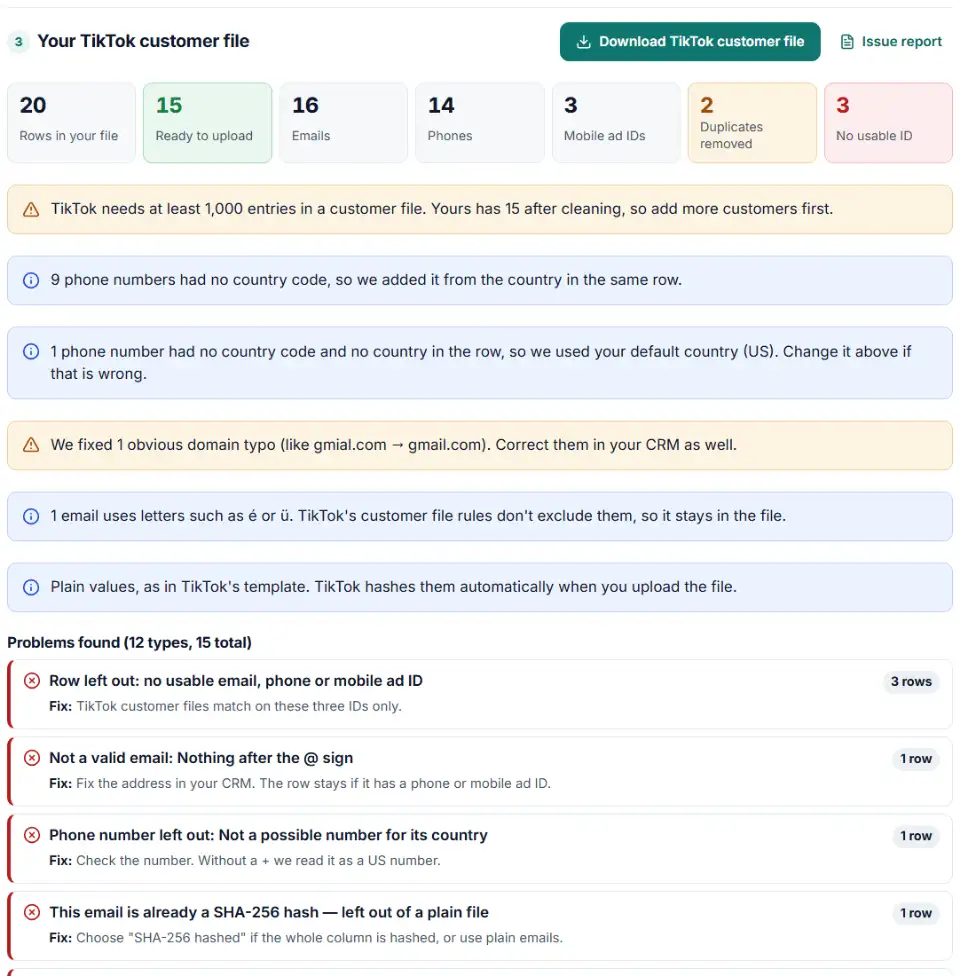
- Rows with no usable ID, all-zero ad IDs and exact duplicates are removed and listed, so the entry count is honest.
TikTok custom audience upload in Ads Manager
- Open Audience Manager. In TikTok Ads Manager click the Tools tab, then Audience Manager.
- Create the audience. Click Create Audience, choose Custom Audience, then Customer File.
- Upload and name it. Upload the CSV from this page, give the audience a clear name (for example the export date), and click Confirm.
- Give it a day or two. TikTok says the audience can take 24 to 48 hours to generate. After matching, TikTok deletes your uploaded file.
- Check the matched size before you use it. Audience Manager shows the matched users. Under 1,000 matched, the audience can't be added to an ad group yet.
Common TikTok customer file problems
“File must contain at least 1000 entries”
TikTok wants at least 1,000 entries, and rows without a real email, phone or ad ID can never match. The tool counts the usable rows before you upload.
TikTok custom audience unavailable
The audience needs 1,000 matched users to be available. It can also expire when it is not used for a long time; then it can only be deleted. Upload a fresh file.
No header row, or headers TikTok doesn't know
TikTok asks for a header row that describes the ID. A pasted list straight from a CRM usually has none, or uses names like E-mail Address. The download always starts with TikTok's own header names.
The same header more than three times
Some exports have four or five email fields per customer. TikTok allows each header at most three times in one file, so the tool keeps the first three and reports the rest.
Mobile ad IDs in mixed case
TikTok's guidelines ask for MAIDs in all uppercase or all lowercase. A mix of both, common when iOS and Android IDs come from different systems, is fixed by lowercasing every ID.
Hashed phones that match nobody
A number hashed without its country code can't match. Whether the "+" belongs in the hashed text is less clear: TikTok's customer file page asks for E.164 with "+", yet its example hash on that page is of the number without "+". The tool lets you pick either, and warns you. The simplest fix is to upload plain values and let TikTok hash them.
Frequently asked questions
What does TikTok's custom audience template look like?
TikTok’s template file has one header row — email,email,email,phone,phone,phone,maid — and one customer per row below it. You only need the columns you have: a file with a single email column is fine. Each header may appear at most three times.
Can one TikTok customer file contain emails, phones and mobile ad IDs?
Yes. TikTok’s help page allows several ID types in one file, as long as each header appears no more than three times. Apple IDFA and Android GAID can also be mixed in the same maid column.
Does TikTok accept hashed or plain customer data?
Both. Plain values are hashed automatically when you upload. If you hash yourself, normalize first, hash emails and phones with SHA-256, and label the columns Email_SHA 256 and Phone_SHA 256 as TikTok’s Help Center prints them (its API pages write email_SHA256, without the space). Mobile ad IDs may use SHA-256 or MD5.
How many matched users does a TikTok custom audience need?
At least 1,000 IDs from your file must match TikTok users before the audience can be used in an ad group. The file itself must also contain at least 1,000 entries, so upload well above that number.
Why does my TikTok custom audience say unavailable?
Either fewer than 1,000 people were matched, or the audience was not used for a long time and expired. An expired audience can only be deleted, so build a new one from a fresh export.
How should phone numbers be formatted for a TikTok customer file?
For plain values TikTok recommends E.164: a plus sign, the country code and the number, like +16577770000, and also accepts numbers without the plus. For hashed phones its sources disagree: the Help Center table says E.164 with the plus, but the example hash on the same page — and the template — leave the plus out. Plain upload avoids the question.
Related tools and guide
-
Get a health score for a customer list, fix email typos in one click and send the clean list to the Google, Meta or TikTok formatter.
GoogleMetaTikTok -
Turn a CRM or store export into a Facebook custom audience CSV with Meta's column names, country codes and optional hashing.
Meta -
Map any CRM or store export to Google's Customer Match columns, fix phones and emails, and download a plain or hashed CSV.
Google -
Turn messy phone numbers into E.164 in bulk, with the country code added and invalid numbers flagged before you upload.
GoogleMetaTikTok -
Hash emails and phones the way Google and Meta want, and check a pre-hashed file for hashes that will never match.
GoogleMeta -
Turn one messy export into Snap-ready email, phone and mobile ad ID files, plain or SHA-256.
Snap
Need help setting this up? Talk to EmproIT