Bulk Phone to E.164 Converter
Convert a whole column of phone numbers to E.164 (+14155550123) with a valid, check or invalid flag, number type and country for every row.
Bulk Phone to E.164 Converter
- Upload
- Check
- Download
1 Add your phone numbers
Choose a file or drag it here
CSV, Excel, TSV, or a TXT list with one number per line · up to 300 MB
2 Check the columns and options
Rules last checked: against the official pages:
- Create a Customer Match list by uploading a data file (old URL answer/7659867 redirects here) (Google Ads)
- Customer list formatting guidelines for custom audiences (Meta (Facebook and Instagram))
- How to create a Custom Audience with a customer file (Last updated: September 2025) (TikTok Ads)
How to use the E164 converter
This E164 converter rewrites a whole column of phone numbers in E.164, the format ad platforms such as Google's Customer Match use to match customers by phone. It adds the missing country code, checks that each number can exist, and tells you whether it is a mobile, a landline or a toll-free line.
- Add the numbers. Load a CSV or Excel file, or paste one number per line. Other columns in your file stay as they are.
- Check the phone column. The tool finds headers like
Phone,MobileorBilling Phone. If your file has a country column, map it too. - Choose the default country. It decides how a number like
0491 570 156is read when it has no + and the row has no country. - Review the flags. It works as an E.164 format checker too: every row gets a status — Valid, Check, Invalid or Empty — plus the number type, the detected country, its country code and how that code was found.
- Download. Get the full file with the new columns, or a clean one-column list of valid numbers without duplicates.
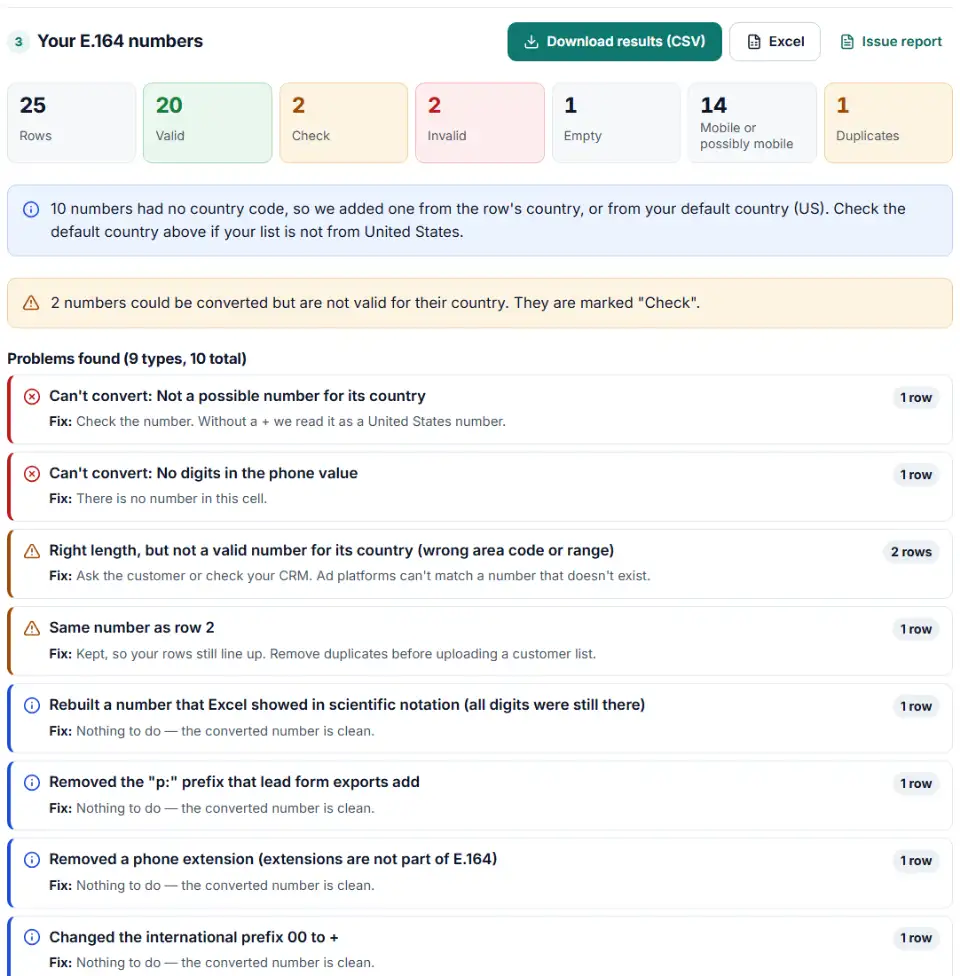
What this E.164 phone number converter cleans up
- Spaces, dots, dashes and brackets:
415.555.0187→+14155550187. - Trunk zeros: the 0 at the start of UK, German, French or Australian numbers.
00international prefixes and(0)written after the country code.- Extensions, which are not part of E.164, and prefixes such as
p:ortel:. - Spreadsheet damage: scientific notation like
1.4155E+10, a trailing.0, or a lost leading zero. - Two numbers in one cell: the first is converted, and the row is flagged. Vanity numbers like 1-800-FLOWERS and numbers Excel cut short are flagged with the fix.
What to do with your E.164 numbers
- Building an audience? Hand the list to the formatter for Google Customer Match, Meta or TikTok. Each one adds its own column names and hashing rules on top of E.164.
- Fixing your CRM? Import the E.164 column back into the phone field, and set that field (or spreadsheet column) to Text so the + and every digit survive the next export.
- Sending SMS or WhatsApp? Many messaging tools also want E.164. Remove the rows marked Invalid first, and look at the Check rows by hand.
- Hashing for an API? Hash the column in the form that platform asks for: the + version for Google, the digits-only version for Meta.
Common phone number problems
E.164 format for UK, Australia and India numbers
These countries write numbers with a leading 0 at home: 07400 123456, 0491 570 156, 098765 43210. In E.164 that 0 goes away: +447400123456, +61491570156, +919876543210. Keeping the 0 after the country code is one of the most common mistakes.
The leading zero or the + sign disappeared in Excel
When a column is formatted as a number, Excel removes leading zeros and the plus sign, and long numbers turn into 1.4155E+10. The converter rebuilds what it can and flags those rows. Next time, format the column as Text before you paste.
Numbers read with the wrong country
Without a + or a country column, the default country decides. A list of Canadian customers converted with "United Kingdom" as default gives wrong or invalid results. Mixed lists need a country column.
Numbers marked "Check"
They have the right length but use an area code or range that isn't assigned. Some are typos, some are fake numbers typed into forms. Ad platforms can't match them, so fix or remove them.
Toll-free and company numbers
A 1-800 or other toll-free number is valid, but it belongs to a business, not a person. It is flagged as a note, because it rarely matches anyone in an ad platform.
Frequently asked questions
What is E.164 phone number format?
E.164 is the international numbering standard from the ITU. A number in E.164 starts with a plus sign, then the country code, then the national number without its leading zero — no spaces, dashes or brackets, and at most 15 digits. Example: (415) 555-0132 in the US becomes +14155550132.
How do I convert a list of phone numbers to E.164?
Load your file or paste the column above, choose the country most of your numbers come from, and download. Numbers that already start with + or 00 keep their own country code. If your file has a country column, each row uses its own country.
What does a UK mobile number look like in E.164?
Drop the leading 0 and add +44. So 07400 123456 becomes +447400123456, and a London landline 020 7946 0958 becomes +442079460958. If the number was written as +44 (0)20 …, the 0 in brackets is removed too.
Do Google Ads and Meta need phone numbers in E.164?
Google’s Customer Match rules ask for E.164 with the plus sign when you hash phones, and a country code in any case. Meta needs the country code on every number and accepts punctuation, but its hashed form is digits only, without the plus. TikTok recommends E.164 for customer files.
Why is a phone number marked invalid?
It is too short or too long, has no digits, or can’t exist in its country. Check means the length is right but the area code or range is not in use, according to Google’s open-source libphonenumber data. Also check the default country: a UK number read as a US number will fail.
Can I convert phone numbers to E.164 in Excel?
Only for very simple lists. A formula can strip spaces and add +1, but it can’t handle trunk zeros, mixed countries or invalid numbers. Convert the column here, then paste the E.164 column back — and format that column as Text so Excel keeps the + sign.
Related tools and guide
-
Get a health score for a customer list, fix email typos in one click and send the clean list to the Google, Meta or TikTok formatter.
GoogleMetaTikTok -
Map any CRM or store export to Google's Customer Match columns, fix phones and emails, and download a plain or hashed CSV.
Google -
Turn a CRM or store export into a Facebook custom audience CSV with Meta's column names, country codes and optional hashing.
Meta -
Build a TikTok custom audience file from a messy export, with TikTok's template columns, phones with country codes and the 1,000-entry check.
TikTok -
Clean a Facebook leads CSV for your CRM: strip “p:” and ID labels, split names, fix dates and merge duplicate leads.
Meta -
Fill Klaviyo's import template from any export, with the right email and SMS consent columns, international phone numbers and SMS country checks.
Klaviyo
Need help setting this up? Talk to EmproIT