Customer List Health Checker for a Better Audience Match Rate
Score a customer list before you upload it: bad emails, phones without country codes, duplicates, role and test emails, domain typos and list size against Google, Meta and TikTok minimums.
Customer List Health Checker
- Upload
- Check
- Fix
1 Add your customer list
Choose a file or drag it here
CSV, Excel, TSV or TXT export from your store, CRM or email tool · up to 300 MB
2 Check the columns and options
Rules last checked: against the official pages:
- Fix Customer Match issues with list upload, small list size, or low volume (Google Ads)
- Prepare your data for a customer list custom audience (Meta (Facebook and Instagram))
- Manage Custom Audience (TikTok Ads)
How to check your list's audience match rate before upload
Your audience match rate is decided by the list you upload. This checker reads the whole file, scores it out of 100, and shows every row that can't match, using the formatting rules from Google's Customer Match troubleshooting page, Meta's customer data guide and TikTok's customer file help.
- Load the list. Any store, CRM or email-tool export. The sample shows typical problems.
- Confirm the columns. Make sure every email and phone column you plan to upload is picked.
- Pick the platform. Google, Meta and TikTok have different minimum sizes, and the score uses the one you choose.
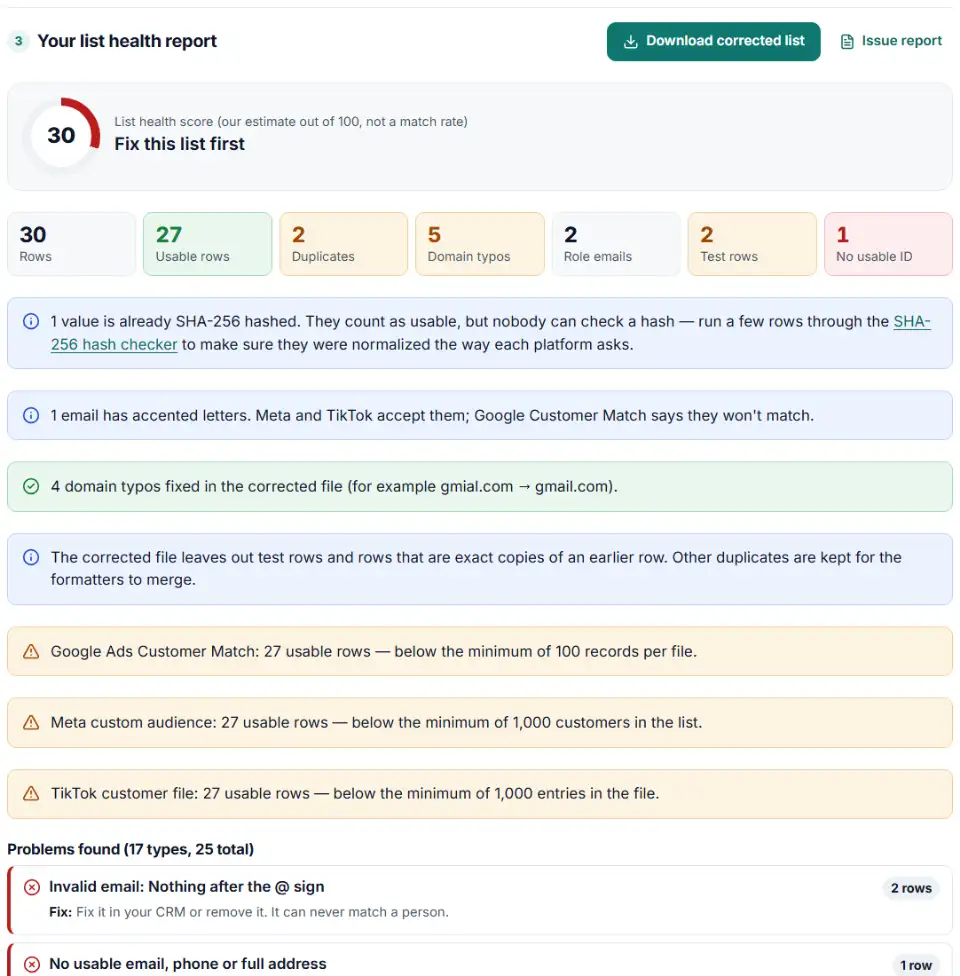
- Read the report card. The score, valid emails, phones with a country code, and rows with each problem.
- Fix it. Download the corrected list, the rows with problems, or send the corrected list straight to the formatter for Google, Meta or TikTok.
Fix common email domain typos in bulk
Typos like gmial.com, hotmial.com or yahoo.con come from checkout and signup forms. They never match anyone. The checker lists each misspelled domain with its row numbers. Obvious ones are fixed in the corrected download; unsure ones (for example gmailll.com) are only flagged, so you can check them.
How the score works
The score is our own estimate, not a match rate from Google, Meta or TikTok. It starts at 100 and loses points for the share of rows with each problem — most for rows with no usable ID, then invalid emails and phones, then duplicates, typos, test, role and throwaway emails, broken characters, a missing country column and a list below the platform minimum. Hashed values count as usable but can't be checked.
What to do next
- Click a Fix it button. The corrected list opens in the formatter for Google Customer Match, Meta or TikTok, which adds country codes, removes duplicates and builds the upload file.
- Fix the source. Use the rows-with-problems download to correct emails and phones in your CRM or store, so the next export starts clean.
- Stop typos at signup. Turn on email confirmation or a "did you mean" check in your forms, and ask for phone numbers with a country picker.
- Re-check before every upload. Lists decay as people change email addresses.
Why audience match rates drop
Meta custom audience match rate is low
Meta's match score is matched rows divided by uploaded rows, so every dead row pulls it down. The biggest fixes are phone numbers with a country code, a country column, and more than one identifier per person. Meta suggests adding more emails, phone numbers and device IDs.
Google Customer Match list size is much smaller than the file
Google counts only matched people who are active on its services, so the list size is always smaller than your row count. A very large gap points to formatting problems: typos, phones without country codes, or a badly pre-hashed file.
Role-based email addresses
B2B lists are full of info@ and sales@ addresses. They belong to teams, so they rarely match a personal account. They are counted separately so you can decide.
Duplicate customers
Order exports repeat a customer once per order. Duplicates make the list look bigger than it is and hide how many real people you have. The formatters merge them for you.
Test rows and broken characters
Addresses like [email protected], names like "Test User", and text like Zoë instead of Zoë come from staging stores and wrong file encodings. Remove test rows and export the file again as CSV UTF-8.
Audience too small to use
Even a clean list can be too small. TikTok needs 1,000 matched users before an audience is available, and Google needs 100 active matched people. Combine customer and subscriber lists if you have both.
Frequently asked questions
What is audience match rate?
It is the share of your uploaded customers that an ad platform could link to one of its users. Meta shows it as a match score out of ten (matched rows divided by uploaded rows). Google shows a list size of matched, active users, and TikTok shows the number of matched users in Audience Manager.
Why is my customer list match rate so low?
Mostly because of the data, not the platform: invalid or mistyped emails, phone numbers without a country code, work or shared inboxes, test rows, and files saved in the wrong encoding. Some customers simply don’t use that platform with the same email. This checker shows how many rows have each data problem.
Do role emails like info@ hurt match rates?
They rarely match, because addresses like info@ or sales@ are shared inboxes, not the email a person signs up to Facebook or Google with. Keep them only when you have nothing else for that customer, and try to collect a personal email or phone number instead.
Does a missing country code lower match rates?
Yes. Meta says phone numbers must include a country code to be used for matching, and Google and TikTok expect the international E.164 form. Without it, a number like (415) 555-0132 can’t be tied to a country. Our formatters add it from the country column or a default country.
How big does a customer list need to be for Google, Meta and TikTok?
Google needs at least 100 records per file, and 100 matched people active in the last 30 days before ads serve. Meta asks for at least 1,000 customers. TikTok needs 1,000 entries in the file and 1,000 matched users before the audience can be used. The checker compares your usable rows with all three.
Does this checker upload my customer data anywhere?
No. The file is read and checked by your own browser. When you click a Fix it button, the list is passed to the next tool inside the same browser tab and deleted after it is read. Nothing is sent to our server or anyone else.
Related tools and guide
-
Map any CRM or store export to Google's Customer Match columns, fix phones and emails, and download a plain or hashed CSV.
Google -
Turn a CRM or store export into a Facebook custom audience CSV with Meta's column names, country codes and optional hashing.
Meta -
Build a TikTok custom audience file from a messy export, with TikTok's template columns, phones with country codes and the 1,000-entry check.
TikTok -
Turn messy phone numbers into E.164 in bulk, with the country code added and invalid numbers flagged before you upload.
GoogleMetaTikTok -
Hash emails and phones the way Google and Meta want, and check a pre-hashed file for hashes that will never match.
GoogleMeta -
Get the Mailchimp import CSV format right: one Tags column, groups split by comma and space, MM/DD birthdays, one file per status.
Mailchimp
Need help setting this up? Talk to EmproIT