Catalog Feed Checker for Pinterest Ads
Check a Pinterest catalog data source before ingestion — required fields, title and link limits, price format, availability, variants and product types — and download a corrected CSV.
Catalog Feed Checker for Pinterest Ads
- Upload
- Check
- Download
1 Add your Pinterest catalog file
Choose a file or drag it here
CSV, TSV, XML, TXT or Excel · up to 300 MB
2 Check the columns and options
Rules last checked: against the official pages:
- Get started with retail catalogs (formats, required and optional fields) (Pinterest Ads)
- Add your data source (Pinterest Ads)
How to check a Pinterest catalog feed
A Pinterest catalog feed is all or nothing: Pinterest's retail catalog requirements warn that missing or badly formatted required fields make the entire catalog fail ingestion. Run your file through this checker before you add it as a data source, so a single broken column doesn't stop every Pin.
- Add your product feed. Upload the CSV, TSV or XML you'll give Pinterest, paste rows from Google Sheets, or open the sample garden shop catalog.
- Check the field matches. Headers like Image_Link or Item Group ID are matched to Pinterest's names; both
gtinandGTINare accepted. - Pick your currency. Prices written as
24.99are fine in USD; for any other currency the code is added so Pinterest doesn't assume dollars. - Fix the errors first. They are the problems that can block ingestion. Warnings, such as possible variants without a group, come next.
- Download. Take the corrected CSV, the list of products still to fix, and the summary of problems by share of the catalog.
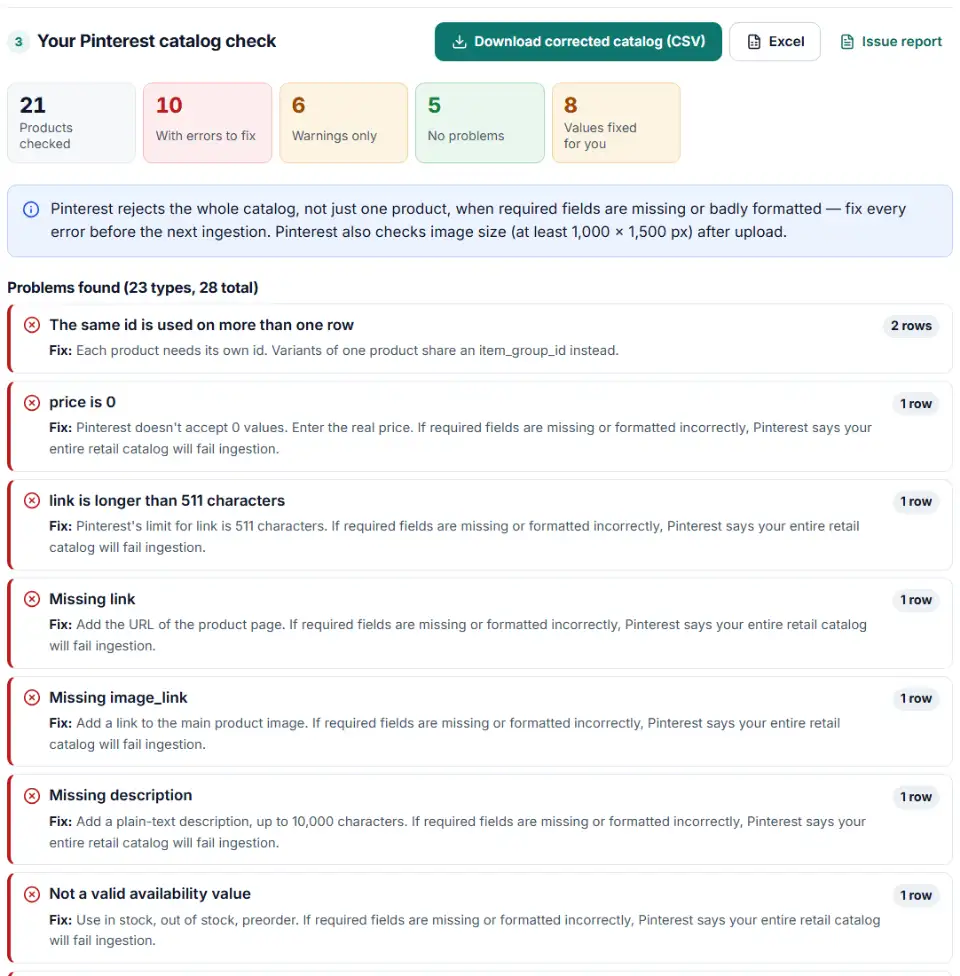
Pinterest product feed requirements it tests
- Prices — Pinterest is flexible:
24.99 USD,24,99USDandGBP 24.99all work. Symbols and 0 do not. - Availability — in stock, out of stock or preorder, in plain American English.
- Product type — up to five levels joined by
>with a space on each side; commas and pipes aren't read as levels. - Short attributes — color, size, material and pattern have 30 characters, brand 100, mpn 70, custom labels 511.
- Images — commas in image URLs are encoded, and placeholder pictures are flagged.
What to do next in Pinterest
- Check you're eligible. You need a business account, a claimed website, the Pinterest tag installed, and contact details, a shipping policy and a refund policy on your site.
- Add the data source. Go to Catalogs and product groups > Add data source, then choose Provide URL link for a hosted file or Upload manually. Pick the country and language carefully — they can't be changed later.
- Validate a sample. Use Test your data source with a few rows plus the header, then Validate data source.
- Keep IDs unique across sources. Don't reuse item IDs from another data source, and remember that deleting a data source removes all its products and product groups for good.
- Refresh it. A linked file is ingested every 24 hours. Re-upload a manual file within 30 days to stay in organic results.
Common Pinterest product feed errors and fixes
Pinterest catalog ingestion failed
Look at the required columns first. A missing availability column or a blank image_link is enough to stop the whole catalog, so these appear as errors here even when they hit only one row.
Pinterest catalog price format
Pinterest accepts the code before or after the number, with or without a space, and a comma or a dot for decimals. It rejects currency symbols and zero prices. Without a code it assumes USD, which quietly turns a euro or pound price into dollars.
Pinterest catalog link length
Long UTM strings can push a product link past 511 characters. Shorten the URL, or move tracking into the separate ad_link field, which holds the full URL with tracking.
Pinterest catalog item_group_id for variants
Rows that share a name but differ by size or color are flagged when the file has no item_group_id column. Pinterest requires the group ID for products with variants.
Encoding and floating delimiters
Data sources must be UTF-8, so a Windows Excel export shows broken accents. Pinterest also asks for the same number of delimiters on every row; an empty column at the end of each line counts as a floating delimiter. The corrected download fixes both.
HTML in the description
The description field is plain text. HTML tags and codes like & are converted in the corrected file; use description_html for a formatted version.
Frequently asked questions
What fields does a Pinterest catalog feed require?
Seven: id, title, description, link, image_link, price and availability. item_group_id becomes required as soon as a product has variants. Pinterest’s retail catalog guide lists the optional fields, such as brand, GTIN, sale_price and product_type.
Why did my Pinterest catalog fail to ingest?
Pinterest says that if required fields are missing or formatted incorrectly, the entire retail catalog fails ingestion — one bad column can block every product. Typical causes are an empty required column, a price with a currency symbol or a value of 0, an availability word Pinterest doesn’t use, or a file that isn’t UTF-8.
How long can titles and links be in a Pinterest catalog?
Titles can have up to 500 characters and descriptions 10,000. link is limited to 511 characters, which long tracking URLs often break, and image_link to 2,000. id and item_group_id may have 127.
How do I group product variants for Pinterest?
Give each size or color its own row and its own id, then put the same item_group_id on every variant of the product. Optional variant_names and variant_values (for example Color,Size and Red,Small) control how the options are shown.
How do I test a Pinterest data source before creating Pins?
In the catalog setup, use Test your data source: paste a sample of your file including the header row, then select Validate data source to see errors. Running the whole file through this checker first means the sample should come back clean.
What happens if I don't update a manually uploaded Pinterest catalog?
After 30 days without an update, products stop being shown organically. After 90 days they stop showing in ads too. A data source added by URL is fetched every 24 hours, so it doesn’t go stale.
Does this tool upload my catalog?
No. The checker runs inside your browser and nothing is sent to us or to Pinterest.
Related tools and guide
-
Get Pinterest tag code for checkouts, leads and sign-ups, with value, order ID, an event ID for the Conversions API and enhanced match.
Pinterest -
Check a Meta catalog feed for missing required fields, bad prices, unsupported availability values, wrong image types and duplicate IDs.
Meta -
Catch missing required fields, the wrong ID column, emoji in titles, unsupported image hosts and currency mismatches before TikTok rejects products.
TikTok -
Find missing attributes, bad prices, wrong availability values, invalid GTINs and duplicate IDs before Google disapproves them.
Google -
Check thousands of product barcodes (GTIN, UPC, EAN, ISBN) at once and catch wrong check digits and restricted codes before Merchant Center does.
GoogleMetaTikTokPinterestMicrosoft -
Build Pinterest tracking links that report the campaign, ad group and Pin behind each click, checked for your ad type and Pinterest's automatic UTMs.
Pinterest
Need help setting this up? Talk to EmproIT