Catalog Feed Checker for Meta (Facebook Catalog Feed Template)
Check a Facebook and Instagram product catalog against Meta's catalog fields — required fields, price format, availability values, images and IDs — and download a corrected CSV or a blank template.
Catalog Feed Checker for Meta
- Upload
- Check
- Download
1 Add your catalog file
No catalog yet? Download the Facebook catalog feed template (CSV) with the fields Meta needs and the common optional ones.
Choose a file or drag it here
CSV, TSV, TXT, XML or Excel · up to 300 MB
2 Check the columns and options
Rules last checked: against the official pages:
- Product data specifications for catalogs in Commerce Manager (Meta (Facebook and Instagram))
- Catalog Fields (Meta for Developers, .md mirror) (Meta (Facebook and Instagram))
How to use the catalog feed template and checker for Facebook
Start from the Facebook catalog feed template above if you are building a catalog from scratch, or load the file you already send to Commerce Manager. The checker compares every item with Meta's product data specifications for catalogs and its developer field list, then hands back a fixed CSV.
- Add the catalog. Drop a CSV, TSV, XML or Excel file, paste rows from Google Sheets, or press Try sample data to see a home and apparel shop catalog with typical problems.
- Confirm the fields. Headers that already use Meta's names are matched automatically. Old names such as
visibility,inventoryorproduct_tagsare mapped to today'sstatus,quantity_to_sell_on_facebookandinternal_label. - Set the options. The currency only fills in a code where a price has none; tick Shops if you sell with checkout on Facebook or Instagram.
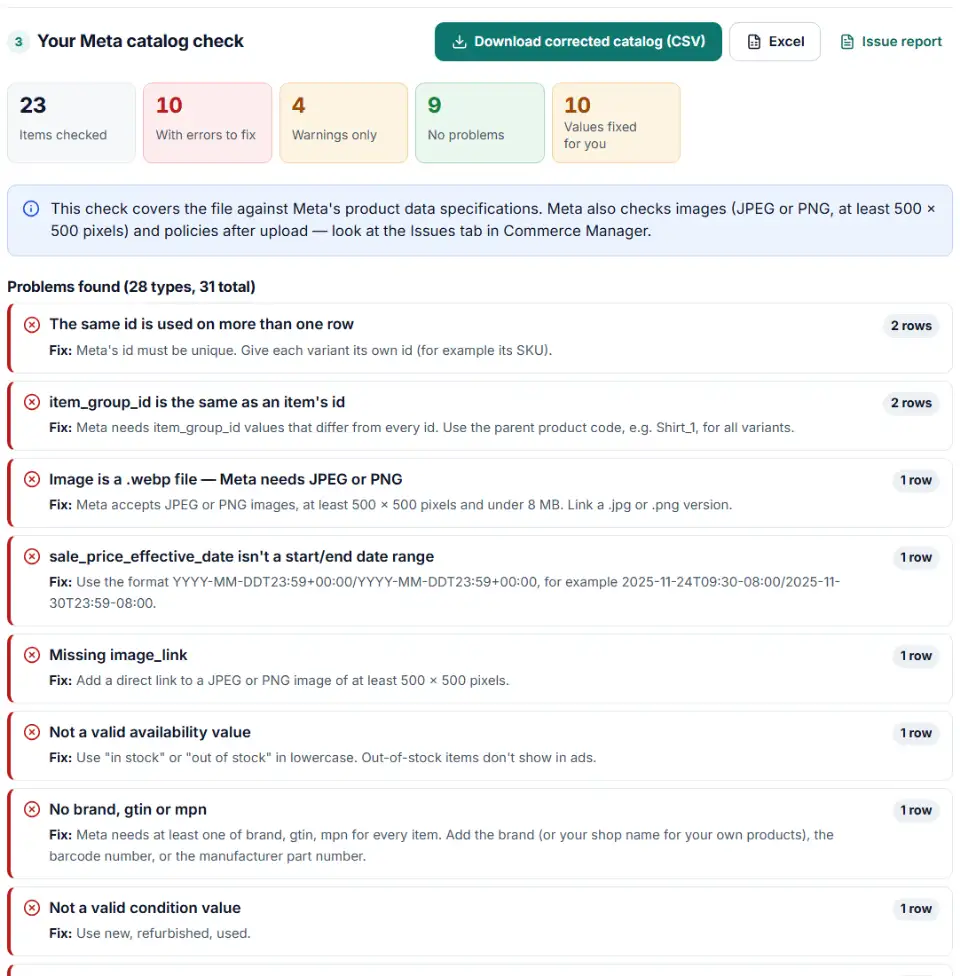
- Review and download. Problems are grouped by type with the share of the catalog each one touches. Download the corrected CSV, the list of items still to fix, and the summary.
What the Facebook product feed specification checks cover
- Required fields — the eight upload fields on every row, plus at least one of brand, gtin or mpn.
- Limits —
idup to 100 characters,title200 (65 recommended),description9,999,brandandmpn100, custom labels 100. - Values — availability, condition, gender, age group and status checked against Meta's lists.
- Formats — prices, sale dates, links, JPEG or PNG images, GTIN digits, shipping and weights.
- Catalog logic — duplicate IDs, group IDs equal to item IDs, mixed currencies.
What to do next in Commerce Manager
- Match your pixel first. For Advantage+ catalog ads, each
idmust be exactly the value your Meta Pixel and Conversions API send incontent_ids. If you change IDs to fix duplicates, change the pixel too. - Choose how Meta gets the file. A one-time upload can be up to 100 MB. A scheduled feed reads a URL (http, https, ftp or sftp) and can be up to 4 GB; Meta asks you to compress files over 1 GB with ZIP or GZIP.
- Using Google Sheets? Keep the feed on the first tab, shared with anyone who has the link.
- Check the issues list after the first run. Commerce Manager reports items it rejected and policy problems this file check can't see.
- Filter product sets with internal labels. Meta recommends
internal_labelover custom labels for product sets because internal labels don't trigger a policy review.
Common Facebook catalog errors and fixes
Facebook catalog price format errors
Writing $24.00, 24,00 EUR or USD 24 breaks Meta's rule of number, space, code. The corrected file rewrites each one to 24.00 USD. A price Meta can't read at all, such as "call us", is left for you.
Facebook catalog availability values
Meta's page lists two values, written with a space: "in stock" and "out of stock". The Google-style in_stock is rewritten for you. Older words like "preorder", "available for order" or "discontinued" are flagged because they are not on the current list.
Facebook catalog duplicate IDs
Meta needs every id to be unique, so two rows with the same one are an error. And because the field is case sensitive, abc123 and ABC123 become two separate products — fine if that's intended, a mess if your pixel sends only one spelling.
Facebook catalog item group ID for variants
A shared item_group_id ties variants together, but it may not equal any item's id. A common slip is using the first variant's SKU as the group ID; use a parent code instead.
Facebook catalog title length and description problems
Titles may have 200 characters, but past 65 they may be cut off in ads. Descriptions must be plain text without links, not all capitals, and different from the title. HTML from a shop export is stripped in the corrected file; put formatted text in rich_text_description instead.
Images that aren't JPEG or PNG
WebP, GIF and SVG links are flagged. Link a .jpg or .png of at least 500 x 500 pixels.
Frequently asked questions
What fields are required in a Facebook catalog feed?
Meta’s Catalog Fields reference lists eight fields without which products may not upload: id, title, description, availability, condition, price, link and image_link. Every item also needs at least one of brand, gtin or mpn. If you sell with checkout on Facebook or Instagram, clothing and shoes need size too.
How should prices be written in a Meta catalog feed?
A number with a dot for decimals, a space, then the 3-letter ISO 4217 code: 9.99 USD or 7.99 EUR. Symbols such as $, € or £ are not accepted, and one file should hold one currency. A price with no code falls back to the data feed’s default currency.
What image size does a Facebook catalog need?
Meta asks for JPEG or PNG images of at least 500 x 500 pixels and under 8 MB. When you replace a picture, give it a new URL so Meta fetches the new file. This checker flags other file types such as .webp or .gif; it can’t measure the pixels without downloading the image.
How do I group product variants in a Meta catalog?
Give every size or color its own row and its own id, and put the same item_group_id (for example Shirt_1) on all of them. The group value must be different from every id in the file, and both fields are case sensitive.
Why are items in my Facebook catalog rejected?
Usually a required field is empty, the price has a symbol instead of a code, availability uses a value outside “in stock” and “out of stock”, or the image is the wrong type. Policy reviews and broken links show up in the catalog’s issues list in Commerce Manager after upload.
Can I check a CSV, TSV or XML catalog feed?
Yes. The checker reads CSV, TSV, TXT, RSS or Atom XML and Excel files, with no row limit. The corrected download is a UTF-8 CSV, a format Meta accepts for one-time uploads and scheduled feeds.
Is my catalog uploaded anywhere?
No. Your browser checks the file; nothing is sent to us or to Meta.
Related tools and guide
-
Find why your Meta catalog match rate is low: compare catalog IDs with the product IDs your pixel sends and see which ID format breaks the match.
Meta -
Get Meta pixel code for purchases, leads and other events, with order value and a matching Conversions API event so no sale is counted twice.
Meta -
Catch missing required fields, the wrong ID column, emoji in titles, unsupported image hosts and currency mismatches before TikTok rejects products.
TikTok -
Find the missing or badly formatted required fields that make Pinterest reject a whole retail catalog, plus price, variant and length problems.
Pinterest -
Find missing attributes, bad prices, wrong availability values, invalid GTINs and duplicate IDs before Google disapproves them.
Google -
Check thousands of product barcodes (GTIN, UPC, EAN, ISBN) at once and catch wrong check digits and restricted codes before Merchant Center does.
GoogleMetaTikTokPinterestMicrosoft
Need help setting this up? Talk to EmproIT