Catalog Match Rate Checker for Meta (Pixel content_ids vs Catalog)
Compare your Meta catalog IDs with the content_ids your pixel or Conversions API sends, get the match rate, and see the exact ID pattern that breaks it — parent vs variant ID, SKU vs number, prefixes, capitals, spaces or lost zeros.
Catalog Match Rate Checker for Meta
- Upload
- Compare
- Download
1 Add your catalog and pixel IDs
File 1 is required. Add file 2, or paste IDs in step 2, to get the match rate.
1. Your catalog
Choose a file or drag it here
Catalog feed, Commerce Manager export, Shopify or WooCommerce export: CSV, TSV, XML or Excel · up to 300 MB
2. IDs your pixel sends (optional)
Choose a file or drag it here
Events export with content_ids, or one ID per line · up to 300 MB
2 Check the columns and options
Rules last checked: against the official pages:
How to check your catalog match rate
A low catalog match rate means Meta can't find the products from your pixel events in your catalog, so Advantage+ catalog ads have less to work with. This checker compares the two lists using Meta's rule that the catalog id must exactly match the pixel's content_ids (product data specifications), and names the pattern that breaks it.
- Add your catalog. Use the file your catalog is fed from, or an export of the items. The tool reads
idanditem_group_id, and optionally another ID column such as the SKU. - Add the IDs your pixel sends. Load an events export with a content_ids column (counts make the rate more accurate) or paste IDs copied from test events, the Pixel Helper or a dataLayer log.
- Check the columns. Make sure the catalog id column is the one your catalog really uses as
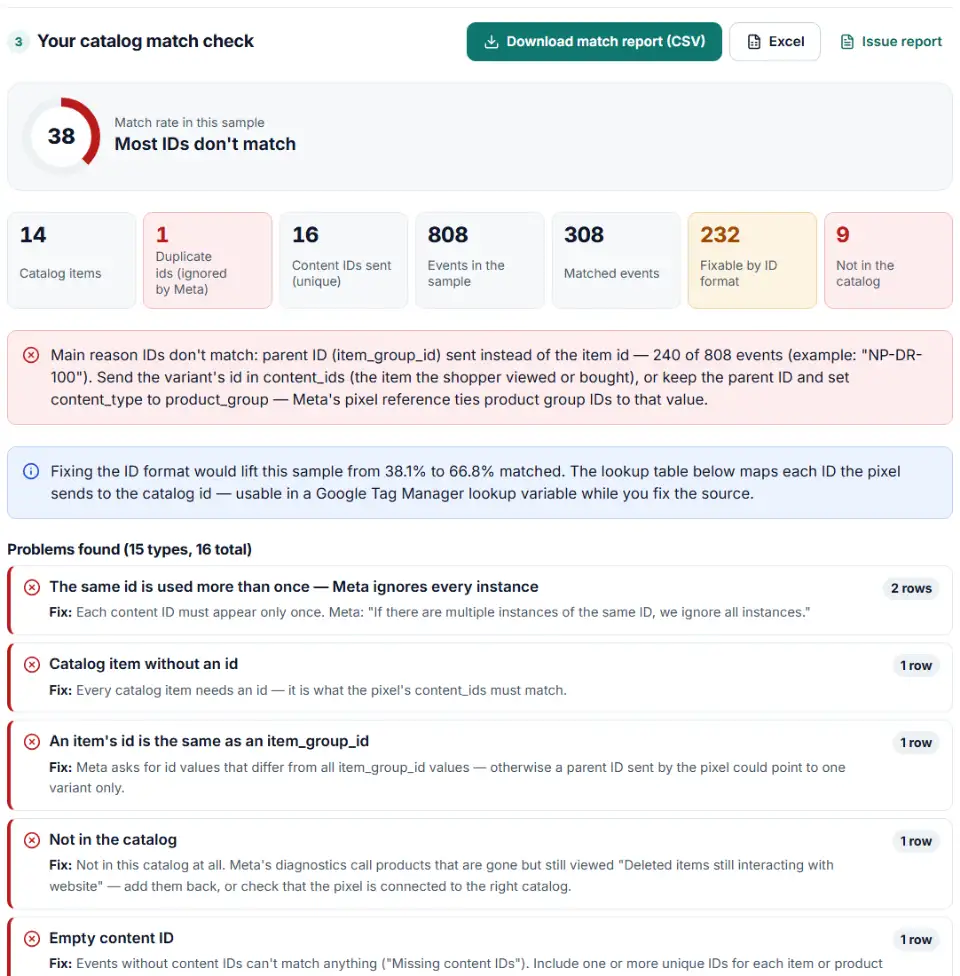
id. - Read the diagnosis. You get the match rate for your sample, the main reason IDs don't match, and the catalog id each wrong value should have been.
- Download. Get the full report and a lookup table from sent ID to catalog id.
ID patterns that break the match
- Parent instead of variant — the pixel sends the product's group ID while the catalog lists each variant.
- Prefix formats — IDs like
shopify_US_8012345678901_44012345678901in the catalog, but only the variant number in the pixel. - Another identifier — the pixel sends the SKU, the catalog uses a numeric ID, or the reverse.
- Small differences — capital letters, spaces, lost leading zeros, or an extra prefix on one side.
- Duplicate ids — Meta's catalog fields page says that when an ID appears more than once, all instances are ignored.
What to do next
- Fix the main pattern first. It usually explains most of the gap. Change the pixel's content_ids or the feed's id so both use one format.
- Check content_type. Send
productwith item IDs, orproduct_groupwith group IDs, as Meta's pixel reference describes. - Test one product. View a product page with Events Manager's test events open and compare the content_ids with that product's catalog id.
- Check the connection. The catalog must be connected to the pixel or app that sends the events, or nothing can match.
- Watch the trend. Re-check over the following weeks with fresh events from your pixel.
Catalog match rate problems in Meta's diagnostics
Meta's catalog diagnostics name these issues for events and catalogs.
“Catalog not connected to Meta Pixel or app SDK”
The catalog has no event source, so no event can match. Connect the pixel that runs on your site to the catalog.
“Invalid content IDs”
Meta's advice is to check that content IDs are formatted correctly with no extra numbers or symbols. That is exactly what the prefix, zero and spacing patterns above find.
“Missing content IDs”
Events arrive without any ID. Meta asks you to include one or more unique IDs for each item or product group in the code.
“Deleted items still interacting with website”
Shoppers still view products you removed from the catalog. Meta suggests adding them back to raise the match rate; the checker lists them as “not in the catalog”.
Catalog match rate 0 with variants
When every event carries the parent number and the catalog only has variants, nothing matches. Send the variant id, or send group IDs with content_type set to product_group.
Frequently asked questions
What is catalog match rate in Meta Commerce Manager?
It shows how well the products in your pixel or app events can be found in your catalog. Meta’s diagnostics state it plainly: “Valid content IDs for interacted products in your website are required to match products to this catalog” (Diagnostics API). Meta doesn’t publish the exact formula on a page we could check, so the percentage in this tool is simply the share of the IDs you add that equal a catalog id exactly.
Why is my catalog match rate 0%?
Almost always because the pixel and the catalog use different IDs for the same product: the parent product number instead of the variant, a SKU instead of a numeric ID, or a prefix such as shopify_US_ on one side only. A catalog that isn’t connected to the pixel, or events without content IDs, also give zero. Paste both lists above to see which one it is.
Should content_ids be the variant ID or the product ID?
Send the id of the catalog item the shopper looked at or bought — in a catalog with variants, that’s the variant’s id — and set content_type to product. If you send product group IDs instead, Meta’s pixel reference says content_type should be product_group.
How do I see which IDs my pixel sends?
Open a product page and watch the event in Events Manager’s test events or in the Meta Pixel Helper browser extension, check the tag in your tag manager’s preview, or export your event data. Copy the content_ids values into the box above — JSON arrays and quotes are fine.
Do content_ids have to match the catalog ID exactly?
Yes. Meta’s catalog specification says the id must exactly match the pixel’s content_ids for Advantage+ catalog ads, and IDs are case-sensitive: abc123 and ABC123 are two different products (product data specifications).
Should I change the pixel or the catalog to fix the match rate?
Change the side that’s easier to keep right. Pixels set up in a tag manager can often be fixed in one variable. Feeds made by a shop app may let you choose the ID format. Avoid changing catalog IDs back and forth: each new ID is a new item to Meta.
Related tools and guide
-
Check a Meta catalog feed for missing required fields, bad prices, unsupported availability values, wrong image types and duplicate IDs.
Meta -
Get Meta pixel code for purchases, leads and other events, with order value and a matching Conversions API event so no sale is counted twice.
Meta -
Check the server events you send to Meta's Conversions API for hashing mistakes, missing fields and weak customer details, and get a fixed version.
Meta -
Get custom pixel code for Shopify that sends checkout and cart events to Meta, Google, TikTok and Pinterest, plus a checker for wrong event names.
ShopifyMetaGoogleTikTokPinterest -
Convert a Shopify products CSV into a Google Shopping feed without an app: variants grouped, options mapped, bad barcodes left out and every row checked.
GoogleShopify -
Group your Google Shopping products by price range, margin or best sellers with custom labels, in a supplemental feed kept within Google's limits.
Google
Need help setting this up? Talk to EmproIT