Pixel Event Code Generator for Facebook and Meta Ads
Generate Facebook Pixel event code for Purchase, Lead, AddToCart and every standard event — with value, currency, content IDs and an event ID that matches your Conversions API payload.
Pixel Event Code Generator for Meta
1 Build or check
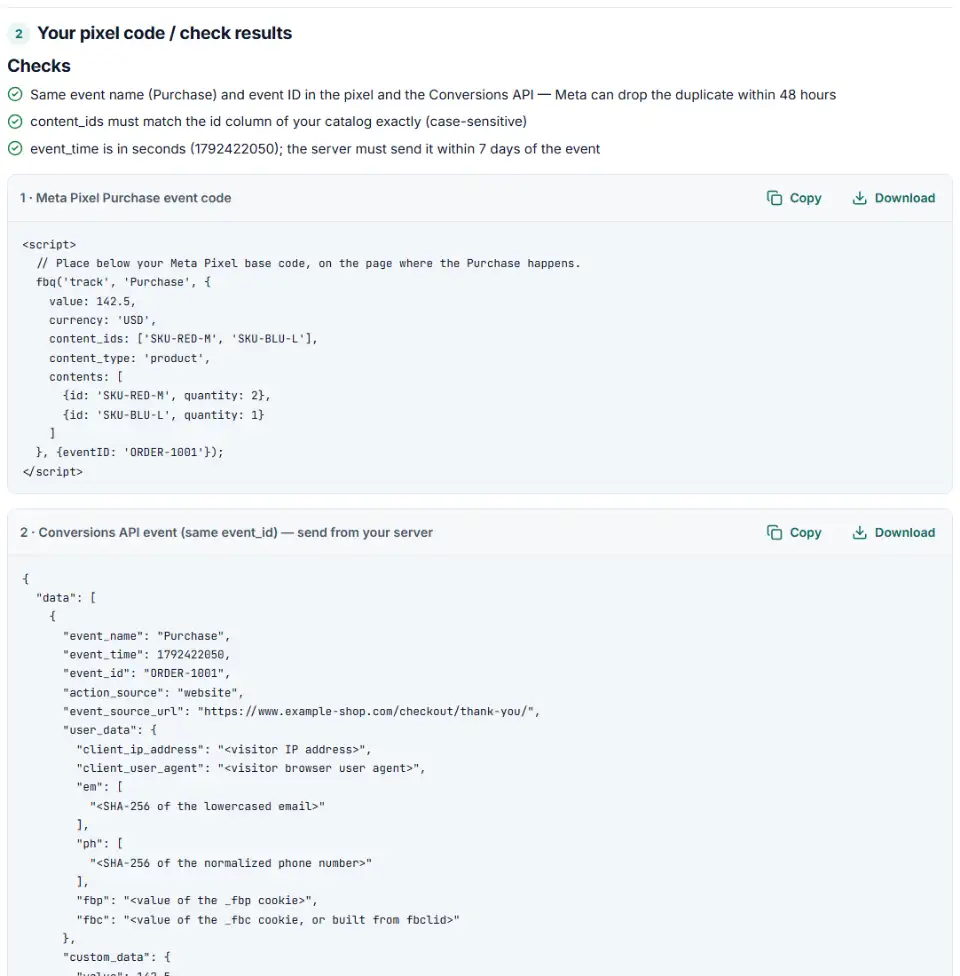
2 Your pixel code / check results
Fill in the settings above — your result appears here instantly.
Rules last checked: against the official pages:
- Specifications for Meta Pixel standard events (Meta (Facebook and Instagram))
- Meta Pixel Reference (standard events and object properties) (Meta (Facebook and Instagram))
- Handling Duplicate Pixel and Conversions API Events (eventID syntax) (Meta (Facebook and Instagram))
How to use the event code generator for the Facebook Pixel
This event code generator for the Facebook Pixel writes the fbq() call for any standard event and the Conversions API event that pairs with it. Names, parameters and the event ID position follow Meta's Meta Pixel reference and its deduplication guide.
- Pick the event. Choose Purchase, Lead, AddToCart or any other standard event. Only the parameters Meta lists for it are shown. Pick Custom event for your own name.
- Fill in value and currency. Purchase can't be sent without them. Type the value as a plain number.
- Add product lines. One line per product with ID, quantity and price. The tool builds
contentsandcontent_idsfrom them. - Set the event ID. Use the order number, or the name of a variable your page already has. The same ID goes into the server event.
- Copy both code boxes. Box 1 goes on your site. Box 2 is the JSON your developer or server tool sends to the Conversions API endpoint in box 3.
What to do next: add the event to your site
The Meta Pixel base code must already be on every page, between <head> and </head>. The event code then runs after it, only on the page or click that matters.
Plain HTML
- Open the template of your confirmation page (or the page with the button).
- Paste box 1 below the base code. For click events, change
#your-buttonto your button's selector — the code works even in<head>. - Replace the example value, currency and order number with the real ones your server prints for that order.
WordPress and WooCommerce
- If Meta's own integration or a pixel plugin already sends Purchase, don't add it twice — check Test Events first.
- In a child theme, WooCommerce runs the
woocommerce_thankyouaction with the order ID. Load the order there and print box 1 with$order->get_total()and$order->get_currency(). - Use
$order->get_order_number()as the event ID, and send the same number from your server.
Shopify
- Shopify's new Thank you and Order status pages don't run additional scripts, so purchase events must come from an app pixel (from a Meta integration app) or a custom pixel.
- A custom pixel reads the order from Shopify's
checkout_completedevent — build it with our custom pixel code generator for Shopify.
Google Tag Manager
- Meta's setup: a Custom HTML tag with the base code, tag firing option Once per page, trigger All Pages.
- Add one more Custom HTML tag per event with its trigger. For clicks, use box 1b with a Click trigger — box 1 would only start listening on the first click.
- Use Tag Manager variables for value and order number instead of fixed text.
- Check in Preview mode and in Events Manager Test Events, then click Submit to publish (Meta's GTM guide).
Common Meta Pixel event errors and fixes
Facebook Pixel purchase event not working: wrong capitals
Standard event names are case-sensitive: purchase or AddtoCart are not Purchase or AddToCart. Meta's reference lists the exact spelling of every standard event; anything else is a different event.
Event ID inside the parameters
The ID belongs in a separate fourth argument written {eventID: '…'}, with a capital I and D. Put inside the value/currency object, or spelled eventId, it is not read as the deduplication key.
Facebook pixel duplicate events
Purchases count twice when the pixel and the Conversions API send different IDs, different event names, or no ID at all. Another cause is a second fbq('track', 'PageView') — the base code already sends one.
Value sent as text
value: '$49.90' is a string with a symbol. Send value: 49.90 and put the currency in currency: 'USD', using the 3-letter code.
content_ids that don't match the catalog
Meta's catalog rules say the product id must exactly match the pixel's content_ids for Advantage+ catalog ads, including letter case. Sending parent product IDs while the catalog lists variants breaks the match.
Custom event sent with track
Own names like TookQuiz need fbq('trackCustom', …). The track method is for Meta's standard events.
Frequently asked questions
What does Facebook Pixel purchase event code look like?
fbq('track', 'Purchase', {value: 142.50, currency: 'USD'}, {eventID: 'ORDER-1001'}); — the event name, an object with the parameters, and an optional fourth object with the event ID. It runs below the Meta Pixel base code on your order confirmation page.
Which parameters should a Purchase event include?
Meta requires value and currency for Purchase. Add content_ids or contents (each entry with id and quantity) if you run Advantage+ catalog ads — the IDs must match your catalog exactly. content_type is product or product_group.
How do I test Facebook Pixel events?
Open Events Manager › Data sources › your pixel › Test Events and browse your site — events show up live. For the Conversions API, copy the test code from the same Test Events screen into test_event_code, and remove it before going live.
What is event_id and why does it matter with the Conversions API?
It is the ID Meta uses to spot the same event arriving twice — once from the browser pixel (eventID) and once from your server (event_id). When both have the same event name and ID, Meta keeps one, within a 48-hour window. Your order number works well.
Why is my Facebook Pixel purchase event not working?
Most often: the event name is written purchase instead of Purchase, value or currency is missing, value is text with a currency sign, the event code runs before the base code, or the code sits on a page shoppers never reach. Paste your code into Check my code to find which.
Can I create custom events with the Meta Pixel?
Yes: fbq('trackCustom', 'TookQuiz', {…});. Meta says custom event names must be strings of up to 50 characters. You can turn them into custom conversions — up to 100 per ad account.
Related tools and guide
-
Build Meta's fbc click value from an ad click link, and bulk-check fbc and fbp values for the time, case and hashing mistakes that break matching.
Meta -
Check the server events you send to Meta's Conversions API for hashing mistakes, missing fields and weak customer details, and get a fixed version.
Meta -
Get custom pixel code for Shopify that sends checkout and cart events to Meta, Google, TikTok and Pinterest, plus a checker for wrong event names.
ShopifyMetaGoogleTikTokPinterest -
Get TikTok pixel code for purchases, leads and other events with the 2025 event names, value, currency and a matching Events API event.
TikTok -
Get Pinterest tag code for checkouts, leads and sign-ups, with value, order ID, an event ID for the Conversions API and enhanced match.
Pinterest -
Find why your Meta catalog match rate is low: compare catalog IDs with the product IDs your pixel sends and see which ID format breaks the match.
Meta
Need help setting this up? Talk to EmproIT