Conversion Tag Event Code Generator for Pinterest Ads
Generate Pinterest tag event code for checkout, add to cart, lead, sign-up and the other events — with value, order_quantity, currency, order_id, line items, an event_id for the Conversions API and the <noscript> image — or check the tag code you already have.
Conversion Tag Code Generator for Pinterest
1 Build or check
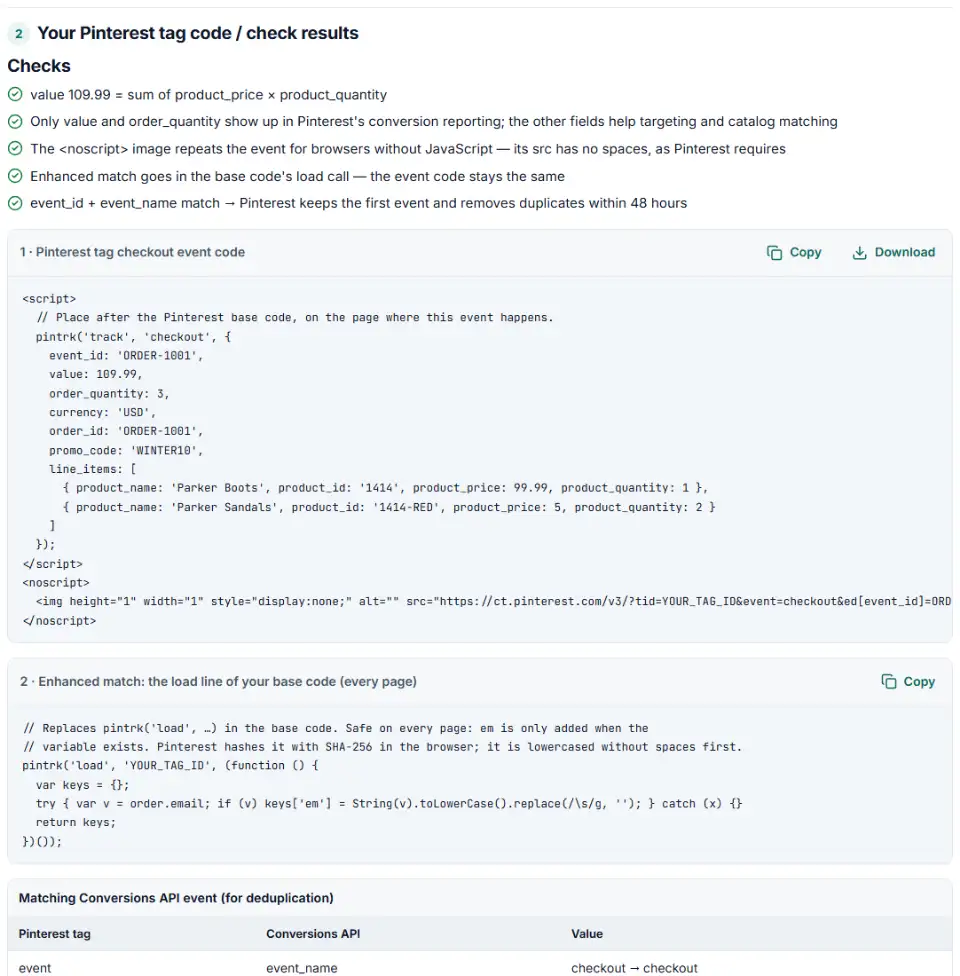
2 Your Pinterest tag code / check results
Fill in the settings above — your result appears here instantly.
Rules last checked: against the official pages:
- Add event codes (Pinterest Ads)
- Track conversions with Pinterest Tag (developer guide) (Pinterest Ads)
- Enable optional enhanced match (Pinterest Ads)
- Conversions API (event_name enum, event_id dedup best practices) (Pinterest Ads)
How to use the conversion tag generator for Pinterest
Pick an event and this conversion tag generator for Pinterest writes the pintrk('track', …) call, the matching <noscript> image and, if you want it, the enhanced match line. Field names, the three accepted spellings of the event ID and the image format come from Pinterest's Add event codes help page.
- Choose the event and your campaign objective. Catalog sales campaigns have stricter needs, and the checks follow them.
- Enter the order details — or leave value and order_quantity empty and let the tool total your line items.
- Add line items with the product IDs from your Pinterest catalog.
- Set an event ID when your server also sends the event through the Conversions API.
- Copy the code. To audit an existing setup, paste it into Check my code, including the image tag.
What to do next: add the event code to your site
Only one copy of the Pinterest base code is needed per site, in the <head> of every page. Event code always comes after it.
Plain HTML
- Paste the script and the
<noscript>image on the order confirmation page, below the base code. - Have your server print each order's real total, quantity and number into both — they must match.
WordPress and WooCommerce
- Look for
pintrk('load'in your page source — a plugin may already add the one base code Pinterest needs per site. - On WooCommerce's order-received page, print the checkout event from a child theme, with the order's line items as
line_items.
Shopify
- Pinterest's checkout event can't sit in Additional scripts on the new Thank you page. Use an app pixel or a custom pixel (Settings › Customer events); its
event.data.checkout.lineItemsgive you each product's quantity and variant forline_items. - A custom pixel is JavaScript only: drop the
<script>and<noscript>parts and send checkout from thecheckout_completedevent. Our custom pixel code generator for Shopify builds a Pinterest version.
Google Tag Manager
- Load the base code once, in a Custom HTML tag on All Pages. Put enhanced match (box 2) in that same tag.
- Leave the
<noscript>image out of Tag Manager: tags only run with JavaScript, so it never fires there. - Fire the checkout tag on the confirmation page, sequenced after the base tag, with data layer variables for value and order_id.
To verify, open the network tab, filter for ct.pinterest and complete a test order: the request should show your event and its ed data. Pinterest says a new tag should verify within 3 hours. Turn on enhanced match in Ads Manager under Conversions › Event quality.
Common Pinterest tag errors and fixes
Pinterest checkout event value sent as text
value: '$109.99' is a string with a symbol. Send value: 109.99 and put the code in currency; order_quantity must be a whole number.
Pinterest tag event_id deduplication not working
The ID field is case-sensitive and accepts only eventID, event_id or eid, so eventId isn't read as the event ID. The same value must reach the Conversions API as event_id, with the same event name.
Spaces in the image tag
Pinterest warns that whitespace in the image's src breaks it. Spaces inside values become +, and the whole URL stays on one line.
A plain email in the image
The JavaScript tag hashes emails for you; the image doesn't. pd[em] must carry a hash, never an address.
Product fields outside line_items
product_id and product_price belong inside line_items. That is where Pinterest's examples put them, and catalog sales campaigns need product_id to match your catalog.
Frequently asked questions
What is the Pinterest conversion tag?
The Pinterest tag is a small piece of JavaScript from Ads Manager. Its base code loads on every page and records page visits. Event code — pintrk('track', 'checkout', {…}) — tells Pinterest when someone buys, adds to cart, signs up or becomes a lead, so those actions show up as conversions.
How do I set up the Pinterest tag?
Copy the base code from Ads Manager and paste it between <head> and </head> on every page, once. Then add event code after it on the pages or clicks that matter. Pinterest says the tag should be verified within 3 hours of its first use.
Which events can the Pinterest tag track?
Pinterest lists 20 event types, including a custom one. The tag strings in its examples are pagevisit, viewcategory, search, addtocart, checkout, watchvideo, signup, lead, addpaymentinfo, initiatecheckout, subscribe, viewcontent and AddToWishList. Contact, Schedule, StartTrial and a few newer types have no published code example yet.
Which parameters should the checkout event include?
value, order_quantity and currency at least — only value and order quantity feed conversion reporting. Add order_id for conversion analysis, line_items with each product_id for catalog sales, and an event ID if your server also sends the purchase.
Why does Pinterest say my conversion source needs attention?
Check the basics first: is the base code on every page and loading before the events, does the event name match Pinterest’s list, and do events send value and currency? In your browser’s network tab, filter for ct.pinterest and look for the event and ed values in each request.
What is enhanced match in the Pinterest tag?
It adds the customer’s email to the base code’s load line — pintrk('load', 'TAG_ID', { em: … }) — so Pinterest can match more conversions. The JavaScript tag hashes raw emails with SHA-256 before sending. Turn it on in Ads Manager under Conversions › Event quality.
Related tools and guide
-
Build Pinterest Conversions API events that get accepted and matched, with hashed customer details, an event ID and a matching tag call.
Pinterest -
Build Pinterest tracking links that report the campaign, ad group and Pin behind each click, checked for your ad type and Pinterest's automatic UTMs.
Pinterest -
Find the missing or badly formatted required fields that make Pinterest reject a whole retail catalog, plus price, variant and length problems.
Pinterest -
Get custom pixel code for Shopify that sends checkout and cart events to Meta, Google, TikTok and Pinterest, plus a checker for wrong event names.
ShopifyMetaGoogleTikTokPinterest -
Get TikTok pixel code for purchases, leads and other events with the 2025 event names, value, currency and a matching Events API event.
TikTok -
Get the Snapchat pixel code for purchases and other actions, with order value and an ID that stops double counting.
Snap
Need help setting this up? Talk to EmproIT