Pixel Events Code Generator for Snapchat Ads
Generate snaptr event code for PURCHASE, ADD_CART, SIGN_UP and every Snap Pixel standard event — with price, currency, transaction_id and a client_dedup_id for the Conversions API — or check the Snap Pixel code you already have.
Pixel Event Code Generator for Snapchat
1 Build or check
2 Your Snap Pixel code / check results
Fill in the settings above — your result appears here instantly.
Rules last checked: against the official pages:
- Directly Implement the Pixel On Your Website (Snapchat Ads)
- Purchase Event Examples (Snapchat Ads)
- Getting Started with Enabling the Pixel (Snapchat Ads)
- Deduplication (Conversions API) (Snapchat Ads)
How to use the pixel events generator for Snapchat
This pixel events generator for Snapchat writes clean snaptr() code for any standard event, with the parameter names and types from Snap's help page Directly Implement the Pixel On Your Website and the deduplication pairs from Snap's Conversions API docs.
- Pick the event. Names are upper case with underscores — the list only offers valid ones.
- For PURCHASE, fill price, currency and transaction_id. Leave price empty to total the product lines.
- Add products to send
item_idsandnumber_items. - Give each conversion a client_dedup_id if your server also reports it.
- Optionally add your pixel ID and email/phone variables to get the base code with them in the init call, then copy everything.
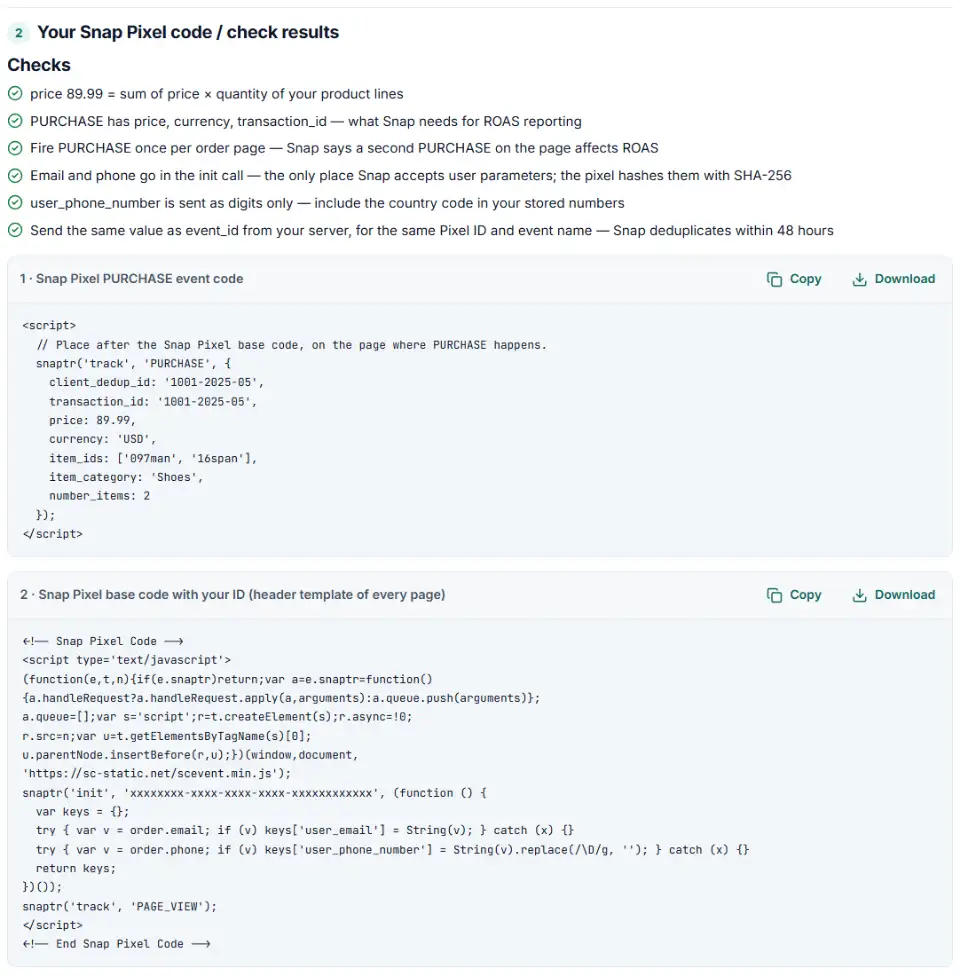
What to do next: install the Snap Pixel events
The base code lives in your header template so it runs on every page and keeps sending PAGE_VIEW. Each conversion gets one more snaptr('track', …) line.
Plain HTML
- Put box 2 (or the code from Ads Manager) in the shared header, once.
- Add box 1 to the order confirmation page only. Snap says to pass PURCHASE once on a page, so keep it off the cart and checkout steps.
Snapchat pixel on WooCommerce
- Snap wants the base code in the header template of every page — a child theme's header or a site-wide header snippet does that.
- On the order-received page, print PURCHASE with the order total as price, its currency and the order number as transaction_id.
- Fill
user_emailin the init call from the order's billing email; the pixel hashes it.
Snapchat pixel on Shopify
- PURCHASE won't fire from Additional scripts on the new Thank you page. Add Snap's code as a custom pixel (Settings › Customer events) or use an app pixel.
- Strip the
<script>tags and the base code's PAGE_VIEW; send PAGE_VIEW frompage_viewedinstead. - On
checkout_completed, send PURCHASE withevent.data.checkout.totalPrice.amount,event.data.checkout.currencyCodeandevent.data.checkout.order.id.
Snapchat pixel in GTM
- Snap reads user_email only in
snaptr('init'), so the email variable belongs in the base code tag (box 2), not in the event tags. - Each event: its own Custom HTML tag with box 1, fired after the base code tag. Make sure PURCHASE has exactly one trigger.
Using the Conversions API as well? Send client_dedup_id's value as event_id with the same Pixel ID and event name within 48 hours. For purchases, the order number as order_id inside custom_data also deduplicates, for up to 30 days. Fixes can take up to 24 hours to show.
Common Snap Pixel errors and fixes
Snapchat pixel events in lower case
'purchase' or 'AddCart' are not Snap events. Use the upper-case names: PURCHASE, ADD_CART, SIGN_UP.
Parameter names from another platform
Copied Meta or Google code often sends value, order_id or event_id. In the Snap Pixel these are price, transaction_id and client_dedup_id; order_id and event_id are the server-side names.
Email in the track call
User details such as user_email only work inside snaptr('init', …). Phone numbers there must be digits only, with the country code.
PURCHASE fired twice
Snap warns that a second PURCHASE on a page distorts ROAS. Check that a theme, an app and Tag Manager aren't all sending it.
Placeholders sent as IDs
Snap's deduplication guide lists IDs like {{order.order_number}}, %OrderId%, null or NA as invalid — they mean a template variable was never filled. Print the real value.
Broken code copied from Snap's own example
The ADD_CART sample on Snap's help page has curly quotes and a missing quote mark. Generate fresh code instead of pasting it.
Frequently asked questions
What are Snapchat Pixel events?
Calls like snaptr('track', 'PURCHASE', {…}) that tell Snapchat a visitor did something worth counting — bought, added to cart, signed up. The base code sends PAGE_VIEW on every page; Snap says at least one standard event is needed for attribution.
Which standard events does the Snap Pixel support?
PURCHASE, SAVE, START_CHECKOUT, ADD_CART, VIEW_CONTENT, ADD_BILLING, SIGN_UP, SEARCH, PAGE_VIEW, SUBSCRIBE, ADD_TO_WISHLIST, START_TRIAL, RESERVE, LIST_VIEW and a set of app and game events such as LOGIN, SHARE or LEVEL_COMPLETE. For your own actions there are CUSTOM_EVENT_1 to CUSTOM_EVENT_5.
What does Snap Pixel purchase event code look like?
snaptr('track', 'PURCHASE', { price: 89.99, currency: 'USD', transaction_id: '1001-2025-05', client_dedup_id: '1001-2025-05', item_ids: ['097man', '16span'], number_items: 2 }); Price, currency and transaction ID are the three Snap requires for accurate ROAS.
How do I set up the Snapchat Pixel?
In Ads Manager open the menu › Pixels › Create Pixel, name it and share it with your ad accounts, then Set up Pixel › Pixel Code. Paste that code in your site’s header template so it runs on every page, then add event code where the actions happen.
How do I check that my Snap Pixel events fire?
Install Snap’s Pixel Helper extension for Chrome, turn off ad blockers and open your pages: its icon shows whether the pixel loaded and events were sent. Log in to check that the email or phone is passed, and place a test order to see PURCHASE with price, currency and transaction_id. For a server-side check, open Events Manager › Test Events, pick your pixel and open your site from there: events from that tab show up as Valid, Valid with Warnings or Invalid without touching your real results.
Can I add the Snap Pixel with Google Tag Manager?
Yes. Put the base code in a Custom HTML tag that fires on all pages and each event in its own Custom HTML tag with the right trigger. Make sure the base code tag fires first.
Related tools and guide
-
Turn one messy export into Snap-ready email, phone and mobile ad ID files, plain or SHA-256.
Snap -
Build Snapchat ad tracking links with Snap's macros in one clean string, checked for typos, Dynamic Ads and Auto-UTM conflicts, plus the GA4 channel.
Snap -
Get Reddit pixel code for purchases, leads, sign-ups and the other standard events, with value, products and a conversion ID that stops double counts.
Reddit -
Get TikTok pixel code for purchases, leads and other events with the 2025 event names, value, currency and a matching Events API event.
TikTok -
Get Meta pixel code for purchases, leads and other events, with order value and a matching Conversions API event so no sale is counted twice.
Meta -
See every tag in a Google Tag Manager export in one Excel file, with unused, paused and outdated items flagged and two versions compared.
Google
Need help setting this up? Talk to EmproIT