Pixel Events Code Generator for TikTok Ads
Generate ttq.track code for Purchase, Lead, AddToCart and every current TikTok standard event — with value, currency, contents and an event_id that matches your Events API event — or check the pixel code you already have.
Pixel Event Code Generator for TikTok
1 Build or check
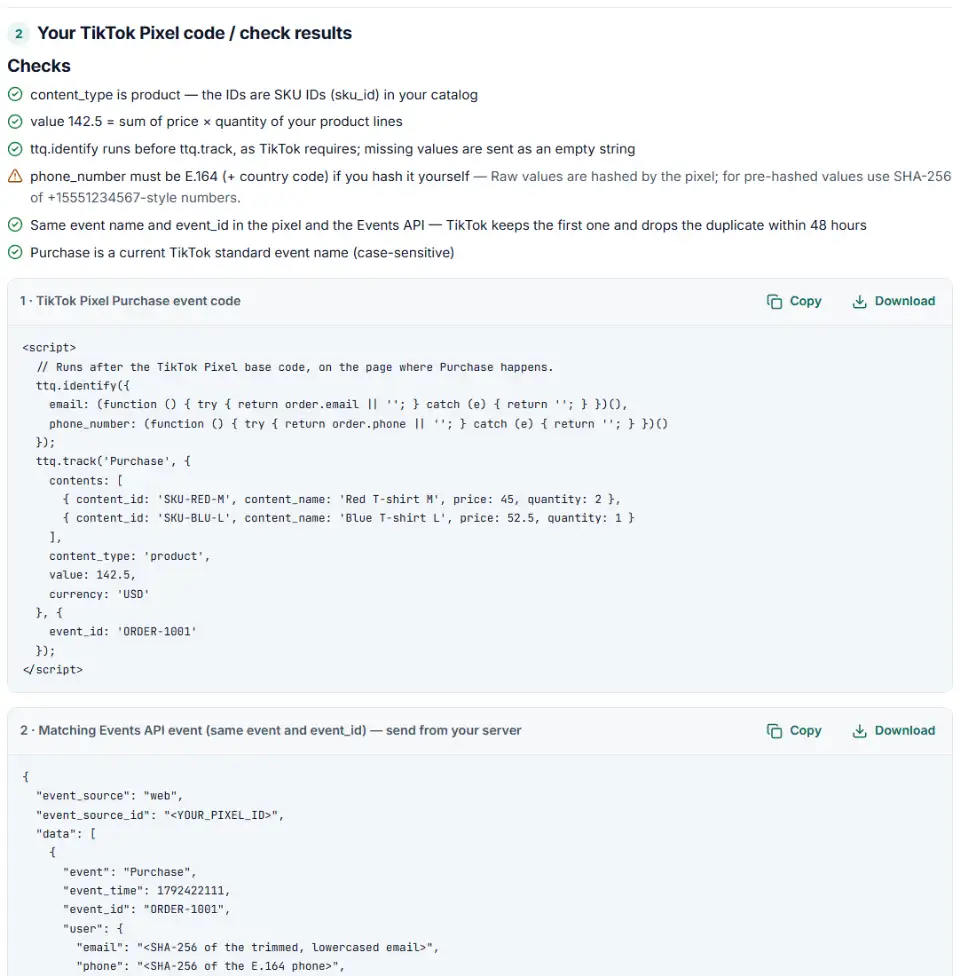
2 Your TikTok Pixel code / check results
Fill in the settings above — your result appears here instantly.
Rules last checked: against the official pages:
- Pixel: Install Pixel using code (base code, events, parameters) (TikTok Ads)
- About Standard Events in TikTok Ads Manager (Last updated: April 2026) (TikTok Ads)
- How to Adopt TikTok's Updated Standard Events (Last updated: May 2025) (TikTok Ads)
- About event deduplication (Last updated: May 2025) (TikTok Ads)
How to use the pixel events code generator for TikTok
This pixel events code generator for TikTok writes the ttq.track() call for any current standard event, with the parameter names and event ID position from TikTok's standard events and parameters page and its 2025 guide to the updated event names.
- Pick the event. The list holds only current names, so you can't pick CompletePayment or SubmitForm by mistake.
- Add the money. Type the value, or leave it empty and the tool adds up price × quantity from your product lines.
- List the products. One line each: ID, quantity, price, name. The IDs must match your TikTok catalog.
- Set an event ID if the same event also goes through the Events API — the order number is ideal.
- Copy box 1 to your site and hand box 2 to whoever runs your server events. To audit old code, switch to Check my code.
What to do next: install the TikTok event code
The base code from Events Manager goes at the top of <head> on every page. Event code runs after it, only where the action happens.
Plain HTML
- Paste box 1 in the body of the confirmation page, or keep the click version if the action is a button.
- Swap the example total and order number for the values your server prints, or switch the tool to variable names.
WordPress and WooCommerce
- Search your page source for
ttq.load(first: if a plugin already loads your pixel, add only the event code. - Print box 1 on WooCommerce's order-received page from a child theme or snippets plugin, using the order total, currency and number for value, currency and event_id.
Shopify
- TikTok purchases can't come from Additional scripts any more — Shopify's new Thank you page skips them. Use an app pixel or a custom pixel (Settings › Customer events).
- In a custom pixel, remove the
<script>tags and the firstttq.page(), then callttq.track('Purchase', …)inside acheckout_completedsubscription. Our custom pixel code generator for Shopify writes it for you.
Google Tag Manager
- TikTok's Event Builder can add events without code (see the FAQ). Use box 1 when value or order ID must come from Tag Manager variables.
- Base code in a Custom HTML tag on All Pages; box 1 in a second tag with its trigger, sequenced after it.
- Two TikTok pixels in one container? Tick “only this pixel” so box 1 uses
ttq.instance('ID').
Then confirm the event arrives: use the TikTok Pixel Helper extension, open Events Manager › your pixel › Test Events, or turn on debug mode with the cookie pixel_debug=true and watch for [TT] lines in the console.
Common TikTok Pixel errors and fixes
TikTok pixel not working: wrong event name
Names are case-sensitive: addtocart is not AddToCart. Reserved names such as Checkout or Registration are remapped to a standard event, so send the standard name yourself.
Is CompletePayment now Purchase in the TikTok pixel?
Yes. Old names keep working — TikTok converts them on its side — but new setups should use the new names. Rename the pixel and any server code together to be safe.
TikTok pixel value and currency missing
Without them TikTok can't report return on ad spend. Send value as a number — '$49.90' is text — and currency as a supported capital-letter code.
Duplicate TikTok pixel code detected
A theme, a plugin and a Tag Manager tag can each load the same pixel. Keep exactly one base code per pixel ID.
event_id in the wrong place
TikTok's documentation puts the ID in a third object, { event_id: '…' }, after the parameters. Use exactly that shape, with the same ID your server sends, or both copies may count.
Advanced Matching sent too late or with the wrong key
ttq.identify must run before ttq.track. The phone key is phone_number — only the Events API uses phone. Missing values should be "", not the word undefined.
Frequently asked questions
What does TikTok Pixel event code look like?
ttq.track('Purchase', { value: 142.5, currency: 'USD' }, { event_id: 'ORDER-1001' }); — the event name, an object with the parameters, and an optional third object with the event ID. It runs after the pixel base code, on the page or click where the action happens.
Which standard events does the TikTok Pixel support?
AddPaymentInfo, AddToCart, AddToWishlist, ApplicationApproval, CompleteRegistration, Contact, CustomizeProduct, Download, FindLocation, InitiateCheckout, Lead, Purchase, Schedule, Search, StartTrial, SubmitApplication, Subscribe and ViewContent. Page views come from ttq.page() in the base code. Names are case-sensitive.
Is CompletePayment now called Purchase?
Yes. In 2025 TikTok renamed CompletePayment to Purchase and SubmitForm to Lead. Old names still work — TikTok converts them and shows the new names in reports — but new setups should use the new ones. ClickButton and PlaceAnOrder are being retired, with a 2027 sunset.
Which parameters should a TikTok purchase event include?
value (the order total as a plain number), currency (a supported ISO code such as USD), and for catalog ads contents with each product’s content_id, price and quantity, plus content_type: product for SKU IDs or product_group for item group IDs.
What is event_id in the TikTok Pixel?
An ID that lets TikTok spot the same event arriving from the pixel and from the Events API. Send the same event name and the same ID from both; TikTok keeps the first and drops the duplicate within 48 hours. The order number works well for purchases.
Do I still need code if I use the TikTok event builder?
TikTok’s Event Builder sets up pixel events without code: you click a button on your site or match a URL keyword, and pick value and content ID from elements shown on the page. You still need code when the value or order number isn’t displayed on the page, or when the same event also goes through the Events API — TikTok points to custom code for that. Both need the base code on every page.
Related tools and guide
-
Turn one event or a whole sheet of them into TikTok Events API requests, with email and phone hashed, times in seconds and a matching pixel call.
TikTok -
Build TikTok tracking links with macros that fill in campaign and ad names, including Smart+ ads, with # sign and duplicate checks and the GA4 channel.
TikTok -
Get custom pixel code for Shopify that sends checkout and cart events to Meta, Google, TikTok and Pinterest, plus a checker for wrong event names.
ShopifyMetaGoogleTikTokPinterest -
Get Meta pixel code for purchases, leads and other events, with order value and a matching Conversions API event so no sale is counted twice.
Meta -
Get the Snapchat pixel code for purchases and other actions, with order value and an ID that stops double counting.
Snap -
Get Pinterest tag code for checkouts, leads and sign-ups, with value, order ID, an event ID for the Conversions API and enhanced match.
Pinterest
Need help setting this up? Talk to EmproIT