Events API Payload Builder for TikTok: Parameters Checked
Build a valid TikTok Events API 2.0 request with the right parameters: event_time in seconds, SHA-256 hashed email and phone, event_id for deduplication — for one event or a whole batch.
Events API Payload Builder for TikTok
1 Build your Events API payload
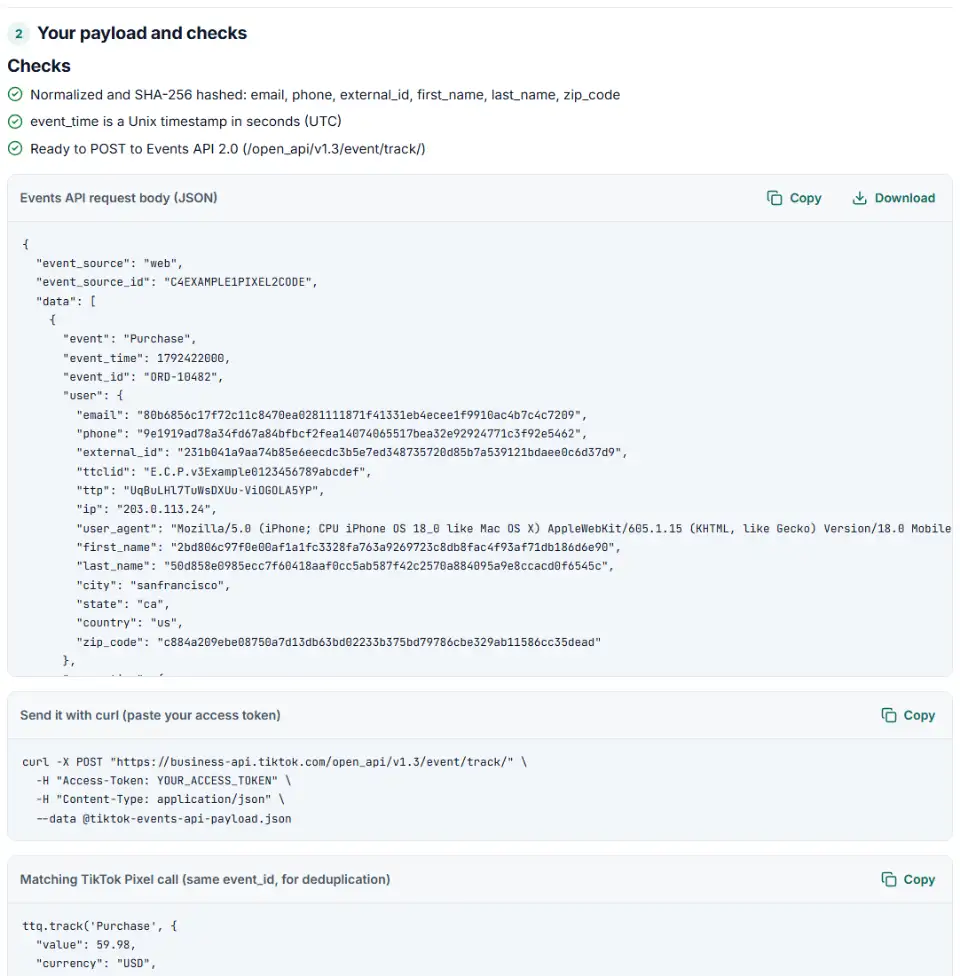
2 Your payload and checks
Fill in the settings above — your result appears here instantly.
Rules last checked: against the official pages:
- API reference: Report App, Web, Offline, or CRM Events (/event/track/) (TikTok Ads)
- Events API 2.0: Parameters (TikTok Ads)
- Events API 2.0: Event Deduplication (TikTok Ads)
- Events API 2.0: Verify Events API setup (test_event_code) (TikTok Ads)
How to set the TikTok Events API parameters
The TikTok Events API parameters decide whether an event is accepted and whether TikTok can match it to the person who saw your ad. This builder follows TikTok's Events API 2.0 parameters and /event/track/ reference, and turns your values into a payload you can send or hand to a developer.
- Pick the event source.
webfor website events,offlinefor store sales,crmfor lead stages. Paste the matching ID from Events Manager. - Choose the event and time. Use a standard event where you can. The time is converted to Unix seconds in UTC.
- Add customer details. Email, phone and IDs are normalized and hashed with SHA-256 right in your browser. For web events, add the click ID, IP address and user agent too.
- Add value and products. A value with a supported currency lets TikTok report return on ad spend.
- Copy the result. You get the JSON body, a curl command and, for web events, the matching Pixel call with the same
event_id. Switch to batch mode to turn spreadsheet rows into requests of up to 1,000 events.
TikTok also has its own payload helper inside Events Manager, which needs a login. This builder works without one, explains each problem in plain English and handles a whole batch of rows at once.
Send and verify your Events API events
- Create an access token. Generate it in Events Manager for your pixel or event set. Keep it on your server; never put it in website code.
- Test first. Open your pixel in Events Manager, go to the Test Events tab, copy the code under Test Server Events and add it as
test_event_code. Send the payload and watch it arrive in Event Activity. - Go live. Remove
test_event_codeand send events as they happen. TikTok recommends real time, one event at a time, rather than daily batches. - Check the connection. The pixel overview should show the connection method as Server, or Server & Browser when the Pixel sends the same events.
TikTok Events API errors and fixes
40002: invalid payload
The most common error. It covers broken JSON, a missing required field, a wrong type, an unhashed value in a field that must be SHA-256 hashed, or more than 1,000 events. In a batch, the message names the first bad event by its position, counting from zero: data.2.event_id is the third event.
40104: access token is empty
The Access-Token header is missing or blank. It goes in the header, not in the JSON body.
40001: no permission
The token belongs to a user who is not an admin or operator on the ad account or the pixel. Ask the account owner for access, or create the token from the right account.
40100: too many requests
TikTok allows 1,000 queries per second. Slow down and retry, or send fewer, larger requests.
Events counted twice
The Pixel and the Events API sent the same purchase with different or missing event_id values. Use one ID, such as the order number, in both.
Event time in milliseconds
A 13-digit event_time puts the event thousands of years in the future. TikTok wants seconds: divide by 1,000.
Frequently asked questions
What parameters does a TikTok Events API request need?
At the top level: event_source (web, app, offline or crm), event_source_id (your Pixel Code, Offline Event Set ID or CRM Event Set ID) and a data array. Each event needs event and event_time. Web events also need page.url, and CRM events need lead.lead_id. Send it as a POST to /open_api/v1.3/event/track/ with your token in the Access-Token header.
Which user data must be hashed for the TikTok Events API?
Email, phone, external_id, first name, last name and ZIP code must be SHA-256 hashed after normalizing: email trimmed and lowercased, phone in E.164 with the + and country code. City, state and country are sent normalized but not hashed, and ip and user_agent are sent as they are.
What time format does the TikTok Events API use?
A Unix timestamp in seconds, in UTC, for example 1687758765. A 13-digit value is in milliseconds and is wrong. This builder converts milliseconds and dates for you.
How do I deduplicate TikTok Pixel and Events API events?
Send the same event name and the same event_id from the Pixel (ttq.track(…, { event_id: … })) and from the Events API. TikTok keeps the first one it receives and discards copies that arrive within 48 hours. An order number makes a good event_id.
How many events can I send in one TikTok Events API request?
Up to 1,000 events in data. If a request has more, TikTok rejects the entire request. TikTok still recommends sending each event in real time as soon as your server sees it.
Should I still use TikTok Events API 1.0 endpoints?
No. The six Events API 1.0 endpoints, such as /pixel/track/ and /offline/batch/, were scheduled for sunset in the second half of 2024. Use Events API 2.0 (/event/track/) for web, offline and CRM events. Old payloads with pixel_code or a context object belong to 1.0.
Is my data or access token sent anywhere?
No. The payload is built and hashed in your browser and nothing is uploaded. The tool never asks for your access token: you paste it into the curl command on your own computer.
Related tools and guide
-
Get TikTok pixel code for purchases, leads and other events with the 2025 event names, value, currency and a matching Events API event.
TikTok -
Build a TikTok custom audience file from a messy export, with TikTok's template columns, phones with country codes and the 1,000-entry check.
TikTok -
Build TikTok tracking links with macros that fill in campaign and ad names, including Smart+ ads, with # sign and duplicate checks and the GA4 channel.
TikTok -
Send in-store and phone sales to Meta: get an Events Manager upload file and Conversions API batches with hashed email and phone, date limits checked.
Meta -
Check the server events you send to Meta's Conversions API for hashing mistakes, missing fields and weak customer details, and get a fixed version.
Meta -
Build Pinterest Conversions API events that get accepted and matched, with hashed customer details, an event ID and a matching tag call.
Pinterest
Need help setting this up? Talk to EmproIT