Conversions API Payload Builder for Pinterest
Build a valid Pinterest Conversions API request: the right event_name, event_time in seconds, a required event_id, SHA-256 hashed user data as arrays, and custom_data with value as a string — for one event or a batch of spreadsheet rows.
Conversions API Payload Builder for Pinterest
1 Build your Conversions API event
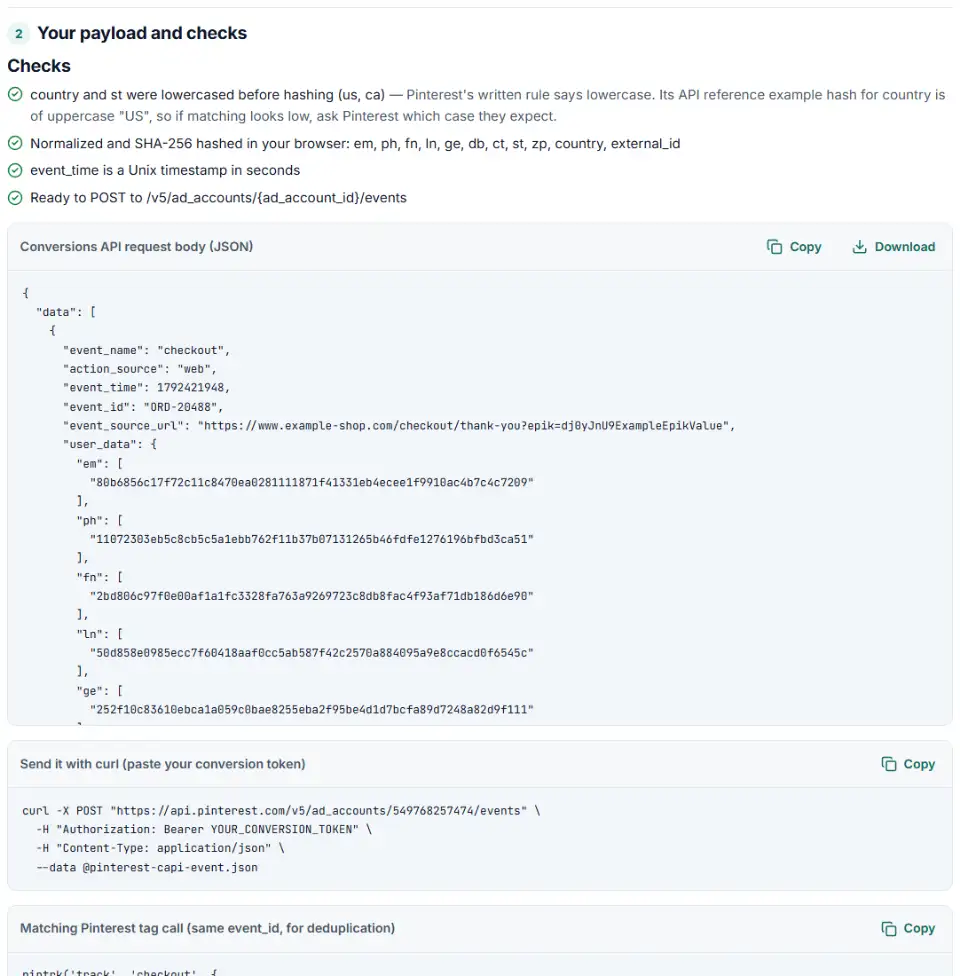
2 Your payload and checks
Fill in the settings above — your result appears here instantly.
Rules last checked: against the official pages:
- Track conversion events in the API (developer guide) (Pinterest Ads)
- Send conversions — events/create (API reference, OpenAPI spec) (Pinterest Ads)
- Define custom events (developer guide) (Pinterest Ads)
- The Pinterest Conversions API (Business help) (Pinterest Ads)
How to build a Pinterest Conversions API event
The Pinterest Conversions API accepts an event only when five fields are right, and it can match the event to a person only when the customer details are hashed the way Pinterest asks. This builder follows Pinterest's Track conversion events in the API guide and the Send conversions reference, and turns your values into a request you can send or hand to a developer.
- Get your ad account ID and token. In Ads Manager, open Conversions, then Set up API, and generate a conversion access token. Copy the ad account ID shown with it. The token stays with you; this page never asks for it.
- Pick the source and the event. Choose
web,offlineor an app, then the event. Names from the tag or other platforms, like AddToCart or Purchase, are turned into the API names. - Set the time and event ID. The time becomes Unix seconds. The event ID is required, and it must match the
eventIDyour tag sends for the same event. - Add customer details. Email, phone, name, city, state, ZIP, country, birth date and gender are normalized and hashed with SHA-256 right here, and written as lists like the API expects.
- Copy the result. You get the JSON body, a curl command and, for web events, the matching
pintrkcall. Switch to batch mode to turn spreadsheet rows into requests of up to 1,000 events each; every request is shown.
Details the builder gets right for you
- value is a string. Pinterest reads
"66.95"as a number on its side. Zero and negative values are flagged as invalid. - Phones are digits only. No plus sign, spaces or leading zeros, but with the country code.
- States and countries are two letters. “California” becomes
ca, lowercased as Pinterest's text says. Pinterest's own example hash uses uppercase “US”, so the tool tells you whenever it sends these.
Test and go live with the Pinterest Conversions API
- Send a test request. Turn on test mode, which adds
?test=true, and send the payload with your token in theAuthorization: Bearerheader. Test events get the same response messages but aren't recorded. - Check the response. Each event comes back as
processedorfailed, in the order you sent them, with an error or warning message. - Confirm in Ads Manager. Open Campaign manager > Conversions > Test events to see the test event arrive.
- Go live in real time. Remove
?test=trueand send events as they happen, or within an hour. Send the same events from the Pinterest tag with the same event ID. - Watch event quality. The Conversions Health page in Ads Manager shows your Event Quality Score.
Pinterest Conversions API errors and fixes
“Invalid event_name”
Pinterest's own example rejects subscription and suggests subscribe or checkout. Use the lowercase API names. Custom events must be mapped to a standard event, up to 15 per advertiser.
“AdAccount not found”
Pinterest's example error for a request it can't link to an ad account. Check the ad account ID in the URL, and that your token was generated for that account. Copy both again from the Conversions API setup page.
401 or 403: token or permission problems
The token's user must own the ad account or have the Admin, Analyst, Audience or Campaign role through Business Access. Send it as Authorization: Bearer, not in the JSON.
pinterest conversions api hashed email not matching
Hash the lowercased email, and send em as a list. A hash of “[email protected]” never matches the hash Pinterest makes of “[email protected]”.
429: too many requests
The limit is 5,000 calls per minute per ad account. Batch events, up to 1,000 per request, instead of sending one call per event.
Events counted twice
The tag and the API sent the same checkout with different or missing IDs. Send one ID, such as the order number, from both. Offline events can't be deduplicated at all.
Frequently asked questions
What is the Pinterest Conversions API?
A server-to-server connection that sends your conversions straight to Pinterest: web, in-app and in-store or offline sales. Pinterest uses them for campaign optimization, targeting and conversion reporting (Pinterest’s overview). You only need a Pinterest Business account and a token from the Conversions page in Ads Manager; no Pinterest app is required.
Which fields does a Pinterest Conversions API event need?
Five are required: event_name, action_source, event_time, event_id and user_data. user_data must include em, hashed_maids, or both client_ip_address and client_user_agent. Events go in a data array, up to 1,000 per request, sent as a POST to /v5/ad_accounts/{ad_account_id}/events (API reference).
How do I hash email and phone for the Pinterest Conversions API?
With SHA-256. Lowercase the email first. Write the phone as digits only, with the country code and no symbols, spaces or leading zeros, so (415) 555-0132 becomes 14155550132. Each hashed field is sent as a list, like "em": ["…"]. This builder does all of it in your browser.
How do I deduplicate Pinterest tag and Conversions API events?
Send the same event_name and the same event ID from both: eventID (or event_id) in the tag and event_id in the API. Pinterest keeps the first event and removes duplicates within 48 hours. An order number works well as the ID.
Can I send offline sales through the Pinterest Conversions API?
Yes. Set action_source to offline and send the customer’s hashed email or phone. Pinterest notes that offline events cannot be deduplicated, so send each sale once. Without a developer, you can also upload a CSV in Ads Manager under Conversions > Upload file; that route asks for data within 30 days of each conversion.
What time format does the Pinterest Conversions API use?
A Unix timestamp in seconds, such as 1769818893. A 13-digit value is in milliseconds and is wrong. Pinterest asks you to send events in real time, or at most one hour after they happen.
Related tools and guide
-
Get Pinterest tag code for checkouts, leads and sign-ups, with value, order ID, an event ID for the Conversions API and enhanced match.
Pinterest -
Make the one-column CSV Pinterest wants for customer list audiences, without names, phones or iOS IDs.
Pinterest -
Build Pinterest tracking links that report the campaign, ad group and Pin behind each click, checked for your ad type and Pinterest's automatic UTMs.
Pinterest -
Turn one event or a whole sheet of them into TikTok Events API requests, with email and phone hashed, times in seconds and a matching pixel call.
TikTok -
Send in-store and phone sales to Meta: get an Events Manager upload file and Conversions API batches with hashed email and phone, date limits checked.
Meta -
Check the server events you send to Meta's Conversions API for hashing mistakes, missing fields and weak customer details, and get a fixed version.
Meta
Need help setting this up? Talk to EmproIT