Catalog Feed Checker for TikTok Ads
Check a TikTok catalog feed against TikTok's product parameters — the 9 required fields, sku_id, allowed values, image rules and the catalog currency — and download a corrected CSV.
Catalog Feed Checker for TikTok Ads
- Upload
- Check
- Download
1 Add your TikTok catalog file
Choose a file or drag it here
CSV, XML, TSV, TXT or Excel · up to 300 MB
2 Check the columns and options
Rules last checked: against the official pages:
How to check a TikTok catalog feed
Load the TikTok catalog feed you plan to upload and the checker tests each product against TikTok's Catalog Product Parameters and its list of catalog product issues. It is built for the files people really reuse: a Google Shopping feed, a Shopify or WooCommerce export, or a sheet from a feed app.
- Load the file. Drag in a CSV, XML, TSV or Excel file, paste from a spreadsheet, or try the sample beauty catalog.
- Check the column matches. TikTok's names are recognized automatically, including
g:tags from a Google XML feed. Anidcolumn is treated assku_idand renamed in the download. - Choose your catalog currency. Prices in another currency are flagged; prices without a code get the catalog currency added.
- Work through the problems. Errors are likely to get products rejected, warnings are worth fixing, notes are for information. Each one lists the rows and the fix.
- Download the corrected CSV. Upload it in Catalog Manager, and send the "products to fix" file to whoever maintains your product data.
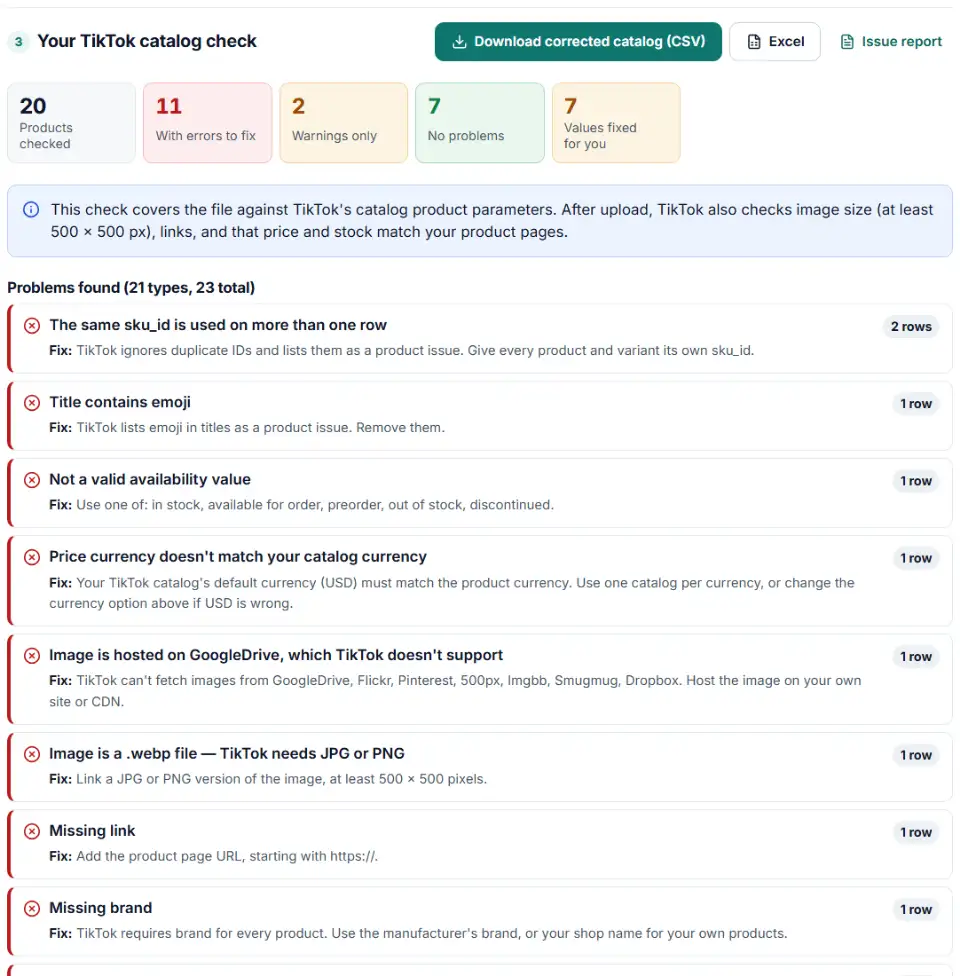
TikTok product feed specifications this checker applies
- Values — availability must be in stock, available for order, preorder, out of stock or discontinued; condition new, refurbished or used.
- Text — no emoji or control characters in
sku_idortitle, and no promotional words such as "free shipping", "high quality" or "wholesale". - Images — JPG or PNG, a link that ends in .jpg, .jpeg or .png, and no unsupported hosts.
- Categories — TikTok reads only three levels of
google_product_category, so longer paths are cut to three. - Limits — fewer than 20 million products and less than 50 GB per file; custom labels up to 100 characters.
What to do next in TikTok Catalog Manager
- Create the catalog if you don't have one. In TikTok Ads Manager go to Assets > Catalog > Create. Give it a name, a default currency that matches your prices, and one targeting location.
- Add products. Open the catalog, then Manage > Products > Add Products. Choose Upload File for the corrected CSV, or Data Feed Schedule to fetch it from a URL on a timetable. Download Template on the same screen gives TikTok's own blank file.
- Connect your pixel or app. TikTok asks for catalogs to be bound to a pixel or app. Send the same
sku_idascontent_idin pixel events so ads can match products. - Keep it fresh. Update the feed at least weekly and keep ads running from the catalog to avoid the 28-day freeze.
Common TikTok catalog errors and fixes
TikTok catalog required fields missing
A file without one of the nine required columns gets an error for every product. The most common cause is a Google feed where the ID column is called id and there is no sku_id.
Duplicate IDs
TikTok ignores duplicate IDs. Each size and shade needs its own sku_id; tie variants together with the same item_group_id.
TikTok catalog price and currency format
Write prices as a number with a dot, a space and the code: 9.99 USD. Symbols and commas are rewritten in the corrected file, but a price in a different currency from the catalog has to be fixed at the source.
Invalid image link or image too small
The link must lead straight to a JPG or PNG file of at least 500 x 500 pixels. If your image server blocks TikTok, add TikTok's crawler IP addresses listed on its issues page to your allowlist.
Emoji or special characters
Emoji in titles and IDs are listed as a product issue. They are flagged here but not removed, because the title should be rewritten by a person.
Incorrect number of columns
Stray commas, unquoted line breaks or an empty column at the end of each line shift values into the wrong fields. The corrected file is written with proper quoting and without empty trailing columns.
Frequently asked questions
What fields does a TikTok catalog feed require?
TikTok’s Catalog Product Parameters page lists 9 required fields: sku_id, title, description, availability, condition, price, link, image_link and brand. TikTok shows an error for the file if any of them is missing. Fields like item_group_id, gtin, sale_price and the custom labels are optional.
Is the TikTok catalog ID column called id or sku_id?
sku_id. Many feed guides copy Google’s id, but TikTok’s own parameter list and template use sku_id. If your file says id, this checker renames the column in the corrected download.
Does the product currency have to match the catalog currency?
Yes. When you create a catalog you pick a default currency, and TikTok says it must match the product currency. Put a German shop in EUR and a US shop in USD into separate catalogs.
What image size does a TikTok catalog need?
JPG or PNG images of at least 500 x 500 pixels. TikTok can’t fetch pictures from Google Drive, Flickr, Pinterest, 500px, Imgbb, Smugmug or Dropbox, so host them on your own site or CDN.
Why were products in my TikTok catalog rejected?
TikTok’s product issues list includes duplicate IDs, images under 500 x 500 pixels, broken image or product links, prices or stock that don’t match the landing page, emoji or control characters, and a bad file format or column count. This checker finds the file problems; landing page mismatches only show in Catalog Manager.
Why was my TikTok catalog frozen?
TikTok freezes a catalog that has had no ad activity for 28 days, which slows or stops product review. It also warns when a feed hasn’t been updated for 7 days. Run ads from the catalog and keep the feed schedule active.
Is my catalog file uploaded anywhere?
No. The check runs in your browser; nothing is sent to us or to TikTok.
Related tools and guide
-
Get TikTok pixel code for purchases, leads and other events with the 2025 event names, value, currency and a matching Events API event.
TikTok -
Check a Meta catalog feed for missing required fields, bad prices, unsupported availability values, wrong image types and duplicate IDs.
Meta -
Find the missing or badly formatted required fields that make Pinterest reject a whole retail catalog, plus price, variant and length problems.
Pinterest -
Find missing attributes, bad prices, wrong availability values, invalid GTINs and duplicate IDs before Google disapproves them.
Google -
Check thousands of product barcodes (GTIN, UPC, EAN, ISBN) at once and catch wrong check digits and restricted codes before Merchant Center does.
GoogleMetaTikTokPinterestMicrosoft -
Build TikTok tracking links with macros that fill in campaign and ad names, including Smart+ ads, with # sign and duplicate checks and the GA4 channel.
TikTok
Need help setting this up? Talk to EmproIT